A/B testing backlinks: keep URLs stable and avoid wrong indexing
A/B testing backlinks can hurt SEO if variants get indexed. Learn how to keep linked URLs stable, use canonicals, and control redirects during tests.
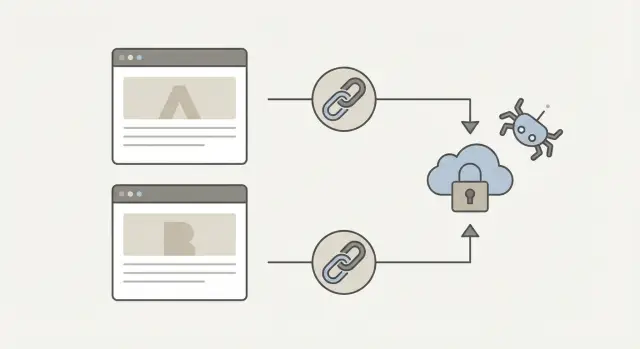
Why A/B tests can clash with backlinks
Backlinks aren’t just “traffic sources.” They’re also signals that help search engines decide which URL should rank. That’s why testing can get messy when an experiment creates extra URLs or changes how a page is delivered.
A common collision looks like this: an external site links to your landing page, but your testing setup sends some visitors (and sometimes crawlers) to a variant URL. If that variant can be reached directly, it can start collecting its own signals. Over time, search engines may treat it like a separate page, even if you meant it to be temporary.
Variant URLs can become the page that ranks when they’re easier for crawlers to discover than you expect. This often happens when the variant has a clean URL, loads faster, gets shared, or is the version your experiment rules serve to Googlebot more often. Once a variant is treated as “the” page, backlinks can end up reinforcing the wrong experience, and the page you meant to rank loses strength.
When the indexed page changes, the damage is usually quiet at first. Then you start seeing symptoms: conversions drop because the ranking page has different copy or a broken form, traffic quality shifts because the search snippet no longer matches the page, or reporting gets confusing because sessions and goals split across multiple URLs.
The goal most teams should stick to is simple: change the experience, not the URL that search sees. Keep one stable, indexable URL that holds the backlink equity, while experiments happen behind the scenes without creating new ranking candidates.
If you’re buying or earning high-authority links (for example, through a service like SEOBoosty), this matters even more. A single strong backlink should reinforce the page you intend to rank, not accidentally build up a short-lived test variant you’ll remove later.
How variants get their own URLs
An A/B test is supposed to change what people see, not what search engines think your page is. The trouble starts when a variation turns into a separate, crawlable address. Links point to one page, but Google discovers and indexes another.
The common ways variants turn into new URLs
Some setups create different addresses on purpose. Others do it by accident. The most common patterns are:
- Query parameters, like
/pricing?variant=b - Path changes, like
/pricing-b/or/pricing/new/ - Subdomains, like
b.example.comortest.example.com - Redirect-based splits where some requests get sent to another URL
- JavaScript swaps that pull variant content from extra endpoints that can still be discovered
Visitors may feel like they’re on “the same page,” but search engines care about unique addresses they can fetch and store.
How crawlers discover your variants
Even if you never intend to show variant URLs to search engines, they can leak into places bots routinely check. That includes internal navigation, your XML sitemap, analytics tools that generate shareable URLs, and redirect behavior that exposes the alternate address.
A common scenario: someone copies the variant URL from the browser bar (often with a parameter) and drops it into an email, a social post, or a “temporary” internal link. One small leak is enough for crawlers to start exploring.
When separate URLs are actually OK (rare)
Separate URLs make sense only when the pages are meant to stand on their own long term, such as distinct language versions or truly different product lines. If the plan is to pick a winner and remove the rest, separate URLs usually create more risk than benefit.
Set the non-negotiables before you launch
If you’re testing a page while also building links to it, you need a few rules that don’t change mid-test. These rules keep backlinks, analytics, and SEO signals from drifting across variants.
Start by choosing one URL that every backlink should point to. Treat it as the control URL and protect it. Even if your test tool can show different experiences, the destination people and crawlers land on should stay the same address.
Avoid changing that URL during the test window. Small shifts like switching from /pricing to /pricing-v2, adding random parameters, or moving the page to a new path can split link equity and make results harder to trust.
Keep the same page topic and intent unless the test is specifically about messaging. If the topic changes, you’re no longer comparing like with like, and it’s easier for a variant to look like a different page to search engines.
Also decide upfront what should be indexable and what should not. Don’t assume the test tool will handle it automatically.
A practical pre-launch agreement between marketing and engineering looks like this:
- One canonical destination URL for all backlinks
- No URL renames or migrations until the test ends
- A clear rule for which versions can be indexed, and which must not
- A rollback plan if a variant starts getting indexed or shared
Example: you buy high-authority backlinks (from a provider like SEOBoosty) to your product page. If someone changes the destination path halfway through the experiment, some links point to the old URL and some to the new one. Results get noisy, and search engines may pick the wrong version to show. Locking the rules prevents that collision.
Choose an A/B setup that keeps URLs stable
Backlinks are votes for a specific address. If your test creates multiple public URLs, those votes can split, and the wrong page can start showing up in search. The safest setups keep one public URL and treat variations as an internal detail.
Prefer one public URL, change the experience behind it
When possible, run the test on a single URL and swap the variant with client-side logic (or server-side logic that still serves the same address). People, crawlers, and backlinks all hit the same URL, but users see different versions.
For example, you build links to /pricing and keep /pricing as the only public page. During the experiment, your testing tool changes the headline and layout after load (or your server renders a different layout for some visitors), while the address stays the same.
If you must use separate URLs, keep them hard to discover
Sometimes teams create URLs like /pricing?variant=b or /pricing-b/. If you go this route, treat variant URLs like private test endpoints, not pages meant to be browsed.
Keep the stable URL in control by:
- Pointing menus, buttons, breadcrumbs, and XML sitemaps to the stable URL only
- Avoiding variant URLs in share buttons, “copy link” widgets, emails, ads, and partner outreach
- Preventing your tool from rewriting internal links to variant URLs for test users
This matters most when you’re paying for high-authority placements. If you secure a premium link placement through SEOBoosty, you want that backlink to point to the stable URL you plan to keep long term, not a test-only address.
Log assignment so you can debug collisions fast
Make sure you can see how users (and bots) were assigned to a version. Log the variant, timestamp, and request details (like user agent and referrer). When indexing or rankings look odd, these logs help you confirm whether crawlers were repeatedly seeing a variant and why.
Canonical and robots: the basics that prevent indexing drift
The safest goal is straightforward: keep one URL as the “real” page for search, and make every variant point back to it.
Pick your canonical URL, usually the control page, and don’t change it mid-test. If you switch the canonical target while bots are recrawling, you create mixed signals.
Then make every variant explicitly declare the canonical back to the control. This applies to parameter variants (like ?variant=b) and path variants (like /lp-b/). The canonical tag should be in the HTML head and match the exact canonical URL you chose (including trailing slash rules and https).
Meta robots is the second guardrail. Canonical is a strong hint, but robots is a direct instruction. Decide what you want indexed and keep that decision consistent.
A simple baseline:
- Control page:
index,followwith a self-referencing canonical - Variant pages: canonical to control
- Variant pages you don’t want indexed:
noindex,follow
One common trap is your testing platform or CMS injecting its own canonical tag after your template loads. For example, a script might set the canonical to the current URL (the variant), which cancels your plan. Conflicting tags (two canonicals, or inconsistent robots rules across variants) can also cause drift.
A realistic scenario: you run a pricing page test and the variant lives on /pricing-v2/. The variant accidentally self-canonicals and stays index,follow. A few weeks later, that version starts ranking, and your backlinks effectively reinforce the wrong page experience. One clean canonical and consistent robots settings prevent this.
Redirect rules that do not confuse search
Redirects are a frequent hidden cause of test collisions, especially when valuable backlinks point at the page. Redirects are strong signals, so they should match your intent: temporary during the experiment, permanent only after you pick a winner.
302 vs 301: the simple rule
Use a 302 (temporary) when the redirect exists only to run the test. This tells search engines, “keep the original URL in mind.” If you use a 301 (permanent) while testing, you risk transferring indexing and ranking signals to a variant URL.
Once the test is over and you’re sure the winner is staying, switch to a 301. Do it once, not in stages.
Also avoid redirect chains. They waste crawl budget, slow down signal consolidation, and increase the odds that variant URLs get discovered and treated as real.
Good redirect habits during tests:
- Use 302 for temporary test routing, then remove it when the test ends
- If you go permanent, use one clean 301 straight to the final URL
- Avoid client-side redirects (JavaScript or meta refresh) for routing
- Keep redirects consistent for bots and people (don’t vary by user agent)
Parameters are another trap. If your experiment uses ?variant=b, don’t accidentally create a new indexable “page” for every value. If parameters are only for routing, it’s often cleaner to keep the URL stable and decide the variant via cookie or server logic, with no redirect.
Example: you buy a strong backlink (maybe via a provider like SEOBoosty) pointing to /pricing. If your test redirects some users to /pricing-b with a 301, Google can start favoring /pricing-b as the main version. A 302 during the test, followed by one clean 301 to the final chosen page, keeps signals from drifting.
How to monitor if variants are getting indexed
The biggest risk isn’t that Google sees two versions. It’s that the wrong one becomes the version shown in search.
Start with Google Search Console. Inspect the stable URL and a few variant-looking URLs (if they exist). Watch which URL Google reports as the selected canonical. If Google keeps selecting a test URL, your setup is leaking.
Also watch indexed URL patterns. A sudden increase in indexed pages isn’t always growth. It can be test URLs being discovered and kept.
Clear naming helps. If variants use obvious markers (for example, a single parameter like ?variant=a), it’s easier to spot them in reports, logs, and crawls.
Quick checks that catch most issues early:
- Confirm the selected canonical matches the stable URL for key landing pages
- Look for newly indexed URLs with test markers (parameters, extra path segments, random IDs)
- In server logs, verify Googlebot mostly requests the stable URL
If you use a backlink provider like SEOBoosty, monitoring matters even more, because strong links can speed up discovery. Strong links are valuable, but they also reduce your margin for messy experiment URLs.
Common mistakes that cause collisions
Collisions happen when teams treat an experiment as “just a front-end change.” Search bots don’t see it that way. If a variant has its own address, can be crawled, or gets linked by accident, it can start competing with your main page.
Link leakage is a classic trigger. Someone copies a preview URL, an experiment QA link, or a tracking dashboard link and pastes it into an email, ad, or homepage banner. Now real visitors (and crawlers) arrive through a variant URL, and that version starts collecting signals meant for the original.
Another trigger is crawlable variant paths. If URLs like /page?variant=b or /v2/page return a 200 status with unique content and aren’t blocked, Google can treat them as separate pages. Server-side experiments can also expose bucketed URLs to the browser by accident.
The mistakes behind most “wrong page wins” problems:
- Linking to a variant URL in ads, newsletters, social posts, or internal promos
- Allowing variant URLs to be crawlable (200 responses, internal links, or sitemaps picking them up)
- Changing both content and URL structure in the same test
- Leaving test rules, parameters, or alternate paths live after the experiment ends
- Using 301 redirects to a variant and forgetting to undo them
A simple scenario: you buy a premium link placement (for example through a service like SEOBoosty) and paste the destination URL from an experiment preview without noticing. The backlink goes live, the variant URL gets crawled more often, and the variant starts showing in search results. Later, when the test ends, you remove the variant, but the backlink still points to it, creating redirect chains and lost relevance.
The safer habit is boring but effective: always copy the destination URL from the canonical, non-test version of the page, and treat every alternate URL as something that must never be shared outside the experiment.
Example: a variant becomes the indexed version
A SaaS company runs a homepage experiment. Version A is the normal homepage, and version B has a different headline and layout. The test tool creates a separate URL for B, like /home?variant=b (or /home-b/). The team assumes Google will still treat the main homepage as the real one.
Then they publish a guest article on a high-authority site, and the author copies the variant URL from a preview doc. Now a strong backlink points to the temporary B URL.
Within a week, the team notices:
- Rankings jump around day to day for brand terms
- Search results sometimes show the variant URL
- Conversions look inconsistent because traffic and tracking split across two URLs
What’s happening is simple: the variant URL looks like a separate page, it gets the strongest backlink, and Google starts treating it as the best candidate to index. If redirects are inconsistent (some requests go to B, some to A), Google gets mixed signals and keeps testing both.
How they fix it
They stop the experiment and restore one stable, public URL for the homepage. Then they make every signal match that decision:
- Set the variant URL to use a canonical pointing to the main homepage
- Add
noindexto variant URLs if they must exist during future tests - After the test ends, 301 variant URLs to the main homepage
- Update internal links so the site only links to the stable URL
- If possible, ask the publisher to update the backlink to the stable URL (especially if it’s a premium placement)
If the wrong URL is already indexed
Don’t panic, but act quickly. Keep the main homepage accessible and consistent, and avoid flipping rules back and forth. After you set the canonical and/or 301 redirect, it usually takes time for the index to settle.
Remove ambiguity: one URL should be the “real” page, and every signal (links, canonicals, redirects, internal links) should agree.
Quick checks and next steps
If you only do one thing to keep experiments from going sideways, keep the URL that receives backlinks the same for every visitor. Experiments should change what people see, not what search engines can index.
Before you launch a test, verify:
- One stable “linked” URL (the one you promote and earn backlinks to)
- Every variant canonical points to that stable URL
- Variant URLs don’t appear in navigation, footers, or XML sitemaps
- Temporary redirects use 302 and avoid chains
- Search Console confirms the stable URL is the selected canonical
Then do a reality check in Search Console. Inspect the stable page and confirm it’s the canonical Google chose. Inspect at least one variant URL and confirm it isn’t being indexed, or that it consolidates to the stable URL.
After the test ends, clean up so the winner becomes the normal page again:
- Remove experiment parameters, alternate routes, and test-only templates
- Keep the winning content on the stable URL (don’t swap URLs)
- Remove temporary routing rules and recheck canonicals and robots
- Request a recrawl in Search Console if the wrong version was showing
When you build new backlinks, point them to stable URLs you expect to keep for years (home, core product pages, evergreen guides). If you’re sourcing placements, decide the destination first and don’t change it mid-test. Services like SEOBoosty can help you secure strong referring domains while you keep the destination URL consistent and the experiment clean.
FAQ
What’s the safest way to A/B test a page that’s getting backlinks?
Keep one stable, public URL as the destination for all backlinks, and run the experiment by changing the experience behind that same address. This prevents link equity and indexing signals from splitting across multiple URLs.
Why can A/B tests mess up SEO when backlinks are involved?
Because search engines treat different URLs as different pages, even if they look similar. If your test creates crawlable variant URLs, backlinks and ranking signals can drift to a version you never intended to keep.
What kinds of A/B setups accidentally create new URLs?
Common culprits are query parameters like ?variant=b, path changes like /pricing-b/, subdomains used for variants, and redirect-based splits that send some traffic to another URL. Any of these can turn a “temporary” variant into an indexable page.
How do variant URLs usually leak out to Google?
Variants get discovered when they leak into internal links, XML sitemaps, share buttons, emails, ads, or social posts. One copied variant URL is often enough for crawlers to find and keep revisiting it.
How should I use canonical tags during an A/B test?
Use a canonical tag on every variant that points back to the one stable control URL you want to rank. Keep the canonical consistent throughout the test, including exact HTTPS and trailing slash rules.
Should test variants be “noindex”?
If you don’t want variants indexed, set them to noindex,follow while still canonically pointing to the control. The practical goal is simple: one page is indexable, everything else consolidates signals back to it.
Should I use a 301 or 302 redirect for A/B testing?
Use a 302 for temporary test routing so search engines keep the original URL as the main one. Save a 301 for after you pick the winner and you’re ready to make the change permanent.
How can I tell if a variant is getting indexed?
Check which URL Google selects as canonical in Google Search Console, and look for a rise in indexed URLs with test markers like parameters or extra path segments. Server logs are also useful to confirm what Googlebot is actually requesting.
What are the most common mistakes that cause the “wrong page” to rank?
Accidentally linking to a variant URL in newsletters, ads, or internal promos is a big one. Other common mistakes are leaving variant URLs as 200 OK and crawlable, using 301s during the test, or keeping test routes live after the experiment ends.
How do I avoid wasting premium backlinks while running tests?
Lock the destination URL first and keep it unchanged for the full test window. If you’re using a service like SEOBoosty to place high-authority backlinks, always give it the stable canonical URL you plan to keep long term, not a preview or variant address.
Share