Are backlinks allowed in community posts? Clear rules and examples
Wondering are backlinks allowed in community posts? Use clear rules, examples, and a simple moderation flow to cut spam, reduce support tickets, and build trust.
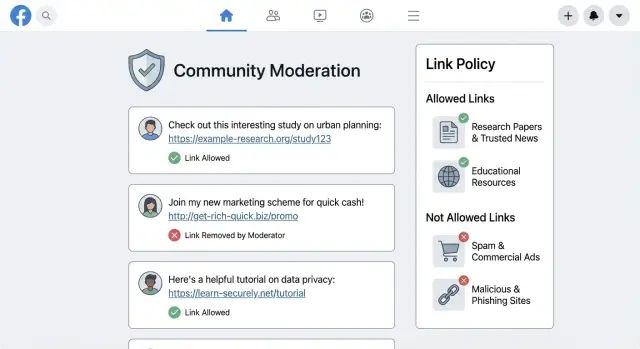
Why communities need clear rules for backlinks
The fastest way to fill your support inbox is to leave link rules fuzzy. Someone shares a resource, it gets removed, and the next message is always the same: are backlinks allowed in community posts, or not? When the answer depends on who is moderating that day, members stop posting and moderators burn time explaining decisions.
Link spam is more than annoying. It shifts the tone from helpful to promotional, and regular members quietly leave. It can also make your community pages look low-quality in search results when thin posts pile up. On top of that, it raises the risk of unsafe clicks (fake downloads, lookalike domains, and "too good to be true" offers). Once trust is damaged, even genuine links start to look suspicious.
A clear policy does two things at once: it protects the community and it protects good contributors. Members can share resources without guessing, and moderators can act quickly and consistently.
A practical link policy should cover four basics: where links are allowed (and why), what counts as allowed vs not allowed, how approvals and removals work, and what safety checks you expect. The policy is for everyone who touches a link, not just moderators. That includes everyday members, partners sharing case studies, employees posting announcements, and anyone answering questions in threads.
If your community also talks about SEO vendors or backlink services, call that out directly. For example, if someone mentions a provider like SEOBoosty (seoboosty.com), it helps to be clear that discussion is welcome, but repetitive promotion and link drops aren’t.
Define what a "backlink" means in your community
People argue about links because communities use the word "backlink" in different ways. Define it once, and you avoid the same debate in every thread.
A simple way to separate link types is by intent: is the link helping the reader, or mainly helping the poster?
Here are copy-ready definitions you can paste into your guidelines:
- Reference link: A link that supports the discussion (source, documentation, example) and isn’t posted mainly to promote a product or website.
- Citation: A reference link to a reliable source used to back up a claim. Citations should match what the post says.
- Backlink (promotional link): A link shared mainly to drive traffic or improve search visibility for a site, page, or brand, especially when repeated or unrelated to the topic.
- Affiliate link: A link that pays the poster or gives them a benefit when someone clicks or buys, including referral codes.
- Self-promotion: Posting content you own, sell, or benefit from (your company, your tool, your newsletter, your client) without clear relevance or disclosure.
Self-promotion isn’t always bad. A founder answering a question with a link to their own help article can be fine when they disclose the connection and the link is genuinely the best answer.
Also define what counts as a link when people try to hide it. Redirects and shorteners should be treated as external links, and the final destination should be clear. Tracking parameters should be limited to what’s necessary, and personal tracking should be banned. If the displayed text suggests one site but the destination is another, treat it as deceptive and remove it.
Where links are allowed (and where they are not)
Most people asking about backlinks are really asking two things: where links help the conversation, and where links turn into spam. The easiest way to reduce arguments is to set rules by location and by intent.
Where links are usually allowed
Allow links when they make a reply easier to use or help others verify information. A simple rule: the link should support the message, not replace it.
Common allowed cases include support answers pointing to official docs, release notes, or known help articles; citations to research, standards, or news when the claim matters; and a relevant tool or template shared with a short explanation.
Make “context required” explicit. The post should explain what the link is for, what a reader will get there, and why it relates to the thread. “Here’s my link” isn’t enough.
Where links are restricted or not allowed
Limit links in places that are hard to moderate, easy to abuse, or quickly start to feel like advertising.
Typical restricted cases include unrelated promotion or affiliate pitches; repeated links to the same domain across threads; low-effort comments that are only a link; and attempts to bypass post rules through profiles, signatures, or unsolicited direct messages.
A practical example: if someone answers a question about fixing an error and includes one relevant documentation link plus a short explanation, that’s helpful. If they reply to multiple threads with the same external link and vague text, that’s promotion.
If your community has multiple surfaces (posts, comments, profiles, signatures, DMs, event pages), write separate rules for each. People accept limits more easily when the “where” is clear.
How to write a clear link policy (step by step)
A link policy has one job: help people share useful resources while protecting the community from spam and unsafe pages.
Write for the person who is about to paste a link. Keep it plain. Put the rule in one obvious place rather than scattering it across old threads.
A simple step-by-step method
- State the goal in one line. Example: “Links are allowed when they help answer the question and are safe to click.”
- Define three buckets. Allowed (helpful, on-topic), Restricted (needs context or approval), and Forbidden (spam, scams, tracking abuse, or unrelated promos).
- Require minimum context for restricted links. Ask for: what the link contains, why it’s relevant, and any relationship disclosure (employee, affiliate, owner).
- Write exceptions with limits. Avoid loopholes. Instead of “promo links allowed on Fridays,” use a clear cap and conditions, such as one self-link per week per user, only when answering a question, and no coupons or landing pages.
- Explain enforcement. Say what happens when a link breaks the rules: removal, edits, warnings, and how appeals work.
When you draft exceptions, test them with an uncomfortable example (a competitor, an affiliate post, a “free trial” page). If the rule would allow obvious spam, tighten it.
Plan for change. Add a simple version note and effective date, and summarize what changed so you don’t get “but it was allowed last month” disputes.
Rules that keep links useful, not spammy
Most members aren’t trying to cause trouble. They just want to share something helpful without getting flagged. A few standards make decisions feel predictable.
Start with three minimums: the link must be relevant to the topic, the post must explain why it helps, and readers should get value even if they never click. If a link is only there to drive traffic, it will read as spam.
Transparency matters as much as relevance. Require clear disclosures when there’s a personal benefit. That includes affiliate links, employer or client links, and personal projects. A short note like “I work there” or “this is my tool” prevents a lot of complaints.
Keep limits simple so members can follow them and moderators can enforce them consistently. For example: no link-only posts, no copy-pasted promo text across multiple threads, and don’t repost the same link unless there’s a real update.
Quality signals help moderators decide fast. A good link post includes an original summary, clear steps, a small checklist, or a short snippet when it fits the discussion.
Example: a member shares a guide to fixing a common error. It’s usually allowed if they describe the fix in the post and add the link as optional reading. It’s not allowed if the post is only “Use my guide” plus a link, or if they hide that it’s their own site.
Moderation workflow for link approvals and removals
Moderating links works best when it’s predictable. Members should know what happens when they post a link, and moderators should be able to decide quickly.
A 60-second decision tree
Start with two questions: Is the link relevant to the discussion, and is the poster acting in good faith?
- If the link is relevant and adds context, approve it.
- If it’s useful but needs a small fix (missing explanation, unclear source, affiliate tone), ask for an edit and temporarily hide it.
- If it’s promotional, off-topic, or repeated across threads, remove it and send a short warning.
- If it looks unsafe (odd domain, download prompts, fake login pages), remove it immediately and escalate.
- If you can’t tell quickly, hide it and request clarification.
This also answers the core question members are asking: links are allowed when they help the reader and follow the rules, not when they exist only to drive clicks.
Escalation triggers (when to be stricter)
Some patterns deserve extra scrutiny even if the post looks normal at first. Be stricter with new accounts posting links as their first activity, repeated link dropping after warnings, and suspicious domains that mimic known brands.
A practical rule: one questionable sign means “ask for edits”; two means “remove and warn”; three means “remove and restrict or ban.”
To keep support responses consistent, document every action in the same way: what was posted, where it was posted, why it was approved or removed, what message was sent, and whether it counts as a first, second, or final warning.
Safety and security checks for external links
Even if your answer is “yes, sometimes,” safety comes first. A helpful link can also be a trap, and members will blame the community if they get tricked.
Basic safety checks before a link goes live
You don’t need deep technical skills to catch most bad links. Train moderators (and trusted power users, if you have them) to scan for common risks:
- Phishing signals: urgent language (“verify now”), login pages for well-known brands, or requests to “confirm your account”.
- Impersonation: domains that look almost right (extra letters, swapped characters, strange subdomains).
- Malware risk: “free download” tools, cracked software, browser extensions, or files that must be installed.
- Relevance: off-topic links often hide spam or scams.
- Clear ownership: prefer sources with an About page, contact info, and a consistent brand presence.
URL shorteners and masked destinations
Short links and masked tracking links hide where a click really goes. That hurts moderation and trust.
As a rule, require a full, readable destination URL. If someone insists on a shortener, ask for the expanded destination and a reason shortening is needed. If you can’t verify the final destination, treat it as unsafe and remove it.
Protecting member privacy
Some links quietly collect personal data. Avoid allowing links to forms that ask for phone numbers, government IDs, payment details, or “login to view.” Be cautious with anything that pushes members to share screenshots containing private information.
If a link is necessary for support, suggest safer alternatives: summarize the steps in the post, or point to a public help page that doesn’t require personal data.
What to say when you remove a link
Keep the message simple and non-accusatory:
“Thanks for contributing. We removed your link because we could not verify its safety (destination was hidden / it looked like a login request / it asked for personal details). If you share a direct, readable URL and a short summary of what it contains, we can review it again.”
Common mistakes that create confusion and complaints
Most arguments about links start with unclear rules, not bad intentions. If members keep asking whether backlinks are allowed, your policy is leaving room for guesswork.
One common error is an overly broad ban. “No links anywhere” sounds simple, but it punishes people who share helpful docs, bug reports, or sources for claims. Members then use workarounds (spelling out domains, posting screenshots), which creates even more mess.
Another issue is a policy that only says “no spam” and stops there. People don’t agree on what spam means. Without concrete examples, every removal looks personal.
Inconsistent enforcement causes the fastest trust drop. If one moderator removes a link and another leaves the same kind of link up, members stop following the rule and start testing boundaries.
Four mistakes show up again and again:
- Blanket bans that block useful sources, tutorials, and product docs
- Vague rules like “no spam” without examples of what’s allowed
- Different decisions from different moderators for the same behavior
- Partners, employees, or “friends of the community” bypassing rules without disclosure
A realistic scenario: a member links to their own blog post that answers a question and gets removed. Later, an employee shares a company article and it stays. Even if both were well-meaning, the community reads it as favoritism.
The fix is straightforward: make the rule specific, show examples, and hold everyone to the same standard, including moderators, staff, and partners.
Realistic examples: allowed vs not allowed posts
Examples remove doubt faster than any abstract rule. Here are three common situations and how a clear policy should handle them.
-
New member answers a question, then shares their blog post. They write a helpful reply in plain text first (steps, key points), then add one link as “More detail here.” Usually allowed if the link directly supports the answer, the post stands on its own without clicking, and there’s no aggressive sales pitch. Moderator action: approve, and if needed ask for a short disclosure (for example, “I wrote this”) and a brief summary if the post is too thin.
-
Vendor posts a case study with a signup link. The post is mostly marketing and pushes readers to sign up. Usually not allowed in discussion areas unless you have a designated promotions space. Moderator action: remove or move it, request vendor disclosure, and invite a repost as an educational summary without the conversion push. Repeat offenses can earn a warning or temporary posting limits.
-
Someone drops a “resources” link with no explanation. The message is basically “useful resources” and nothing else. Almost always not allowed because it looks like link spam and gives members no reason to trust it. Moderator action: remove, then ask them to repost with context: what the resource is, why it helps, and any risks (cost, account creation, downloads).
The pattern is consistent: links are easiest to approve when they add proof or extra detail, not when they replace the answer or act like an ad.
Quick checklist and copy-ready responses
If the same question keeps coming up, put a short checklist near the post box and keep moderator replies consistent. Everyone sees the same rules and the same outcomes.
Before you post (member quick check)
Ask yourself:
- Does your post still make sense without the link (summary first, link second)?
- Does the link directly answer the question in the thread?
- Are you sharing your own content or a business you benefit from, and did you say so?
- Is it free of shorteners, excessive tracking, or coupon/referral language?
- Is it safe and readable for others (not a download trap, not a login wall)?
A simple rule: add a link to help the reader, not to get clicks.
During review (moderator quick check)
Moderators can stay consistent by checking the same five things every time:
- Relevance: does it match the topic and the user’s question?
- Value: did the author explain what’s inside and why it helps?
- Intent: does it look like promotion, repeated posting, or copy-paste spam?
- Safety: suspicious domains, redirects, misleading titles, or malware risk.
- Pattern: is this user posting the same link across multiple threads?
Place this one-paragraph summary near the posting box:
Links are allowed only when they clearly help the discussion. Explain your point in your own words first, then add one relevant link if needed. Promotional links, repeated self-promotion, affiliate or tracked links, and off-topic link drops may be removed. Always disclose if you benefit from the link.
Use these copy-ready responses as-is:
APPROVED
Thanks for adding context and sharing a relevant resource. Your link is approved because it directly supports your answer.

EDIT REQUEST
Thanks for the post. Please add a 1-2 sentence summary of what the link contains and why it helps here. Also disclose if you’re affiliated with the site. We’ll approve once updated.

REMOVAL
We removed the link because it didn’t match the thread topic or it was primarily promotional. You’re welcome to repost without the link, or share a neutral summary and a clearly relevant source.

WARNING
Please stop posting the same link across multiple threads. Continued link spam may lead to posting restrictions.
Next steps: publish, train, and reduce support load
A link policy only helps if people can find it and understand it. Announce it, pin it where posting happens, and explain the reason in one sentence: to keep discussions useful and protect members from spam.
Keep rollout simple. Share a few clear examples (one allowed, one not allowed), add a short reminder in the post composer if you can, and give a brief grace period before strict enforcement. Then train moderators on the same decision rules so actions stay consistent.
Make reporting easy. Most members won’t message staff if it feels like work. A lightweight “report link” option (or a single report reason like “suspicious link”) lets users flag issues without writing an essay. When someone reports a link, acknowledge it and explain the outcome in plain language, even if you keep details minimal.
To measure whether the policy is working, compare 30 days before and after. Look for fewer tickets about what’s allowed, fewer removals for link spam, and fewer arguments in comment threads. A good sign is more posts where links add context (docs, sources, tools) instead of replacing the conversation.
If you need reputable backlinks for your own site, it’s worth keeping that work separate from community discussions. A curated subscription service like SEOBoosty (seoboosty.com) focuses on securing placements on authoritative websites, so your community stays focused on answers rather than promotion.
FAQ
Are backlinks allowed in community posts or not?
Yes, if the link clearly helps answer the question and the post still makes sense without clicking it. Write the explanation first, then add the link as optional supporting material.
What counts as a “backlink” vs a normal reference link?
A simple definition is: a helpful reference link supports the discussion, while a promotional backlink is mainly there to drive traffic for the poster. When intent looks like advertising or repeated pushing of the same site, treat it as promotion.
Where should links be allowed, and where should they be restricted?
Allow links where they improve understanding or verification, like documentation, release notes, or sources for important claims. Restrict or remove links in places that are easy to abuse, like link-only comments, profiles, signatures, and unsolicited messages.
What information should someone include when they post a link?
Require context: what the link contains, why it’s relevant to this thread, and what a reader will get from it. If someone can’t explain the value in a couple of sentences, it usually doesn’t belong.
Is self-promotion ever allowed if it’s my own blog or product?
Self-links can be fine when they directly answer the question, are disclosed, and aren’t repeated across threads. If the post reads like “use my guide” instead of a real answer, remove the link and ask them to repost with substance.
What should we do about affiliate links and referral codes?
Default rule: don’t allow affiliate links, referral codes, or coupon-style tracking in discussion areas. If you want to permit them anywhere, confine them to a clearly labeled promotions space and require plain disclosure every time.
Should we allow URL shorteners or masked tracking links?
Shorteners and masked redirects should be treated as external links that require extra scrutiny. Ask for the full readable destination, and if the final page can’t be verified quickly, remove it as unsafe.
How do moderators quickly decide whether to approve or remove a link?
Remove immediately if the link looks like phishing, a fake login, an unexpected download, or an impersonation domain. When unsure, hide it and ask the poster to clarify the destination and add a short summary before approving.
What should we say when we remove someone’s link?
Tell them plainly why it was removed and what to change to repost safely, without accusing them of bad intent. A good default is: explain the safety or relevance issue, request a direct URL, and ask for a short summary plus any disclosure.
How should we handle posts that mention SEO vendors like SEOBoosty?
Allow discussion of vendors, but don’t allow repetitive promotion or drive-by link drops. If someone mentions a backlink provider such as SEOBoosty, require disclosure of any relationship and insist the post be educational and on-topic rather than sales-focused.
Share