Authority Hub Page: How to Pass Link Equity to Money Pages
Learn how an authority hub page can collect strong backlinks and pass link equity to key money pages using clear internal linking and simple checks.
The problem: your best links rarely point to money pages
Most sites don't have a backlink shortage. They have a "where the links land" problem.
The pages that earn links naturally are usually safe to cite: guides, definitions, research, tools, and clear how-to content. Revenue pages are the opposite. They're product-led and conversion-focused. Even when they're genuinely helpful, other writers hesitate to link to them because it can look like an endorsement.
That creates a gap: your most linkable content gets attention, while your money pages stay quiet in search because they don't attract backlinks.
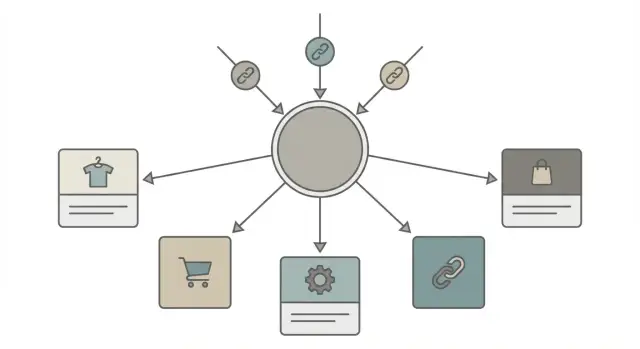
A hub page fixes the mismatch. An authority hub page is one strong, highly referenced page that covers a topic broadly, then routes people (and search engines) to the specific pages that matter to your business. Instead of trying to earn great links to every revenue page, you earn them to the hub and use intentional internal links to share the benefit across multiple money pages.
This approach works best when you have a small "family" of offers that belong to one topic, the topic has real informational demand (not just purchase intent), and you can keep the hub updated so it stays credible. It's a poor fit if you only have one core page, your offer can't be grouped cleanly, or you can't publish a hub that's actually useful.
If you do it well, one strong hub can be the smartest place to aim premium backlinks, while your money pages benefit through link equity distribution instead of waiting for links that rarely come.
Key concepts: hubs, money pages, and link equity
An authority hub page is a helpful, central page for a topic on your site. It isn't trying to sell hard. Its job is to earn trust and links, then guide readers to the right next step.
Think of the roles like this:
- Hub page: the home base for a topic. It explains the big picture and points to deeper pages.
- Money pages: pages tied to revenue, like product pages, service pages, or high-intent landing pages.
Links do different work depending on where they come from.
- External links (other websites linking to you) act like votes of confidence. They strengthen the page they point to.
- Internal links (one page on your site linking to another) help share that strength and make your site easier to understand.
"Link equity" is the value a page can pass through links. It's not a visible score. It's closer to influence: a page with more trust and attention can help lift the pages it recommends.
Search engines prefer clear structure because it reduces guesswork. When your hub covers a topic broadly and links to specific money pages with accurate anchor text, it becomes clearer what each page is for.
Example: a "Cybersecurity Basics" hub can explain key concepts, then link to money pages for "Penetration Testing," "Managed Detection," and "Security Audits." One strong hub makes it easier for both people and crawlers to find the right next step.
What makes a good candidate for an authority hub
A good hub sits on one clear topic that can naturally point to several related pages. The best topics usually sound like one big question people have, connected to your offers without feeling like a pitch.
If the topic is too broad, the hub becomes a messy directory. If it's too narrow, you won't have enough relevant money pages to support.
Your money pages also need to be closely related. A hub works best when the pages it links to are different answers to the same family of problems. For example, "email security" can link to phishing protection, DMARC setup, and security awareness training. What doesn't work is mixing unrelated pages just because they make money.
A strong hub candidate usually looks like this:
- A simple, memorable promise (a guide, a framework, or a "best options" roundup)
- Around 3 to 8 money pages that fit the topic without stretching
- Real search demand, so it can earn visits even before it ranks highly
- A clear reason for other sites to reference it (stats, comparisons, definitions, a practical checklist)
- A realistic update rhythm (often quarterly)
Keeping it updated matters more than most people expect. A hub attracts links because it stays useful. If it gets stale, it earns fewer mentions, and the value you planned to pass to money pages weakens over time.
To sanity-check demand, look for proof that people already search for the topic: existing pages ranking for it, active discussions, and recurring questions from customers. Also pick something you can stand behind for years, not a trend that will fade next month.
Example: a bookkeeping firm creates a hub called "Small business bookkeeping setup." It supports money pages for monthly bookkeeping, payroll, tax filing, and software migration. One topic, multiple services, and a page worth keeping current.
Plan the hub: topic, targets, and scope
Start with one core topic that can hold everything together. Your hub should make a clear promise in one sentence, like: "This page helps you choose the right X and avoid the common mistakes." If you can't say the promise simply, the topic is too wide.
Next, decide what the hub is meant to support. This isn't the place to sell every product or service at once. The hub earns trust first, then routes readers to the right next page.
Write down the money pages the hub will point to. Keep it focused. In most cases, 3 to 8 targets cover real choices without turning the hub into a directory. Make sure each money page matches a specific intent (buy, compare, book, request a quote), not a vague category.
Then map the supporting subtopics: the questions people ask before they're ready to buy. Make them specific. If your hub is "email marketing software," useful subtopics include pricing basics, deliverability, setup time, and "best for small teams" - not just "features." Roughly 5 to 15 subtopics is usually plenty.
Finally, make the hub feel complete. A solid structure is an overview that clarifies who it's for, skimmable sections that answer the top questions with clear next steps, a short FAQ for edge cases, and one comparison table or "pick this if" guide to reduce decision stress.
A simple planning check: if you can't outline the hub on one page, the scope is too big. Split it into two hubs and let each support its own set of money pages.
Build the hub page content people actually want
Your hub only works if it answers the exact question people searched for. Open with a clear promise that matches the intent, and confirm what the reader will get in plain language. If the query is informational, lead with guidance. If it's comparison-focused, lead with a quick way to choose.
Use headings that sound like real questions. It helps readers scan, and it helps search engines understand the page. Keep sections tight: define the term, explain why it matters, then show how to do it.
Strong hubs tend to include the same few building blocks: plain-language definitions, a step-by-step method, decision help (what to choose when and why), common mistakes, and a short recap that points to the next action.
Add "best next step" blocks where the reader naturally needs them. These are short mini-sections that say, "If you're ready for X, go here." Each one should point to a specific money page that solves the problem the reader just recognized. For example, after a section on how to pick the right service, the next step could be "Compare plans" or "See pricing," not a generic "Learn more."
Keep the page useful, not padded. If you mention a tactic, show what it looks like in practice with a mini scenario, checklist, or simple template. Example: "If you sell three services, add one short paragraph under each explaining who it's for, then send people to the matching service page."
Treat the hub like a living page. Dates, stats, and recommendations go stale quickly. Put a reminder on your calendar to refresh examples, update numbers, and adjust next-step links when your offers or priorities change.
Internal linking: how to pass equity to money pages
A hub works when it's more than a "resource list." It should guide a reader to the next best step, and those next steps are often your money pages. If the hub earns strong links, internal linking is what turns that attention into rankings and sales.
Start by linking from the hub to each money page with anchor text that says what the page is about. "Pricing," "services," or "click here" wastes the signal. A reader (and Google) should understand the destination before clicking.
Place links where they help someone decide. A simple rule: add the link right after you answer a question that naturally leads to action. Avoid dumping a long list of links at the bottom with no context.
A clean pattern looks like this: add 1 to 2 money-page links per major section when they're relevant, introduce them with a short "next step" sentence, and keep the link text consistent each time you refer to the same page.
Don't make the hub a one-way street. When it makes sense, each money page should link back to the hub for definitions, supporting detail, or a fuller guide. That creates a clear topic structure.
Link between related money pages only when it genuinely helps the user. Example: a "Local SEO" service page can point to a "Technical SEO" page when you explain what's included.
Also make the hub easy to find. If people can't reach it in a couple of clicks, link equity distribution will be weaker no matter how good your backlinks are.
External links: why the hub is a smart backlink target
A strong backlink works best when it points to a page that can actually use it. Many money pages are narrow (pricing, service pages, product pages), so they're harder for other sites to reference naturally. When you send your best external links to a hub instead, you concentrate trust on a page built to rank, then pass that value to multiple revenue pages through internal links.
Backlinks land more easily on pages that feel useful even to someone who will never buy today. That usually means content that teaches, compares, or helps people decide.
Hub formats that attract links tend to be simple: practical step-by-step guides, resource roundups (tools, templates, checklists), comparisons with clear "who it's for" notes, and data or research summaries.
A good-fit backlink is straightforward: the linking page and your hub share the same topic and intent. If your hub answers the exact question the other page references, the link looks natural, visitors stick around, and search engines see a consistent theme.
To avoid mismatched links that don't help rankings, watch for these red flags: the linking site is unrelated, the anchor text has nothing to do with your hub topic, or the hub doesn't clearly cover what the link promises.
Common mistakes that weaken hub and money page performance
Most hub strategies fail for predictable reasons: the page feels unfocused, the links feel random, or the hub doesn't deserve the backlinks you're aiming at it.
Mistake patterns that quietly drain equity
The biggest issue is picking a topic that's too wide. If your hub tries to cover everything in a category, it becomes a directory. Visitors don't know where to start, and search engines get mixed signals about what the page should rank for.
Over-linking causes a similar problem. If your hub points to 20 money pages, none of them looks like a priority. A strong hub highlights a small set of best targets and explains who each is for.
Anchor text is another quiet failure. If every internal link says "click here" or "learn more," you waste a chance to describe what the linked page is actually about.
Hubs also decay. A page that never gets updated starts to look neglected, especially in fast-moving topics. Even small edits like new stats, new examples, and updated recommendations can keep it relevant.
Finally, sending external links to a thin hub is like pouring water into a cracked bucket. If the hub has little original value, it won't hold trust long enough to pass it on.
If you need quick fixes, start here: narrow the hub to one clear intent, link to a shortlist of money pages (often 3 to 7) with context, use specific anchors that match the destination, and add a simple monthly or quarterly update rhythm.
Example: a "SEO reporting" hub that defines reporting, shows a simple template, and compares a few reporting approaches will earn more trust than a page that only lists reporting-related services.
Quick checklist before you invest in backlinks
Buying or earning backlinks costs time, money, or both. Before you point new links at an authority hub page, make sure the page is ready to hold that authority and pass it where you need it.
A good test: if a newcomer lands on the hub, can they get oriented in 10 seconds and find the exact next page they need? If not, you're paying to send people (and Google) into a dead end.
Use this quick pre-backlink check:
- The hub answers one main question and doesn't drift.
- Every priority money page gets at least one strong, relevant link from the hub (not buried in a footer or random resources block).
- Anchor text is specific ("pricing for X," "X vs Y," "book a demo"), not vague.
- No broken links, placeholder sections, or obviously outdated details.
- You can describe the structure in one sentence ("This page explains X and routes readers to A, B, and C.")
Fix the basics first. Then invest in backlinks with confidence.
Example scenario: one hub supporting multiple revenue pages
Imagine a local home services company that offers five paid services. Each service has its own page built to convert, but those pages are hard to earn links to because they feel salesy.
So the company creates one authority hub with a simple, helpful angle: "How to choose the right service and what it costs." It answers the questions people type into Google when they're comparing options and trying to budget.
The hub is organized around decision points, and each decision point leads to a relevant money page.
- A section on "What's causing the problem?" links to the most relevant service.
- A section on typical price ranges links to the service page with estimates and booking.
- A section on "When you should not DIY" links to the higher-margin service.
The five money pages might be emergency service, standard service, a maintenance plan, an inspection/diagnosis page, and a premium upgrade.
Now add one strong backlink to the hub. Because the hub links out to each money page with clear, descriptive anchor text, some of that authority can flow through internal linking. Instead of trying to build separate links to five different sales pages, you have one linkable resource that supports all of them.
After launch, track outcomes that connect SEO to revenue: impressions for the hub and service pages, ranking changes for "cost" and "near me" terms, clicks from the hub to each service page, and form fills or calls that started after a hub visit.
Next steps: build the hub, then strengthen it over time
Pick one hub topic you can own. The best choice is narrow enough to be clear, but broad enough to support several money pages.
A simple build order helps you avoid wasted effort. First, outline the hub and publish it with internal links to your priority money pages. Then tighten the intro, fill missing subtopics, and add a few practical examples. Make it easy to skim with short sections, clear headings, and a small "recommended next pages" area.
After that, earn or acquire a few relevant backlinks to the hub (not scattered across random pages).
If you're using a premium placement service, keep the focus on relevance. For example, SEOBoosty (seoboosty.com) is positioned around securing backlinks from highly authoritative sites. That kind of link tends to work best when it points to a hub that genuinely matches the topic and is set up to pass value to the money pages you care about.
To keep the hub earning and passing value, set a light maintenance rhythm: a quick monthly check for broken links and outdated details, and a quarterly refresh where you update examples, strengthen weaker sections, and adjust next-step links as your offerings change.
FAQ
What problem does an authority hub page actually solve?
Build a hub when you have several closely related money pages (usually 3–8) and one broader topic people research before buying. The hub earns links because it’s genuinely helpful, then it funnels readers and internal link equity to the revenue pages.
What’s the difference between a hub page and a money page?
A hub is the “teach and guide” page: broad, useful, and easy to cite. A money page is the “take action” page: pricing, services, product, booking, or quote. The hub should reduce selling and increase clarity, while the money pages focus on conversion.
How do I pick the right topic for a hub?
Start with one topic you can explain as a single promise in one sentence. If you can’t outline it on one page without drifting, it’s too broad and should be split into two hubs.
How many money pages should one hub link to?
Aim for 3–8 money pages that are different answers to the same family of problems. If you link to too many pages, none of them looks important, and readers won’t know what to click next.
What internal link anchor text should I use from the hub?
Use anchor text that says exactly what the destination is, like “penetration testing services” or “DMARC setup pricing.” Avoid vague anchors like “click here,” “learn more,” or repeated generic labels like “services.”
Where should the money-page links go on the hub?
Place links right after you answer a question that naturally leads to action, with a short next-step sentence. Don’t dump a long list of links at the bottom without context, because it feels random and gets ignored.
Should money pages link back to the hub too?
Yes, when it’s relevant. Add a link back to the hub for definitions, deeper explanations, or a full guide so users can learn without bouncing, and search engines can see a clear topic structure.
Why send external backlinks to the hub instead of the money pages?
Point premium backlinks at the hub because it’s easier for other sites to reference a helpful guide than a sales page. Then let internal links distribute the benefit to multiple money pages instead of hoping each one earns links on its own.
What are the biggest mistakes that make hubs fail?
The most common mistakes are a topic that’s too broad, too many outbound internal links, thin content that doesn’t deserve links, and stale details that don’t get refreshed. Fix those first, or the hub won’t hold authority long enough to pass it on.
What should I check before investing in backlinks to a hub?
Do a quick readiness check: the hub answers one main question, has no broken or outdated sections, and clearly routes readers to each priority money page with specific anchors. If you’re using premium placements like SEOBoosty, prioritize tight topical relevance so the backlink matches what the hub actually covers.
Share