Backlink change monitoring: weekly diffs to catch edits early
Backlink change monitoring with weekly diffs helps you spot anchor edits, rel swaps, or removals early so you can protect rankings and act fast.
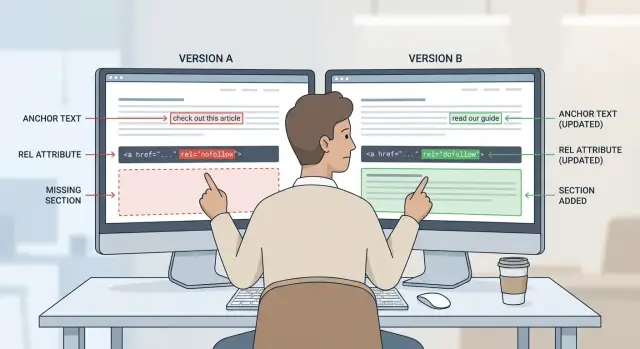
Why valuable backlinks change without warning
A good link rarely breaks all at once. More often it drifts into something weaker, and you only notice after rankings or traffic drop. That drift can happen for normal reasons: editors refresh old articles, CMS templates change, pages get merged, or a site tightens its outbound link rules.
In practice, backlink drift usually looks like small edits:
- Anchor text gets softened from a clear phrase to something vague like “here” or just your brand name.
- The link moves from the main body to a footer, sidebar, or a general “resources” block.
- The rel attribute flips (for example, to nofollow or sponsored).
- The destination quietly changes to your homepage, a tracking URL, or even a 404 after a restructure.
- The surrounding paragraph gets rewritten so the mention is less relevant.
These changes matter because they change what the link signals. Anchor edits can reduce topical relevance. Rel changes can reduce how much value the link passes. Placement changes can lower visibility and, on some sites, reduce the weight search engines give it.
If you only check links occasionally, you lose time. A link can degrade for months, and the site may be less willing (or able) to fix it later. You also lose the ability to tell normal site updates from real problems because you have no before-and-after record.
The goal of backlink change monitoring is simple: notice meaningful changes quickly, then respond calmly. Weekly snapshots and diffs are usually enough to catch quiet downgrades without turning this into a daily chore.
The changes worth tracking
Most “lost value” links are still technically live. Good backlink change monitoring focuses on edits that change meaning, trust, or visibility.
Anchor text edits
Anchor text can shift in ways that change what the link communicates. A keyword phrase might become neutral (“this tool”), overly generic (“website”), or disconnected from the topic.
This is easy to miss because the link still works. But the value can drop if the anchor no longer supports the page you’re trying to rank.
Rel attribute swaps
A followed link can become nofollow, sponsored, or ugc when a publisher updates policies, labels content, or changes CMS defaults.
Treat rel changes as a priority alert on high-value placements.
Removal, replacement, or access changes
Not all removals look like “link deleted.” Watch for the link being replaced with a different brand, moved behind a paywall or login, or disappearing because the page was merged, unpublished, or rebuilt.
Placement and surrounding context
Even if the HTML is similar, placement can change impact. A link pushed out of the main content and into a footer, author box, or a long resources list often becomes less visible and less editorial.
Also pay attention to the sentence or paragraph around the link. If the surrounding text becomes irrelevant, the link can look less natural and carry less topical support.
Redirect and destination changes
Track whether the link now goes through a tracking URL, a different page, or a redirect chain. A clean link to a key page can quietly turn into a redirect to the homepage or to a campaign URL that later expires. The link “exists,” but it stops supporting the page you care about.
Which backlinks to monitor first
Start with the links that would hurt the most if they changed. Treating every mention equally is how monitoring turns into noise.
Prioritize:
- Highest-authority or highest-effort links
- Links pointing to money pages (pricing, product, lead forms) or signup paths
- Links that send steady referral traffic
- Links on pages that get updated often (news posts, “best of” lists, resource hubs)
- Links that support your main keywords (the ones you wouldn’t want swapped to “click here”)
Then split your list into two buckets:
- Must-keep: you’ll follow up quickly if anchor, rel, destination, or placement changes.
- Nice-to-have: still useful, but you can tolerate small edits.
Weekly is a solid default. It’s frequent enough to catch quiet edits before they sit for months, and light enough to keep up with. For extremely valuable links, check weekly and again after any known site redesigns or major page refreshes.
Ownership matters more than tools. Assign a “link owner” for each must-keep backlink. That person checks the diff, confirms it’s real (not a temporary variant), and decides the next action.
Define a baseline for each backlink
Weekly checks only work if you know what “correct” looks like. A baseline turns a vague link into a record you can compare against.
Record the basics:
- Source URL (the page that links to you) and the expected target URL (the exact page on your site).
- Expected anchor text, plus 2-3 acceptable variants.
- Acceptable rel values for this placement.
- Expected placement, described in plain language (for example, “first body section under the H2 ‘Tools’”).
- 1-3 sentences around the link, with the date you verified it.
That placement note matters. Links often “move” into footers, author bios, or UI elements that load late, while the page still technically links to you.
How to run weekly diffs
Pick one day each week and stick to it. Consistency makes changes easier to spot, and it keeps you from reacting to random snapshots.
Capture the page where the backlink lives:
- If the page is simple, saving the raw HTML is often enough.
- If the page loads content with scripts, also capture a rendered snapshot (what a normal browser shows).
A simple workflow:
- Save this week’s copy with a consistent file name (include the date).
- Keep last week’s copy as your comparison point.
- Run a diff tool on last week vs this week.
- Search the diff for your target URL or brand name to jump near the backlink.
- Log the result in one line (OK, changed, missing, needs follow-up).
Don’t alert on every page change. Many pages update menus, dates, or unrelated sections. Narrow your focus to what affects link value.
What to check in each diff
A weekly diff is only useful if you review the same few fields every time.
Anchor text
Compare the exact clickable words, not just whether a link exists. Normal variation includes capitalization and punctuation. Flag changes that remove keywords completely, change intent, or turn the anchor into something generic or unrelated.
rel attributes
Track the full rel value and note both additions and removals. A link can remain visible while switching from follow to nofollow or gaining sponsored/ugc labels.
Target URL and redirects
Confirm the href still points to the right page. If the URL “looks close,” also check where it actually lands. A redirect to a homepage or category page often reduces relevance.
Placement and visibility
Verify the link is still present in the rendered page content, not just in raw HTML. Also check whether it moved into a weaker area (footer, sidebar, author box, collapsible UI).
A quick review should answer:
- Did the anchor text change in a meaningful way?
- Did any rel value change?
- Did the destination change or start redirecting?
- Is the link still visible in the main content?
What to do when you detect a change
Start calm. A surprising number of “changes” are just page variants. Before acting, confirm it’s real:
- Check in a private window.
- Try another browser.
- Check logged out.
- If possible, check from another network (mobile data vs home Wi-Fi).
Once confirmed, capture proof right away: a screenshot of the link area, the HTML snippet around the link, and a dated note of what changed.
Then decide severity. These usually deserve quick follow-up:
- Anchor text changed to generic or unrelated wording
- rel switched to nofollow, sponsored, or ugc unexpectedly
- Target URL changed, redirects, or points to the wrong page
- Link moved to a low-visibility spot
- The section, page, or link was removed
Send a short, specific message. Be polite, assume it was accidental, and make the request easy to complete.
Hi [Name],
On [date], we noticed our link in the [section name] changed from [old anchor/rel/URL] to [new anchor/rel/URL].
Could you please restore it to [exact requested version]?
Here’s the exact page section: [brief description]. Thanks for your help.
Common mistakes that make monitoring useless
Backlink change monitoring only helps if it points you to problems you can act on.
Common failures:
- Watching only homepage links and ignoring deep links to guides, product pages, or pricing pages.
- Tracking the wrong URL version (http vs https, www vs non-www, trailing slash), creating false alarms.
- Treating every nofollow as a disaster. Some nofollow links still send traffic and build trust.
- Creating too many alerts for tiny edits, then ignoring the one that matters.
- Skipping the baseline and reacting too slowly. Without a baseline, it’s harder to show what changed.
Example: a single backlink that slowly loses value
A founder pays for a high-authority mention and then moves on, assuming it will stay the same forever. The link is live, traffic bumps, and rankings start to climb. But the page keeps getting edited, and each small change chips away at the link’s value.
- Week 3: Anchor shifts from a clear product name to something vague like “this site.” The link still works, but topical support weakens.
- Week 6: rel updates to
sponsoredafter a policy change. That can reduce how much value the link passes. - Week 9: A refresh removes the paragraph that contained the link. It isn’t “broken.” It’s simply gone.
Weekly diffs catch this early while the editor still remembers the update and the page is still in flux.
Quick weekly checklist for backlink health
Weekly checks work best when they’re small and consistent. Spot-check the page itself (not just a report), then confirm:
- The link is still present and clickable.
- The destination is still correct and loads cleanly (no surprise redirects).
- The anchor text still makes sense and isn’t overly generic.
- rel matches what you expect.
- The link still sits in the main content, not buried in a footer, sidebar, or low-visibility block.
Log it in one line: date, page, status (OK/Changed), and a short note like “anchor edited” or “now redirects.” A tiny log beats a perfect spreadsheet you never update.
Next steps: build a routine that protects your best links
Treat backlink monitoring like backups: boring when it works, painful when you skip it.
Keep the routine simple:
- Start with your top 10-20 links by impact.
- Diff them on the same day each week.
- Log changes consistently.
- Use one response template for outreach.
- Add more links over time if it stays manageable.
Once a month, look for patterns. Some sites rewrite old posts, add nofollow across the board, or move links into less visible areas. Others rarely touch published pages. That trend review helps you decide where monitoring should be tighter.
If you secure placements through a curated provider like SEOBoosty (seoboosty.com), add each new placement to your baseline list the day it goes live. That simple step makes it much easier to catch quiet edits before they turn into a real ranking or traffic hit.
FAQ
What is “backlink drift,” and why does it matter if the link still works?
Backlink drift is when a link stays live but quietly loses value because something around it changes, like the anchor text, the link’s placement, the rel attribute, or the destination URL. It’s easy to miss because nothing looks “broken,” but the signal to search engines and users can weaken over time.
How often should I monitor my most important backlinks?
Weekly is the best default for valuable links because it’s frequent enough to catch quiet edits before they sit for months, but not so frequent that you chase normal site noise. If a source site is actively updating a page (like a “best tools” list), checking weekly plus an extra check after known refreshes is usually enough.
Which backlinks should I monitor first?
Start with links that would hurt if they changed: high-authority placements, links pointing to money pages, links that send steady referral traffic, and links on pages that get updated often. Monitoring every single mention creates noise and makes it easier to miss the changes that actually impact rankings or revenue.
What should I include in a baseline for each backlink?
At minimum, record the source URL, the exact target URL you expect, the expected anchor text (plus a couple acceptable variants), the expected rel value, and a plain-language placement note describing where the link sits in the content. Add a short snippet of the surrounding text and the date you verified it so you have a clean before-and-after record.
What are the most important changes to look for in a weekly diff?
Track anchor text, rel values, the target URL and whether it redirects, and whether the link is still visible in the main content. Many value losses come from a link being moved into a footer/sidebar/resources block or being changed to a generic anchor like “here,” not from the link being deleted.
If a link becomes nofollow or sponsored, is it a disaster?
A nofollow, sponsored, or ugc label can reduce how much ranking value a link passes, but it doesn’t automatically make the link “useless.” If the link still drives qualified traffic or builds credibility with readers, it can still be worth keeping; treat rel changes as a priority review rather than an instant panic.
How do I make sure a detected change is real and not a page variant?
Many “changes” are just variants caused by caching, personalization, A/B tests, or being logged in vs logged out. Confirm the change in a private window, try another browser, and if possible check from a different network before you assume the link was actually edited.
What should I do the moment I spot a meaningful backlink change?
First capture proof immediately: a screenshot of the link area, the HTML snippet around it, and a dated note of what changed. Then send a short, specific message that clearly states the old vs new anchor/URL/rel, and the exact version you want restored, making it easy for the editor to fix quickly.
What are the most common mistakes that make backlink monitoring ineffective?
Checking only if the page still links to you misses the biggest losses, like anchor text being softened, placement being downgraded, or the target URL being redirected to a less relevant page. Another common issue is tracking the wrong URL version (http vs https, trailing slash), which creates false alarms and wastes time.
How does backlink monitoring fit if I get placements through a curated provider like SEOBoosty?
It helps most by adding each new placement to your baseline on day one, then running the same weekly checks for anchor, rel, destination, and placement. Even if a provider secures rare placements for you (for example, SEOBoosty), ongoing monitoring still protects you from later CMS edits, policy changes, and page refreshes you don’t control.
Share