Backlink procurement workflow for teams that avoids mistakes
Backlink procurement workflow for teams: roles, approvals, docs, and QA checks to prevent wrong URLs, missing anchors, and lost time.
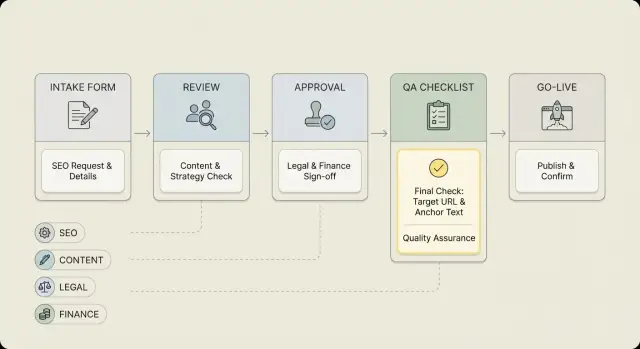
Why teams ship the wrong link (and how it happens)
Most backlink mistakes are small. The URL is almost right but missing the tracking tag marketing needed. Or it points to an old page that now redirects. The anchor text is close, but not the approved phrase. The publisher marks it as nofollow when you paid for a standard followed link.
Each miss looks minor, but it burns budget, delays results, and creates hours of back-and-forth to fix something that should’ve gone live correctly.
Teams struggle because a placement rarely lives in one person’s inbox. One person requests it, another approves it, someone else pays, and a different person checks the live page. When ownership is fuzzy, everyone assumes someone else confirmed the final URL, the anchor, and the link attributes. Add a rushed go-live (“we need it live today”) and you get copy-paste errors, outdated notes, and approvals that happen in chat with no record.
A reliable backlink procurement workflow fixes this by making “done” unambiguous. A placement isn’t done when the invoice is paid or an editor says “published.” It’s done when the live page matches the exact requirements that were approved.
“Done” should mean all of this is true:
- The link points to the correct final URL (no unexpected redirects)
- The anchor text matches the approved wording
- The link attribute matches the spec (followed/nofollow/sponsored)
- The link is on the agreed page and in the agreed section
- Proof is saved (screenshot or archived copy) and logged
This is a process, not a one-off task. Whether you place links through outreach, partners, or a provider with pre-vetted inventory, the same risk exists: without clear steps and a final QA check, the wrong version is what goes live.
Roles and ownership: who does what
Most link mistakes happen when everyone assumes someone else is responsible. Clear owners for each step make your backlink procurement workflow predictable, even when requests come in fast.
Separate three jobs:
- Decides: sets rules and priorities
- Does: executes the placement
- Checks: verifies it’s correct before you mark it done
In a small team, one person can wear two hats, but each hat should be explicitly assigned.
Typical roles (and their “decide/do/check” hat)
A simple setup looks like this:
- SEO lead (decides + checks): Sets anchor requirements, target pages, and quality rules. Gives final SEO sign-off.
- Marketing owner (decides): Confirms the placement supports a campaign or priority and approves messaging risk.
- Content/editor (does + checks): Provides the exact URL, suggested anchor, and guardrails (brand terms, banned phrasing). Reviews the final surrounding text if the link appears inside copy.
- Finance (decides): Approves spend, subscription terms, and renewals. Defines what can be purchased without extra approval.
- Legal/compliance (checks): Reviews regulated claims, trademarks, and disclosure requirements when needed.
Define who can request a link (usually SEO and marketing) and who can approve it (usually SEO lead plus finance when money is involved). Avoid “group approvals” where five people can approve but nobody feels accountable.
A practical rule: one approver for SEO correctness, one approver for budget, and legal only when the topic triggers it.
Also assign a backup for the SEO lead and the executor. Vacations and busy weeks are when wrong URLs slip in.
Request intake: the info you must collect upfront
Most link mistakes start before anyone talks to a publisher. A clear intake form is the easiest way to keep your backlink procurement workflow from turning into guesswork and rushed fixes.
Use one shared request form (a doc or ticket is fine). The point is to force the requester to define what “done” means and give the person placing the link everything they need.
The five fields that prevent most errors
Collect these every time, even for “quick” placements:
- Target page and purpose: what page you’re promoting and why (product, blog, location page, campaign landing page).
- Final destination URL: the exact URL that must receive the link, including https, trailing slash rules, and any required tracking tags.
- Canonical URL (if different): if the page canonicalizes elsewhere, record it and confirm which URL should be linked.
- Anchor preference and guardrails: suggested anchor, approved variations, and prohibited anchors or regulated terms.
- Timing and constraints: deadline, budget range, and must-haves (followed vs nofollow preference, language, region, topic fit).
One detail that saves a lot of pain: make the requester confirm the URL is final. If the page is about to change (new slug, redesign, migration), either wait or agree on a redirect plan upfront.
Capture brand rules in plain language. “Don’t use exact-match anchors for this product name” is clear. “Follow brand guidelines” isn’t.
Finally, require a one-sentence success criteria. Example: “Drive qualified traffic to the pricing page for our February promo.” That line keeps everyone aligned when there are multiple possible target pages.
Standard requirements: anchor, URL rules, and link specs
A backlink procurement workflow breaks down fast if “requirements” live in someone’s head. Write them down once, then reuse the same spec so a link never goes live with the wrong URL, the wrong anchor, or the wrong attributes.
Placement specs
Be clear about what counts as an acceptable placement. Otherwise, a vendor can deliver something technically “live” but useless.
Keep the spec short:
- Link type: followed or nofollow (and whether sponsored/ugc tags are acceptable)
- Page type: new post or existing post (and whether the edit must be contextual)
- Link location: in-body only, not author bio, sidebar, footer, or comments
- Surrounding context: at least 1-2 relevant sentences around the link
- Access: page should be viewable without logins or paywalls
URL and anchor rules
Anchor text and URLs are where most mistakes happen because they look “close enough” in a quick review.
For anchors, define a small set of allowed options (branded, partial match, generic) and what’s not allowed (for example, exact-match anchors on sensitive pages or anchors that change the meaning of a claim). Note acceptable variations (capitalization, singular/plural) so reviewers don’t guess.
For URLs, lock down the format:
- https only (and whether www is required)
- final destination must match the request (no redirects unless approved)
- tracking parameters allowed or not, and which fields (if any)
- query strings allowed or blocked
- canonical expectations (link should point to the canonical version)
Also make documentation part of the spec. Don’t leave it to chance. For each placement, record:
- a screenshot showing the link in context
- the final target URL as placed (copy/paste)
- invoice or order reference (if paid)
- date/time of go-live
- proof the link is followed or nofollow as agreed
Example: if the request is “branded anchor to https://example.com/pricing, no tracking tags,” then “Example pricing” might be fine, but “best pricing software” is not. And “http://example.com/pricing?utm_source=partner” fails, even though it looks similar.
Approvals that are fast but safe
Speed matters, but most mistakes happen in the gap between “approved” and “understood.” A good SEO approvals process uses a small number of approvals with clear questions, so reviewers can say yes quickly or block for the right reason.
Most teams only need four gates: the requester confirms the goal, SEO confirms placement details, brand or legal checks anything sensitive, and finance confirms budget.
Use yes-no questions (not opinions)
Approvers should answer the same decision questions every time. If any answer is “no,” it goes back with a specific fix.
- Is the target page the correct URL (final, canonical, publicly accessible)?
- Is the anchor text allowed (no trademark issues, no risky claims, no mismatched intent)?
- Does the placement meet the spec (followed/nofollow, correct destination, correct placement location)?
- Is the cost approved and within the agreed cap for this type of domain?
Set explicit time limits to prevent silent blocking. If someone needs more time, they should reply with what’s missing.
Pre-approve the repeat work
You can remove a lot of friction by defining what is auto-approved:
- repeat buys on already-vetted domains
- recurring placements for the same page category
- a short list of “safe” anchors (brand name, plain URL, a few neutral variations)
- standard budgets by tier (finance reviews exceptions only)
Documentation: what to record so nothing gets lost
Even a good approvals process fails if people can’t find the latest details. Keep one source of truth for every placement. If anyone has to ask, “Which URL are we using again?”, your record isn’t doing its job.
Create a single “link order record” per placement. It can be a spreadsheet, a project tool, or a shared doc. What matters is that it’s searchable and updated in one place.
At a minimum, include:
- Placement ID (unique, never reused)
- Publisher domain and page type (guest post, existing article edit, resource page)
- Target URL (exact final URL, including trailing slash rules)
- Anchor requirements (exact anchor, allowed variations, not allowed)
- Price, billing status, and one internal owner
- Due dates (requested date, expected go-live window, follow-up date)
Change history is where teams save money. When the URL or anchor changes, don’t overwrite it. Log the change with date, who requested it, and why. That prevents the classic failure where a publisher goes live with an older version because they were working from an earlier message.
When it’s live, store final proof in the same record: live page URL, date verified, and notes on any deviations (wrong anchor, nofollow tag, link placed in author bio).
Step-by-step workflow from request to go-live
A clean backlink procurement workflow is less about moving fast and more about avoiding surprises. Everyone works from the same locked specs, and every handoff has a quick check.
Five steps most teams can follow
- Lock the specs. Confirm the final target URL (including https, trailing slashes, and tracking rules) and the exact anchor text. Freeze these in one place.
- Send the request with exact requirements. Submit the specs verbatim. If something is optional (brand mention, placement section, attribute flexibility), mark it clearly.
- Pre-live review (if you can see a draft). Scan for the correct destination, anchor text, and whether the surrounding sentences match your intent.
- Go-live capture. As soon as it’s published, record the live page URL, date/time, and a screenshot or saved copy of the relevant section.
- Post-live QA within 24-72 hours. Recheck that the link still resolves correctly, is clickable, and matches the agreed attributes.
Handoffs that prevent “wrong URL” mistakes
Keep each handoff small and explicit:
- requester confirms business goal and target page
- SEO owner confirms URL, anchor, and link rules
- approver signs off (one person, one decision)
- buyer or publisher contact executes using locked specs
- QA owner verifies and reports the result
QA steps before and after the link goes live
QA is where the workflow pays off. Most expensive mistakes are tiny: one wrong character in the URL, an anchor that changed “just a bit,” or a link that exists but is placed where users won’t see it.
Before go-live: verify the placement details
Do the final check against the approved request, not against memory or chat messages. Open the target page and copy the destination URL from the approval record, then compare it to what will be published.
Pay special attention to redirects. A redirect might be fine, but only if it was approved. Otherwise you can send authority to the wrong page, or to a tracking URL that later breaks.
Confirm the anchor text letter-for-letter. Spacing, capitalization, and small words matter because they often tie back to brand rules or compliance.
If possible, check the page source for link attributes. If the requirement is a followed link, make sure it’s not marked nofollow, sponsored, or ugc unless that was explicitly allowed.
After go-live: confirm it behaves like a real user link
Review it like a visitor would. The link should be visible and clickable. If it’s hidden, placed in a collapsed element, or only appears inside an image, treat it as a change request unless that format was pre-approved.
Use this short post-live QA checklist:
- Click the link and confirm it lands on the exact approved URL (no typos, no surprise redirects)
- Re-check the anchor text matches the approved version
- Verify attributes match the requirement (followed vs nofollow, plus sponsored or ugc tags when needed)
- Confirm the link is visible in the main page content as agreed
- Capture evidence (screenshot and live page URL) in the order record
Common mistakes and traps to watch for
Most link mistakes aren’t “SEO problems.” They’re handoff problems. Someone assumes, someone edits, and the link goes live before anyone notices.
One big trap is treating the homepage as the safe default. Teams ask for links to product, pricing, or location pages because those pages are tied to a goal. If the request just says “site link” or “target page: TBD,” a publisher may choose the homepage and call it done.
Another frequent failure is allowing last-minute URL swaps without re-approval. Switching from /pricing to /features, adding tracking, or changing region can break messaging, analytics, or legal requirements. Any change after approval should trigger a quick re-check, even if it feels minor.
Watch for these issues before you sign off:
- destination URL is “close enough” but not the intended page (wrong path, locale, or subdomain)
- anchor reads overly promotional, off-brand, or conflicts with internal wording rules
- attributes were never recorded, then you discover it’s nofollow or marked sponsored
- URL resolves but redirects through a chain and lands somewhere unexpected
- page returns a 404, loads a soft 404, or ends up thin or irrelevant
A common scenario: marketing requests a link to “/pricing,” legal approves that exact page, and the vendor swaps it to “/trial” at the last second because “it converts better.” Without re-approval, you can end up with non-compliant messaging and broken tracking.
Quick checklist for every placement
Use the same checklist every time, even when the placement feels simple. That’s how teams stop small copy-paste mistakes from turning into expensive fixes.
Before you mark anything as done, verify these five items against the approved request:
- Destination check: approved URL is exactly the live destination (right page, right protocol, no surprise redirects, no unapproved tracking parameters).
- Anchor check: live anchor matches the approved wording (including capitalization and punctuation).
- Attribute check: attributes match the requirement (followed vs nofollow, plus sponsored or ugc tags when needed).
- Proof captured: live page URL, go-live date, and where the link appears are recorded.
- Clear owner: one person is assigned to follow up if anything is off, with a deadline for the fix.
Example workflow in a real team scenario
A product team ships a new pricing page on Monday. Marketing wants coverage fast, so they order five links to support the launch.
The request and intake
Marketing submits a request: “5 placements to the pricing page, mixed anchors.” Intake is owned by one SEO coordinator who checks basics before anything is purchased or pitched.
During intake, the coordinator spots a problem: the request points to an older URL that still exists (the pre-launch pricing page). Product confirms the new approved URL and provides the exact page title so there’s no confusion.
They also lock anchor text requirements. Marketing wanted “best pricing” as the primary anchor, but brand guidelines prefer safer language.
Before moving forward, the coordinator confirms:
- final destination URL (copied from the live page)
- one primary anchor and 2 acceptable alternates
- a one-sentence “why this page” note so reviewers can sanity-check relevance
- go-live deadline and who can approve exceptions
Pre-live review catches the anchor mismatch
A draft comes back with an anchor that wasn’t approved (“cheap pricing”). In pre-live review, the coordinator flags it and requests an approved option instead. The publisher updates the draft before it goes public, so the wrong anchor never ships.
Right before go-live, QA runs the destination check again. This is where old URLs sneak back in through cached briefs or copied templates. The coordinator clicks the draft link, confirms it lands on the new pricing page, and checks that it isn’t redirected.
After go-live: reporting and keeping the record
Once all five placements are live, the team logs results and saves details for renewals:
- live page title and date found live
- final URL and anchor used
- who approved the final version
- notes for renewal (what worked, what to avoid next time)
If you’re using a provider to reduce the back-and-forth of traditional outreach, keep the same internal discipline. For example, SEOBoosty (seoboosty.com) offers a curated inventory of high-authority sites and subscription-based placements, but you still want one locked spec, one source of truth, and a quick QA pass before you mark any placement done.
FAQ
What does “done” mean for a backlink placement?
Start by defining what “done” means in writing: the exact destination URL, the approved anchor text, the required link attribute, and the expected placement location on the page. Most mistakes happen when people treat “published” or “paid” as done instead of verifying the live page matches the spec.
Who should own a backlink placement end-to-end?
Assign three explicit hats: one person decides the rules and priorities, one person executes the placement, and one person verifies the live result. In small teams, the same person can wear two hats, but you still want a named owner for the final check so nothing falls into a gap.
What information should be required in every link request?
Collect the final destination URL (including https and any tracking rules), the canonical URL if different, approved anchor options plus what’s forbidden, and the basic placement requirements like followed vs nofollow and in-body vs bio. Also capture a one-sentence goal so reviewers can sanity-check the target page.
How do we prevent last-minute URL or anchor changes from causing errors?
Freeze the specs in one source of truth before anyone contacts a publisher or vendor. If a URL or anchor changes later, treat it as a new approval moment and update the record with who changed it and why, so the executor doesn’t work from older notes.
What’s the fastest approval setup that still prevents mistakes?
Use a small number of gates with yes/no questions: SEO correctness, budget approval, and legal or brand review only when the topic is sensitive. Make sure each approval is tied to the same written spec, not a chat message that can be misread or lost.
What should we log for each backlink so details don’t get lost?
Record one unique placement ID, the publisher and page type, the approved target URL and anchor rules, the cost and billing status, the go-live date, and the final live page details once it’s published. Keeping everything in one searchable place is more important than the tool you use.
Why are redirects such a common backlink problem?
Redirects often hide mistakes because the link “works” but lands somewhere unexpected, like an old page, a regional version, or a tracking URL that later breaks. Default to “no redirects unless approved,” and verify the final landing page matches the exact approved URL.
What should we verify before a link goes live?
Check the draft or preview against the approved spec, not memory. Confirm the destination URL character-for-character, confirm the anchor text exactly, and verify the link attribute matches what you requested so you don’t discover a nofollow or sponsored tag after it’s public.
What should we QA after the link is live?
Recheck the live page within 24–72 hours because edits, template changes, or attribute updates can happen after publication. Confirm it’s visible and clickable in the agreed section, and save proof in your record so you can request a fix quickly if something changed.
If we use a backlink provider, do we still need this workflow?
A provider can reduce back-and-forth, but it doesn’t remove the need for a locked spec and a final QA pass. Even with a curated inventory solution like SEOBoosty, you still want one internal source of truth for the exact URL, anchor, and link requirements before you mark the placement complete.
Share