Backlinks to author profile hubs: build authority the simple way
Learn how backlinks to author profile hubs can consolidate expertise signals, then pass authority to your strongest articles without overdoing it.
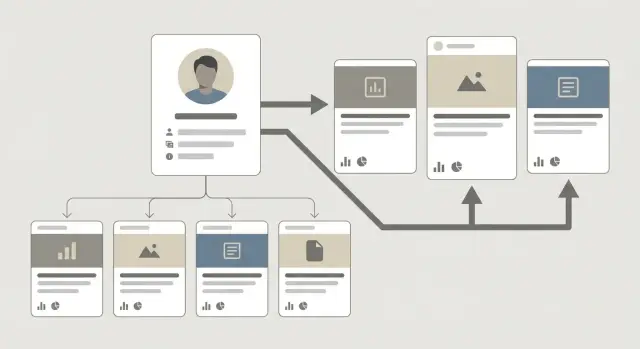
The problem: scattered authority and weak author signals
Most sites already have author pages, but they rarely help rankings. They’re thin, rarely updated, and disconnected from the content that earns traffic. Sometimes they’re blocked from indexing, or they’re buried behind pagination and tag pages.
When links point only to individual articles, authority gets scattered. One post picks up a few mentions, another gets none, and the writer behind them stays mostly invisible to search engines. Over time, you end up with a site that has decent content but weak, inconsistent signals about who created it and why that person should be trusted.
Backlinks to author profile hubs solve that by consolidating trust in one place and distributing it on purpose. Instead of trying to earn external links for every article, you build one strong author hub that represents the person’s expertise. Then you use internal links from that hub to pass value to the author’s most important pages.
This tackles two problems at once: the author becomes easier to understand (credentials, topics, body of work), and link building becomes less dependent on luck because you’re focusing on one page that can support many articles.
This approach works best when an author publishes multiple pieces in a focused area and you want the whole cluster to benefit (for example, one person owns all content on accounting basics, SaaS onboarding, or home fitness). It’s a weaker fit when the author has only one or two articles, writes across unrelated topics, or your site doesn’t want to highlight individual authors (like short news updates or anonymous product listings). It also won’t help much if the author hub is treated like a bio box and never maintained.
If you want stronger author page SEO and clearer E-E-A-T signals, the starting point isn’t more content. It’s gathering authority and trust, then distributing it with intent.
What an author profile hub is (and what it is not)
An author profile hub is a dedicated page that acts as the home base for one writer or expert on your site. It collects the details that prove who they are, what they know, and where their best work lives. Think of it as an organized index of a person’s expertise, not a short introduction.
A standard bio box under an article helps a little, but it’s easy to miss and it doesn’t create a strong, consistent picture. What makes a hub different is that it answers the questions readers and crawlers have in one place:
- Who is this person, and why should I trust them?
- What topics do they cover most?
- What are their best articles?
- Where should I start?
A hub also gives you a clean internal linking structure. If you later earn backlinks to author profile hubs, you’re not boosting one random article. You’re strengthening a central page that can pass attention and authority to the pieces you choose.
What an author hub is not
It’s not a resume dump, and it’s not a “team page” that lists 20 people with one-line blurbs. It’s also not a place to stuff keywords. If the page reads like it was written for bots, it won’t build trust.
What to expect (realistically)
A good hub usually leads to clearer author page SEO signals, a stronger understanding of the author’s specialty, and more deliberate link equity distribution to the pages you choose. It may not rank on its own, and it won’t fix weak content. But it makes your expertise easier to verify and gives you a structure you can improve over time.
What to include on the hub to signal real expertise
An author profile hub should make one thing obvious within a few seconds: who this person is, what they know, and why their writing on your site is worth trusting.
Start with a short bio that matches the content you publish. One tight paragraph is enough. If you use headshots elsewhere, add one here too, but keep the focus on the facts readers care about.
A strong hub usually includes:
- A clear role and niche: what the author does and the topics they cover on your site
- Credentials that matter: degrees, certifications, years in the field, or hands-on experience (only what’s relevant)
- A focused topic list: 3 to 6 themes, written in plain language
- Featured work: a small “start here” set of the best articles, guides, or research
- Freshness signals: a “last updated” note, recent contributions, or a short “what I’m working on” line
Optional elements can help, but only if they’re real and easy to verify. A couple of strong proof points beat a long list nobody reads.
Optional proof that builds trust (without clutter)
Media mentions, podcast guest spots, conference talks, and awards can add weight, especially in competitive topics. A short FAQ can also help when readers ask the same questions (for example: “How do you test a tool?” or “What do you consider a reliable source?”). If the author builds tools, templates, or public resources, include a small section that points to the most useful ones.
The biggest trap is turning the page into a keyword-stuffed resume. If a line doesn’t help a reader understand the author’s experience, remove it. Aim for proof of work, not self-praise.
Keeping hubs consistent across multiple authors
Consistency makes your site feel more trustworthy. Use the same layout for every author, with the same core sections (bio, focus topics, featured work, update signal). Then allow small differences that fit the person: one author may have speaking events, another may have tools, another may want to explain their method.
If you plan to build backlinks to author profile hubs, this structure also helps the page feel like a credible destination. And when the hub highlights the author’s best content, it becomes a natural place to pass authority into the articles that deserve it most.
Step by step: build the hub and route authority to key articles
Treat each author page like a mini site. It should stand for one clear theme, not a grab bag of everything the author has ever written.
1) Pick a single topic focus per author
Choose one primary topic where that author can credibly own the conversation. If an author writes about both email marketing and SQL, split them into separate hubs (or separate authors) instead of mixing signals.
2) Curate a small featured set first
Don’t feature 30 posts on day one. Pick 5 to 10 core articles that already perform well or clearly deserve to. These are the pages you want the hub to point to consistently.
A simple mix covers different intents without looking random: one beginner guide, one comparison page, one how-to tutorial, one case study, and one updated “best of” list.
3) Build the hub layout to make relevance obvious
Add short topic sections that match how people search. Under each section, feature one or two key articles with a clear title and a short summary that explains what the reader will get.
4) Link from hub to articles, and back again
The hub should link out to every featured article, ideally high on the page. Then add a visible path back to the hub from each featured article (author box, byline area, or a short “More from this author” section). This creates a tight loop so users and search engines understand the relationship.
Use a consistent, natural anchor style for the hub link (for example, “About [Author]” or “[Author] on [Topic]”).
5) Set a monthly refresh routine
Make it a habit, not a one-time build. Once a month, swap 1 to 3 featured articles based on performance and priorities. Keep the routine light:
- Review which featured articles gained traffic or rankings
- Replace underperformers with stronger candidates
- Update summaries so they match what the article now covers
- Check that every featured article links back to the hub
- Add at least one new internal link from a fresh post to the hub
Example: If Nina writes about B2B SEO, her hub focuses on that only. She features eight cornerstone posts, and each one links back to her hub in the byline module.
How to choose the best-performing articles to push
Choosing which articles get the extra push from your author hub is mostly about finding pages that are close to winning. If you point attention at the wrong pages, you can spend months building momentum for something that won’t rank or convert.
Start with articles that already earn search impressions but sit just outside the top results. These are often pages ranking on page 2 or hovering near the bottom of page 1. They have demand and relevance, they just need a stronger nudge.
Choose pages that deserve more visibility
Rankings alone aren’t enough. Favor pages with a clear intent match and solid on-page quality. A good candidate answers one specific question well, has a clean title and intro, and feels complete. If the page has confusing structure, outdated facts, or weak examples, fix that first.
A quick gut-check: would you be happy if this page was the first thing a new customer read from your brand? If not, it’s not a featured page yet.
Use a simple scoring rule (so it’s not guesswork)
Keep scoring small and repeatable. For each article, give 0 to 2 points for each factor, then sort by total:
- Demand and momentum: steady impressions and near-top rankings
- Business value: conversions, sign-ups, leads, or strong assisted value
- Proof: existing backlinks or mentions (even a few help)
- Freshness: updated recently or easy to refresh this week
- Quality: strong intent match, clear structure, not thin
If an article has high impressions and ranks around positions 8 to 20, converts decently, and is updated, it will usually beat a brand-new post with no traction.
Decide on a rotation schedule. Many sites rotate featured articles monthly while keeping 1 or 2 evergreen winners pinned longer. Rotation helps you keep routing authority to pages that are already proving they can rank.
A practical backlink plan for author hubs
If you have a lot of content, pointing every new backlink at individual posts gets messy fast. A single author hub is often a safer target because it stays stable over time, represents the person behind the content, and can pass value to multiple articles through internal links.
Start small and measure. For many sites, a good first test is 3 to 5 quality backlinks to the author hub, then a 2 to 4 week wait to see what changes (rankings, impressions, crawl activity). If the hub is new, publish it first and let it get indexed before you send links.
Anchor text should look like what a real editor would use when referencing a person. Keep it simple and varied: the author name (and close variations), the brand name, and natural phrases like “about the author.” Avoid repeating the same anchor across different sites, and avoid pushing money keywords at the author hub. The hub is about credibility, not a sales page.
For placements, prioritize relevance and trust over volume. Aim for a mix of sources that make sense for your niche, and spread links out over time. A steady drip usually looks more natural than a sudden spike, especially if your site hasn’t earned links consistently in the past.
Internal linking patterns that pass value from hub to articles
Your author hub only helps if it quickly sends people (and search engines) to the pages you want to rank. Make the hub a strong page, then give it clear, intentional exits to your best work.
Put your priority links where people see them
Add a small “Featured articles” block near the top. Keep it focused. If you cram in ten links, none of them feels important.
A good rule is 3 to 5 featured links, each with a one-line promise like “Complete guide” or “Best practices.” This keeps the click path short: hub to article in one click.
Use mini topic clusters inside the hub
After the featured block, group the rest of your internal links by topic. Each topic becomes a hub section with a handful of supporting articles. Keep it tight: 2 to 4 supporting links per section is often enough.
Use anchors that match what the page is actually about (article titles work well). Avoid vague “read more” links. If you label content as updated, make sure it really is.
When multiple authors cover similar topics
Avoid having three author hubs pushing the same keyword target. Pick a primary owner for each topic, then have other authors link to that person’s strongest article when it’s genuinely the best resource.
A simple rule helps: each article should be featured on only one author hub unless it’s a true collaboration.
Don’t bury old content, refresh it and re-feature it
If a once-good article is aging, don’t just push it deeper down the hub. Update it, then bring it back into a topic section or the featured block. Even small updates help: better examples, clearer headings, and a simple “Last updated” note.
Example scenario: turning one author page into a growth hub
Say you run a site with one main writer, Maya, who focuses on a single product category (for example, home espresso machines). Over two years she publishes 30 posts: reviews, buying guides, how-to fixes, and comparisons. Traffic is decent, but spread thin. A few posts do well, most sit on pages 2 to 4, and Maya’s author page is a basic bio that nobody links to.
You rebuild Maya’s author page into a true hub: a clear bio with credentials, a short “what I test and how” section, and a tightly curated set of her best content. Then you earn backlinks to the hub rather than pointing every new link at random articles.
Choosing the featured set (8 articles)
From the 30 posts, you pick eight to feature because they already pull traffic, can convert well, or can become strong pillars for the category:
- Two buying guides
- Two reviews of popular models
- Two comparisons
- One accessories roundup
- One troubleshooting guide
The other 22 posts still matter, but they support the featured eight. They can link up to the hub and laterally to the most relevant featured page.
How hub backlinks change internal linking priorities
Once the hub starts earning external links, treat it like a power source. The hub should link prominently to the eight featured articles, and those eight should link back to the hub and to each other where it genuinely helps the reader. You also reduce random cross-linking across the archive. Instead, links become intentional: supporting posts feed the hub and the featured set.
What to monitor over the next 4 to 8 weeks
Look for signals that search engines are crawling and revaluing the cluster:
- Rankings for the featured pages (not just the hub)
- Clicks and impressions, especially for buying guides and comparisons
- Crawl activity on the hub and featured URLs
- Which featured pages benefit most from hub placement
- Indexing and cannibalization (older posts competing with featured ones)
If the hub gains authority but one featured page doesn’t move, it’s usually a content issue (query match) or an internal link placement issue (the hub link is too buried).
Common mistakes and traps to avoid
Most author hubs fail for boring reasons. The page exists, but nothing else on the site treats it as important. Then teams build backlinks to author profile hubs and wonder why rankings don’t move.
One big trap is leaving the hub stranded. If posts don’t point to the author page, search engines see it as an orphan. Make sure the author name in every byline is a real link, and the hub is reachable from at least one predictable place (like an About or Team area).
Another common mistake is turning the hub into a dumping ground. If you list 60 articles, you dilute attention and bury the work you actually want to push. A hub works best when it highlights a small set of your strongest pieces and makes it obvious what the author is known for.
Watch for these patterns:
- Treating the hub like a dead-end page instead of a gateway to your best articles
- Overloading it with every post the author ever touched
- Repeating exact-match anchors in a way that looks unnatural
- Mixing unrelated topics under one author to chase volume
- Publishing a thin bio with no clear ownership cues (role, update date, consistent attribution)
Page quality problems quietly kill results. If the hub has a generic bio, no clear expertise area, and no signs of real editorial ownership, any authority you point at it has less to work with.
Example: a marketing site creates a hub for “Alex,” but the bio is two lines and the page lists 40 mixed-topic posts. Even with a strong backlink, visitors and crawlers can’t tell what Alex is an expert in, and the hub can’t guide them to the few pages that matter. Tighten the topic, feature 5 to 8 best articles, and clean up the bylines first.
Quick checklist and next steps
Use this as a final pass before you start building links. If you can say “yes” to each item, your author hub is ready to carry authority and pass it to the pages that matter.
Quick checklist
- The hub clearly explains who the author is, what they cover, and why they’re qualified. It highlights a small featured set (not every post ever published).
- The hub points to your priority articles with internal links that are easy to spot (for example, a short “Start here” or “Best guides” area).
- Each priority article links back to the hub in a visible place (byline, author box, or footer note).
- Your backlink plan looks natural: mixed sources, mixed anchor styles (name, brand, plain text), and no forced repetition.
- You have a simple tracking note ready: baseline rankings and traffic now, plus check-ins on a fixed schedule.
Next steps
Pick one author hub to prove the model. Update it, tighten the featured set, and make sure internal links point to the pages you want to grow. Then refresh those priority articles so they deserve the push: a clear intro, up-to-date facts, and a strong match to search intent.
After that, build a small number of high-quality backlinks to the hub, not to every article. Concentrate authority on the author page, then let internal links distribute it.
If you want to skip outreach and still secure hard-to-get placements, SEOBoosty (seoboosty.com) focuses on premium backlinks from authoritative websites. The same rule applies either way: point links at the author hub first, then use the hub’s internal links to route value to the few articles you’ve chosen to grow.
FAQ
What exactly is an author profile hub?
An author profile hub is a dedicated page that explains who an author is, what they specialize in, and which pieces of content represent their best work. It’s built to be a stable “home base” that can receive authority and then pass it to selected articles through internal links.
Why would I build backlinks to an author hub instead of individual articles?
It can help because it concentrates external authority on one durable page instead of scattering links across many posts. When the hub then links prominently to a small set of priority articles, those articles can benefit from clearer relevance and stronger internal signals.
Which authors are the best candidates for a hub-first backlink strategy?
Start with authors who publish multiple articles in a focused topic area and whose work you want to grow as a cluster. It’s usually not worth it for authors with only one or two posts, or for sites that don’t want to emphasize individual authors.
What should I include on the hub to make it feel credible?
Keep it tight: a clear niche, a short bio, a few credible proof points, and a curated “start here” set of the best content. Add a simple freshness signal like “last updated” and make it easy to navigate to the priority pages without scrolling forever.
Can one author hub cover multiple unrelated topics?
You can, but it’s usually weaker because it mixes topics and dilutes the main signal. If someone truly covers separate, unrelated areas, it’s better to split the focus so each hub clearly “owns” one theme.
How many articles should be featured on the hub?
Aim for 5–10 featured articles to start, then rotate a few monthly based on performance. If you feature too many, none of them looks important and you bury the pages you actually want to push.
How do I choose which articles the hub should push?
Prioritize pages that already get impressions and sit near the top results but aren’t winning yet. Make sure the content is genuinely strong and intent-matched before you boost it, because internal links can’t compensate for a weak page.
What anchor text should I use when building backlinks to an author hub?
Use mostly natural references like the author’s name, your brand name, or phrases such as “about the author.” Avoid repeating the same anchor everywhere and avoid pushing money keywords at the hub, since the hub is about credibility, not selling.
How many backlinks should I build to an author hub, and how fast?
A practical first test is 3–5 quality backlinks, then wait 2–4 weeks to evaluate changes in impressions, rankings, and crawl activity for the featured pages. Build steadily rather than spiking a lot of links at once, especially if your site hasn’t earned links consistently before.
What are the most common mistakes that make author hubs fail?
Most failures come from orphaned hubs, thin bios, and messy internal linking. Make sure every featured article links back to the hub in a visible place, the hub is easy to find on the site, and the page stays focused rather than listing everything the author ever touched.
Share