Backlinks and conversions: turn rankings into real revenue
Backlinks and conversions depend on intent. Learn how to choose link targets, offers, and pages so new rankings become leads and sales.
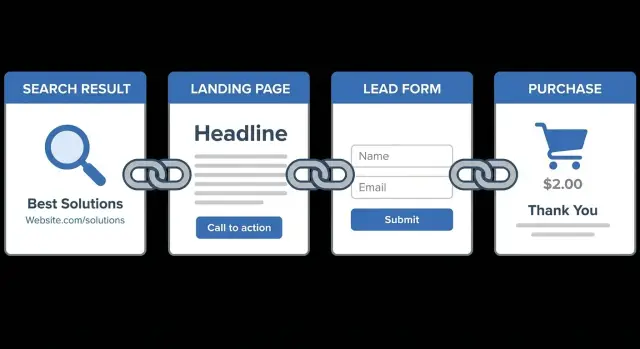
Why backlinks do not automatically lead to sales
It’s common to watch rankings climb after you earn new links and still see revenue stay flat. A backlink can improve visibility without improving what happens after someone lands on your site. More visitors isn’t the same as more buyers.
When traffic is up but leads are not, the usual problem isn’t “SEO isn’t working.” It’s either the wrong people are arriving, or they’re landing on a page that doesn’t guide them to the next step. A page can rank well and still be a dead end for your business.
A backlink really does two things:
- It sends ranking signals to search engines (authority, trust, relevance).
- It shapes click quality: where the link appears, what the surrounding text suggests, and what the reader expects when they click.
If someone clicks from an industry article expecting a comparison or pricing and lands on a generic homepage, you often lose them in seconds.
Intent is usually the missing piece. Informational intent means the searcher wants to learn ("what is", "how to", "examples"). Commercial intent means they’re closer to choosing or buying ("best", "pricing", "tool", "agency", "alternative"). Backlinks and conversions line up when the page you’re promoting matches the intent behind both the keyword and the link context.
A few signs rankings are improving but revenue isn’t:
- Traffic is growing, but demo requests, trial signups, or contacts are flat.
- Time on page is short, and people bounce back to search.
- Visitors read a blog post but don’t reach a product page.
- Top landing pages have no clear next step.
Imagine you secure a strong link from a respected tech publication (through outreach or a service like SEOBoosty) and it points to a beginner guide. The guide ranks and brings in students and hobbyists. If your real customers are teams looking for a paid solution, that traffic may never convert. The link “worked” for rankings, but it didn’t work for sales.
The fix isn’t fewer backlinks. It’s choosing link targets that match intent and giving visitors a clear path from that first click to the next step.
Start with intent and the page role
The fastest way to waste a good backlink is to point it at a page that’s doing the wrong job. Before you connect backlinks to conversions, start with one question: what is the searcher trying to do right now?
A simple way to map the journey is: query -> first click -> next question -> action. If your page doesn’t answer the “next question,” people leave even if the traffic looks great.
Separate pages for different jobs
Most sites need different pages for different moments in the journey. Mixing them usually hurts both rankings and signups.
A practical split looks like this:
- Learn pages teach and define.
- Compare pages help people weigh options (differences, “best for,” pricing logic).
- Buy pages make the offer clear, with proof, FAQs, and a direct call to action.
- Support pages help existing users solve problems.
If someone searches “what is domain authority,” they’re in learn mode. Sending them straight to a hard-sell checkout page feels wrong. But if they search “buy guest post backlinks for SaaS,” they’re closer to buying and should land on a page that speaks to that goal.
Decide what a conversion is, then pick one
Be specific about what “conversion” means for each page. It might be a demo request, trial signup, call booking, email subscription, or purchase. The trap is trying to make one page do all of them.
Pick one primary conversion per page and let everything support it. Secondary actions are fine (like “download a guide”), but they shouldn’t compete with the main goal.
Example: a comparison page about “editorial backlinks vs outreach” might aim for “start a subscription,” with a softer secondary option like “get pricing by email.” For a provider like SEOBoosty, that keeps the page honest: it educates, then offers a clear next step without forcing a decision too early.
Choosing the right link target for each keyword
Your backlink target decides what a visitor can do next. If the keyword suggests research, send people to a page that helps them decide. If it suggests buying, send them to a page that can convert. This is where backlinks and conversions either connect or fall apart.
A simple rule: match the keyword intent to the page role.
Match the target to the intent
Homepage links make sense for brand-led searches (your company name, product name) or when you need a broad trust signal. But homepages often try to speak to everyone at once, so they’re a poor fit for specific searches.
Category pages work best when the keyword describes a group need (“email marketing tools”, “running shoes for trails”). Product and pricing pages are the right target when the keyword is clearly transactional (“buy”, “pricing”, exact model name). If someone is ready to act, don’t make them hunt.
A quick mapping:
- Brand and “company + reviews”: homepage or a trust/about page
- Broad commercial terms: category or solutions page
- Product-specific and pricing terms: product page or pricing page
- “Best” and “vs”: comparison page
- “How to”: guide that naturally leads to a next step
When a guide or comparison page is the best target
Guides and comparisons are often the best targets for editorial placements because they fit the context. If a tech blog references your brand in a “best tools” style article, a comparison page can feel like the natural continuation.
The common mistake is sending high-intent clicks to low-intent pages. If a backlink appears in an article about “best CRM pricing,” pointing that link to a generic blog post wastes the moment when the visitor is ready to compare.
If you can’t link directly to the money page (or it would feel pushy), use a bridge page. A good bridge page answers the question that earned the click, then offers one clear next step (demo, pricing, product).
Example: you earn a premium placement through a provider like SEOBoosty from an authoritative tech publication. If the anchor is about “alternatives” or “vs,” point to a comparison page with a short table and a single call to action that moves readers toward pricing or a demo.
Align the landing page with lead capture
A backlink can bring the right person to your site, but the page still has to do its part. The fastest way to lose that visitor is a mismatch between what they expected and what they see in the first five seconds.
Start by aligning the page headline with the promise behind the query. If someone searches “pricing for X,” a vague headline like “Welcome to Our Platform” feels wrong. Use something that confirms they landed in the right place.
Make the next step obvious above the fold. Keep the top of the page focused: one message, one action, minimal distractions. If your menu, popups, and multiple buttons compete, people hesitate, scroll, and leave.
Pick one primary offer per page. Mixing “Start trial,” “Book a demo,” “Get a quote,” and “Join the newsletter” usually reduces signups because visitors don’t know what you want them to do.
A simple intent-to-offer match:
- High commercial intent (pricing, alternatives, “best”): trial or purchase
- Mid intent (comparison, use cases): demo or “talk to sales”
- Early intent (how-to, definitions): newsletter or downloadable guide
Then support the offer with proof that answers the quiet question: “Will this work for someone like me?” Keep proof close to the action.
Strong proof elements (choose a few, not all): a short customer quote tied to an outcome, one measurable result, real and relevant logos, or a brief case example (who, problem, result).
If you use a service like SEOBoosty to place a link on a respected publication, send that traffic to a page that continues the same story. If the link context is about “enterprise security,” a generic homepage signup is a weak handoff. A focused page with an enterprise headline, a single “Request a demo” form, and one strong proof point turns backlinks and conversions into a connected path.
Product positioning that matches the link context
A backlink isn’t just a ranking signal. It also introduces you. The linking page sets expectations about who you are, what you do, and why you can be trusted. If your landing page tells a different story, visitors bounce.
Think about what the linking page implies:
- A technical blog mention often signals expertise and proof.
- A “top tools” list signals comparison shopping.
- A forum thread signals a specific problem and a desire for practical steps.
Your page should pick up that same thread and continue it.
Keep your message clear in three lines: who it’s for, what it does, and why it’s better for that reader. Don’t make people hunt for the point. If the link context is “enterprise SEO teams,” don’t greet them with a vague, catch-all headline.
One common conversion killer is bait-and-switch targeting. Earning links from posts about “free SEO tools” and sending visitors to a premium service page can work only if you explain the value quickly and offer a low-friction next step. Otherwise, you attract the wrong audience.
To reduce friction, build one or two supporting pages that match the objections implied by the link context. Keep them tight and factual:
- “How pricing works” with examples and boundaries
- “Why this is safe” (process, quality checks, what you won’t do)
- “Alternatives” that explain fit without trashing competitors
- “Proof” with outcomes, examples, and what results depend on
If you’re placing backlinks on high-authority sites, pay extra attention to positioning. A premium placement sets a premium expectation, so the destination page should feel specific and easy to act on.
A step-by-step workflow to connect links to revenue
If you want backlinks and conversions to move together, treat every link like a paid ad click. It needs the right promise, the right destination, and a clear next step.
The workflow
One spreadsheet and one decision per keyword is enough to keep link building tied to revenue.
-
List your target keywords and tag intent. Mark each as learn (informational), compare (evaluative), or buy (transactional). Tag what the searcher wants, not what you wish they wanted.
-
Pick the destination page that matches that intent. Learn keywords usually deserve a helpful guide. Compare keywords fit comparisons, pricing explainers, or “why us” pages. Buy keywords should land on product, pricing, or demo pages.
-
Give the destination page one clear conversion goal. Choose the primary action and remove competing CTAs.
-
Create supporting pages for common objections. People rarely buy on the first click. Make it easy to answer trust, fit, and “how it works” questions.
-
Track what happens after the click and adjust targets. Don’t stop at rankings. Watch bounce, scroll depth, key clicks, form completion, and assisted conversions. When traffic lands but doesn’t act, it’s usually mismatch: wrong intent, weak offer, or an unclear next step.
A quick example
Say you’re promoting a backlink subscription like SEOBoosty. A link from an article about “how to evaluate domain authority” shouldn’t go straight to a checkout-style page. Send that visitor to a guide that explains what “authority” means, what to look for in a placement, and then offers one next step, like “View available domains” or “Get a recommendation.”
But a link from “best backlink providers” is closer to a decision. That can go to a page that clearly states what you sell, who it’s for, what to expect, and how to start, with one primary CTA.
Run this workflow monthly. You’ll spend less on links that look good on a report and more on links that create customers.
Common mistakes that break the link to conversion
A good link can still send the wrong people to the wrong place. The report looks like a win, but revenue stays flat.
Mistake 1: Building links to the homepage out of habit
A homepage is usually a catch-all: multiple messages, multiple paths, and no single next step. If someone clicks because they want one specific solution, the homepage makes them work to find it.
Match the target page to the promise implied by the link context. If the link mentions a specific use case, send visitors to the page that speaks to that use case.
Mistake 2: Targeting broad traffic terms that never convert
Broad keywords bring curious readers, students, and competitors. That traffic can inflate sessions and lower conversion rates, which makes the page look “weak” even though it was never meant to sell.
Signs you’re chasing the wrong terms: the query is informational but the page is trying to sell, visitors bounce after scanning the first screen, sales calls ask basic questions your page doesn’t answer, or the page ranks but pipeline doesn’t move.
Mistake 3: Sending buyers to blog posts with no next step
Strong articles can rank and attract links, but many end with nothing to do next. If someone is ready to compare options, they shouldn’t have to hunt for pricing, a demo, or a simple “talk to us” path.
Mistake 4: Ignoring mobile forms, speed, and confusing navigation
A backlink doesn’t excuse a frustrating landing experience. If the form is hard to use on a phone, loads slowly, or the page has too many exits, you pay for traffic you can’t keep.
Keep it simple: one primary action, a short form, and a layout that makes the next step obvious.
Mistake 5: Changing too many things at once
After a backlink lands, it’s tempting to rewrite the page, change the offer, swap forms, and redesign the layout. Then you can’t tell what actually helped or hurt.
If you’re placing links through a controlled source, protect your learning by making one change at a time and tracking results for a few weeks.
Measuring what matters after the backlink lands
A new backlink can move rankings quickly. The real question is whether it moves people closer to buying. To evaluate backlinks and conversions together, track what happens after visitors arrive, not just the position change.
Start with three outcomes: conversions, assisted conversions, and revenue. Conversions are the obvious wins (forms, demos, trials, purchases). Assisted conversions capture cases where the backlink visit is an early touch and the person returns later via branded search, email, or direct. Revenue ties the whole effort to a number the business cares about.
A useful starter set:
- Conversion rate and total conversions on the linked page
- Assisted conversions tied to that landing page or campaign
- Revenue (or estimated value) per conversion
- On-page engagement that predicts intent (scroll depth, time on page, key clicks)
- Lead quality signals (SQL rate, close rate, average order size)
Attribution doesn’t need to be perfect to be useful. First-click helps you see what introduces new people. Last-click shows what closes. If your analytics supports it, a blended view can reduce the temptation to over-credit the final touch.
When you can, tag placements you control so you can separate “this backlink” from “organic traffic in general.” For links you can’t tag, segment by landing page and date range and look for lifts after the placement goes live.
Look for patterns by page type (blog post vs product page vs landing page), query intent (informational vs commercial), and offer (ebook vs demo vs trial). You might find that commercial-intent pages get fewer visits but much higher revenue per visitor, while educational pages drive more assists.
Example: you point a high-authority placement (from a service like SEOBoosty) to a pricing-related page. Rankings improve, but direct conversions stay flat. Assisted conversion reports show visitors returning later and converting on a demo page. That tells you the backlink is working, but the landing page may need a clearer next step for comparison shoppers.
Quick checklist before you build links to a page
Before you point a new backlink at a page, confirm the page is built to turn that click into a lead or sale.
- Intent match is obvious in the first screen. Make it clear what it is, who it’s for, and what to do next.
- One primary call to action is visible without scrolling. Extra links are fine, but don’t let them compete.
- Mobile completion is fast. Test the form or checkout on your phone and remove unnecessary fields.
- Internal paths help people decide. Add a few relevant routes to pricing, comparison, FAQs, proof, or the product page that matches the promise.
- Conversion tracking is in place. You should be able to tie signups or purchases back to the landing page, not just sessions.
If you’re using a service like SEOBoosty to place premium backlinks, this checklist matters even more because strong links can move rankings quickly. Make sure the destination page is ready before the rankings arrive.
Example scenario and practical next steps
A SaaS team sells a reporting tool. They build a few strong backlinks to a helpful post like “How to build a weekly KPI dashboard.” Rankings improve, traffic grows, and time on page looks great. But trial sign-ups barely move.
The issue isn’t the backlinks. It’s the destination and what the page is designed to do. The blog post answers an early question, so most visitors are still learning. If the only next step is a generic “Contact us” button in the footer, you get attention but not action.
What they changed
They kept the guide (it’s doing its job) and added two pages aimed at higher intent:
- A comparison page for people actively choosing a tool (for example, “Tool A vs Tool B” or “Best alternatives”).
- A dedicated trial landing page with one goal: start a trial, supported by a short promise, a few outcomes, one screenshot, and a simple form.
Then they adjusted link targets based on intent. Informational placements still pointed to the guide. Any placement that mentioned “software,” “tool,” “pricing,” “alternative,” or “best” pointed to the comparison page or the trial landing page.
Practical next steps
Start with a small set of pages so each backlink has a clear purpose:
- Tighten one lead-capture page (trial or demo): one offer, one primary CTA, minimal distractions.
- Create one commercial page (comparison or “best for X”) that naturally links into the trial or demo.
- Update your top guide to send interested readers to that commercial page with a relevant CTA.
- Secure placements that match each page’s intent and point links to the right target.
- Track what happens after the click (trial starts, demo requests, paid conversions), not just rankings.
If you control your placements, tools and services can make the targeting side easier. For example, SEOBoosty (seoboosty.com) offers a curated inventory of backlink placements on authoritative websites, and you can point each placement to the specific page that matches the intent you’re trying to convert.
FAQ
Why can rankings go up after backlinks, but sales don’t?
Because a backlink mainly boosts visibility and authority signals; it doesn’t fix what happens after the click. If the visitor’s intent doesn’t match the page they land on, or the page has no clear next step, rankings can rise while leads and sales stay flat.
What are the clearest signs backlinks aren’t helping revenue?
Look for traffic growth with flat demo requests, trials, or contact submissions, plus short time on page and high bounce rates. Another clue is that people land on a blog post and never reach pricing, product, or a key action page.
What does “search intent” mean, and why does it affect conversions?
Intent is what the visitor is trying to do right now. Informational intent is about learning, while commercial intent is about comparing options or getting ready to buy. Conversions improve when the link target matches both the keyword intent and the context of where the link appears.
Which page should a backlink point to: homepage, blog post, comparison, or pricing?
Send brand searches to the homepage or a trust page, “vs” and “best” terms to a comparison page, and “pricing” or “buy” terms to a pricing or product page. For “how to” queries, use a guide that naturally leads to one clear next step.
What is a “bridge page,” and when should I use one?
A bridge page is a destination that matches the click’s context but still moves the visitor toward a business action. It answers the immediate question that earned the click, then offers one clear step like viewing pricing, starting a trial, or requesting a demo.
How do I choose the right conversion goal for a landing page?
Pick one primary conversion per page, such as “Start a trial” or “Request a demo,” and make it obvious above the fold. Keep secondary options minimal so they don’t compete with the main action and confuse visitors.
What should I change on a landing page to convert backlink traffic better?
Start by matching the headline to the promise implied by the query or the referring article, so visitors instantly feel they landed in the right place. Then keep the first screen focused on one message and one action, with proof close to the call to action.
Why do homepage backlinks often convert poorly?
It usually fails because the homepage is trying to speak to everyone, so it doesn’t confirm the visitor’s specific need quickly. Homepages also tend to have many exits and mixed calls to action, which makes high-intent visitors work harder than they should.
What’s a simple workflow to connect backlinks to revenue?
Treat each link like a paid click: tag the keyword intent, choose the matching destination page, set one primary conversion, and ensure the page answers the next question the visitor will have. Then track what happens after the click and adjust link targets before buying or building more links.
How should I use a backlink service like SEOBoosty without wasting strong placements?
Place links on pages built for the intent behind the placement, not just on pages that can rank. With a provider like SEOBoosty, you can point each placement to a specific guide, comparison page, or pricing page so the click has a clear path toward a trial, demo, or purchase.
Share