Backlinks for discontinued product URLs: keep authority intact
Backlinks for discontinued product URLs can keep working if you use clean redirects and a successor page that matches intent. Avoid redirect chains and lost rankings.
What goes wrong when a linked product disappears
“Earned authority” is the trust a page builds when other sites choose to reference it. Each good link is like a public vote that says, “this page is worth sending people to.” Over time, those votes can help a product URL rank for product names, comparisons, and buyer-intent searches.
Product pages often collect links quietly. A reviewer links to the exact SKU they tested. A forum thread shares the product URL as the answer to a question. Partners copy-paste the link into guides and PDFs. Months later, a surprising amount of value can be tied to one specific URL.
When that URL starts returning a 404, shows a thin “not available” page, or dumps visitors onto a generic category, everyone loses. Shoppers hit a dead end and stop trusting the site. Search engines see a page that no longer satisfies the intent behind the link, so the authority that page earned fades instead of supporting your current catalog.
Backlinks to discontinued product URLs need a plan. The goal is simple: keep the promise of the original link and make sure people land somewhere useful.
When you do nothing, the usual problems look like this: referral traffic disappears, rankings for the old URL drop, shoppers feel the click was “broken,” support requests rise (“Where did this product go?”), and you miss an easy chance to guide buyers to the best next option.
Out of stock vs discontinued: pick the right approach
First, decide whether the product is coming back.
If it’s out of stock and likely to return, keep the original URL live. A sudden redirect confuses shoppers who bookmarked the page, and it can weaken the relevance that made other sites link to it in the first place.
For an out-of-stock page, clarity matters most. Say it’s temporarily unavailable, share a restock estimate if you can, and show close alternatives. The page stays useful, and the intent stays consistent.
If the product is discontinued, treat it as permanent. That’s when a planned redirect makes sense, because you need a new destination that satisfies the same need. In most cases, the best target is a specific replacement (a successor model), not a broad category and definitely not the homepage.
Seasonal products sit in the middle. If it’s a predictable pause (like a holiday-only bundle), keep the page and explain when it returns. If it’s a new model every year, plan a clear handoff to the latest version when the old one should stop ranking.
A rule of thumb that works for most stores:
- Returning soon or returning on a schedule: keep the page and update the message and alternatives.
- Never returning, with a clear replacement: 301 redirect to the replacement.
- Never returning, no true replacement: redirect to a successor page built for the same intent.
- Only minor variation changes (size, color): consolidate and keep one main page.
Example: if a “Model X” coffee grinder is discontinued, redirecting it to the homepage is a mismatch. Redirect it to “Model Y” if it’s the direct successor, or to a tightly focused page that helps shoppers choose the closest match.
How backlinks and authority behave when a page is gone
Backlinks point to a specific URL, not to your store “in general.” If a popular blog links to /products/blue-running-shoe, the credit and the clicks are tied to that exact address.
When that URL starts returning a 404, two things happen over time. Referral traffic dries up because visitors hit a dead end. Search engines also have less reason to keep trusting that URL, so the value the link used to pass tends to fade.
A common trap is the soft 404: a page that returns a normal 200 status but behaves like an error. This often shows up as an “Out of stock” page with almost no useful content, or a template that offers no next step. Google can treat it like a missing page anyway, which leaves you with no sales and weaker SEO.
User experience is the quiet third piece. If shoppers click a link, land somewhere unhelpful, and leave right away, that’s a strong signal the result didn’t satisfy the search.
When teams ignore old linked product URLs, the fallout is usually predictable: fewer visits from referring sites, slipping rankings for long-tail product searches, crawl waste as bots keep checking broken URLs, and lower trust in similar pages over time.
The successor page idea: keep intent consistent
The best way to preserve value from backlinks to discontinued product URLs is to redirect to a page that answers the same shopper question. That’s the “successor page”: the closest match in use case, audience, and expectations, so people who click the old link still feel like they landed in the right place.
Match intent, not just keywords. If the discontinued item was a mid-range daily trainer running shoe, the successor should be another daily trainer in a similar price range. A broad “All shoes” category or a premium racing model is a mismatch.
A practical way to pick the right successor is to look for alignment on the basics: the product’s main job, the buyer level (beginner vs pro), the price tier, the key specs shoppers care about (fit, capacity, compatibility), and current availability.
Category pages can work when the original product was one of many near-identical variants (like a color that’s gone) and the category is tightly focused. If the category is broad, people bounce and the redirect often carries less value.
Where does the “discontinued” explanation go? Put it on the successor page as a short, factual note near the top, like: “Model X is no longer available. Model Y is the closest replacement with the same fit and cushioning.” It reduces confusion and keeps trust.
Step-by-step: preserve authority with clean 301 redirects
When a product URL with earned links goes away, you want relevance and authority to land on the closest match. The goal is one clear redirect from the old page to the best current page, with matching intent.
A practical workflow
Start with a quick inventory, then decide one URL at a time:
- List product URLs that are discontinued (or permanently out of stock) and still have backlinks.
- Pick a successor destination for each one: replacement model, newest version, or the most specific category page that still fits the intent.
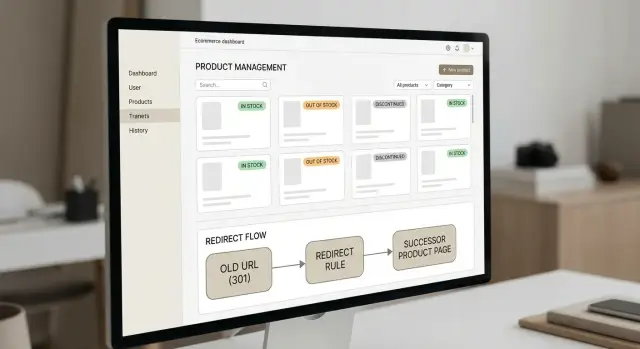
- Set a single 301 redirect from the old URL straight to the final destination.
- Update internal links (navigation, collections, related products, blog mentions) so they point to the new page.
- Confirm the destination page is indexable: it returns 200, isn’t blocked by robots rules, and doesn’t have a
noindextag.
One clear redirect beats a chain
A common pattern is:
Old product -> temporary “out of stock” page -> category -> new product.
That redirect chain adds friction, slows crawling, and can weaken the signal. Prefer:
Old product -> successor page.
If a “Blue Runner 2” shoe is discontinued and has press links, redirect it to “Blue Runner 3” only if it matches the same intent (type, audience, price tier). If there’s no direct replacement, redirect to the most specific category that still solves the visitor’s problem, not the homepage.
Redirect chains and duplicates: how to keep it clean
Redirects should be a simple handoff, but many sites accumulate layers of rules. A discontinued product URL gets redirected, then redirected again after a redesign, then again after a catalog change. That extra friction can dilute signals and make reporting harder.
Aim for one hop: every old product URL should go straight to the final destination, with no detours.
Chains often happen because different systems stack rules (CMS settings, CDN rules, plugins). Duplicates happen when the same product existed under multiple URL styles. If two URLs show the same product, pick one canonical format and make all other variants resolve to it consistently.
Common trouble spots include protocol and hostname differences, trailing slash variations, tracking parameters, and older category path structures. If parameters are only for tracking, strip them or make sure they still land on the same final page.
Example: if /product/alpha, /product/alpha/, and /collections/sale/alpha exist in the wild, they should all 301 to the single destination you want indexed. One destination, one hop.
Common mistakes that quietly lose rankings
Most ranking drops after a product is discontinued aren’t caused by the product going away. They come from what happens next: the wrong target, the wrong status code, or a page that stays indexable while offering nothing.
The biggest mistakes are usually simple:
- Redirecting every discontinued product to the homepage. It’s a poor match for intent, and users bounce.
- Sending users to a loosely related category page that changes constantly (filters, sorting, seasonal items).
- Leaving a thin “out of stock” page indexable for months with no alternatives, no restock estimate, and no clear next step.
- Using a 302 when the change is permanent.
- Deleting the URL first, then realizing it had strong links from press, reviews, or partner sites.
If you’ve built links intentionally, add one extra check before you flip the switch: confirm the page you’re retiring is the one receiving links, and confirm the redirect target is live, indexable, and genuinely useful.
What to put on a successor page (so it earns the redirect)
A successor page should feel like the original product page, just updated. If someone clicked a backlink expecting a specific item, they should land on a page that solves the same need with as little friction as possible.
Start with intent. If the old product solved a problem (say, a noise-cancelling headset for remote work), the replacement should clearly solve that same problem. Avoid sending people to a category page unless it helps them choose quickly.
Include the details people came for: key specs, size and fit info, compatibility notes, and real use cases. If the old page answered common questions, carry the useful parts over and update them for the new model.
Add a short replacement note near the top. One or two lines is enough. Don’t over-explain.
A simple, practical checklist:
- Clear product title and images
- A “replaced by” message that names the old model and the new model
- Updated specs and compatibility (chargers, accessories, software versions)
- Pricing, availability, shipping/returns, and support info
- Fast load time and a clean mobile layout (no pop-ups blocking the page)
Keep the page focused. Don’t add filler text just to “pad” SEO, and don’t cram keywords.
Quick checklist before and after you redirect
When you change a discontinued product URL, you’re not just moving a page. You’re moving trust signals other sites already gave you.
Before you flip the switch
Pick one clear destination that matches the original intent. Decide the exact URL version you want indexed (for example, your preferred www vs non-www and trailing slash format). Avoid the homepage as the default.
After the redirect is live
Test the old URL in a browser and with a redirect checker. You want a clean path:
- Old product URL returns a true 301 (not a 404, and not a soft 404 page).
- The redirect lands in one hop.
- The final page loads with a 200 status and is indexable (not blocked, no
noindex). - The canonical tag points to the correct final URL.
- Internal links, navigation, and your sitemap point to the final page, not the old one.
Example: a discontinued product with strong backlinks
A small ecommerce store redesigns its catalog and retires an older product page: “Acme Trail Lamp 200.” The URL had been around for years and picked up a few strong backlinks from review posts plus forum threads where hikers recommended it.
After the redesign, that URL starts returning a 404. Traffic drops. The old page still shows up in search for terms like “lightweight trail lamp,” but clicking leads nowhere. That’s a fast way to waste the authority those links earned.
The store picks a replacement that matches the same job: “Acme Trail Lamp 300,” the closest successor in use case, audience, and price range. Then they fix the basics:
- Set a one-hop 301 redirect from the discontinued URL straight to the successor product page.
- Update internal links (category pages, best-sellers modules, blog posts) to point to the successor URL.
- Remove extra hops so the redirect chain stays clean.
- Add a short note on the successor page that the old model is discontinued and this is the current version.
What to expect: some link value carries over, users landing via old links get a relevant page, and rankings often stabilize over days or weeks.
What not to expect: a perfect 1:1 transfer, instant ranking jumps, or good results if the “successor” is a totally different product.
How to monitor if the plan is working
After you set up a successor page and redirects, monitoring tells you whether old linked product URLs are still helping you or leaking into errors.
Track two pages side by side: the old product URL (the one that earned links) and the new destination. In analytics, watch organic visits and landing page entries for the new page, and watch how often the old URL is still requested. A healthy trend is simple: requests for the old URL gradually decline, while the replacement page holds or gains search traffic.
In Google Search Console (or a similar tool), check weekly for the first month:
- Crawl errors for the old URL (404s, soft 404s, server errors)
- Whether Google is indexing the new page instead of the old one
- Impressions and clicks that shifted after the redirect
- Crawl spikes that suggest loops or messy chains
- Mobile usability issues on the successor page
Backlinks take longer to update. It’s normal to see new links still pointing to the old URL. The bigger risk is when the old URL now redirects multiple times or lands on an unrelated page.
How long should you keep the redirect? Keep it as long as people and bots still request the old URL. Removing it is usually only worth considering if the old URL was a mistake, the product was legally removed, or the redirect creates a genuinely bad experience.
A simple monthly habit helps keep things clean: review your most-linked discontinued URLs, confirm each one has a single hop to the right successor, fix any new chains introduced by platform changes, and update successor content if soft 404 warnings appear.
Next steps: a simple workflow you can repeat
Treat this like ongoing maintenance. The goal stays the same: keep the value from backlinks to discontinued product URLs by sending users and search engines to the closest, most helpful next page.
Here’s a repeatable workflow:
- Export a shortlist of product URLs with the strongest backlinks (from Search Console, your SEO tool, or referral reports).
- Identify which are 404, soft 404, or bouncing through multiple redirects.
- Choose one best successor per URL (replacement product, newer model, or the most relevant category page).
- Apply a direct 301 redirect and remove extra hops.
- Update internal links so they point straight to the successor.
If a successor page is business-critical and underperforms after the redirect, reinforcing it with a small number of high-quality links can help. If you already use a service for link placements, keep the focus on relevance: for example, SEOBoosty (seoboosty.com) secures premium backlinks from authoritative sites, and those placements tend to work best when you point them at stable successor URLs you plan to keep live.
FAQ
Why is it a problem when a linked product page disappears?
When a linked product URL returns a 404 or a thin “not available” page, the page stops fulfilling the promise of the link. Over time you usually lose referral traffic, rankings tied to that URL, and shopper trust because people feel like the click was broken.
Should I keep an out-of-stock page live or redirect it?
If the product is likely to return, keep the original URL live and make the page useful with clear messaging and alternatives. If it’s permanently discontinued, use a 301 redirect to the closest replacement so the intent stays consistent.
What is a soft 404 and why does it hurt SEO?
A soft 404 is a page that returns a normal 200 status but behaves like an error because it has little or no useful content. Search engines may treat it as missing anyway, which means you can lose visibility while still serving a page that doesn’t help shoppers.
What exactly is a “successor page”?
A successor page is the most relevant current page that satisfies the same shopper need as the old product page. It preserves trust because people who click an old link still land on something that feels like the right match, not a random category or the homepage.
How do I choose the right redirect target for a discontinued product?
Match intent first: the product’s main job, target buyer level, price tier, key specs, and availability. A direct replacement model is usually best; a tightly focused category can work when the old item was just one of many near-identical variants.
Should I use a 301 or 302 redirect for discontinued products?
Use a 301 when the change is permanent, because it signals a lasting move and consolidates signals toward the new URL. Avoid 302 for discontinued products unless you truly expect to bring the original URL back soon.
Why are redirect chains bad, and how do I avoid them?
Redirect chains add friction for users and crawlers, and they can weaken the signal you’re trying to pass to the final page. The clean setup is one hop: old product URL redirects straight to the final successor URL.
What are the most common mistakes that quietly lose rankings?
Don’t redirect everything to the homepage, don’t send users to broad or constantly changing categories, and don’t leave a thin out-of-stock page indexable for months. Also avoid deleting the URL before checking whether it has strong backlinks worth preserving.
Should I mention the discontinued product on the successor page?
Keep it short and factual near the top, like: “Model X is no longer available. Model Y is the closest replacement.” This reduces confusion, helps users trust the page, and makes the redirect feel like a helpful handoff instead of a bait-and-switch.
How do I monitor whether my redirects are working?
Watch the old URL for errors and requests, and watch the destination page for organic landings, impressions, and clicks. A healthy pattern is fewer requests for the old URL over time while the successor page holds or gains search traffic, without new 404s or redirect loops.
Share