Backlinks for documentation: make your help center rank
Backlinks for documentation can turn your help center into a strong entry point. Pick topics with demand, fix structure, and point links to the right URLs.
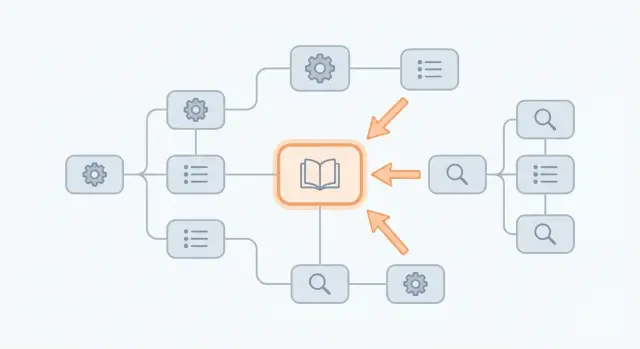
Why docs often don't attract traffic (and how backlinks help)
Most documentation stays invisible for simple reasons. It's written for existing users, not searchers. Titles read like internal labels, important pages are buried a few clicks deep, and multiple articles overlap while none fully answers the question.
Search engines also treat docs differently when nobody else points to them. Even strong content can look low-priority if other sites rarely cite it.
Backlinks change that. A backlink is another website effectively saying, "This page is worth referencing." Search engines treat those references as trust signals. A single mention from an authoritative site can outweigh lots of minor on-page tweaks, because it shows the page isn't just helpful, it's recognized.
Docs can also be a better entry point than a homepage. A homepage tries to speak to everyone. A doc page can match one clear intent, like "how to fix error X" or "how to set up SSO." When someone lands on that page and gets a quick answer, you win attention at the exact moment they need a solution.
That's what it looks like when a help center becomes an acquisition asset: docs don't just reduce tickets. They pull in new people from search and guide them toward the next step.
A docs page is usually a good backlink target when it:
- Answers a high-intent question but gets little or no organic traffic.
- Offers a clear, complete answer (not a thin FAQ).
- Could reasonably be cited as a source.
- Leads naturally to a product action (setup, integration, trial).
Start with intent: who you want to bring in from search
Docs can attract the wrong visitors if you don't define intent first. Before thinking about backlinks, decide who should land on your pages and what they're trying to accomplish.
Most help centers serve multiple audiences. A single product can be searched by end users trying to finish a task today, admins managing settings and access, developers integrating APIs or troubleshooting, and evaluators looking for proof and limits.
Write down outcomes, not topic names. Searchers want to set something up, fix an error, understand limits, or compare options. If your page matches the outcome, it feels like the right answer even before they know your product.
Beginner and advanced queries rarely belong on the same entry page. Beginners search in plain language ("how to import contacts"). Advanced readers search for specifics ("OAuth scope missing", "webhook signature mismatch"). Mix them and you either overwhelm beginners or disappoint power users.
A quick check: if a page needs more than 30 seconds of context before a reader can act, it's not a good beginner entry point.
Finally, decide what visitors should do after reading. Pick one primary next step per intent group. For example:
- Beginners: complete a first success action (create, connect, invite).
- Admins: confirm settings, permissions, or compliance details.
- Developers: copy a working example and run a test.
- Evaluators: understand capabilities and limits without marketing talk.
If people search "SSO setup," they likely want an admin guide, not a feature overview. End the page with a clear next action that fits that admin journey.
Choose documentation topics that already have demand
Documentation brings in new users only when it matches what people already search for. Before you promote a page, prove there's steady demand.
Start with your own support history. Scan tickets, live chat logs, and call notes for questions that repeat with similar wording. If many people ask the same thing in slightly different ways, searchers are doing it too.
Then widen the view. Look at forums, community threads, and Q&A sites where your audience hangs out. Posts that include an error message, a setup problem, or a "best way" question often map directly to high-intent doc pages.
The easiest queries to target have clear, repeatable phrasing:
- "How to" tasks (setup, install, connect, migrate)
- Error and "failed to" problems (including the exact message)
- "Best" or "recommended" choices (settings, defaults, limits)
- "Can I" and "does it support" checks (compatibility, permissions)
- "Difference between" comparisons (plans, modes, features)
Prioritize topics that will still matter in 6 to 12 months. A doc built around a stable workflow (like "how to export data") is usually a better long-term entry point than a page about a short-lived UI change.
A reality check: if a doc only exists because a feature exists (not because people ask about it), it's a weak backlink target. Keep it for current users, but aim promotion at a broader entry page that can funnel readers to the niche details.
Pick the right entry URLs to point backlinks to
A backlink is strongest when it sends people to a page that stands on its own. That usually means choosing one clear entry page per topic, not spreading links across many near-duplicate pages.
Ask one question: if someone lands here from Google, can they understand what this page is, who it's for, and what to do next in under 10 seconds? If not, the backlink might still pass authority, but it won't bring readers deeper into your product.
Choose pages that will stay stable
Docs change often, so pick URLs that are unlikely to be renamed every release. Versioned paths, temporary "beta" pages, or pages that get rewritten each quarter are risky. If you know a page will move, plan a permanent redirect now.
A simple approach:
- Pick one canonical page for each query cluster (for example, "API authentication") and treat it as the main entry.
- If the topic has many sub-articles, use a hub page that covers the overview and links out to details.
- Avoid pages that only make sense after reading multiple other pages.
- Prefer pages with a clear next step (setup checklist, quickstart, or a strong troubleshooting section).
- Keep the title and URL aligned with the phrase people actually use.
Docs page, guide, or comparison page?
Not every query should land in docs. If the search is "how to solve X," a doc article is perfect. If the search is "best way to do X" or "X vs Y," a short guide or comparison page may convert better, then you can route readers into the docs.
Example: you have five pages about webhooks. Instead of building links to each one, point backlinks to a stable "Webhooks overview" hub. That hub should explain what webhooks are, link to "Create a webhook," "Verify signatures," and "Troubleshooting," and end with one clear action like "Set up your first webhook."
If you're using paid placements, share your entry URL list first. It keeps every link focused on pages that can rank and convert.
Strengthen page structure so backlinks actually convert
Backlinks can bring the right people to a doc page, but the page still has to do its job. If the first screen feels like a wall of text, visitors bounce and the link stops being worth it.
Answer the question fast. Put a 2 to 4 sentence summary at the top that matches what the searcher expects, then show the shortest path to success. If the task is visual, add one screenshot near the top so readers can confirm they're in the right place.
Make the page easy to scan
Use headings that sound like the query your reader typed, not internal product language. "Set up SSO" is clearer than "Configure Identity Provider Integration." Keep headings specific so readers can jump to the exact step they need.
For long pages, add a simple table of contents near the top. It reduces scrolling and signals the page is organized.
Add a few small blocks that prevent drop-offs
Most support readers get stuck in predictable places. Catch that with short sections that make the page stand on its own:
- Prerequisites (versions, permissions, what they need before starting)
- Common fixes (a handful of quick checks for frequent errors)
- Expected result (what "working" looks like after the last step)
- Time estimate (a realistic range, like 5 to 10 minutes)
Keep these tight. The goal is to remove doubt, not add more reading.
Example: someone lands on a "Reset API key" doc from search. If the top explains when to reset, shows the exact menu path in three steps, and adds one "Common fixes" note like "If you don't see the button, ask an admin for access," they can finish without opening five tabs.
Build internal links that move readers deeper (without being pushy)
Backlinks do the hardest part: they bring someone new onto one page. Internal links do the second job: they help that person finish what they came to do and discover the next helpful page.
A good path is simple. An entry doc answers the main question, points to the best next doc, and then to a clear product action. Link to the next specific page, not to a broad category that forces people to hunt.
Create a clear path from question to outcome
On an entry page like "Reset your password," don't end with "See all account articles." End with two or three links that match what readers usually ask next.
For example:
- If you can't receive the email: "Email not arriving"
- If you no longer have access: "Change your recovery method"
- If you're an admin: "Reset a team member's password"
Those links feel helpful because they continue the same task.
Make linking predictable with consistent labels
Readers move faster when they recognize the same labels everywhere. Pick a small set (like Getting started, Troubleshooting, API) and reuse them consistently. Keep the wording identical in sidebars and in-page links so people learn the pattern.
Avoid dead ends. Every doc should offer a next step for different user types: a beginner who needs basics, a power user who wants advanced settings, and an evaluator who needs limits or plan details. When you structure internal links this way, any backlink to a single entry URL has more value.
Step by step: a simple backlinks plan for a help center
A help center can earn real search traffic if you treat a few pages like landing pages and support them properly. Keep it small and measurable so effort doesn't get scattered.
The 5-step plan
-
Choose 3 to 5 pages worth promoting. Pick topics with demand and pages that naturally lead to a next action (setup, trial, connecting an integration).
-
Match the wording people type into Google. Rewrite the first paragraph and main headings so they reflect search terms, not internal names. If users search "export to CSV" but your page says "data extraction," fix the mismatch.
-
Add supporting links on the entry page. Link to 2 to 4 pages that answer the next questions. Use clear labels like "Set up SSO" or "Troubleshoot login errors."
-
Decide where links can realistically come from. Start with warm options (partners, integration directories, communities you're already active in), then expand to resource pages and industry publications that cover the problem your doc solves.
-
Point each backlink to the chosen entry URL and track impact. Avoid sending links to random sub-sections or PDFs.
What to measure (so you know it worked)
Watch a few signals over 2 to 6 weeks: impressions and clicks in Search Console for the target query, average position, and whether visitors click from the entry doc to supporting pages. If rankings rise but people leave quickly, the intro and next-step links usually need work.
Example scenario: turning one doc page into a top entry point
A SaaS team has setup docs, error-message docs, and a detailed integration guide. Their mistake is spreading attention across dozens of small pages. Instead, they pick one page to become the entry point: the integration guide that matches real search intent.
They turn it into a hub. The top answers the big question fast: what the integration does, who it's for, and what you need before you start. Then it points readers to the exact next steps instead of making them hunt through a sidebar.
They also create a small set of supporting pages that cover the moments where users get stuck: initial setup, permissions and security requirements, common errors, and an FAQ for limits and expected behavior.
Then they focus link effort. Rather than sending backlinks to random sub-pages, they get a small number of relevant mentions to the hub page. The supporting pages can still rank over time, but the hub is the best entry URL because it routes visitors to the right path.
The success signal isn't only rankings. It's more organic visits landing on the hub and more clicks into next-step pages (install, permissions, troubleshooting).
Common mistakes that waste backlinks on documentation
Backlinks can lift a doc page quickly, but only if the target page is stable, useful, and easy to continue from. Most "failed" link efforts aren't about the source. They fail because the target page is a moving target or a dead end.
One classic trap is pointing links to URLs that change every release. Versioned paths, migration pages, or auto-generated slugs get renamed, merged, or removed. The backlink stays, but it lands on a redirect chain or a 404.
Another issue is spreading links across many thin pages that each answer only part of the question. Searchers want one page that explains the problem, shows the steps, and offers the next move. Thin pages split authority and make it harder for any single page to rank.
Docs also waste backlinks when they read like internal notes. If a page starts with "Assumes you already know X" and jumps into settings without context, new visitors bounce. Add a short "what you'll achieve" intro, a quick example, and a simple success check.
Before you build links to a doc page, watch for:
- Unstable, release-specific URLs instead of long-lived entry pages
- Multiple similar pages competing for the same query
- Repeated exact-match anchor text, which looks unnatural
- Mismatched intent (the reader expects a fix, but lands on a glossary)
- Missing internal links, so readers finish one page and leave
Quick checklist before you build or buy backlinks
Before you spend money or time on backlinks, make sure the page you're boosting can do the job.
First, decide the one entry URL for each topic. If you have three similar pages (setup, troubleshooting, FAQ) targeting the same query, backlinks get split and rankings stay soft. Pick one main page that owns the topic, and make the others support it.
Then check whether the entry page answers the query immediately. The top should confirm, "You're in the right place," then show the fix or setup path. If it opens with background, release notes, or long definitions, people bounce.
Make sure headings match real search terms. Your H1 and early H2s should use the words people actually type, not internal names.
After the reader solves the immediate problem, give them one clear next step. A backlink visitor shouldn't hit a dead end.
Finally, point backlinks at stable pages you expect to keep live and relevant. Backlinks compound over time.
A quick self-check:
- One primary entry URL per topic
- The answer appears immediately
- Headings mirror real search language
- A next step is obvious once the task is done
- The page will stay valid for a long time
Next steps: a simple rollout plan
Pick one topic cluster first, not your whole help center. Choose a cluster with clear demand and a single entry page you want to rank (for example, "API authentication" plus the supporting docs). Set a 30-day target like "move from page 3 to page 1-2" or "double organic visits to the entry page."
Keep the rollout small and repeatable:
- Week 1: tighten the entry page (clear promise, short intro, table of contents, visible next step)
- Week 2: improve supporting pages and connect them with sensible internal links
- Week 3: earn or secure 1 to 3 quality backlinks to the entry URL
- Week 4: review results, fix drop-offs, and decide what to scale next
Tracking matters more than counting links. Watch three numbers: rankings for the entry page, organic visits to that page, and clicks into next-step pages (setup, integration, account creation, or whatever fits your product).
Plan to refresh the entry page every quarter. Outdated steps quietly reduce trust and conversions, even if rankings look fine.
If you want to accelerate authority for a small set of carefully chosen entry pages, a provider like SEOBoosty (seoboosty.com) can be a fit. It focuses on securing premium backlinks from authoritative sites, which is most useful when your docs are already organized around stable hub pages and clear next steps.
Share