Backlinks to documentation pages: avoid search and filter URLs
Backlinks to documentation pages should land on indexable docs, not thin search or filter URLs. Use this checklist to audit, fix, and choose better targets.
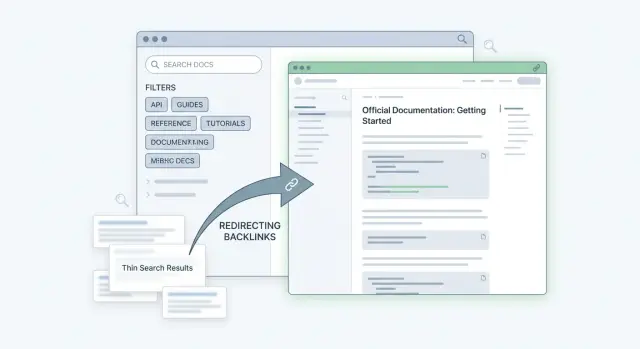
Why backlinks to docs search pages are a problem
Most documentation sites generate URLs that look helpful but aren't real documentation pages. These include internal search results, tag and category listings, filtered views (product, version, platform), and query-based pages that change depending on what a visitor clicks.
A normal docs page is stable: one topic, one URL, and content that stays mostly consistent. Search and filter URLs are different. They often include parameters (query, sort order, selected tags), and the page content can shift as soon as you publish new docs.
These pages feel useful to humans because they quickly surface relevant articles. For SEO, they usually underperform for predictable reasons:
- They create endless near-duplicate variations.
- They change over time, even when the URL stays the same.
- They are often blocked or set to noindex by docs platforms.
- They can compete with the real page that should rank.
- They send weak topic signals because they're mostly lists.
When people call a page "thin," they usually mean it has little unique value on its own. A thin docs search page might be nothing more than a heading like "Results for API" and a list of links, with no explanation, steps, examples, or context. It can also be thin because it's one of hundreds of similar pages where only a filter value changes.
The goal is simple: backlinks should point to stable, indexable pages that can stand on their own. That usually means a page that answers one question well (setup, troubleshooting, reference, limits, pricing, migration) and still makes sense if someone lands on it directly from Google.
This is why backlinks to documentation pages need extra care. Sharing a "search for error 401" URL in a forum might be convenient, but it rarely becomes a durable SEO asset.
The good news is that you can usually fix this without rebuilding your whole docs site. Often it's enough to guide links toward better URLs, adjust indexability rules, and make sure search and filter views don't become the default target for external mentions.
What can go wrong when links land on results pages
A link that looks "close enough" can still be the wrong target. Search and filter pages are built for navigation, not ranking. When backlinks point to a results screen instead of a real article, you risk wasting most of the value.
Common failure modes:
- Not indexed at all. Search and filter pages are frequently blocked by robots rules, tagged as noindex, or crawled inconsistently.
- Near-duplicate sprawl. Every filter combination can create a new URL that looks unique but isn't, which dilutes signals.
- Unstable destinations. Parameters change, results reorder, and redesigns remove old patterns. A working link can turn into an empty state or a generic search screen.
- No single topic. A results page can cover several intents at once, which makes it hard for search engines to understand what the page should rank for.
- Hard to measure. A URL like
search?q=apidoesn't clearly represent one topic, and what it "means" can drift over time.
Example: someone links to your docs search page for "rate limits." Next week, you publish a new guide and the results reorder. The backlink still points to the same URL, but now the first result is a different page, so the link stops supporting the page you actually want to rank.
How to tell if a docs URL is indexable and worth linking
A good docs backlink should land on a page that can rank, explain something clearly, and stay stable over time. A simple human test helps: if you'd bookmark it and share it with a teammate as the best answer, it's usually a safer target than a search or filter view.
Fast page quality signals
Before you look at any SEO tags, look at the page itself. Strong documentation pages usually have a clean URL path (not a long string of parameters), a clear title, and enough content to answer one question.
Quick signs the URL is worth linking to:
- The page has one specific topic and a unique heading that matches it.
- The main content is visible immediately (no searching or filtering required).
- The URL looks permanent (guide, reference, concept), not like a temporary results view.
- The page includes context, steps, examples, or explanations, not just a list.
- It doesn't have dozens of near-identical variants where only a filter changes.
Quick technical checks
Even a helpful page can be a bad backlink target if it's not indexable, or if search engines are told to prefer a different URL.
Check:
- Indexability: no
noindex, and not blocked by robots rules. - Canonical: the canonical should point to the same page (or the exact version you want indexed).
- Redirects: the URL should resolve in one hop, not through a chain.
- Crawlability: reachable from normal docs navigation, not only from an internal search box.
- Duplication: avoid URLs that generate many variants (sort, filter, pagination) with nearly the same content.
A common mistake is linking to search?query=rate+limits because it looks relevant. That page can change tomorrow or be blocked from indexing. A better target is the dedicated "Rate limits" reference page (or a specific guide section) with a stable path and a canonical that points to itself.
Choosing the best documentation pages for backlinks
The best target is a docs page that solves one clear problem from start to finish. If someone lands there from another site, they should understand what the page is about, what to do next, and how to finish the task without running a search.
For backlinks to documentation pages, evergreen pages usually beat newsy updates. "Getting started," installation, a specific API reference entry, and focused troubleshooting guides tend to stay useful longer, get refreshed over time, and match steady search demand.
A practical way to pick targets is to match the intent of the page linking to you. If the linking page is a tutorial, send visitors to the exact doc that completes the tutorial. If the linking page compares tools, send visitors to the doc that explains the feature being compared, not the top-level docs homepage.
A strong target page typically has:
- A stable URL that doesn't depend on search terms, filters, or pagination
- A clear title and opening that states the outcome
- Enough content to answer the question without extra clicks
- Obvious next steps (related docs, examples, or a short "What's next" section)
- A close match to the linking page's topic
Avoid pages that depend on user input. Search result URLs, filtered listings, pagination (like page=2), and faceted navigation often produce thin or duplicate pages. They can also become useless later when a filter is removed or the content set changes.
Sometimes a category hub is the right target, but only when it truly helps the reader choose a path. A good hub summarizes options and links to the best deep pages. For example, "Authentication" can be a better landing page when there are multiple valid methods and the linking article is general.
Step by step: audit backlinks pointing to docs URLs
Start by collecting backlinks that land on your documentation. Use what you already have: Google Search Console, analytics, and reports from SEO tools. Put them into a spreadsheet with two columns: the linking page and the exact docs URL it points to.
Then group the target URLs by what they really are. You're looking for patterns in URL formats.
1) Triage your backlink targets
Label each target URL type:
- Doc article page (single guide, reference page, tutorial)
- Search results page (internal search query)
- Filtered listing (category, tag, facet)
- Parameter-heavy URL (tracking strings, sorting, pagination)
- Other (PDFs, changelogs, old versions)
This usually reveals a small set of "weird" URL patterns that attract a lot of links.
2) Check indexability, canonical, and usefulness
For each suspicious URL, open it like a normal visitor would and answer three questions:
- Indexability: Is this page meant to be indexed? Warning signs include "no results" states, constantly shifting content, or pages that are clearly blocked/noindexed.
- Canonical: Does the page declare a different preferred URL? If a search or filter page canonicals to a hub, your backlink should usually go to the canonical instead.
- Content depth: Would you be happy if this page ranked and became the first impression? If it's mostly a list of links, it's probably thin.
Assign a simple action to each backlink: keep (already good), change target (same topic, better URL), or replace (different page that better matches the intent).
Finish by writing a short preferred targets list (about 10 to 30 URLs) that you want future backlinks to use. This keeps new links from drifting to thin results pages.
Practical ways to fix or reduce thin docs URLs
When backlinks land on docs search, filter, or query-based URLs, you often get the worst of both worlds: the link equity goes to a page that's harder to crawl, rarely ranks, and may change tomorrow. The fix is usually not "get more links," but "make the right URL the obvious destination."
If you control the documentation site
Create a stable page that represents the topic the results page was trying to show. Think "Logging overview" or "API authentication" instead of a q=auth results view. Then make your search and filter pages guide people (and crawlers) toward that stable page.
Moves that work on most docs sites:
- Create a clean landing page and add strong internal links to the best deep pages.
- Use a 301 redirect when an old, parameter-heavy URL should permanently move to a clean docs page.
- Use canonical tags when multiple URLs show essentially the same content.
- Add a small amount of helpful context above listings so they aren't just a bare list of links.
Internal linking is the quiet winner. A good hub that links to key subtopics helps crawlers find the pages you actually want to rank, and it makes it more likely that future backlinks naturally point to stable URLs.
If you don't control the linking site
You can still fix a lot with a simple update request. Keep it easy: explain that the current URL is a search/results page that may change, and provide one evergreen replacement URL.
A short message is enough: "Could you update the link target from the search page to this stable documentation page? It will stay valid and is a better resource for readers."
Common mistakes to avoid
Docs sites often end up with "working" URLs that are bad backlink targets. The page loads, but search engines treat it as low value or unstable. These mistakes quietly waste the value of hard-earned mentions.
Mistake 1: letting filters create endless crawlable URLs
Faceted navigation helps people, but it can generate thousands of crawlable combinations. If each combination is indexable, you end up with near-duplicate pages competing with your real docs.
A quick test: if changing a filter mostly changes the list of results (not the core content), that URL is a risky backlink target.
Mistake 2: pointing links to a search query that will change
A backlink to ?q=error-123 breaks in two ways. Results change as your docs grow, and the page is often thin because it lists links instead of explaining the answer.
If a topic is important enough to earn a backlink, give it a stable page that explains the error, the cause, and the fix.
Mistake 3: redirect chains and temporary redirects
Redirects are normal during docs updates, but chains add friction and can reduce the chance the final page is crawled and credited as expected.
Keep it simple:
- Aim for a single redirect hop
- Use permanent redirects for long-term moves
- Avoid bouncing through tracking or language selector URLs
Mistake 4: canonicalizing everything to the docs homepage
Some setups accidentally point canonical tags to the docs home (or a category hub) across many pages. That erases topic relevance. Even if a backlink points to a deep page, search engines may credit the homepage instead.
Canonical tags should usually point to the exact page version you want indexed, not a catch-all.
Mistake 5: assuming "it loads" means "it is indexable"
A page can load in a browser and still be a poor backlink target because of noindex, blocked crawling, or content that only appears after scripts run. Before you accept or pay for a placement, verify the destination page is meant to be indexed and contains real content on its own.
Quick checklist before you build or accept a backlink
A backlink is only as good as the page it lands on. With docs, a quick check upfront can prevent you from sending authority to a thin results page or a URL that will never rank.
The 60-second docs URL check
Before you request, buy, or approve a link, confirm:
- The page is allowed to be indexed (no
noindex, not blocked by robots rules). - The URL looks like a stable topic, not a temporary view (avoid queries, filters, sorts, pagination, session-style parameters).
- The page stands on its own (a real answer without needing to search).
- The canonical matches what you want to rank.
- You would confidently share it as the best answer.
If the URL is generated from user actions (searching, filtering, paging), treat it as risky by default.
A quick sanity test
Open the page in an incognito window and ask two questions: Does it clearly explain one topic, and would it still make sense with no prior context? A search results page for "API errors" might look helpful to you, but to a crawler it's often a thin list that changes over time.
Example: replacing a search results backlink with a better doc page
A SaaS company gets mentioned in a "top tools" roundup. The writer tries to be helpful and links to the docs, copying whatever URL is in their browser. It happens to be a docs search results page, like a query for "SSO setup" or "API token."
At first the link seems fine: it works and users see results. Weeks later, rankings and traffic don't move. The target page isn't a stable, indexable piece of content. Many docs search and filter URLs are blocked, set to noindex, or change based on new content.
Search engines either ignore the page (thin or not indexable) or treat it as low value because it's a doorway to other pages. Either way, you don't get the relevance and trust signals you wanted.
Replace the target with one strong "fix" page
Instead of sending authority to a results screen, pick a single page that directly answers the intent behind the search. For example: "Set up SSO with Okta" or "Create and rotate API tokens." The best target is usually a page that explains the task end to end, has a clear title, is meant to be indexed, and doesn't depend on parameters to display the content.
If you control the docs site, use a redirect from the messy URL to the chosen page. If a redirect isn't possible, use a canonical from the thin URL to the main doc page. The goal is one consistent, crawlable URL that can collect value over time.
Make the new page easy to reach inside your docs
After the external link is fixed, make the page easy to find without searching. Add it to docs navigation, link it from a relevant hub (like "Getting started" or "Security"), and include a short related topics section.
Next steps: make future docs backlinks cleaner and more predictable
Clean docs backlinks are mostly a process problem. Decide ahead of time which pages deserve authority, and you stop accidental links to search, filter, and tag results from piling up.
Start by writing down 5 to 10 preferred docs targets. Choose pages that stay stable over time: core "Getting started" guides, key API entry points, limits and pricing docs (if public), and the best troubleshooting page for common errors.
Then set one simple rule: external links never go to search, filter, or tag result URLs. If someone needs to share a set of results, they can link to the real guide and mention the query in the surrounding text.
A lightweight routine that holds up:
- Keep a short preferred targets list in a shared doc
- Add the "no results pages" rule to your publishing checklist
- Review new backlinks quarterly and flag bad destinations early
- Redirect or canonicalize repeated thin URL patterns
- Improve your top target pages so they satisfy visitors and earn links naturally
If you use a controlled placement approach where you pick the destination URL upfront, this targeting step becomes even more important. For example, with SEOBoosty (seoboosty.com), the value is in securing strong placements, so it's worth spending an extra minute making sure each link points to a durable, indexable docs page rather than a disposable results view.
Finally, make your landing pages worth linking to. A clear H1, a short intro that sets expectations, and one concrete example go a long way. If a reader clicks a docs backlink while stuck on an error, the first screen should give context, steps, and a clear next action.
FAQ
Why are backlinks to docs search pages usually a bad idea?
They’re usually built for navigation, not for ranking. The URL often depends on a query or filters, and the content is mostly a changing list of links, which makes it hard for search engines to treat it as a stable, valuable page.
How can I quickly spot a search or filter URL in documentation?
If the URL is driven by parameters like ?q=, ?tag=, sort=, or page=, treat it as risky by default. If the page doesn’t explain one topic on its own and mainly shows a list of results, it’s not a great backlink target.
What’s the fastest way to tell if a docs page is indexable and worth linking to?
Open the page and check whether it’s allowed to be indexed and whether it points canonically to itself. If it’s blocked, marked noindex, or canonicals to a different page, you’re better off sending backlinks to the indexable canonical page instead.
What does “thin” mean for a docs search or tag page?
A “thin” results page is often just a title like “Results for X” plus a list of links, with little or no unique explanation. Even if it helps users browse, it rarely provides enough standalone value to earn or keep rankings.
What can go wrong when backlinks land on docs results pages instead of real articles?
The link’s value can get wasted if the page isn’t indexed, changes over time, or doesn’t clearly represent a single topic. It can also compete with the real guide or reference page you actually want to rank, splitting relevance signals.
What’s the best type of documentation page to target with backlinks?
Pick the one page that best completes the reader’s intent and still makes sense as a landing page from Google. In practice, that’s usually a dedicated guide, a specific troubleshooting article, or a focused reference page with a stable path and clear title.
How do I audit existing backlinks to my documentation URLs?
Start by exporting the backlinks that point into your docs and grouping target URLs by pattern (articles vs search, filters, pagination, parameter-heavy URLs). Then mark each target as keep, change to a better URL on the same topic, or replace with a more appropriate page that matches the linking page’s intent.
Should I use redirects or canonical tags to fix messy docs URLs?
If a parameter-heavy URL should never be used, redirect it to the best stable page so any new or old links consolidate on a single destination. If multiple URLs show basically the same content, set a canonical to the preferred version so search engines know which page should get credit.
How do I ask a site to change a backlink that points to a docs search query?
Send a short note that the current URL is a search or filtered results view that can change, and provide one evergreen replacement URL. Make it easy to accept by offering the exact anchor text or sentence they can swap in without rewriting the article.
What should I check before I approve or pay for a backlink to a docs page?
Confirm the destination is indexable, has a canonical pointing to itself, and contains real standalone content above the fold. If you’re using a controlled placement service like SEOBoosty, the safest approach is to choose the final, stable doc URL upfront so you don’t pay for a strong placement that points to a disposable results page.
Share