Backlinks for faster indexing: help bots find new pages
Use backlinks for faster indexing by pointing bots to hubs, tightening internal links, and shortening crawl paths so new pages get found sooner.
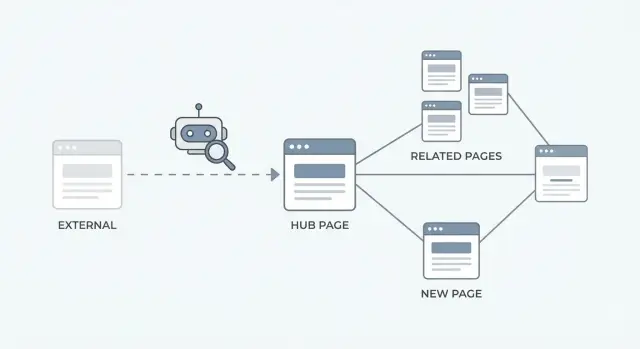
Why new pages can sit unseen for days or weeks
You hit publish, share the page with your team, and then nothing happens. No impressions, no clicks, and the page doesn’t show up when you search for the title. That can feel like you broke something, even when the page itself is fine.
The key idea is simple: published doesn’t mean discovered. Search engines have to find the URL, decide when to crawl it, and only then can it be considered for indexing. If your site is large, new, lightly linked, or full of low-value URLs, crawlers may spend their attention elsewhere.
A page is most likely to sit unseen when there’s no clear path from pages bots already visit often (your homepage, popular blog posts, main category pages). This also happens when a page is buried deep in the site, tucked behind filters, or placed in a section that rarely changes.
Common signs the page hasn’t been crawled yet:
- You see zero impressions in Search Console after several days.
- URL Inspection shows “discovered” but not “crawled,” or the URL can’t be found at all.
- Server logs show no Googlebot or Bingbot requests for that URL.
- The page has no internal links pointing to it.
When should you wait vs take action? If your site is small and you linked the new page from a prominent spot, give it a few days. If the page is important (product, landing page, time-sensitive content) and it’s still isolated, act right away by strengthening internal paths and, where it makes sense, using external links so crawlers have both a reason and a route to reach it.
How search bots discover and prioritize pages
Search bots usually find new URLs the same way people do: by following links. A bot lands on a page it already knows, sees a link to something new, and adds that URL to a queue.
Sitemaps help, but they’re closer to a directory than a discovery engine. Links tend to trigger faster discovery, while sitemaps improve coverage and consistency over time.
Whether a new page gets crawled soon depends on how important it looks. Bots use signals like how often the site changes, how many pages point to the URL, and how trusted those linking pages are. If a new page has no links (internal or external), it can sit there like a shop with no street signs.
Internal and external links do different jobs:
- Internal links tell bots, “This matters on my site, and here’s how to get to it.”
- External links add, “Other sites reference this, and here’s another path into the site.”
Crawl budget basics are just a limit on attention. A crawler has only so much time and so many pages it will fetch from your site in a given period. If your site has lots of thin pages, duplicates, or dead-end paths, that attention gets wasted.
A simple way to think about prioritization:
- Bots revisit pages they already crawl often.
- From there, they follow clear, prominent links.
- They favor pages that look useful, unique, and connected.
- They return more often to sites that stay tidy and update regularly.
If you publish 20 new guides and only add them to a sitemap, discovery can lag. If you also link them from a well-visited category page, and one of those pages gets a strong external mention, the bot has multiple reasons and routes to show up sooner.
Where backlinks help most in getting pages discovered
A backlink can work like a front-door entry point for crawlers. If Googlebot already visits a trusted site often, a new link from that site gives it a fresh path to follow, even if your new page isn’t well connected inside your own site yet.
Where you point the backlink matters as much as getting it. In many cases, the best target is a hub page (category page, guide, “start here” resource) that already links out to your newest content. That way, one external link can help bots discover a whole cluster, not just one URL.
Linking directly to a brand-new page makes sense when:
- The page is time-sensitive (news, a launch page).
- It won’t be linked from a hub for a while.
- It’s the one page you need indexed first (for example, a new pricing page).
You rarely need a large number of backlinks for faster indexing. You usually need a clear crawlable signal, then your internal structure does most of the work. If nothing changes after a few days, treat it as a site architecture issue first, not a “get more links” issue.
Link to hubs first: the fastest way to create a path
When you publish a new page, the quickest way to help crawlers find it is to connect it to pages they already visit a lot. These are your internal linking hubs: high-traffic, frequently updated pages that are easy for bots to reach.
Keep it small. In most sites, three to five hubs is enough. Good candidates are the homepage, a main category page, a “best of” resource page, and any evergreen guide that already gets steady visits.
From each hub, add one or two clear links to the new page, only where it makes sense. This creates a clean route. It also means that when external authority lands on a hub, it can flow quickly to your newest URL.
Anchor text matters, but it doesn’t need to be clever. Use short, descriptive wording that matches what the page is actually about. Avoid repeating the same keyword-heavy phrase everywhere.
A practical way to do it
If you’re publishing a new “Pricing FAQ” page, update your main “Pricing” page and your “Help Center” hub to include a single link like “Pricing questions” or “Pricing FAQ.” That’s often enough to create a reliable crawl path.
Keep hubs alive
A hub only helps if crawlers keep returning to it. Small, real updates are usually enough: refresh a section monthly, add links to new pages as they go live, and remove outdated links that lead to redirects or thin pages.
If you’re also using external placements, sending that authority to a hub first often makes discovery more predictable than pointing everything at a brand-new URL with no history.
Improve internal linking so crawlers reach new pages
Search bots usually enter your site through pages they already trust and crawl often: the homepage, main category pages, and a handful of popular posts. If your new page isn’t connected to those busy pages, it can sit unnoticed even if it’s published and well written.
Give every important new page at least one clear path from a high-importance page. A single internal link from a homepage module (“New” or “Featured”), a category page, or a top-performing article is often enough to get it found.
A few internal linking moves that tend to work well:
- Add a small “New this week” block on the homepage that links to your latest pages.
- Link from the relevant category or hub page, not only from tag archives.
- Add one or two contextual links inside older posts that already get crawled often.
- Use breadcrumbs so every page points back up to a section and the homepage.
- Add a “Related” block so pages link sideways, not only up and down.
Orphan pages are the biggest silent problem. If a page has no internal links pointing to it, bots have to rely on sitemaps or luck. That’s unreliable when you’re trying to get new pages indexed.
Aim for important pages to be reachable in two to three clicks from the homepage. If it takes five clicks and several thin “in-between” pages, discovery slows down and the page looks less important.
Update older pages that bots already visit often
Old, trusted pages are often the fastest way to put a new URL on a crawler’s radar. Search engines return to certain pages again and again: the homepage, top category pages, and evergreen guides.
Start by identifying your crawl magnets. A simple clue is steady organic traffic. If you can see crawl stats or server logs, look for URLs that get hit often by Googlebot and Bingbot.
Then add one clear, contextual link to the new page where it fits naturally. One good link in the main body usually beats a pile of links shoved into a footer.
If the new page belongs in a section users browse, update navigation, category listings, and “related” modules too. These areas are often scanned on every crawl, so they create reliable paths.
A clean approach:
- Pick three to five frequently visited pages you control.
- Add one in-text link on each page that genuinely helps the reader.
- Use descriptive anchors that match the topic.
- Keep the link in visible content, not inside tabs, accordions, or hidden sections.
Example: you publish a new pricing comparison page. Add a link from your main “Pricing” page, a popular “Getting Started” guide, and the top category page for your product. If those pages are already crawled daily, the new URL often gets discovered much faster.
Shorten crawl paths and remove dead ends
A crawl path is the route a bot can follow from a page it already trusts to your new page. The shorter the route, the sooner your new URL usually gets discovered and crawled.
Start from your strongest pages: homepage, top category pages, and older articles that already get regular bot visits. Add a direct HTML link from those pages to your new content, or to a hub page that links to it.
Long chains slow things down. If a bot has to go Homepage - Category - Tag - Pagination - Article, it may stop early or delay the final step. Aim for one or two clicks from a strong page to the new page, not five.
Dead ends matter too. Pages with no crawlable links (or links hidden behind scripts) trap bots. Use normal HTML links in the main content or navigation.
Quick ways to shorten the path without redesigning your site:
- Link to the new page from one to three frequently crawled pages.
- If you use script-driven “read more” buttons, also include a plain HTML link.
- Avoid long redirect chains and keep the final URL stable.
- Make sure each new page links back to a relevant hub or category page.
- Keep pagination reasonable so important links aren’t buried.
A consistent URL pattern can help too. When pages are grouped clearly (for example, /guides/..., /pricing/..., /blog/...), bots tend to understand structure faster and revisit sections more predictably.
A step-by-step plan to speed up discovery
New pages get found faster when you give crawlers an obvious path from places they already visit. This plan focuses on crawl path optimization first, then adds a small push from external links.
The 2-week rollout
Pick one hub page that already gets crawled often (a category page, a popular guide, or a resources page). Your goal is to create multiple short routes to the new URL.
- Day 1: Choose the hub page and add a clear internal link to the new page. Put it high on the page if it fits, and use descriptive anchor text.
- Day 2: Update three to five older pages that already get traffic or rankings. Add contextual links where they naturally help the reader.
- Day 3: Add the new page into relevant category, tag, or listing pages (only the ones you actually want crawled and kept tidy).
- Week 1: Point one or two quality backlinks at the hub (or another strong page that links to the new page). This can speed up discovery because bots revisit trusted pages more often.
- Week 2 to 4: Repeat the same pattern for each new batch, and track what changes: first crawl date, time to index, and organic impressions.
What “track” really means
Use a simple sheet: URL, publish date, when it first appears in Search Console, and whether it received internal links from the hub plus older pages. After a few batches, you’ll see which hubs and which older pages consistently help you get new pages indexed.
Example: getting a batch of new pages discovered faster
A local home remodeling business publishes 10 new service pages at once (kitchen remodel, bathroom remodel, flooring, and so on). The pages are well written, but they’re new, so search bots have no obvious reason to visit them soon.
They choose one entry point: a single “Services” hub page. That hub lists all 10 services with short summaries and a simple link to each page. Now there’s one page to promote and one place that points to everything new.
Next, they make sure bots can reach the hub quickly. They add a visible link to the “Services” hub from the homepage, and they update two blog posts that already get steady visits to include a short mention and link to the hub.
Then they add one strong external signal: a high-quality backlink to the hub page. This is where backlinks for faster indexing help most. Bots discover the hub sooner, and the hub immediately leads them to the 10 new pages.
If only some pages get found, check a few quick fixes:
- Confirm every new page is linked from the hub (no missing links).
- Keep the hub close to the homepage (one click away is ideal).
- Add one more internal link to the hub from another frequently crawled page.
- Reduce dead ends on new pages by adding a link back to the hub.
- If a few pages are very similar, rewrite intros so each page is clearly distinct.
Common mistakes that slow crawling and indexing
Most “slow indexing” problems are self-inflicted. The page is live, but bots either can’t access it, can’t find it easily, or decide it’s not worth spending time on yet.
The biggest mistake is trying to build links to a page that’s blocked. Before you do anything else, confirm the page is not set to noindex, not blocked by robots.txt, and not stuck behind a login, interstitial, or broken redirect chain. A backlink can’t help a page bots aren’t allowed to crawl.
Another common issue is placing internal links in places bots rarely visit (or on pages you don’t really want crawled). If you add the only link on a low-value page with no traffic and no other links, crawlers may not reach it for a while.
Anchor text can backfire when it looks forced. Using the exact same keyword phrase everywhere is a pattern. Vary it with natural wording, partial matches, and brand terms so it reads like a real reference.
Speed also drops when you publish a large batch of thin pages with no support. If you launch 50 near-empty pages and barely link to them, bots may crawl a few and deprioritize the rest. Give new pages a reason to exist: unique content, clear purpose, and internal links from relevant sections.
Finally, don’t rely on sitemaps alone. They help with coverage, but discovery is still driven by links.
Quick self-check before you chase indexing:
- Is the page crawlable (no noindex, no blocks, no messy redirects)?
- Does at least one frequently crawled page link to it?
- Is there a short path (home or hub -> category -> new page)?
- Does the page offer something meaningfully different from existing pages?
- Do your anchors sound like something a human would write?
Quick checklist before and after you publish
A new page can be strong and still sit unnoticed if crawlers have no clear path to it. Use this quick check to make sure the page is easy to find and worth revisiting.
Before you publish
- Add two to three internal links to the new page from real, already-indexed pages (not just the sitemap).
- Put the page into the right hub: a category page, a “latest” list, or a resources index that gets regular visits.
- Confirm it’s crawlable: no accidental noindex, no robots block, and no login wall.
- Check click depth: aim for a short route from the homepage or a top hub.
If you do only one thing, build the strong page -> hub -> new page path. It creates a simple trail bots can follow quickly.
After you publish
Give it a little time, then verify discovery and tighten the path if needed.
- Re-check in a few days: did the page get crawled, and is it showing impressions?
- If not, add one more internal link from a page that already gets steady visits.
- Update an older popular page with a relevant mention and link (small, natural, not forced).
- Remove dead ends near the new page: avoid orphan pages and thin tag pages that don’t connect anywhere.
- If you’re using backlinks for faster indexing, point them to the hub first, not the brand-new URL, so the crawl path stays clean.
Example: you publish 10 new guides. Put all 10 into one “Guides” hub, then add a single link to that hub from a top page like your main “Resources” page. Now bots can discover the whole batch without needing 10 separate pushes.
Next steps: make this repeatable (and scale it)
Once you see new pages getting found faster, the goal is to turn it into a routine. Consistency is the real unlock: every publish should create a clear path for crawlers, without you having to rethink the process each time.
Start with one decision: should an external link point to a hub page or directly to the new page? If the new page is part of a category, guide, or product family, point the link to the hub. Hubs stay relevant longer and pass discovery to many new pages as you add them. If it’s a one-off page (a major announcement or a single high-value landing page), a direct link can make sense.
A lightweight routine you can repeat:
- Publish the new page, then add it to the right hub (and make sure the hub is easy to reach from your main navigation).
- Update one to two older pages that already get crawled often, adding a clear internal link to the new page.
- Confirm the new page is no more than two to three clicks from the homepage or a top hub.
- Verify there are no dead ends (orphan pages, broken links, noindex by mistake).
- Track publish date vs first crawl and first impressions so you can spot slowdowns.
If you need a steady way to add high-authority entry points, SEOBoosty (seoboosty.com) focuses on securing premium backlinks from authoritative websites. Used well, those links work best when they point into a hub that immediately routes crawlers to your newest pages.
A simple monthly review helps keep everything working: pick your top hubs, confirm they link to the newest important pages, remove outdated links, and add a few fresh internal links where they genuinely help the reader.
FAQ
Why does my new page have zero impressions for days after publishing?
Because publishing only makes the URL exist; it doesn’t guarantee a crawler has found a path to it. If the page isn’t linked from pages bots already visit often, it can sit “discovered” or completely unknown for a while.
What’s the first thing I should check if a page isn’t being crawled?
Start by confirming it’s crawlable: no noindex, not blocked by robots.txt, and not behind a login or tricky script-only navigation. Then check whether any already-indexed, frequently visited page on your site links to it in normal HTML.
Do sitemaps make indexing fast, or do links matter more?
A sitemap is more like a directory than a trigger. It helps search engines understand what exists, but links from crawled pages usually create faster discovery because bots follow them immediately and treat them as stronger “this matters” signals.
Should I build a backlink to the new page or to a hub page?
Point to a hub when the new page is part of a group (guides, services, categories) and the hub links out to the new content. Point directly to the new page when it’s time-sensitive or the one URL you need indexed first, like a launch or critical landing page.
How many internal linking hubs do I actually need?
For most sites, three to five hubs are enough if they’re truly high-visibility pages like the homepage, a main category, or a widely visited evergreen guide. The goal is a short, reliable path, not a huge web of links everywhere.
What anchor text should I use when linking to a brand-new page?
Use short, descriptive text that matches what the page is about and reads naturally in the sentence. Avoid repeating the exact same keyword-heavy anchor on every page; small variations are safer and usually more helpful.
What is an orphan page, and why does it slow down indexing?
Orphan pages have no internal links pointing to them, so bots must rely on sitemaps or chance to find them. Fix it by adding at least one clear internal link from a frequently crawled page, ideally a hub or another page that already gets steady visits.
How do older pages help my new content get discovered faster?
Older pages that already get crawled often are your fastest “entry points.” Add one relevant, contextual link from a few trusted pages (like your main category or top-performing articles) and the new URL usually gets discovered sooner than if you only link from brand-new pages.
What does “shortening the crawl path” actually mean?
A short crawl path means fewer steps from a strong page (like the homepage or a major hub) to your new URL. If the route is long or goes through thin tag pages, filters, or heavy pagination, crawlers may delay or skip the deeper URL.
How many backlinks do I need for faster indexing, and when does SEOBoosty help?
A small number of high-quality backlinks can be enough if your internal linking is clean and the page is easy to reach. If you want predictable, high-authority entry points without long outreach cycles, a service like SEOBoosty can place premium backlinks on authoritative sites, and these tend to work best when they point to a hub that immediately routes crawlers to your newest pages.
Share