Backlinks for podcasts: episode pages that guests link to
Learn how to structure show notes pages for search and earn backlinks for podcasts that help episodes rank for guests, topics, and titles.
Why podcast episodes struggle to rank and get links
Great episodes often disappear in search for a simple reason: the page for the episode is thin, unclear, or scattered across too many places. The audio can be excellent, but search engines can’t listen and understand it the way a person can.
Search engines need a page that spells out what the episode covers, who it features, and why it matters. If the page is mostly an embedded player with a couple of lines, it’s hard to match it to searches like a guest’s full name, a specific topic, or a question discussed in the conversation.
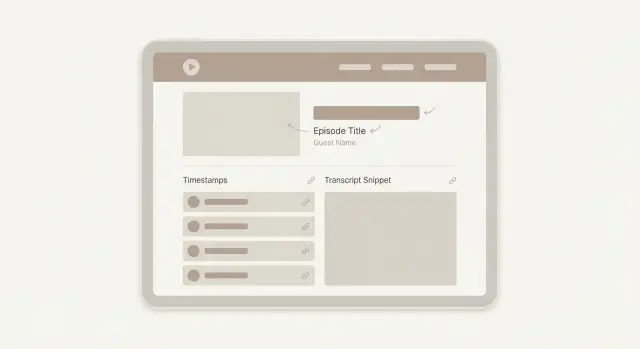
A strong episode page usually includes a few basics that make the topic obvious at a glance: a clear title (guest + topic), a short intro in plain language, show notes with scannable sections, and a transcript or expanded notes (even a cleaned-up version helps). It also helps to call out specific “mentions” like tools, books, and frameworks people might search.
Links are the other big reason episodes struggle. Podcasts often earn mentions, but the links land in the wrong place. Guests and listeners link to whatever is easiest: the show homepage, a platform profile, or a generic “listen” page. That spreads link value across pages that aren’t trying to rank for a specific guest or topic.
Episode-page links work better because they’re naturally relevant. If an article mentions your guest and references the exact conversation, a link to that episode page sends a clear signal about what the page should rank for. A homepage link is broader and usually helps brand searches more than “specific episode” searches.
“Rank for guests and topics” means this: when someone searches the guest’s name, the topic (like “pricing strategy for SaaS”), or the episode title, your episode page shows up near the top because it’s the best match.
Example: a guest shares the episode in their newsletter. If they link to a clean episode page with a strong summary and clear headings, Google can connect that page to the guest’s name and the theme. If they link to the podcast homepage instead, that signal gets diluted.
Pick the right page to be your ranking page
If you want guests and readers to link to you, you need a single, obvious place to send them. That means one page per episode, on a domain you control. When the same episode lives in five places, links split, Google gets mixed signals, and your best page never becomes the clear winner.
Make the episode page about one clear thing: the main topic plus the guest. “Interview with Alex Rivera about hiring your first engineer” is focused. “Everything we talked about this week” isn’t. A page with a sharp promise is easier to rank and easier for someone to reference when they share the episode.
Thin pages are the quiet killer. If every episode page looks like the same template with two sentences and an embedded player, it gives people nothing to quote, nothing to skim, and nothing worth linking to.
A strong ranking page usually includes:
- A specific title that matches how people search (topic + guest)
- A short intro that frames the problem and who the episode helps
- A real summary with 5 to 8 key takeaways
- Scannable sections (timestamps, questions covered, notable quotes)
- A transcript (full or edited) or detailed notes that stand on their own
Here’s a simple example. If your guest is a well-known product leader, don’t rely on their name alone. Lead with the angle: “How to run user interviews that change your roadmap (with Maya Chen).” Someone searching for “user interview roadmap” should feel like the page was made for that.
If you publish on multiple platforms
You can still distribute everywhere, but pick one “home” page for search and links.
Publish the full show notes on your website episode page, embed the player there so it feels official, and keep other platforms brief while pointing people back to the main page in plain text. Use the same episode title everywhere to avoid confusion, and if you have duplicates on your own site, merge them into one page.
Once you’ve chosen the ranking page, every guest share, newsletter mention, and press reference should point to that same URL.
Write the on-page basics: title, intro, and summary
Most episode pages lose rankings for one simple reason: the page doesn’t clearly say what the episode is about in the first few lines. If a guest or journalist lands on the page, they should understand the topic in 10 seconds and feel comfortable linking to it.
A title that matches real searches
Treat the episode title like a search headline, not a creative tagline. People usually search by topic first, then guest, then the show name.
A simple format works well: Main topic or question + guest name (optional) + podcast name (optional).
Example: “Hiring your first PM: interview loop and scorecards (with Maya Chen)”. It reads like a real query, and it still sounds like a real episode.
A short intro that earns the click
Put the guest name near the top, but keep it natural. One clean sentence is enough: “This episode features Maya Chen, Head of Product at a B2B SaaS company.” Then add one sentence that frames the problem: “We talk about how to hire a PM when you don’t have a product org yet.”
Avoid repeating the guest name or topic awkwardly. If it sounds strange to a human, it’s usually a bad sign.
A one-paragraph summary that tells the truth
Write a tight summary that states the core topic and what a listener will learn in 30 seconds. Think of it as the text someone will quote when they share the episode.
A good summary includes the situation (who it’s for), the main topic, the outcome (what the listener can do after), and one specific detail that proves it’s not generic.
Example: “If you are hiring your first product manager, this episode breaks down a practical interview loop, what to score, and how to avoid hiring a ‘mini CEO’ by mistake. Maya shares the exact signals she looks for in discovery and writing exercises, plus a simple 30-day onboarding plan.”
When the title, intro, and summary are clear, guests have an easy page to link to, and publications have a clean reference point if they mention the episode later.
Structure show notes so Google can scan them
Show notes should read like a well-labeled outline, not a wall of text. When Google can quickly tell what each section is about, your episode has a better shot at ranking for the guest, the main topic, and specific subtopics. It also makes the page easier to skim, which helps when you want people to link to it.
A simple layout that works for most episodes
Use clear H2 sections and keep the wording plain. A reliable pattern looks like this:
- Key topics discussed (the big themes)
- Top takeaways
- Resources mentioned (books, tools, companies, frameworks)
- Highlights (quotes, stats, strong opinions)
- Transcript (full or partial)
Add timestamps near the top, but don’t treat them like filler. Make each timestamp a mini headline that names the subject, not just the time. For example, “12:40 Hiring your first engineer” is more useful than “12:40 Hiring.” Those labels often match real searches.
Make highlights and quotes easy to spot
Put 3 to 6 pull highlights in their own section. Choose lines a guest would actually repost. Keep each highlight to 1 or 2 sentences and add the timestamp. This gives people something easy to cite.
For transcripts, pick the option that fits your time and quality goals:
- Full raw transcript: fastest, but messy wording can weaken clarity
- Edited transcript: best for reading and search, but takes time
- Partial transcript: a good compromise if you include the key segments
Most episodes do well with 800 to 1,800 words total across notes and transcript. If the conversation is complex, longer is fine as long as the sections stay scannable.
Example: a 45-minute interview can use 8 to 10 timestamps, 5 takeaways, and 4 highlights. Then the transcript supports the page without burying the main points.
Optimize for guest searches without sounding spammy
Most people find an episode by searching a person’s name, not the show name. If your page makes it easy to confirm who the guest is and why they matter, you can rank for that name and pick up natural shares.
Start with a short guest bio that sounds like a human wrote it. Two or three lines is enough. Aim for one clear identifier, one credibility point, and one tie-in to the episode topic.
Keep guest details consistent across episode pages so readers can scan and search engines can connect the dots:
- Guest full name (same spelling everywhere)
- Current role and company (one version only)
- Episode publish date
- A one-sentence “known for” line
- Optional: location only if it matters
Mention the guest’s company or product carefully. Include it once in the bio and once in the show notes if it’s truly relevant. Repeating it in every heading or bullet makes the page feel like an ad.
Write an “About the guest” snippet people can copy
Guests often want a ready-made blurb for their newsletter or website. If you provide it, they’re more likely to mention the episode and link to it.
Keep it short and reusable:
About the guest: Jordan Lee is the Head of Data at Northwind Labs, where he helps teams build practical analytics that teams actually use. In this episode, Jordan breaks down simple ways to measure retention without drowning in dashboards.
Concrete example: If your guest is “Priya Shah, founder of a sleep app,” don’t write “Priya Shah” across the page. Use her name naturally in the title and once early in the intro, then let the bio, role, and summary do the work.
Use internal links to build topic clusters
A podcast site often has dozens (or hundreds) of episode pages that look like islands. Internal links turn those islands into a map. When pages connect around a clear theme, search engines can understand what you cover most, and visitors can keep listening without going back to the homepage.
Start by choosing 3 to 8 themes that match real searches. Use simple words, not clever labels. For example: “email marketing”, “startup hiring”, “Python”, “product leadership”. Then use those topic words consistently in the internal links you add between episodes.
Build a simple topic hub page
A hub page is a page that groups episodes by one theme and makes them easy to browse. It doesn’t need to be fancy. A short intro, a one-line promise (who it’s for), and a list of episodes is enough.
Keep the hub page useful:
- Write a 2 to 3 sentence intro using the topic phrase once
- List episodes with clear titles and a one-sentence takeaway
- Add 3 to 5 “best for” bullets like “beginners”, “case studies”, “tools”
- Update it when you publish a new episode in that theme
Use a consistent link pattern (and avoid orphans)
An easy pattern is: every new episode links to its hub page, and to 2 to 4 related episodes that share the same topic words people search.
A simple internal linking routine:
- Add a “Related episodes” block in every show notes page
- Link the episode back to 1 main hub page (the best fit)
- Link to 2 to 3 older episodes with similar guest roles or topics
- From the hub page, link back out to the strongest episodes in that theme
- Once a month, find episodes with zero internal links pointing to them and add links from hubs or newer posts
Example: you publish “How to Hire Your First PM (with Jordan Lee).” On that episode page, link to your “Product management” hub, plus two older episodes like “PM interview questions” and “Working with engineers.” Now when someone searches the guest name, the role, or the topic, your site looks like a focused resource instead of a one-off page.
This structure also helps when you earn external links later. Those links land on one episode, but internal links help spread value across the whole topic cluster.
How to earn links from guests (without awkward outreach)
Guest links are often the easiest links you’ll get because the guest already has a reason to share the episode. The trick is to make it effortless and specific. You’re not asking for a favor. You’re handing them a ready-made asset.
Build a simple “guest pack” (send it the day you publish)
Most guests want to promote the episode but get stuck on what to say. Send a small pack they can copy in 30 seconds.
Include:
- Two short blurbs (one sentence, then 2 to 3 sentences)
- Two social captions (one casual, one more professional)
- One suggested quote from the episode
- The exact episode title and guest name as you want it written
- A note that they can link to the episode page (not the audio app)
On your episode page, add a clean spot that feels worth linking to, like a short guest intro block or a “Key takeaway” section. When that section is clear, guests feel good linking to it because it reads like a resource, not a promo.
Ask for one link in places they control
Don’t ask for five things. Ask for one link in one place they own, where links are normal: a personal site “Media” page, a bio page, or a company news post.
Timing helps. If you ask before publishing, frame it as planning: “When it’s live, would you be open to adding it to your bio page?” Then follow up on launch day with the guest pack.
If someone says yes but doesn’t follow through, assume they got busy. Make the follow-up easy:
- Reply in the same thread with the exact sentence they can paste
- Remind them where it fits (bio page, news page, personal site)
- Offer to send a 1-paragraph blurb tailored to their site tone
- Follow up once more a week later, then stop
Example: a product lead guest agrees to add the episode to their “Speaking” page. You send a 2-sentence blurb and point them to the guest intro section on your episode page. That single link can help the episode rank for their name and the topic.
Earn links from publications with linkable episode assets
Most publications won’t link to “an episode.” They link to something that improves their article: a stat, a quote they can cite, or a short resource their readers can use.
A practical way to earn links is to turn one episode into a few small, citable assets that live on the episode page (or in a clearly labeled section of it). That way, when someone links, they support the page you want to rank.
Assets that tend to earn links because they’re easy to cite:
- One original stat (from your data, a survey, or a simple tally from the episode)
- A “best quotes” box with 3 to 5 punchy lines and who said them
- A mini guide (5 to 10 steps) that solves one narrow problem from the episode
- A short glossary for a niche topic
- A template or checklist (copyable text usually beats a fancy PDF)
Pitch the asset, not the episode. Your email should read like “Here is a citable resource for your story,” not “Please listen to my show.” Also tell the editor where the asset sits on the page so they can verify it quickly.
How to pitch without being ignored
Editors move quickly. Help them decide in seconds with a specific subject line and one clear ask.
Keep the message tight:
- Subject line: topic + asset type (example: “Remote work security: 7-step checklist you can cite”)
- First sentence: why it matches something they cover
- One short excerpt: 1 stat or 1 quote
- One clear ask: “If you use it, please cite the checklist on our episode page”
- Optional: a clean attribution line with the guest’s name and title
Example: if your episode is about reducing customer churn, add a “5 churn triggers to audit” mini guide to the show notes. Then pitch SaaS newsletters or marketing writers who publish churn content. They can quote one trigger and cite the guide.
When this is worth it
Do this when the episode has a strong, narrow takeaway that fits existing articles. If the topic is broad or the guest has an active audience, you’ll usually get faster wins by focusing on guest sharing first, then using publication pitches for your best episodes.
Common mistakes that waste time and links
Most podcast sites do the hard work (recording, editing, publishing), then accidentally make the episode page almost impossible to rank. The result is frustrating: you get mentions, but not the kind of links that move search traffic to the episodes.
The five problems that show up again and again
- An episode page that is only an audio embed. An embed is great for listening, but it gives search engines almost nothing to understand. Add a short intro, key takeaways, a guest bio, and a clean transcript or detailed notes.
- Titles that are clever, not searchable. “We Went There” might be fun, but it won’t win searches. Put the topic and guest in plain language.
- No single primary page for the episode. If the same show notes live on multiple platforms and none is clearly the main one, links scatter. Pick one canonical episode page on your own site and treat everything else as distribution.
- Keyword stuffing plus sponsor blocks that drown the point. A page packed with unrelated keywords, long sponsor copy, and random names reads messy. Keep sponsor text short and separate so the topic stays obvious.
- Building links to the homepage while episodes stay invisible. Homepages rarely rank for specific guests, questions, or episode titles. When a guest shares the show, make it easy to link to the exact episode page.
Example: imagine you interview “Jordan Lee, Head of Data at Acme” about forecasting. If the title is vague and the page is mostly an embed, the guest may share a platform link, and any press mention may point to your homepage. If the episode page clearly targets “Jordan Lee forecasting” with scannable notes and a short transcript, those same shares can become links that help the page rank.
Checklist, a real example, and next steps
Treat each episode page like a mini landing page. It should be easy to scan, clear about what the episode is, and useful enough that someone feels good linking to it.
Here’s a quick quality check you can run in 2 minutes per episode page:
- Use a clear title format: episode number + guest (if relevant) + outcome/topic
- Open with a short summary (3 to 5 lines) that says who it’s for and what they’ll learn
- Break show notes into scannable sections with descriptive H2s
- Add timestamps that match real sections (and keep them updated if you edit)
- Include a clean transcript (even if it’s lightly edited for readability)
Then make sure the page can win guest and topic searches without sounding forced. Add a short guest section that explains who they are and why they’re credible, and connect the episode with internal links to related episodes and a relevant topic hub page.
A simple example that tends to work
Say you interview a founder named Maya Chen about “pricing a B2B SaaS for the first 100 customers.” Your title includes her name and the pricing angle. The intro names the exact problem listeners have (confusion around tiers, annual plans, and first hires). The H2s mirror the conversation: positioning, pricing page mistakes, how to pick a starting price, when to raise it.
Now the page can rank for “Maya Chen podcast,” “Maya Chen pricing,” and even the full episode title. When Maya shares the episode, she has a single page that looks credible and complete. When someone writes a “best pricing resources” roundup later, your page has enough structure (summary, sections, transcript) to be a safe citation.
What to track for 30 to 60 days
Keep it simple: watch impressions and top queries in Search Console for that episode page, note any new referring domains (links), and check whether the page starts appearing for the guest name, the core topic, and longer versions of your episode title. Also compare which episode pages are becoming your top entry points from search.
To move fast, pick 3 episodes to upgrade this week and set a small link goal:
- Choose 3 episodes: one guest with an audience, one evergreen topic, one recent release
- Upgrade the pages using the checklist above (don’t overthink design)
- Ask guests for one specific placement: their site “press” page, newsletter archive, or resources page
- Create one linkable asset per episode (a short quote sheet, key takeaways, or a simple statistic recap)
- Aim for 5 to 10 quality links total across the three pages, not all to one episode
If you want help adding stronger, relevant links to specific episode pages (instead of your homepage), SEOBoosty (seoboosty.com) focuses on securing placements on authoritative sites and pointing them to the exact pages you want to rank.
FAQ
Why don’t my podcast episodes show up in Google even when the content is great?
A podcast player doesn’t tell search engines what the episode is about. Add a clear title, a short intro, a real summary, and text that covers the key questions discussed so the page can match searches for the guest name and the topic.
Should I publish show notes on every platform or keep one main episode page?
Pick one episode page on a domain you control and treat it as the “home” for that episode. Put the full notes and transcript there, and keep other platforms short so shares and mentions point back to the same page.
What’s the best episode title format for ranking?
Use a searchable format that states the main topic first and the guest second. Keep it plain and specific so it matches how people actually type queries, and avoid clever titles that hide what the episode covers.
How long should the intro and summary be on an episode page?
Aim for 3–5 lines that say who the episode is for, what problem it addresses, and what the listener will be able to do afterward. Include one concrete detail from the conversation so the summary feels real and easy to quote.
How should I structure show notes so search engines can understand them?
Use a small set of named sections that mirror the conversation, and make section labels descriptive so they can match searches. When the page is easy to skim, guests and writers are more comfortable linking to it as a reference.
Do I really need a transcript to rank a podcast episode?
A full transcript helps, but a lightly edited transcript or detailed notes can also work if they stand on their own. The key is readable text that clearly supports the title and summary, not a messy block that hides the main ideas.
How do I optimize for guest name searches without sounding spammy?
Put the full name in the title or near the top, then add a short bio that states who they are and why they’re credible. Keep spelling and job titles consistent across pages so the same person isn’t described five different ways.
What’s the easiest way to get backlinks from podcast guests?
Send a simple “guest pack” on launch day with a copy-and-paste blurb and the exact episode page URL you want shared. Ask for one link in one place they control, like a bio, media, or resources page, and make the request easy to complete.
How do I earn links from newsletters or publications for a podcast episode?
Give writers something they can cite quickly, like a clear quote, a specific stat, or a short mini-guide that lives on the episode page. Pitch the asset and point them to the exact spot on the page so they don’t have to hunt for it.
How do internal links help podcast episodes rank, and what should I link to?
Link each episode to a relevant topic hub page and to a few related episodes using consistent topic words. This helps search engines see the theme of your site and helps link value flow beyond a single episode page.
Share