Backlinks to geo-swapped pages: make Googlebot see one page
Learn how to validate backlinks to geo-swapped pages so Googlebot gets stable content, your canonical signals stay clear, and link equity is not diluted.
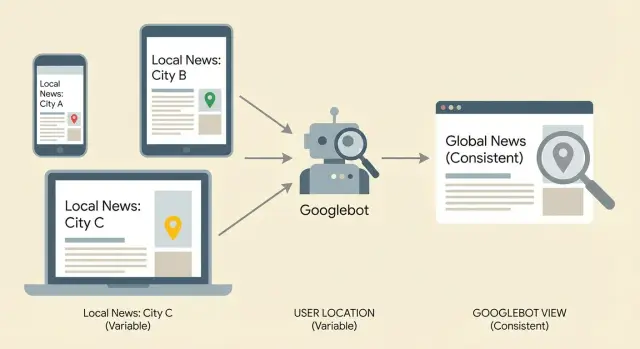
The problem: one URL, different content
A personalized page changes based on who’s viewing it. Sometimes it’s minor (a different headline for returning visitors). Other times it’s major (a different offer, pricing, or location details).
Geo swapping is a common form of personalization. The URL stays the same, but the content changes based on a visitor’s location, usually guessed from IP, device location, or browser settings.
Picture one service page: example.com/plumbing. Someone in Austin sees “Plumber in Austin,” an Austin phone number, and Austin reviews. Someone in Miami visits the exact same URL and sees “Plumber in Miami,” a different phone number, and different testimonials.
That can be helpful for users, but it’s risky for SEO. Google has to decide what that URL is really about, which version should be indexed, and which text should be used to understand the page. If the page changes a lot, Google may treat it as unstable or unclear.
Backlinks get messy in this setup. Links point to one URL, but Googlebot may crawl a different version than many users see, or it may see different versions across visits. When the page isn’t consistent, the signals from those links can get diluted because Google isn’t always confident it’s evaluating the same page.
The goal is simple: one indexable version of the page that stays consistent for crawlers and matches what your backlinks are meant to support. You can still personalize for users, but the “core page” Google indexes should look like the same page every time Googlebot shows up.
How inconsistent pages waste backlink value
Backlinks pass value (often called link equity) through a URL. For that value to concentrate, Google needs to see the URL as one clear page with one main purpose.
If the same URL shows different content depending on location, device, cookies, or time of day, Google can struggle to understand what the page is actually about. Your best links may point to a page that looks unstable: different headings, different body copy, different internal links, or even a different offer depending on when and where Googlebot crawls.
That instability can also lead to canonical confusion. You might set the canonical to /services, but because the content keeps swapping, Google may decide a more stable URL (like /services/nyc) is the better representative. Then your backlinks end up supporting a URL you didn’t intend to rank.
Signs link value is being diluted instead of helping:
- Rankings stall even after you earn strong backlinks
- The indexed title/snippet changes often for the same URL
- Google crawls frequently but the page doesn’t gain traction
- Some locations rank while others never move
Example: you build links to a “Plumbing Services” page, but users in Chicago see “Chicago Plumbing” while users in Dallas see “Dallas Plumbing,” with different FAQs and headings. Google may not consolidate all of those signals into one strong page.
What Googlebot is likely to see (and why it varies)
When Googlebot visits a URL, it usually does more than download HTML. It may render the page like a browser (so JavaScript changes are included), compare it to past crawls, and decide what version to index.
Googlebot also doesn’t crawl from one fixed location. Google uses many IP ranges and data centers. If your server changes content based on IP, cookies, headers, or timing, Googlebot can receive different pages from the same URL.
Repeated crawls are where the trouble shows up. One crawl might hit a warm cache and get your default version. Another crawl days later might hit a different edge node or geo rule and get a swapped version. Over time, Google sees the mismatch and may index the “wrong” version or treat the page as unstable.
Common reasons the same URL can look different to Googlebot:
- IP-based geo swapping (server changes page copy)
- Cookie or login personalization (Googlebot gets a different “guest” version)
- JavaScript changes after load (rendered content differs from raw HTML)
- A/B tests (content varies by request)
- CDN/cache variance (different edge rules, different outputs)
If you’re building backlinks to geo-swapped pages, the safest approach is to make the crawler version boring and consistent, even if users see light tailoring.
Step by step: confirm the page is stable for crawlers
Start by choosing one URL that you want every backlink to strengthen. If you have multiple versions (city pages, parameters, alternate paths), pick the one you actually want to rank and treat everything else as supporting.
Then check what a “neutral” visitor sees. Use a private window, stay logged out, and deny location permissions. If your site changes language or currency based on browser settings, set those to a plain default and reload.
Next, compare that with what a crawler is likely to get. Use a crawler that identifies as Googlebot, or use your SEO platform’s fetch feature (for example, Search Console’s URL Inspection) to see the rendered HTML and resources.
A routine that catches most geo swaps:
- Load the URL in a neutral session and save the visible text.
- Load it again from at least two different regions (VPN or remote browser).
- Fetch the URL as a bot and capture the rendered output.
- Compare the title, H1, main body copy, and primary internal links.
Focus on changes that alter what the page is “about.” If the city name, service scope, pricing, or product availability swaps, Google can treat the URL as inconsistent. Small UI changes (like a local phone number in a header) are usually less risky.
Signals to verify: redirects, status codes, canonicals
Geo swapping often breaks link equity because the same URL behaves differently depending on where the visitor is. That can split signals across multiple URLs or send mixed instructions to crawlers.
Start with redirects. A redirect that changes by country, state, or language is a red flag unless you’re being very intentional. Test the same URL from different locations or language settings and note where it lands.
Then confirm the status code is stable. A page that returns 200 sometimes but 302 (or worse, 404) other times can lose value from links because crawlers treat it as unreliable.
On the final page Google should index, verify:
- The response is consistently 200.
- Any redirect is consistent and ends at one intended URL.
- The canonical tag always points to that same intended URL.
- Redirect targets and canonicals agree (no “canonical to A” but “redirect to B”).
- Parameters (like
?city=,?lang=, tracking tags) don’t create multiple indexable versions.
Canonicals are especially important on personalized pages. If the canonical flips based on location, device, or cookie, you’re telling Google that different versions are “the real one” at different times.
Personalization without turning it into a different page
If the same URL shows meaningfully different HTML to Googlebot than it shows to real users, you risk more than “confusing signals.” It can resemble cloaking, and it can also cause Google to treat what should be one page as multiple versions.
A safer goal: keep the page’s core message identical for everyone, and only personalize around the edges. Think “helpful hints,” not “a different page.” For example, you can detect a visitor’s city and show “Serving Austin today” in a small banner, while the H1, key paragraphs, pricing, and internal links stay the same.
One practical pattern is to keep critical content in the initial HTML, then add small location cues after page load. That way Googlebot still receives a stable, indexable page, and users still get a tailored feel.
Safe personalization checklist
Keep personalization non-critical:
- Keep the main heading, primary offer, and core body copy consistent.
- Keep internal links and navigation consistent across locations.
- Personalize small sections (banner, sidebar, testimonial order), not the main pitch.
- Avoid swapping entire blocks of keyword-focused copy by IP.
- Make sure important text isn’t only inside scripts that might fail to render.
JavaScript isn’t automatically “bad,” but it’s a common failure point. If your main copy or calls to action only appear after a script runs, a rendering delay or blocked resource can leave Googlebot with a thin version of the page.
Geo targeting patterns that usually work better
When the content truly changes by region, separate URLs are usually safer than swapping content inside one URL. Googlebot can crawl a consistent document, and your links point to something that doesn’t “shape shift.”
Separate regional pages are worth it when you have real differences: pricing, legal terms, shipping rules, store locations, or language. If it’s only a small greeting, keep one page and skip the geo logic.
A pattern that tends to work well:
- One main version anyone can access and Google can crawl reliably
- Dedicated URLs for major regions or languages (for example,
/en/and/fr/) - A visible option for users to switch regions themselves
- Optional detection that suggests a better version without forcing it
Where hreflang fits
Hreflang annotations tell search engines which page is meant for which language or region, helping them show the right version in results. Use it when you have multiple versions that are very similar but intended for different audiences (like English US vs English UK, or English vs Spanish). It’s not a ranking boost by itself, but it reduces the chance of the wrong version showing up.
A common mistake is forcing visitors to a different URL based on IP. That can block Googlebot, confuse users on VPNs, and dilute signals if some links land on a URL that immediately pushes people elsewhere.
Common traps that silently break link equity
Most problems with geo-swapped pages aren’t obvious errors. The page loads fine in your browser, but Googlebot may see something different, or it may see several versions across crawls.
Edge logic is a frequent culprit. A CDN or proxy can rewrite content based on IP location, headers, or device rules. If the edge swaps the H1, internal links, or body text while keeping the same URL, Google can treat it like a different page each visit.
Other traps that quietly cause damage:
- A/B tests that include bots, so Googlebot sees rotating titles or headings
- Geo-redirect loops (or chains) where crawlers don’t reach a consistent final page
- Multiple canonical tags coming from conflicting templates or plugins
- Location query strings like
?city=that get indexed and create near-duplicates
If you’re investing in link building, these issues can turn strong links into weaker signals. Fix delivery first, then scale.
Quick checks before you build more backlinks
Before you point new backlinks at a geo-swapped URL, make sure Googlebot can see one stable version of the page. If you can’t repeat the same result twice, you’re gambling with link equity.
Check the page from a few locations (and with location settings off and on) and confirm these stay basically consistent:
- Title tag and meta description (minor tweaks are fine, but not a new topic)
- One clear H1 that matches the page’s purpose
- Main body content (don’t swap the whole pitch or service list)
- Internal links in the main content (same destinations, same overall structure)
- Key structured elements like FAQs or product/service blocks
Then do a fast technical pass:
- Final page returns a 200 status (no redirect chain)
- No automatic IP redirect that sends crawlers to a different city/country URL
- You inspect the rendered page, not just raw HTML
- You can reproduce the same rendered output on repeat visits
Keep a simple log: timestamp, location/test method, final URL, status code, canonical, and what changed (if anything). That makes it easy to re-check after updates.
Example: a local service page with city-based swapping
A common setup: one URL like /services/plumbing, with geo detection swapping the city name, phone number, and testimonials. Austin visitors see “Austin emergency plumber” with Austin reviews. Dallas visitors see “Dallas emergency plumber” with Dallas reviews.
Now add backlinks. A partner site links to that one URL. But the link is effectively “vouching for” whatever Googlebot sees when it crawls. If Googlebot sometimes gets Austin and sometimes gets Dallas (or gets a generic version), the target isn’t stable.
The fix is deciding what must stay the same vs what can change safely. In most cases, keep the core stable: the service description, pricing approach, trust signals, and main heading shouldn’t flip between cities. Personalize small UI elements that don’t change the meaning.
A practical remediation is a stable core page plus an optional location module:
- Keep one canonical service page with the same main copy for everyone
- Add a small location banner based on user choice
- Load local testimonials in a clearly separated module (and limit how much text it adds)
- If you need true city pages, create separate URLs per city and link to those
Success looks like this: crawls show the same main HTML each time, the canonical is consistent, and the indexed snippet stops bouncing between cities.
Next steps: lock the page down, then grow links
Once you’ve confirmed what Googlebot sees, treat that version as the official page and protect it. Geo swapping can creep back in after a deploy, a CDN rule change, or an A/B test that seemed harmless.
Re-check right after releases, and again 24 to 48 hours later when caches have warmed up. Compare status code, final URL, canonical, and main body content against your last baseline.
Only scale link building when the destination is stable. Otherwise, backlinks to geo-swapped pages can land on multiple variants, spreading link equity across versions you didn’t intend.
If you’re using a managed link source, stability matters even more because you’re deliberately concentrating authority into a specific URL. For example, SEOBoosty (seoboosty.com) focuses on securing backlink placements on authoritative sites, so it’s worth validating the target page first to make sure those signals consolidate instead of splitting across swapped variants.
Fix page delivery first, then earn and track backlinks.
FAQ
Why are backlinks risky when the same URL shows different content by location?
Pick one URL you truly want to rank and make sure that URL delivers the same core page to Googlebot every time. You can still tailor small UI elements for users, but the indexed version should stay stable across crawls so backlink signals consolidate instead of splitting.
What does it mean when link equity gets “diluted” on a geo-swapped page?
Because backlinks strengthen a URL as a single entity, and Google needs to understand that URL as one clear page with one main topic. If the title, H1, body copy, or internal links change a lot between visits, Google may treat the page as unstable and the link value can get diluted.
How can I quickly tell if Googlebot is seeing a different version than users?
Test it repeatedly from neutral and varied conditions, then compare the outputs. Load the page logged out in a private window, then load it from at least two regions, and finally fetch the rendered version as a bot; if the main text and intent change, the page isn’t stable for crawlers.
Which page elements matter most for SEO stability on personalized pages?
Focus on the meaning-changing elements: title tag, H1, main body copy, primary internal links, and key blocks like FAQs or service lists. Small changes like a local phone number in the header are usually less risky than swapping the city name in the H1 and rewriting the entire pitch.
Why might Googlebot see different content on different crawls?
It can see different versions across visits because it doesn’t crawl from one fixed place and it may render JavaScript. If your server, CDN, cache, A/B test, or scripts vary output by IP, cookies, headers, or timing, Googlebot can receive different pages from the same URL.
What redirect and canonical mistakes commonly break backlink value on geo-swapped URLs?
Check that the final page consistently returns a 200 status and resolves to one intended URL without location-based redirect changes. Then confirm the canonical always points to that same URL; if redirects or canonicals vary by location or cookie, you’re sending mixed signals that can split ranking credit.
How do I personalize a page without turning it into a different page for SEO?
Keep the core message identical for everyone and personalize only around the edges. A practical approach is to keep critical content in the initial HTML and add minor location cues after load, so crawlers always get a stable page while users still get a tailored experience.
When should I use separate regional URLs instead of one geo-swapped URL?
If the content meaningfully changes by region, separate URLs are usually safer than swapping within one URL. Create dedicated regional or language pages, let users switch versions, and consider using hreflang when you have near-identical pages intended for different language or region audiences.
What is hreflang, and when does it help with geo-targeted pages?
They’re helpful when you truly have multiple versions that are very similar but intended for different audiences, like English US vs English UK. Hreflang doesn’t boost rankings by itself, but it reduces the chance that the wrong version appears in search results when several equivalents exist.
What should I verify before building more backlinks to a geo-swapped page?
Don’t build more links until the destination is repeatably stable. Re-check from multiple locations, confirm the final URL, status code, canonical, and rendered main content match your baseline, and only then scale link building; otherwise even premium links can end up supporting shifting variants instead of one strong page.
Share