Backlinks for Google Discover readiness: a practical plan
Backlinks for Google Discover readiness: learn how to pair authority links with freshness signals and clear author transparency to improve your pickup odds.
Why your content is not showing in Discover
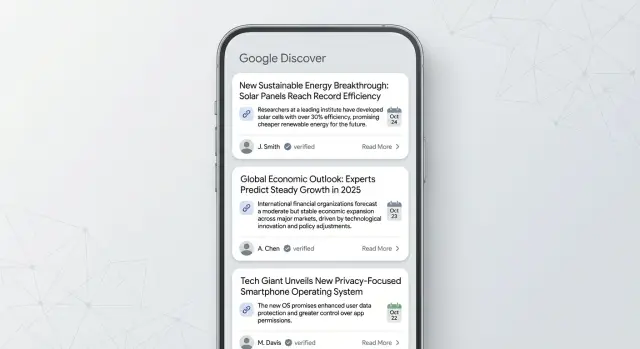
Getting picked up by Google Discover means your article appears in the Discover feed on phones and tablets, usually as a card with an image and headline. People can see it without searching. That’s why Discover traffic can feel random: you publish something genuinely useful and still see nothing.
A common reason is trust. Discover is selective about which sites it recommends as “fresh picks.” Even a strong post can miss out if your site has weak authority signals, uneven quality across pages, or unclear ownership.
Timing also matters. Discover often favors content that looks newly relevant, recently updated, or tied to an active topic. If your post looks stale (even if the info is better), it has a harder time competing.
Backlinks can help because they’re one of the clearest signals that other sites consider your content worth referencing. But links don’t act like a switch. Discover also looks for signs that you publish helpful content consistently and that real people stand behind it.
Discover tends to respond best to four patterns:
- Authority: respected sites mention or link to you, and your overall reputation is clean.
- Freshness: your pages show meaningful updates and stay accurate.
- Trust: clear authorship, contact details, and simple policies that show accountability.
- Consistency: a run of solid posts, not one great post surrounded by thin pages.
Set expectations early. Discover has no guarantees, and spikes can disappear as fast as they arrive. The practical goal is improving your odds by looking credible, current, and dependable.
Two sites can publish the same how-to. The one with a known author, a recent (meaningful) update, and a few strong mentions from authoritative publications is more likely to get tested. If people engage, it may keep showing up. If not, it fades.
How Google Discover differs from normal Google search
Google Discover is a personalized feed inside Google. Instead of typing a query, people scroll and tap stories that match their interests, location, and recent activity.
Search starts with a question. Your page has to match what someone typed, and rankings lean heavily on query relevance. Discover has no query, so Google is trying to predict what someone will want next.
That changes what gets rewarded. Discover favors content that reads clearly at a glance and stays tightly focused on one topic. It also leans toward publishers that show repeatable quality, not one lucky hit.
A simple way to frame it:
- Search asks: “Which page best answers this question right now?”
- Discover asks: “Which source is likely to satisfy this person today?”
Because there’s no query to lean on, authority signals still matter. Links are one of the strongest ways the wider web signals that a site is known and valued. When Google is deciding between similar publishers for a feed recommendation, authority can make you look like the safer choice.
Trust builds over time. If a site consistently publishes clear, accurate pieces and earns mentions from respected places, Google can become more comfortable surfacing it again.
If you use a service like SEOBoosty, it’s best to see it as one part of the picture: reputable mentions supporting a site that already publishes content people want to read. Discover is usually about stacking several clear signals, not chasing one “magic tweak.”
What authority backlinks actually do for Discover readiness
Authority links are backlinks from well-known, trusted websites. They work like public votes that say your site is worth citing. But not every vote counts the same. A link from a respected publication or a major company’s engineering blog usually carries more weight than dozens of links from random sites.
These links matter for Discover because the feed is careful about trust. Discover can surface new posts quickly, but it prefers sources that look dependable. Strong mentions from authoritative sites can help your domain look safer to recommend to people who didn’t ask for your content.
How authority mentions support trust signals
Authority backlinks don’t turn Discover “on.” They raise your baseline credibility and make it easier for Google to believe your pages are legitimate and your brand is real.
In practice, good links support:
- Site reputation: your domain looks more established over time.
- Topic credibility: you’re more likely to be seen as a real source in your niche.
- Author trust by association: when your work is cited, your bylines benefit.
- Confidence in new posts: fresh pages have a better chance of being taken seriously.
Quality beats quantity (and quantity can backfire)
More links isn’t automatically better. A small number of high-quality links is usually safer than a pile of low-quality ones.
Quantity can backfire if links look unnatural, irrelevant, or come from sites built only to sell links. That footprint raises doubts, which is the opposite of what you want for Discover.
A realistic contrast:
A health blog gets 200 cheap backlinks in a week from unrelated coupon sites. Nothing else changes. The site can look spammy.
Now compare that to earning (or securing) a few relevant placements on high-authority sites over a month while also improving the article, updating dates only when changes are real, and using clear author bios. The second approach looks natural and trustworthy.
Links also aren’t a replacement for good content. They amplify what’s already there. If the page is confusing, thin, or lacks transparency, backlinks won’t fix it.
If you use a provider like SEOBoosty, the sensible target isn’t “as many links as possible.” It’s a small set of relevant, authoritative placements that support pages you’re committed to keeping accurate and clearly authored.
Freshness signals you can control without chasing trends
Freshness in Discover isn’t only about publishing today. It’s also about maintenance and timing.
Freshness shows up in a few ways:
- Recency: a genuinely new post, new angle, or new data point.
- Updates: older pieces kept up to date often outperform “new” posts that feel thin.
- Consistency: a steady publishing rhythm makes a site look alive.
- Timeliness: content that matches real-world moments people care about.
You don’t need to publish daily. You need a cadence you can keep.
A practical approach is to choose one rhythm and stick with it for a quarter, such as one strong post per week plus one small update to an older post, or two posts per month on consistent days.
Updates matter most when they’re honest. The goal is to look maintained, not “rewritten for show.” Update the date only when something meaningful changes. Replace outdated screenshots, steps, and claims you can’t support anymore. If you want to be extra clear, add a short note near the top that says what changed.
Recurring interest helps because it creates predictable windows where people want the same answers. Think tax season, holiday shopping, back-to-school, summer travel, or annual product releases.
Example: if you have a guide on “best running shoes for beginners,” you don’t need daily sports news. Update it before spring training season and again before holiday shopping, then add a small section for “new models this year.” That kind of controlled maintenance keeps your content looking current when Discover evaluates it.
Author transparency: simple ways to look more trustworthy
Discover is sensitive to trust signals. Strong writing helps, but it also pays attention to who wrote the piece and whether your site stands behind it. If you want authority links to do their best work, make authorship clear and consistent.
Build an author page that feels real
An author page isn’t a formality. It’s where readers (and reviewers) quickly decide whether a person seems credible.
Focus on the basics, written like a human:
- real name and a clear headshot (or a consistent avatar)
- a short bio that explains what they do and who they help
- credentials that fit the topic (licenses, degrees, years in role, awards)
- a few focus areas (2 to 4 topics they write about)
- recent articles to show they’re active
If someone writes about sensitive topics like health, money, or legal issues, be specific. “Writer and researcher” is vague. “Former mortgage underwriter with 8 years in lending” is easier to trust.
Show accountability without making it complicated
Trust is also about what happens when something goes wrong. A short editorial policy page that explains how you pick sources, how you fact-check, and how you handle updates can go a long way.
Make contacting you easy. A dedicated contact page, a business email, and a simple corrections process signal that a real team is behind the site.
If multiple people publish, still assign each article to one named writer, and optionally list an editor or reviewer. What matters is consistency.
To keep author signals aligned across the site, standardize the basics: the same author name format everywhere, a consistent bio block, matching bylines on post and category pages, and a clear update note when content is refreshed.
A practical plan to combine links, freshness, and transparency
A good Discover setup is a steady system, not a one-time push. You want topical focus, pages that look maintained, and clear signals that real people stand behind the work.
Build a 90-day publishing map
Pick 3 to 5 topics you can realistically cover for the next three months. Discover learns what you publish and how people respond, so repetition helps.
Then decide which pages are your pillars (main guides you want remembered) and which posts support them (timely updates, small how-tos, comparisons, opinions). This structure also makes it easier to point authority links to the right places instead of scattering them across random URLs.
A simple sequence:
- Choose a cadence you can keep (even one post per week).
- Select a small set of pillar pages and plan a handful of supporting posts around each.
- Fix author signals across those pages first.
- Add basic editorial cues like publish date and updated date (when true).
- Build a small set of authoritative links to the pages you want as long-term anchors.
Add links and refreshes without making content feel “touched up”
Authority links usually work best when they reinforce your strongest pages, not the newest post you published yesterday. Pick a handful of target URLs and build links gradually so growth looks natural.
Then set a refresh schedule. Monthly is great for fast-changing topics; quarterly is enough for many evergreen guides. A refresh can be small: update one section, add a new example, and replace outdated screenshots.
Don’t stop at publishing and linking. Watch what earns repeat engagement. If certain topics consistently keep readers longer or bring them back, put your next updates and your best authority mentions behind those winners.
If you use a provider like SEOBoosty for hard-to-get placements, keep the workflow the same: choose your destination pages first, then support the structure you already committed to.
Common mistakes that reduce Discover pickup odds
A page can be “SEO fine” and still get ignored by Discover if it looks thin, risky, or unclear about who made it.
One common miss is building backlinks only to your homepage. That can help the domain, but it doesn’t always support the specific article you want Discover to surface. If your best piece is a guide, case study, or strong opinion post, it needs its own signals.
Another mistake is churning quick “news” posts with no real angle. Discover likes timely content, but rushed and generic posts train readers (and algorithms) to expect low value. One clear viewpoint backed by something real (a small dataset, screenshots, a quick test, firsthand experience) often beats five short reactions.
Fake-looking author profiles quietly sink trust. Vague bios, stock photos, and no proof of experience raise questions. Keep it simple: real name, real face, what you do, and why you know the topic.
Updates that look like manipulation
Refreshing content helps, but changing the date without meaningful improvements can backfire. If you refresh a post, make the change obvious: a clearer intro, updated steps, new examples, or corrected claims.
Also avoid low-quality links. Spammy backlinks create risk instead of authority, especially when Discover is deciding what’s safe to recommend.
Quick checklist before you publish or update a post
Discover readiness isn’t one big trick. It’s a small set of habits you repeat every time you publish or refresh.
Before you hit publish
Decide what the page is trying to be. Discover responds better to content with a clear shape.
- Choose one main format (how-to, explainer, opinion, or update) and stick to it.
- Write a specific headline and a first paragraph that tells readers what they’ll get and why it matters now.
- Use a relevant image that matches the story.
- Make authorship obvious: consistent byline, short bio, and a real author page.
- Keep the page easy to scan with short sections and clear subheads.
If you’re updating an older post, treat the opening like it’s new. Rewriting the first few lines often helps more than adding another long section at the bottom.
After you publish (or when you refresh)
Aim for predictable maintenance and a few strong trust signals.
- Refresh on a schedule you can keep.
- Build a small number of high-quality links to your most important pages (not everything).
- Make internal paths obvious so readers can continue to related pieces.
- Watch real engagement signals like repeat visits, time on page, and shares.
If you publish one strong explainer each week, pick 2 to 3 pages you want Discover to learn first. Support those pages with your best authority mentions and keep them fresh with light, honest updates.
Example: a realistic 60-day Discover readiness sprint
Imagine a small SaaS company that publishes product-led explainers like “How to audit your onboarding” or “A plain-English guide to usage-based pricing.” The goal for the next 60 days isn’t to go viral. It’s to build a repeatable setup that improves the odds of being surfaced: authority, freshness, and clear trust signals.
Days 1-10: pick a tight cluster and plan 6 posts
Choose one topic cluster that matches your product and what your best customers care about. Outline six posts for six weeks: one pillar explainer and five supporting articles that answer specific questions.
Keep the pillar broad and useful, and make the supporting posts concrete (mistakes, templates, metrics, setup steps, common objections).
Days 11-30: publish weekly and fix trust signals first
Before post #1 goes live, clean up author transparency across the cluster. A reader should immediately understand who wrote the article and why they know the topic.
During this period, secure a small number of authority backlinks. Quality beats volume. Point a few strong mentions to the pillar and to one supporting post that already shows good on-page engagement.
Days 31-60: do two refresh cycles based on real signals
Do two meaningful updates, not constant tiny edits. Each refresh should have a clear reason.
Refresh #1 (around day 40): add answers to questions you hear repeatedly (comments, sales calls, support tickets).
Refresh #2 (around day 55): update screenshots, examples, and steps based on recent changes.
When you refresh, be direct about what changed. Add a short updated note near the top and improve sections readers actually reach.
What success can look like
A realistic win is occasional Discover spikes on one or two posts, plus a steadier baseline of impressions and clicks as the cluster gains trust. Even if Discover traffic arrives in bursts, the same work often improves search performance because your content is clearer, newer, and backed by credible signals.
Next steps: a simple way to start improving your odds
Pick one starting point for this week. If your site feels messy, start with author transparency. If your content is strong but stale, start with a refresh rhythm. If your content is solid and updated but still not getting picked up, start with a focused link plan.
The fastest progress usually comes from supporting a few pages, not your whole site. Choose 2 to 3 posts that already have signs of life (steady search traffic, good engagement, or clear topical fit) and treat them as your support set.
A simple 7-day starter plan
Do these in order, and stop when the week ends:
- tighten author signals (bio, consistent byline, and an editor or reviewer note if relevant)
- plan one meaningful update per post (clearer intro, updated steps, new example)
- decide your 2 to 3 link target pages and write down why each deserves support
- assign ownership for updates and a quick quality check (even if it’s the same person on different days)
If you need authority backlinks and you’d rather not rely on long outreach cycles, a curated provider can be a practical option. SEOBoosty (seoboosty.com) focuses on placements from authoritative websites, so you can select domains and point links to the specific pages you’re prioritizing.
What to measure for 30-90 days
Keep tracking lightweight. Look for direction, not perfection:
- Discover impressions (if available in Search Console) and whether they change after updates
- organic clicks and impressions on the supported pages
- ranking stability for the main query group
- engagement basics like time on page and return visits
- indexing and recrawl speed after updates
Set two check-ins: day 30 to adjust your refresh cadence, and day 60 to 90 to decide whether to expand beyond the first few pages. If you don’t see movement, improve author clarity and the quality of your updates before adding more links.
FAQ
Why is my article not showing up in Google Discover?
Google Discover is a personalized feed, not a search result. Even great content can get zero visibility if your site doesn’t look trustworthy, maintained, and consistently useful across multiple pages.
How is Google Discover different from normal Google Search?
Search matches a query, so relevance to typed keywords drives results. Discover predicts what a person may want next, so it leans more on source trust, topical consistency, and content that makes sense at a glance.
What does “trust” mean for Discover, and why does it matter so much?
Discover is selective about recommending sources to people who didn’t ask for your content. If your site has weak authority signals, unclear ownership, or uneven quality, Google may avoid testing your pages in the feed.
Do authority backlinks actually help with Discover visibility?
They raise baseline credibility by showing that respected sites consider your content worth citing. That can make your domain look like a safer recommendation, especially when Google is choosing between similar publishers.
How many backlinks do I need for Discover, and how fast should I build them?
Start with quality, not volume. A small number of relevant, high-authority mentions built gradually is typically safer than lots of cheap links, which can look unnatural and create risk.
Can backlinks alone “turn on” Discover traffic?
Yes. Links amplify what’s already there, but they don’t fix thin content, confusing structure, or missing transparency. For Discover, you usually need links plus freshness signals and clear authorship working together.
What counts as a “meaningful” update for freshness in Discover?
Update only when something meaningful improves: steps, screenshots, examples, facts, or clarity. If you change dates without real changes, it can look manipulative and may hurt trust instead of helping.
What are the simplest author transparency changes that improve Discover readiness?
Use a real name, a consistent byline, and an author page that explains why the person knows the topic. Also make it easy to contact you and include a simple corrections or editorial policy so accountability is clear.
Should I build backlinks to my homepage or directly to the article I want in Discover?
Point links to the specific pages you want Discover to surface, not just the homepage. Choose 2–3 “anchor” pages, improve their clarity and trust signals, then support them with a few strong placements over time.
What’s a practical 60–90 day plan to improve my odds in Discover?
Focus on a tight topic cluster, publish on a cadence you can sustain, fix authorship across those pages, then add a small set of authoritative links to your pillar content. Track Discover impressions and engagement for 30–90 days and iterate based on what holds attention.
Share