Backlinks for JavaScript-heavy pages: rendering and index checks
Backlinks for JavaScript-heavy pages: how to confirm content renders, gets indexed, and passes render tests so authority reaches the right URLs.
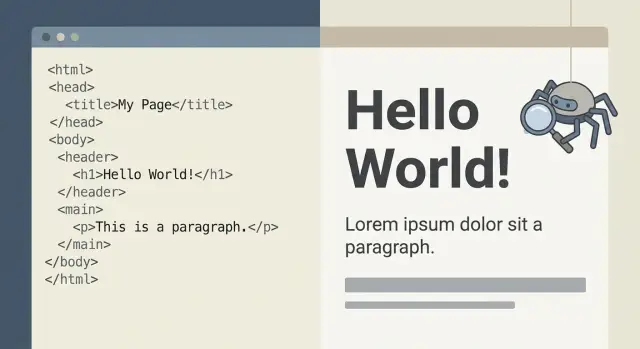
The core problem with JavaScript-heavy backlink targets
A JavaScript-heavy page can look perfect in Chrome, yet still be a weak SEO target. Your browser runs scripts quickly and fills in the content. Crawlers often start with an earlier, emptier version of the page, and they don’t always render everything right away.
On many sites, the first HTML response is basically a shell: a header, a few empty containers, and some script tags. The real page (pricing tables, feature lists, FAQs) appears only after JavaScript runs and triggers additional requests. If anything in that chain is slow or blocked, the crawler may not get the full content, or it may decide the page isn’t worth indexing.
That’s where backlinks for JavaScript-heavy pages can quietly lose value. The link points to a URL users love, but search engines may treat it like a thin page because the important text isn’t reliably visible when they process it.
A simple mental model helps:
- Browser view: runs scripts, waits, then shows the final version.
- Crawler view: fetches initial HTML first, may render later, and may time out or skip parts.
- SEO view: evaluates what’s consistently visible as text and links.
- Backlink view: passes authority to the URL you chose, even if the crawler thinks that URL has little content.
This gap creates predictable failure cases. A backlink lands on a page that redirects in an unexpected way, shows a loader for too long, hides text behind a login or cookie wall, or only reveals key sections after user interaction.
How Google sees JavaScript pages (plain language)
When Googlebot visits a page, it starts by downloading the first server response: the initial HTML.
If that HTML already contains the main text, headings, internal links, and key metadata, Google can understand the page quickly. If the HTML is mostly a shell (for example, one div plus a script tag), Google has to do extra work.
That extra work is rendering. Google runs the page’s JavaScript (in a simplified, crawler-friendly way) so content can appear. Rendering isn’t always immediate, and it can be incomplete when the setup depends on things that don’t load reliably.
Rendering is often delayed or incomplete when:
- The page needs multiple API calls before content appears.
- Content only shows after actions like clicks, scrolls, or dismissing banners.
- Important text is inserted late by client-side scripts.
- Resources Google needs are blocked (scripts, CSS, JSON).
- Canonicals or redirects change after scripts run.
Why this matters for backlinks for JavaScript-heavy pages: a backlink can only pass full value to a page Google can consistently fetch, render, and understand. If Google mostly sees an empty shell, your link may point to a URL that looks thin to the crawler, even if humans see a rich page.
A page can still rank a little today (especially on brand terms or low-competition queries) while having rendering gaps. When you later add stronger links, those links can be partially wasted if Google can’t reliably see the content you intended to boost.
A practical rule: Google has two chances to understand your page, first from raw HTML, then from the rendered version. If your most important content only exists in the second step, you’re relying on a slower and less predictable process.
Choose the right URL before you point a backlink
A backlink only helps the exact URL it lands on. On JavaScript sites, “the page” can have several versions that look the same to people but behave differently for Google. Pick the wrong one and you can end up sending authority to a redirect, a blank shell, or a URL your app changes next week.
Start by writing down the single URL you want to strengthen, character for character. Small differences (a trailing slash, a parameter, a hash) can change what content loads, or whether anything meaningful loads at all.
Pick a stable, crawlable target
Choose a URL that shows key content without needing clicks, logins, consent walls, or client-side steps like “choose a plan to see pricing.” If content appears only after a user action, Google may not reliably see it.
Before you approve the target, do a fast sanity check:
- Load the URL in a clean browser window and confirm the main text appears without interacting.
- Confirm it doesn’t bounce through multiple redirects.
- Remove tracking parameters and confirm the page is the same.
- Standardize the format (www vs non-www, http vs https, trailing slash vs no trailing slash).
- Avoid fragment-based URLs (anything after #) as SEO targets.
Match the canonical to your chosen URL
Even if a page loads fine, the canonical tag might point somewhere else. That’s Google’s hint for “this is the main version.” If your backlink points to a URL that canonicals to a different one, you’re effectively asking Google to transfer value away from your chosen target.
A simple rule: the URL you plan to use should match the canonical URL exactly, and it should match the version your internal links use most often.
Example: if /pricing?plan=pro canonicals to /pricing/, point the backlink to /pricing/. Otherwise, you may build authority for a URL your site doesn’t treat as the main page.
Step-by-step: run a render test and compare outputs
If you’re building backlinks for JavaScript-heavy pages, don’t assume Google will see what you see in your browser. Do a render test and compare what loads before scripts run versus what appears after.
1) Capture what you expect to be indexed
Open the page in a normal browser window (not logged in). Identify the exact pieces you want a backlink to support: the main heading, the key paragraph, primary product details, and any critical internal links.
Keep it simple: write down 3 to 5 must-show items, such as the H1, one key paragraph, plan names or feature text, and the most important internal links.
Then capture two snapshots:
-
View page source (the initial HTML) and copy a small body snippet where the main content should be.
-
Save the fully loaded HTML from the browser (for example, from DevTools) so you can compare it later.
2) Run a Google render test and save what Google sees
Use a tool that shows what Googlebot renders (for example, a live URL test in Search Console). Save the rendered HTML snippet around the main content and the screenshot. This is your baseline.
3) Compare initial HTML vs rendered HTML
The goal isn’t perfection. It’s confidence that the important content is reliably visible.
Check:
- Is the main text present in initial HTML, or only after scripts?
- Does the rendered HTML include the same headings and paragraphs you wrote down?
- Are key details missing unless you scroll, click a tab, or open an accordion?
- Does anything depend on a login, cookie action, or location picker?
If must-show items only appear after interaction, treat the page as a risky backlink target.
4) Repeat with a mobile view
If you can, repeat the render using a mobile user agent (or at least review the mobile screenshot). Many JavaScript issues show up only on mobile: delayed content, hidden sections, or different templates.
A good result is boring: the screenshot matches expectations and the main content appears without clicks, logins, or blockers.
Quick content checks: is the important text actually there?
Before you point backlinks for JavaScript-heavy pages at a URL, make sure the page contains real, readable content in HTML that Google can reliably see. If key text only appears after scripts run, you can earn a great link that sends equity to a page Google treats as thin.
Start with the basics: open page source (not the inspected DOM) and look for the title tag, a clear H1, and the main copy users should read. If those pieces are missing from initial HTML, the page likely depends on client-side rendering and late data fetching.
A quick way to spot trouble is to look for shell pages: lots of markup, but no substance. Common signs are big blocks of empty divs, loading spinners, or placeholder text where pricing, product description, or FAQs should be.
Content signals worth checking:
- A topic-specific title tag (not a generic app name)
- One visible H1 that matches the page intent
- Core paragraph text present as real text (not injected late)
- Navigation and breadcrumbs readable and consistent
- Important copy not trapped inside images or canvas
Navigation matters because Google uses it for context. If category links, header navigation, or breadcrumbs only appear after scripts run, crawlers can miss relationships between pages, and your backlink may not help the page you think it will.
Also watch for “text that isn’t text.” A headline baked into a hero image can look great but add little indexable content.
Indexing checks that matter before the backlink goes live
A backlink only helps if Google is allowed to index the page and can understand what it is. With JavaScript-heavy sites, a page can look fine in your browser but still be hard to index, or it can quietly signal “don’t index me.”
Start with index permission signals. Check the page source and response headers for a robots meta tag and any X-Robots-Tag header. A single noindex (sometimes added by staging configs or cookie-based variants) can make backlinks pointless.
Next, confirm the canonical is self-referential and stable. If the canonical points to a different URL (a category page, localized version, or tracking-free variant), your link equity may be credited somewhere else.
Status codes are another quiet trap. The first HTML response might be 200, but after render the app can swap to an error state, “not found” screen, or login wall. Google may treat that like a soft 404. When you run a render check, verify the rendered version still shows the content users should land on.
If you rely on structured data (FAQ, Product, Breadcrumb), make sure it exists in the rendered output Google sees. If markup is injected late or only for certain users, it may not be picked up.
Finally, watch pagination and faceted navigation. A backlink that lands on a filtered URL can send authority to a low-value variant rather than your main page.
Quick pre-flight checks before approving a target URL:
- No
noindexin meta robots and no X-Robots-Tag header - Canonical points to the exact URL you want to rank
- Rendered page shows the main content (not an empty or error state)
- Structured data appears after render (if you depend on it)
- Avoid parameter-heavy filtered variants unless that variant is intentional
Example: you plan to point a premium placement to /pricing?plan=pro. If the canonical points to /pricing and the rendered page hides pricing behind a region selector, the backlink’s value won’t land where you expect. Fix the target first, then place the link.
Common mistakes that waste backlink value on JS sites
The fastest way to waste a good backlink is to point it at a page where the real content isn’t reliably visible to Google. On JavaScript-heavy sites, small implementation choices decide whether Google sees a strong landing page or a mostly empty shell.
A common problem is content that only appears after a user action. If key text loads only after clicking a tab, opening an accordion, or choosing a plan, Google may index a version that misses the selling points.
Another frequent loss is targeting a URL that later redirects. A backlink to a campaign URL that 301s to a generic homepage can dilute relevance or pass value to the wrong page. Redirects aren’t always bad, but surprises are. Decide the final destination first, then keep it stable.
Mistakes that show up repeatedly:
- Linking to a page blocked by robots.txt or set to noindex
- Using hash-based routes (like
/#/pricing) where the meaningful path isn’t consistently indexable - A/B testing core content so Google and users see different headings or copy
- Pointing to URLs with tracking parameters that create duplicates
- Rendering so late that key text is missing when Google captures the page
A simple scenario: a React pricing page shows only a spinner until a pricing API call returns. On a slow response, the rendered snapshot might capture the spinner and a header, but not the plan details. From Google’s point of view, that’s a weak document.
Pre-backlink checklist (fast yes/no checks)
Before you point backlinks for JavaScript-heavy pages at a URL, answer one question: will Google reliably see the content your link is meant to support?
Use these yes/no checks. If you hit a “no,” fix that first or choose a different target.
- Does the raw HTML show real content? In “view source,” you should see a meaningful title plus at least a short summary of the page.
- Does the rendered output match what users see? In a rendering test, confirm the headings and core copy appear without needing a click.
- Is access stable without clicks, cookies, or popups? The page should load the same way in a clean browser.
- Are signals aligned? Canonical, robots, and (if you use it) hreflang should all support the same URL.
- Will the URL still exist in 3 to 6 months? Avoid short-lived campaign URLs and unstable parameter versions.
Example: if your React /pricing page shows prices only after an animation finishes, a render test may reveal Google captures the page before that content appears. In that case, link to a simpler pricing summary URL, or adjust rendering so the core text is available immediately.
Example: a React pricing page that renders late
Picture a SaaS site with a React pricing page. The URL looks perfect for a backlink because it’s high intent. The catch is that the plan cards (Starter, Pro, Enterprise) load from an API after the page boots.
In a browser, you see clean cards with prices, features, and a “Start trial” button. But the initial HTML is mostly a shell: a title, empty divs, and a script bundle. The plan details only appear after JavaScript runs and the API call finishes.
A Google rendering test makes the problem obvious. In the rendered HTML output, key plan text is missing or incomplete. Sometimes you only see placeholders like “Loading…” or empty containers. That means a crawler might not reliably see what users see, especially when rendering is delayed, blocked, or inconsistent.
This is where backlinks for JavaScript-heavy pages lose value. You can point a great backlink at the pricing URL, but if Google can’t consistently render the plan content, the page may rank worse than expected, or the link may strengthen a thin shell.
Common fixes include:
- Server-side rendering (SSR) so the first response includes plan names and feature text
- Pre-rendering for the pricing route
- Putting critical “money text” into initial HTML, then enhancing with React
- Reducing API dependency for essential plan data
- Unblocking resources that fail during rendering
While a fix is being built, consider targeting a different URL: a pricing overview that’s mostly static, a comparison page, or a “plans” page that already returns real text in initial HTML.
Next steps: validate after placement and scale safely
Once a backlink is live, confirm the target still renders the same way it did when you approved it. Re-run the same render and indexing checks using the exact URL the link points to (including trailing slash, parameters, and canonical behavior). If the render output changed, assume the link value is at risk until you know why.
Watch for quiet template changes
JavaScript-heavy sites often break without anyone noticing. A small release can move key text behind a click, swap real headings for placeholders, or load the main copy only after a slow API call. The page still looks fine to humans, but Google may see thin content.
A practical rule: if important text isn’t present quickly and consistently in rendered HTML, don’t build more links to that page until it’s fixed.
Build a simple scaling cadence
You don’t need a complex dashboard. You need a repeatable habit that catches problems early, especially on pages you link to the most.
A lightweight cadence:
- Within 24-72 hours after placement: rerun a render test and confirm the indexed URL is the one you intended.
- Weekly (first month): spot-check your top linked pages after any deploy.
- Monthly: recheck top linked pages and any page that changed templates.
- After major redesigns: assume everything changed and re-validate before adding new backlinks.
If you’re using a curated placement source like SEOBoosty (seoboosty.com) to secure premium backlinks, these checks matter even more. Strong links are only as effective as the page you point them at.
Keep a simple log (date, target URL, render status, index status). When something breaks, you’ll know when it changed and which backlinks might be affected.
FAQ
Why can a good backlink feel “wasted” on a JavaScript-heavy page?
If the page’s main content only appears after JavaScript runs, Google may see a mostly empty HTML shell first. That can make the target look “thin,” so the backlink’s value may be weaker than you expect even if the page looks great in a browser.
What makes a URL a “safe” backlink target on a JS site?
Prioritize a URL where the core text (title, H1, key paragraphs, and important internal links) is present without clicks, logins, cookie walls, or waiting on long API calls. If the page needs interaction to reveal the important sections, it’s a risky backlink target.
How do I quickly check whether Google can see the content without rendering?
Open “view page source” and search for the title tag, an H1, and a few sentences of the main copy you want indexed. If you mostly see empty containers and script tags, the page likely depends on client-side rendering and may be unreliable as a link target.
How can the canonical tag redirect my backlink value to another page?
A canonical tag tells Google which version is the main one. If your backlink points to a URL that canonicals to a different URL, you’re often sending authority to the canonical instead of the URL you chose.
Do small URL differences like trailing slashes or parameters really matter for backlinks?
Because small differences can create different crawlable URLs, duplicates, or redirects. A trailing slash, a tracking parameter, or switching between www and non-www can change which URL Google treats as the primary version.
Why should I avoid hash-based URLs (anything after #) as backlink targets?
Google typically ignores fragment identifiers for indexing, and many JS apps use them for client-side routing. That means a URL with a hash can be a weak or inconsistent target, even if it works for users in the browser.
Are redirects always bad when placing backlinks?
A 301 can be fine if it’s stable and intentional, but surprise redirects often dilute relevance or send authority to a page you didn’t mean to strengthen. The safest approach is to point the backlink directly at the final, canonical destination that you want to rank.
How do I run a render test to confirm what Google actually sees?
Use a live render check (such as a URL inspection render) and compare what you see in initial HTML versus the rendered output. If the rendered snapshot is missing your “must-show” text or shows spinners, placeholders, or a login state, treat that page as a poor target until fixed.
What’s the most practical fix if my key content loads too late?
Server-side rendering (SSR) or pre-rendering can place the important text in the first HTML response so Google doesn’t have to wait for scripts and API calls. A simpler alternative is to make sure critical copy is in the initial HTML and enhance it with JavaScript instead of generating it late.
After a backlink goes live, what should I verify to protect its value?
Re-check the exact URL the link points to and confirm the page still renders the same way, remains indexable, and keeps the same canonical. If you’re buying premium placements (for example, through SEOBoosty), this step is especially important because strong links only help if the target stays crawlable and consistent.
Share