Backlinks for product education mini-courses: build a hub
Backlinks for product education mini-courses help your lesson hub rank for learning intent and guide readers into product activation in a natural way.
Why mini-course hubs struggle to rank
A mini-course can be genuinely helpful and still pull in almost no search traffic. Most of the time, it’s not because the content is bad. It’s because search engines don’t see it as the best answer yet.
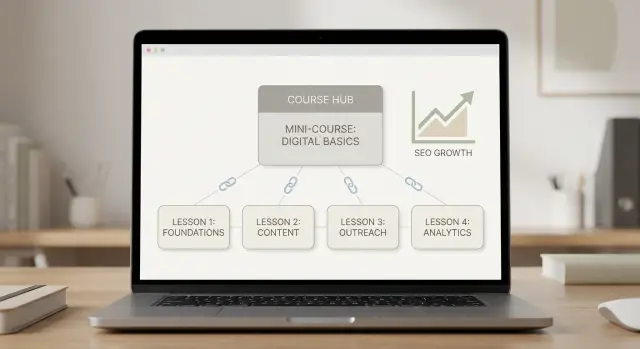
A multi-lesson hub is one parent page plus a set of lesson pages. Each lesson answers one clear question and can stand on its own in search. It’s not a grab bag of blog posts. It’s also not a sales page with a few tips sprinkled in. The point is to teach one topic step by step, with a clear path from beginner to “I can do this now.”
Teams usually miss the “searchable lesson” part. Lessons get published with vague titles, mixed topics, or no clear payoff. Then pages compete with each other, none becomes the obvious result, and the whole hub stalls.
Authority is the other blocker. Even excellent writing struggles on a new or low-authority site because there aren’t enough trust signals. If reputable sites don’t link to your hub, search engines have less reason to rank it above older guides.
“Routes users into activation” sounds like product jargon, but it’s simple: move someone from “I’m trying to understand this” to “I can do this inside your product” without forcing it. A good hub does that by teaching one action per lesson, showing a real example or template, pointing to the next lesson, and offering an optional product step when it fits.
When the hub is discoverable (each lesson matches a real search intent) and trusted (it has authority), it can rank and reliably turn learners into users.
Plan the hub: lessons, outcomes, and reader flow
Start with one main hub page. It’s the table of contents plus a clear promise: what someone will be able to do after finishing, and roughly how long it will take.
Then build 5-12 lessons that each solve one problem. That range is usually big enough to cover a topic properly, but small enough that people will actually finish.
Before writing, define the journey from beginner to first success. “First success” should be a real win a new user can reach in under an hour, like creating a first project, importing data, or publishing a first report.
A simple planning template keeps lessons tight:
- Hub outcome: one sentence describing the end result.
- Lesson outcome: one sentence per lesson (skip “overview” lessons).
- Proof step: the action that confirms it worked.
- Next step: the next lesson in the sequence.
- Soft CTA: a low-pressure product action that matches the lesson.
Soft CTAs work when they feel like the natural next click, not a pitch. Early lessons can invite readers to try a sample, use a template, or compare setups. Later lessons can invite them to start a trial, book a short call, or complete the step inside their account.
Example: a time-tracking SaaS mini-course might go like this. Lesson 1 sets up a workspace. Lesson 2 creates a first project. Lesson 3 invites a teammate. Lesson 4 runs the first weekly report. Lesson 5 fixes the most common mistake. That sequence turns learning intent into a clear path to activation.
This structure also makes promotion easier. People can link to the hub for the big promise, or to a lesson for a single question.
Keyword research for learning intent
Learning intent keywords come from people trying to understand something, not buy something. That’s exactly what a mini-course hub is for: rank when someone is ready to learn, then guide them to the next step.
Start by collecting queries that signal “teach me” behavior. Common patterns include “how to” + a task, “examples,” “best practices,” “template,” “checklist,” “step-by-step,” “common mistakes,” and “what is” vs “how do I.”
Next, separate discovery keywords from product-focused keywords.
- Discovery keywords belong in lessons. They earn trust and traffic.
- Product-focused keywords belong in the hub intro, lesson CTAs, and activation pages.
A quick test: if the query can be answered without naming your product, it’s discovery. If it includes “tool,” “software,” “pricing,” “integrations,” or your category name, it’s product-focused.
Then group keywords into lesson-sized topics. Each lesson should solve one clear problem. If a topic needs more than a few key points, split it into two lessons.
Example: a SaaS onboarding mini-course might group “how to set up onboarding emails” with “onboarding email examples,” but keep “onboarding checklist template” as its own lesson because it attracts a different kind of searcher.
Finally, pick one primary keyword for the hub and one per lesson. Make lesson keywords more specific so each page has a clear reason to exist and rank.
On-page setup that makes each lesson searchable
A mini-course hub should read like a friendly guide, but it also needs clear signals for search.
On the hub page, open with a short intro that answers three questions quickly:
- Who is this for?
- What will they be able to do after finishing?
- How long will it take?
Add a table of contents near the top and make lesson titles match real queries. “Lesson 1: Set up SSO” is vague. “Lesson 1: How to set up SSO in 10 minutes” is closer to what people actually type.
Make lessons easy to scan (and easy to index)
Inside each lesson, use a consistent structure so readers know what to expect. Use one clear H1 for the lesson topic, then a few tight H2s that map to steps or questions. Short sections beat long walls of text.
A simple pattern:
- What you’ll learn (1-2 sentences)
- Prerequisites (only if needed)
- Steps with short headings
- Common mistakes
- Result check (how to confirm it worked)
End every lesson with a summary and a next action
Don’t let the last paragraph fade out. Add a 2-3 sentence summary that restates the outcome, then one obvious next action that moves the reader forward.
Example: after a lesson on importing contacts, close with: “You now have your contacts in place. Next, create your first segment so you can send a targeted campaign.” That handoff is what turns a learner into an activated user.
Internal linking that moves readers toward activation
A mini-course hub should feel like a guided path, not a pile of lessons. Internal links do the guiding, and they help search engines understand what the hub is about.
Start with a simple rule: every lesson links back to the hub, and the hub links out to every lesson. That loop helps skimmers who want the overview and deep readers who want the next step.
Build two paths: skimmers and completers
Most visitors arrive with learning intent, but they won’t all read in order. Give them two obvious routes.
On the hub, include a clear “Start here” pointer to Lesson 1. At the end of each lesson, include a “Next lesson” link to keep momentum.
For people who just want the answer fast, add a short “Jump to the lesson you need” section on the hub that points to the most common problems.
Internal links that tend to work well:
- On the hub: one-sentence lesson blurbs with plain titles
- On each lesson: a “Back to the hub” link near the top
- After the helpful part: a “Try it in your account” CTA to the relevant product page
- When needed: 1-2 links to prerequisite lessons using clear anchors
- At the end: a short “What to do next” block with one link to the next lesson and one activation option
Place activation CTAs after the teaching, not before. If a reader came to learn, a salesy button at the top feels like a trap. A better pattern is: teach, show a quick example, then offer the next action.
Example: someone searches “how to invite teammates” and lands on Lesson 3. After they follow the steps, the page offers “Invite your first teammate” and then “Next lesson: roles and permissions.” The links match what they expect, so they keep moving instead of bouncing.
Step-by-step: earning backlinks for your mini-course hub
Backlinks work best when you give people something worth citing. For product education mini-courses, that usually means one strong hub page plus one standout lesson that feels like a reference.
Start small and pick 1-2 link-worthy assets: the hub (outcomes, lesson list, who it’s for) and one flagship lesson (the most searched, most valuable problem).
Next, decide what should rank first.
- If lessons are narrow and specific, push links to the flagship lesson first.
- If lessons are tightly connected and you want visitors to explore, prioritize the hub first.
You can do both, but don’t split effort too early.
Your pitch angle should fit in one sentence: what does the hub help people do, and why is it better than a random blog post? Strong angles usually include a clear outcome, a short path (3-5 lessons), and a concrete template or checklist.
A practical link-building order:
- Secure a few high-quality backlinks to the hub page.
- Add a smaller set of backlinks to 1-2 key lessons.
- Keep anchor text natural: mostly your brand name, the hub name, and a few descriptive phrases.
Then watch what search engines respond to. In Search Console, look for pages gaining impressions, not just clicks. If a lesson starts showing up for “how to” queries, support it with one more relevant backlink and refresh the lesson with clearer steps.
Example: if your hub teaches “Reports in 30 minutes,” and the “First dashboard” lesson starts getting impressions, that’s a signal to expand with a second dashboard lesson and reinforce the hub.
If you want a faster path to placements, SEOBoosty (seoboosty.com) offers subscription access to premium backlinks from highly authoritative websites. In practice, that can be a straightforward way to point stronger links at the hub first, then reinforce the lessons that start showing traction.
Choosing backlink sources and anchor text
Not all backlinks help a mini-course hub. A mention from a respected site in your space can lift rankings and send the right people. Random links from unrelated pages often do nothing, and can make your link profile look forced.
When picking sources, think about who already teaches, reviews, or compares products like yours. Depending on your niche, that might include software newsletters, industry publications, niche blogs that publish how-to guides, or community resource pages.
Before investing time or budget, check four things: relevance (their readers would need your mini-course), trust (real authors, real content, a publishing track record), context (the link can sit inside an educational paragraph), and stability (the page is likely to stay live).
Anchor text matters just as much. If every link uses the exact same keyword, it looks manipulated. If every anchor is a sales pitch, it attracts the wrong clicks.
A healthier mix includes your brand name, the hub title, and plain phrases people naturally use, like “product setup mini-course” or “lesson series on reporting basics.” Use exact-match phrases sparingly, and only when they fit the sentence.
Point most new links to the hub because it’s the best entry point for learning intent. Add a smaller number of links to specific lessons when a lesson answers a common search (like “how to import data”) and the linking page is clearly about that task.
Common mistakes and traps to avoid
The biggest ranking failures are rarely “SEO tricks.” They’re usually simple missteps that make lessons hard to trust, hard to find, or hard to act on.
One common trap is building links to everything at once. When you spread effort across the hub, every lesson, and every supporting post, nothing gets enough lift. Pick one hero page to earn most of the authority first (often the hub or the flagship lesson), then use internal links to pass value to the rest.
Thin lessons are another quiet killer. If a lesson promises a clear outcome but only delivers a few tips, readers bounce and search engines notice. Each lesson should fully answer the query: define the concept, show a simple example, and end with one practical action.
Mistakes to watch for:
- Repeating the same intro across lessons without adding value
- Letting the hub outline drift away from the actual lesson titles and steps
- Overusing exact-match anchors (it reads unnatural)
- Sending visitors to pricing too early
- Measuring success only by traffic, not by lesson completion and next-step clicks
Don’t ignore maintenance. If you rename a lesson, change the flow, or update screenshots, update the hub page and lesson intros the same day. An outdated hub feels abandoned.
Example: someone searches “how to set up onboarding emails,” lands on Lesson 2, and sees “Buy now” before any template or explanation. They leave. A better path is: explain the approach, show a starter template, then offer a low-pressure next step.
Quick checklist before you promote the hub
Promotion works best when the hub already feels complete and easy to move through.
Start with the hub page. A visitor should understand who the mini-course is for, what they’ll be able to do after finishing, and how long it takes. If that’s fuzzy, you’ll earn clicks but lose trust.
Then check each lesson on its own. People often land on Lesson 3 from search, not the hub. Each lesson should answer one main question, give a simple takeaway, and clearly show what to do next.
A quick pass that catches most issues:
- The hub promise focuses on one audience and one outcome.
- Every lesson has a single focus, a clear “you can now…” takeaway, and a short recap near the end.
- Navigation is consistent: hub to lessons, lessons to hub, and previous/next works the same way.
- Each page ends with one next step that matches the reader’s stage (learn, try, or adopt).
- You have a basic outreach plan: a list of specific pages to target for backlinks, plus a few anchor options.
Do one realistic test. Ask a teammate to Google a lesson topic, land on a lesson, and complete the next step (start a trial setup, run a checklist, or complete a key action). If they hesitate because they can’t find the hub, don’t understand the sequence, or aren’t sure what to do next, fix that before promotion.
Example: turning a searcher into an activated user
A new user types a how-to query like “how to set up weekly KPI emails” and finds Lesson 1 of your mini-course. The page answers the question quickly, then makes it clear it’s part of a short series.
Near the top, they see a small hub box: “5 lessons, 25 minutes total.” The path is visible, so the series feels finishable. They click through, skim the lesson titles, and save the hub because it feels like a complete plan, not a one-off post.
They return to Lesson 1 and hit a short “Try it now” section. It’s not a big pitch. It’s a small action that matches the lesson.
By Lesson 3, they’re ready to do something real. The lesson offers a one-page worksheet or template they can copy in two minutes. It works even if they aren’t a customer yet, but it also fits neatly inside your product.
Now the CTA feels earned: “Create a free account to save this worksheet and run it with live data.” It’s tied to the task they already want to complete.
The flow works because each lesson satisfies one clear question, the hub shows progress and outcomes, a worksheet turns reading into doing, and the CTA promises one specific benefit tied to the worksheet.
Next steps: improve, expand, and support rankings
A mini-course hub is never really “done.” The fastest wins usually come from small updates based on what search data already tells you.
Track three numbers each week: impressions, clicks, and the lesson-to-activation rate (how many readers start a trial, book a demo, or complete your key setup step after reading). If impressions rise but clicks stay flat, your pages are being shown but not chosen.
High-impact fixes:
- Refresh titles and descriptions on lessons with high impressions and low clicks.
- Tighten the first screen of each lesson with a one-sentence takeaway and a quick example.
- Add one simple text-based checklist where it helps.
- Make the CTA match the lesson (a template, a setup step, a default configuration).
As you begin ranking, you’ll see new queries appear in Search Console. Turn the best into 1-2 new lessons per month, and link them into the hub. If you start showing up for “how to set up alerts” and you only mention it briefly, that’s a clear lesson opportunity.
Backlinks help keep the whole hub strong, not just one page. Plan a pace you can sustain: steady links to the hub, plus occasional links to the 2-3 lessons that drive the most learning and activation.
Do this for 8-12 weeks and you’ll usually see compounding results: more impressions, clearer rankings on lesson-level queries, and a smoother path from search traffic to real product usage.
Share