Backlinks for mobile app landing pages: one canonical URL
Backlinks for mobile app landing pages help you rank one canonical page, avoid split signals, and support both web SEO and app discovery over time.
Why app pages often struggle to rank
Mobile apps get mentioned everywhere, but the SEO value usually gets scattered. One article links to the App Store, another points to Google Play, your PR hits a homepage, and paid ads land on a campaign page that later disappears. Each destination collects a little trust, but none of them gets enough to stand out in search.
App store pages are also hard to build around. You can’t fully control their structure, and you can’t easily add the supporting content that helps search engines understand the product: use cases, comparisons, FAQs, changelogs, and problem-focused pages.
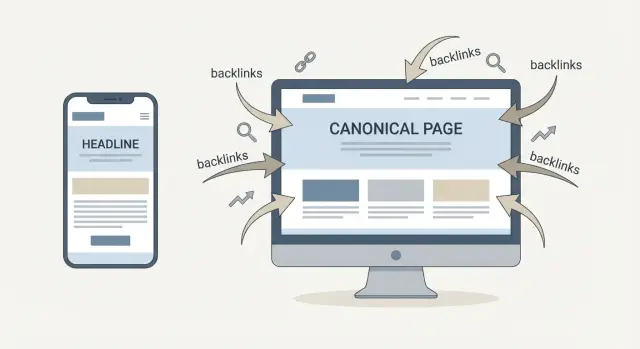
Consolidating signals means sending as many “votes” as possible to one page you control, so that page gets the credit. In practice, those votes are backlinks, brand mentions, and engagement that all point to the same canonical landing page instead of being spread across a dozen URLs.
The goal isn’t to stop people from installing the app. It’s to make one web page rank for the queries you care about, while still giving visitors obvious install options (and sending them to the right store when they’re ready).
Set expectations: this is steady, compounding progress. A few links rarely flip rankings overnight. Consistent links to one canonical page build authority month after month.
What a single canonical app landing page is
A single canonical app landing page is the “home base” for your app on the web. It’s the page you want search engines to rank, and the page you want most people (and most backlinks) to point to.
This matters because app marketing creates competing URLs: store listings, a homepage, features pages, pricing pages, campaign pages, and tracking links. When attention and links get spread across many pages, your SEO signals split too. A canonical page consolidates authority and makes it easier for Google to understand what to rank.
For most apps, one canonical page is the simplest and strongest option when you have one main product name and one primary use case, want to rank for both branded and non-branded queries, or run campaigns that would otherwise create lots of extra URLs.
You may need more than one canonical-style page if the products are genuinely different (multiple apps under one brand, separate audiences, or truly distinct regional and language versions).
Success looks like clearer intent and lift across a few signals: more branded search, more rankings for “feature” and “problem” terms, and more high-intent visits that turn into installs or sign-ups.
Choosing the right canonical URL
Pick one main page that every backlink, press mention, and social profile can point to. This is the easiest way to avoid splitting authority across a homepage, an /app page, and a rotating set of campaign URLs.
Start by deciding what you want the page to rank for. If you’re a new app, the safest early target is usually your brand name plus a simple use case (for example, “BrandName habit tracker”). If you already have demand, you can widen to a category term (like “expense tracker app”) or a specific problem (like “scan receipts to expenses”). One page can cover a few closely related phrases, but it should have one clear theme.
A good canonical URL is boring on purpose: clean, readable, and stable for years. Avoid dates, version numbers, and tracking parameters. If you rename the app later, keep the URL stable and update the on-page text. Changing the URL is where a lot of earned value disappears.
A simple set of rules helps:
- Keep the path short (like /app or /your-app-name).
- Put the canonical page on your main domain, not a separate microsite.
- Choose HTTPS and one format (with or without a trailing slash) and stick to it.
- Don’t make a rotating campaign page the “main” destination.
If you plan to go international, don’t create near-duplicate pages too early. Use one primary canonical page, and only add language URLs when you can truly localize the content.
What to put on the landing page so links work harder
A backlink works best when it points to a page that answers a visitor’s first questions quickly. That usually means a focused page that explains the app in plain language and makes installing easy.
Above the fold, keep it simple: one clear headline that says what the app helps people do, a short value statement, and a few screenshots that show the real flow (not just the prettiest screens). If you have trust signals that are verifiable, place them close to the headline.
Make install paths impossible to miss. App Store and Google Play buttons should be visible without scrolling, and repeated again after the first main content block.
Questions people check before they install
Even good apps lose installs to small doubts. Cover the basics in plain language:
- Pricing (free, trial, subscription, and what’s included)
- Supported devices (iOS/Android versions and key limits)
- Privacy basics (what you collect, what you don’t, and why)
- Onboarding (the first 2-3 steps after install)
- Support (how users get help)
Then add a short FAQ based on real searches. Use questions people actually type, not internal product terms.
Lightweight proof that feels real
A few honest signals beat a wall of logos. Use one or two short user quotes, a small rating snippet, or a single press mention, but only if you can verify them. Specific beats exaggerated every time.
Technical setup that prevents split SEO signals
The biggest threat here is signal splitting. It happens when the same page exists in many versions: tracking parameters get indexed, regional copies compete, or a page builder duplicates a landing page for each campaign.
Pick one true URL and make everything else point back to it. If you must use variants (UTM parameters, /us/ and /uk/ versions), use a canonical tag that names the main page. Keep redirects consistent too: if you advertise a short campaign URL, it should always end up on the canonical page.
Keep duplicates from multiplying
Ad tools and landing page software often create “copy of” pages. That’s fine for testing, but not for SEO. Block test pages from indexing, or merge them back into the canonical page when the test ends.
Make the page send one clear message
Use one stable title and meta description aligned with the page’s main theme. If the headline and title tag are pulling in different directions, you’re making the page compete with itself.
Mobile performance matters because most visitors arrive on phones. Make the page fast, easy to read, and easy to tap. Store buttons should open the correct store reliably.
A quick spot-check that catches most issues:
- Load the page with and without tracking parameters and confirm it resolves to the same canonical URL.
- Search your CMS for near-duplicates from old campaigns.
- Test the page on a mid-range phone on mobile data.
- Tap both store buttons with your thumb a couple of times.
Step by step: a backlink plan for app landing pages
Backlinks work best when they point to one place: your canonical app landing page. That builds one strong URL instead of splitting credit between blog posts, help docs, and store listings.
Start by tightening what you already control. Find the pages on your site that mention the app (homepage, pricing, blog posts, docs, about page) and make sure they link to the canonical page, not directly to the app stores.
Then follow a plan you can repeat:
- Update 5-10 internal pages to link to the canonical page.
- Add 2-3 “linkable” angles either on the landing page or as supporting content (a comparison table, a small stats snapshot, templates, clear use cases).
- Pick a handful of realistic link sources that already cover your category (industry publications, newsletters, roundups, resource pages).
- Use a small, natural set of anchor styles: brand, partial match, and plain phrases like “see features” or “download options.”
- Review monthly: rankings for your main terms, referral visits, and installs or sign-ups that start on the landing page.
A practical example: if your app helps teams scan receipts, a small accuracy test (even 50 samples) can earn mentions from finance blogs and tool roundups. Send those links to the landing page, then route users to iOS/Android from there.
Anchor text and link destinations that stay natural
If every backlink uses the exact same keyword, it looks forced. Real sites link in varied, messy ways. A natural mix also protects you if one keyword cools off or your positioning changes.
Aim for variety while keeping meaning consistent. Use the same app name everywhere, and stick to one simple category description. If different sites describe you in completely different terms, the signals get blurry.
A mix that usually reads well:
- Brand anchors (your app name)
- Naked URL anchors (the page address)
- Descriptive phrases tied to the use case
- Soft variants (not the exact same “perfect match” every time)
- Contextual mentions inside a sentence
Point most links to the canonical landing page. Supporting pages are still useful, but they should link internally back to the canonical page so they support the topic without competing for the same intent.
Supporting app discovery without sending all links to the store
Web SEO and app discovery do different jobs. Web SEO helps your page show up in search results. App discovery helps your listing get found inside the App Store and Google Play.
If you send every backlink straight to the store, you lose the chance to rank a page, explain the app, and capture people who aren’t ready to install yet.
A canonical landing page lets you keep one home base for SEO signals while still making installs easy. The page can route people to the right store based on device, while keeping backlinks pointed at one URL.
Track what each source drives, not just installs:
- Organic visits to the canonical page
- Referral traffic from specific placements
- Store button clicks and installs
- Early interest signals like time on page and branded searches
Keep your promise consistent. If your landing page leads with “15-minute meal planning,” but the store listing leads with “calorie tracker,” people hesitate. Align the core message and the top screenshots across both.
Example: consolidating signals for a new app launch
A three-person team launches a habit tracker app. They can’t run big campaigns or publish a ton of content, so they make every mention count.
They build one canonical landing page on their domain. It explains who the app is for, what problem it solves, and what makes it different. Then they point everything to that page: social bios, outreach, small paid ads, and partner mentions. The app store pages still matter, but they’re treated as install destinations, not the place to build long-term authority.
Over the next month, they focus on a few relevant mentions instead of dozens of random links: a niche productivity newsletter blurb, a small tech roundup, and an indie founder community post. Because those mentions all point to one URL, the signals stack instead of splitting.
They also keep improving the page based on real queries:
- Add an FAQ for questions people actually ask.
- Clarify pricing and what’s free vs paid.
- Expand “How it works” into a simple 3-step flow.
- Add a short comparison paragraph for common alternatives.
One page becomes the home for both SEO and discovery signals, and each new mention has a bigger impact.
Common mistakes that waste backlinks
The biggest waste is splitting links across too many destinations. If half your mentions point to the App Store, a few go to a shortlink, and others go to tracking URLs, your main page never builds enough authority to rank.
Another quiet killer is changing the canonical URL whenever you redesign. A new slug, a new subdomain, or a fresh landing page builder link can reset momentum. Keep one stable canonical page and update it instead of moving the target.
Thin pages are also common. If your landing page is basically a banner, two screenshots, and a “Download” button, it reads like an ad. Links work harder when the page answers real questions: what it does, who it’s for, key features, pricing, privacy basics, and simple FAQs.
Anchor text can waste value too. Repeating the exact same keyword phrase in every link looks unnatural. Mix brand anchors with natural phrases people would actually use.
Finally, slow mobile pages can make good links feel “broken.” If the page takes too long to load, people bounce.
Quick checklist before you build more links
Before you spend time or money on more links, make sure the page you want to rank is clear to search engines and genuinely useful to visitors.
Confirm you have one canonical URL and you use it everywhere (press kit, social profiles, email signature, partner pages, ads). If people keep sharing different versions, your signals split.
Then review the landing page like a first-time visitor. It should quickly answer what the app does, who it’s for, and why it’s better. Add proof you can back up, clear screenshots, and obvious install buttons. If the page feels thin, links won’t rescue it.
5 checks that prevent wasted link equity
- No competing duplicates (indexable tracking parameters, regional copies, old campaign clones, HTTP vs HTTPS).
- Canonical tag points to the chosen URL, and internal links prefer that same URL.
- Most existing backlinks point to the canonical page, not the store listing or random posts.
- Anchor text looks varied and human, not repeated “perfect match” phrases.
- The page loads fast on mobile, and the main content is visible without extra taps.
Finally, set a monthly pulse check: keyword positions, referral visits, and installs (or store click-outs). If installs rise but rankings don’t, you may be sending too many links to non-canonical destinations. If rankings rise but installs don’t, the message or install flow needs work.
Next steps: a simple plan you can keep up with
Make sure every strong backlink has one obvious place to go: your canonical app landing page. That single decision prevents months of scattered progress.
Your first week (keep it small)
- Choose your canonical URL and commit to it long-term.
- Improve the page so it earns trust quickly: clear value, screenshots, FAQs, and a simple call to action.
- Pick 5-10 realistic starter link targets that fit your audience, and point them to the canonical page (not the store).
You’re not trying to “win SEO” in seven days. You’re building a clean system so each future link adds to the same pile of authority.
Tracking that is “good enough”
Check monthly, not daily. For most teams, this is enough: organic visits to the canonical page, a short list of tracked keywords, conversions (email signups or clicks to the store), and new referring domains.
If you want to accelerate the “hard-to-get” side of link building, SEOBoosty (seoboosty.com) focuses on securing premium backlinks from authoritative sites. The key is the same either way: give every placement your single canonical URL and keep it stable so the value compounds.
Steady improvements beat one big push. One page, consistent links, monthly reviews, repeat. "}
FAQ
Should my backlinks point to my App Store/Google Play page or my website?
Use one canonical landing page you control as the main destination for mentions and backlinks. Keep App Store and Google Play pages as install endpoints, but funnel SEO signals to your own page so authority isn’t split across many URLs.
Why do app pages often struggle to rank in Google?
Because marketing creates lots of competing URLs: store listings, homepage, features, pricing, PR links, tracking URLs, and short-lived campaigns. When links and attention spread out, each page gets too little authority to rank well.
How do I choose the right canonical URL for my app?
Pick one stable, clean URL on your main domain that you can keep for years. Avoid dates, version numbers, and tracking parameters, and don’t use a rotating campaign page as the “main” destination.
When do I need more than one canonical-style page?
If the apps are genuinely different products with different audiences, or you have truly distinct language/regional versions you can properly localize. Otherwise, start with one canonical page and expand only when you have a clear reason.
What should I include on the landing page so backlinks work better?
Answer the first questions quickly: what the app does, who it’s for, core benefits, real screenshots, and obvious install buttons. Include practical basics like pricing, device support, privacy summary, onboarding steps, and support info so the page doesn’t feel like a thin ad.
How do I stop SEO signals from splitting across duplicate URLs?
Make sure variants don’t get indexed as separate pages. Use a canonical tag pointing to the main URL, keep redirects consistent, and prevent test/campaign clones from being crawlable so all signals consolidate to one destination.
What’s a simple backlink plan for an app landing page?
Start with what you control: update internal pages (homepage, pricing, blog, docs) to link to the canonical page. Then earn a small number of relevant mentions and send them to that URL, reviewing monthly for rankings, referral traffic, and conversions.
What anchor text should I aim for so links look natural?
Use a natural mix: brand name, the plain URL, and short descriptive phrases tied to the use case. Avoid repeating the exact same keyword in every link, and keep most links going to the canonical page to build one strong asset.
How does a canonical landing page support both web SEO and app discovery?
Web SEO helps you rank a page that explains the product and captures people who aren’t ready to install yet. App discovery helps store listings inside the stores; you can support that with great store pages while still pointing most backlinks to your canonical web page.
What are the most common mistakes that waste app backlinks?
Most often: links split across store listings, shortlinks, tracking URLs, and random pages; the canonical URL changes during redesigns; the landing page is too thin to earn trust; anchor text is unnaturally repetitive; or the mobile page loads so slowly visitors bounce.
Share