Brand-safe backlink anchors: control sentiment in link copy
Learn how to pick brand-safe backlink anchors and surrounding copy that keep sentiment positive and avoid risky associations on partner sites.
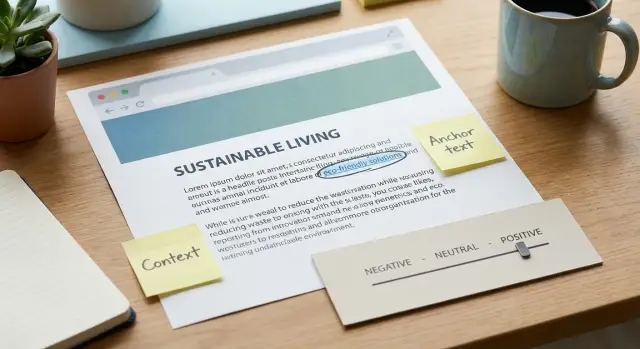
Why backlinks can hurt brand sentiment
A backlink can help SEO and still hurt your brand. People don't read links as technical signals. They read them like a sentence about you. If that sentence suggests something negative, the link can plant the wrong idea in a reader's mind.
This shows up most on pages that warn, compare, or try to sound brutally honest. The writer might not dislike your company, but their wording creates a negative frame. Over time, those frames stack up across search results, roundups, and forum-style posts.
Some common frames that stick even when the link is legitimate:
- "cheap" (often heard as low quality, not just low price)
- "risky" (suggests danger or poor support)
- "complaint" (pulls you into a problem story)
- "scam" (even "not a scam" leaves the word behind)
- "avoid" or "warning" (creates fear before the click)
To keep links brand-safe, focus on two parts of link copy:
Anchor text is the clickable words (your brand name, product name, or a topic phrase). Surrounding copy is the sentence, headline, caption, bullet label, or table row that sits next to it. The surrounding copy usually carries the emotion. The anchor is just the label.
A safe anchor can still feel harmful if the nearby words do the damage. "BrandName (risky for beginners)" lands very differently than "BrandName (simple setup for beginners)," even if the anchor is identical.
The goal isn't to make every link sound like an ad. It's to keep the meaning calm, clear, and neutral-to-positive so your backlinks improve rankings without quietly dragging down trust.
How people (and algorithms) read anchor text and context
Readers rarely interpret a link in isolation. They scan the words right before and after it to decide what the link means. If the nearby copy sounds skeptical, cheap, or risky, the link inherits that tone.
Anchors also set expectations. "Pricing" feels different from "plans," "support," or "how it works." Even when the destination page is the same, the anchor can change what someone assumes about your brand.
Search engines do something similar at scale: they use the anchor and surrounding text to understand what others think the page is about. That's why brand-safe backlink anchors are a messaging decision, not just an SEO one.
Tone can flip fast based on where the link sits. A neutral anchor can look negative if it's placed under a harsh headline or inside a sarcastic bullet.
Where context changes meaning the most
Context tends to distort meaning most when links appear in places designed for judgment or shortcuts, such as:
- headlines and subheads
- "pros and cons" sections
- complaint, warning, or alternative lists
- image captions and pull quotes
- comparison tables (especially labels like "budget")
Context also travels. Pages get quoted, scraped, translated, and reposted. The snippet that survives is often the anchor plus a few words around it. If that fragment contains a negative adjective, it can become the default description of your brand in places you never intended.
A link after "avoid these mistakes" reads like a caution sign. The same link after "here's a clear guide" reads like help.
Create a simple brand-safety word list
A brand-safety word list is a short set of "yes" and "no" terms that guides how backlinks talk about you. It prevents anchors and nearby sentences from hinting at things you'd never want associated with your name.
Start with a "do not associate" list in three buckets:
- Topics: scams, lawsuits, adult content
- Adjectives: cheap, shady, risky
- Claims: guaranteed results, "best in the world"
A good filter: if a word would look bad in a screenshot shared without context, it belongs on the avoid list.
Then add a small set of approved phrases that match your voice and feel natural in articles. Keep it short so people actually use it.
A simple template:
- Avoid: cheap, discount, hack, loophole, guaranteed
- Avoid topics: scam, lawsuit, banned, penalty
- Prefer: premium, authoritative, secure, trusted, proven
- Neutral fallback: your brand name, product name, or a plain page title
Decide which pages deserve the safest framing. Homepages, pricing pages, and reviews pages usually get the most scrutiny. For those, keep anchors simple (brand or product) and keep surrounding copy factual.
If you have compliance needs (health, finance, legal), write the rules in plain language: "No medical promises," "No income claims," "No guaranteed wording." Share the list with anyone writing or approving placements.
Step by step: choose anchors and surrounding copy safely
Start by picking the exact page you want the backlink to support. Then choose one clear idea you want that page to be known for, such as "security audits" or "project management templates." When you try to make one link carry three messages, the copy gets pushy, and sentiment problems sneak in.
Next, pick the anchor type. The safest default is often a brand or product name, especially on high-visibility sites. Topic anchors can work well too, as long as they don't imply a guarantee.
A practical workflow:
- Pick the target page and write a one-phrase "known for" statement.
- Choose an anchor style (brand, product, topic, or partial match).
- Add 1-2 calm sentences explaining what the reader gets.
- Remove loaded words, big promises, and emotional framing.
- Run a replacement test: swap your brand name with a competitor's and see if it still sounds fair.
Treat the surrounding copy like part of the placement. "Offers weekly market reports" reads neutral. "Crushes the competition" reads insecure.
The replacement test is a fast bias detector. If "Competitor X is the only real solution" sounds like an attack ad, your original version probably did too.
Anchor patterns that usually stay brand-safe
The safest link copy is calm and specific. It shouldn't drag your brand into arguments you didn't choose. Since people often remember only the anchor, treat it like a mini headline.
A useful rule: if the anchor would feel awkward on your own homepage, it's probably too loaded for someone else's site.
Reliable anchor patterns
These patterns tend to read neutral and low-risk across most placements:
- Brand anchor: just your company or product name when the sentence already explains the category.
- Topic anchor: what you are, not how amazing you are (avoid harsh adjectives like "toxic" or "spammy" in the anchor).
- Feature anchor: a capability in plain terms, without promising outcomes.
- Resource anchor: descriptive, helpful phrasing for guides or documentation.
- Soft qualifier: if you need a benefit word, keep it modest and specific ("help improve" beats "instantly boosts").
Avoid absolute claims in templates
Absolute words make anchors sound untrustworthy and create reputational risk if the page turns critical.
Avoid anchors that include:
- "best" / "#1"
- "guaranteed"
- "no risk"
- "instant" / "overnight"
- "perfect" / "flawless"
Use grounded phrasing that matches what you can control. Also make sure the surrounding sentence matches the anchor. A neutral anchor can still pick up negative sentiment if the sentence frames it as a shortcut, loophole, or "last resort."
Sensitive contexts: comparisons, pricing, and controversy
Some pages are sentiment traps. The link can be technically fine, but the surrounding words make your brand sound shady, desperate, or low-end.
Comparisons: the "vs" problem
"Brand A vs Brand B" posts often read like a fight, even when the writer is trying to be fair. Nearby lines like "finally catches up" or "is the safe choice" can turn a neutral anchor into shade.
If you need to appear in a comparison, aim for anchors that state what you are, not what you are not. Simple patterns like "BrandName pricing" or "BrandName features" usually age better than "BrandName vs Competitor." Keep competitor mentions factual and short, and avoid words like "beats," "exposed," or "destroyed."
Pricing and controversy: quiet words that hurt
Pricing pages and hot topics invite loaded language. Terms like "budget," "cheap," "barebones," and "bargain" often imply low quality. Even "affordable" can read as lower tier if the paragraph talks about compromises.
If a publisher wants an opinionated tone, push for edits that reduce heat without changing meaning:
- swap judgment words ("cheap") for specifics ("starts at $X")
- use fit language ("good for small teams") instead of status language ("low-end")
- keep claims measurable ("includes priority support") instead of absolute ("best," "worst")
If the context is still risky, change the destination. Point the link to a stable explainer page (product overview or "how it works"), not a page that invites controversy.
Common mistakes that create negative framing
The fastest way to damage sentiment is to make the link feel like a warning label. A few words can turn "reference" into "something is wrong." Over time, that changes how people talk about you.
One common mistake is over-optimizing anchors until they look manipulative. Repeating the same keyword phrase across many placements, stuffing extra descriptors, or using awkward exact-match text can make a brand look spammy.
Another mistake is using problem-words as the anchor, even with helpful intent. Anchors like "fix," "complaint," "avoid," or "scam" can stick to your name like a tag. The surrounding sentence might be neutral, but the clickable text becomes the headline in the reader's mind.
Framing traps to watch for
Watch for:
- anchors that hint at trouble ("Brand X issues" instead of "Brand X overview")
- copy that implies endorsements you can't support ("the best," "guaranteed results")
- placement next to scam lists, warnings, lawsuits, or "what went wrong" stories
- mismatch between the anchor promise and the page content
Mismatch is sneaky. If the anchor says "pricing" but the page hides prices behind a form, readers feel tricked. If the anchor says "case study" but the page is just a sales pitch, the link feels dishonest.
A quick example
If a post says, "To avoid penalties, use SEOBoosty," the brand is placed inside a fear frame.
A safer version: "For high-authority backlink placements, SEOBoosty offers subscription options." Same topic, without implying you're a remedy for wrongdoing.
When you review a placement, read the full paragraph out loud. If it sounds like a warning, accusation, or hype claim, rewrite the anchor and sentence until it sounds calm and factual.
Quick checks before a link goes live
A backlink can look fine as a blue underlined phrase, then read badly once you see the full paragraph. Before you approve a placement, review the exact sentence (or two) around the link. One clean sentence beats a "perfect" anchor dropped into a messy story.
A fast, practical review
Use these checks while you still have time to request edits:
- Get the full sentence of context, not just the anchor.
- Scan the paragraph for negative framing: cheap, scam, shady, risky, complaints, exposed, "too good to be true," and similar language.
- Check the headings and labels above and below the link. "Top mistakes" and "avoid these tools" can change the meaning.
- Confirm alignment: the anchor should match the destination page title and tone.
- Decide what you'll do if the page later turns negative: request an edit, replace the link, or remove it.
One quick example
If the draft says, "If you want a cheap SEO shortcut, try [YourBrand]," the word "cheap" can stick to your name even if the rest of the article is positive.
A safer rewrite keeps the idea without the label:
- "If you want a good-value way to build authority, try [YourBrand]."
Better still, match your landing page tone:
- "If you want a clear, predictable way to build authority, try [YourBrand]."
Example: avoiding the "cheap" label without sounding defensive
Picture a SaaS company that lands a backlink in a "budget tools" roundup. The placement might drive traffic, but the wording around the link can quietly push readers toward a low-trust impression.
Here's the risky version:
If you need a cheap tool for project tracking, try AcmePM.
"Cheap" is the problem. Even when it means "affordable," many readers hear "low quality." It can also attract the wrong expectations: people click looking for rock-bottom pricing, then bounce when they see a serious product. That mismatch can hurt sign-ups.
A safer rewrite keeps the value promise without the negative label:
If you want a good-value project tracking tool with the essentials, try AcmePM.
You can also tighten the surrounding copy so the context supports quality:
Best for small teams that want clear task tracking, simple reporting, and predictable pricing.
Try AcmePM (project tracking for small teams).
That single line does most of the work. It frames who it's for and what it does, so the click comes from the right audience.
The destination page matters too. In a "budget" article, sending readers straight to a pricing page can reinforce the bargain frame. A safer choice is often a product overview or use-case page, where you can lead with outcomes and trust signals before price.
If you need to ask a publisher to change the anchor or sentence, keep it simple:
- confirm you're not changing the meaning
- explain the edit as clarity for readers
- offer a ready-to-paste replacement sentence and anchor
- suggest a destination that matches the section
Next steps: set rules and choose placements you can control
Once you have a brand-safety word list and a few anchor templates, turn them into a habit. Consistency matters more than perfection.
Keep the review process lightweight: pick an approved anchor, read the full paragraph (and the headings around it), scan for avoid-words, and confirm the destination matches what the anchor promises. Save a note or screenshot of the surrounding sentence, because context can change after publication.
If you're using a placement service, treat anchor and context as part of what you're buying. For example, SEOBoosty (seoboosty.com) is built around choosing placements from a curated inventory and pointing the backlink to your site. Even with strong domains, ask to confirm the final sentence around the link so the mention stays calm and brand-safe.
Keep updating your word list based on real feedback. If prospects keep saying they "saw you in a cheap tools list," add that phrasing to your avoid list and adjust your templates so the next round of links reinforces the story you want told.
FAQ
Can a “good” backlink still hurt my brand?
Yes. A backlink can boost rankings while the words around it quietly shape a negative first impression. Readers treat links like a short statement about you, so tone and framing matter as much as the destination.
What matters more for sentiment: anchor text or the words around it?
The surrounding copy usually carries the emotion: the headline, sentence, table label, or bullet text next to the link. The anchor is mostly a label, but the nearby adjectives and framing tell readers how to feel about your brand.
What’s the safest anchor text to use most of the time?
The safest default is usually your brand or product name, especially on high-visibility pages. It’s clear, hard to misread, and less likely to accidentally imply guarantees or controversy.
Why should I avoid problem-words in the anchor even if the article is helpful?
Because people remember the clickable words like a mini headline. Even if the paragraph is neutral, anchors such as “scam,” “avoid,” “complaint,” or “issues” can stick to your name and get repeated in snippets and reposts.
How do I build a simple brand-safety word list for backlinks?
Start with a short “avoid” list of topics, adjectives, and claims you don’t want near your brand, then add a small set of approved neutral-to-positive phrases that fit your voice. Keep it brief so writers actually follow it, and update it when you notice recurring bad labels in the wild.
What is the “replacement test,” and why does it work?
It’s a quick bias check: replace your brand name with a competitor’s in the same sentence and see if it still sounds fair and calm. If it feels like a warning label, a cheap shot, or hype, rewrite the anchor and surrounding sentence until it reads factual and neutral.
How do I handle backlinks in “budget” or pricing-related articles without getting labeled as cheap?
Ask to swap judgment words for specifics and fit language, like using “starts at $X” or “good for small teams” instead of “cheap” or “low-end.” If the section is still heated, point the link to a stable overview or “how it works” page rather than a pricing or controversy-prone page.
Are “Brand A vs Brand B” backlinks risky for brand sentiment?
Comparison posts often frame brands like opponents, and nearby lines can add subtle shade that sticks. If you must be included, prefer anchors like “BrandName pricing” or “BrandName features,” keep surrounding copy factual, and avoid aggressive verbs that imply a fight.
What should I review before approving a backlink placement?
Get the full sentence or two around the link and read the nearby headings and labels, because they can flip the meaning. Make sure the anchor matches the destination page title and content, and save a screenshot of the context in case the page is edited later.
If I’m using SEOBoosty, what should I still control to keep links brand-safe?
Control the anchor and the exact sentence around it as part of what you’re buying, not an afterthought. With services like SEOBoosty, you can choose placements from a curated inventory and point the backlink to your page, but you should still confirm the final wording stays calm and avoids loaded terms.
Share