Canonical backlinks strategy for republished content
Use a canonical backlinks strategy to keep one primary URL when the same content appears in multiple sections, formats, or partner sites.
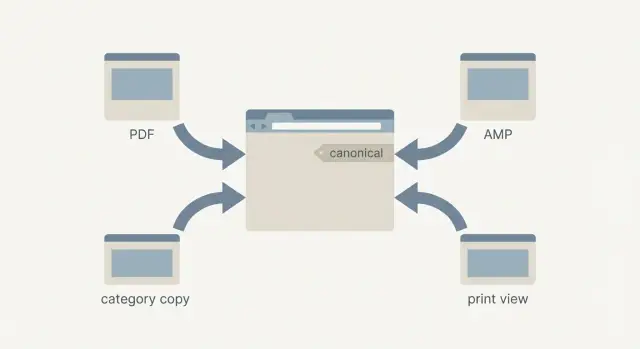
Why republished content creates SEO confusion
When the same article appears in more than one place, search engines have to guess which version is the main one. Sometimes they choose the page you intended. Other times they surface a tag page, a print view, a parameter URL, or a copy hosted elsewhere. That choice can also change over time.
The practical problem is signal splitting. Instead of one page collecting clicks, trust, and backlinks, multiple URLs collect small pieces of it. One version earns links, another ranks, and the page you actually want to promote ends up competing with its own copies.
This happens a lot because “republished” doesn’t always mean “stolen.” Many duplicates come from normal site behavior:
- One post accessible under multiple category or section URLs
- Print-friendly, PDF, AMP, or mobile versions on separate URLs
- Tracking parameters that create crawlable variations
- Partner reposts that publish your full text
The goal is simple: choose one primary URL that gets the credit. Everything else should support that choice, not compete with it.
Duplicates are fine when they’re controlled (for example, a printer view that’s blocked from indexing or properly canonicalized). They get risky when they’re indexable and look like separate pages with the same or near-same content. That’s when rankings can flip between versions, backlinks can land on the “wrong” copy, and performance becomes inconsistent.
Canonical basics, without the jargon
A canonical URL is the one page address you want search engines to treat as the main version when the same content shows up in more than one place.
The canonical tag (rel=canonical) is a hint you place on duplicate pages that says, “This is a copy, please credit the main URL.” This is the core of a canonical backlinks strategy: make it obvious which page deserves to rank, and keep signals from being spread across lookalikes.
What the canonical tag does (and does not) do
It helps search engines pick which version to show and combine ranking signals, like links and engagement, toward the preferred URL. It also reduces confusion when multiple URLs are extremely similar.
It does not guarantee that Google will follow it 100% of the time. It also doesn’t replace good internal linking, and it won’t fix pages that are genuinely different (canonicals are for near-duplicates).
If you do nothing, search engines still choose
If you publish the same article under multiple URLs, search engines will usually pick one as the “main” version anyway. Their choice can depend on what they crawled first, what has more internal links, what loads faster, or what gets more external mentions.
Indexing is about which URL is eligible to show in search. Ranking signals are the “votes” that help a URL compete. Without clear canonicals and consistent internal links, those votes get scattered, and the URL you care about can end up weaker than it should be.
How backlinks interact with canonical decisions
Backlinks are votes from other sites. When the same article lives at multiple URLs, those votes can split across copies, and none of them looks as strong as it could.
A common issue is accidental linking to the wrong version: someone shares a “News” copy, a partner reposts a PDF, or a site links to a tracked URL with extra parameters. Each copy can collect backlinks, even if you meant another page to be the main one.
Canonicals and redirects both help, but they solve different problems:
- Use a redirect when the duplicate shouldn’t be visited anymore.
- Use rel=canonical when the duplicate needs to exist for users but should pass credit to the main page.
To consolidate signals, keep a tight set of habits: set canonicals on duplicates, use the preferred URL in internal links, and avoid promoting parameter-heavy URLs.
Choosing your one primary URL (the “source of truth”)
Pick the version you want real people to share, bookmark, and return to. That’s your source of truth.
A strong primary URL is stable. It doesn’t depend on session IDs, long query strings, or campaign parameters. It stays the same no matter how someone reached the page.
Simple rules that prevent your backlinks to preferred URL from being scattered:
- Choose the cleanest URL that loads the full content without extra parameters.
- Avoid URLs that change with filters, sorting, pagination, or on-site search.
- Treat tracking tags as disposable. The preferred URL should work without them.
- Keep the format consistent (trailing slash or not) and stick with it.
A common trap: the same article lives at /guide, /guide?utm_source=newsletter, and /guide?sort=popular. Users share all three, and backlinks end up scattered. Your source of truth should be /guide, and everything else should point back to it.
Language and region versions need extra care. If English (US) and English (UK) pages are truly different for users, each can be its own primary URL. If the content is basically the same and only minor elements change, choose one main version and keep the others from competing.
Common republishing patterns that create extra URLs
Most duplicate content management problems are self-made. You publish one article, then your site quietly generates other versions that look different to users but read the same to search engines.
The most common patterns are:
- The same article in multiple sections (blog + resource hub + category URL)
- Alternate formats (print view, PDF, AMP, app view)
- Pagination or “view all” pages that repeat large chunks of content
- Sorting and tracking parameters that generate near-duplicates
- HTTP vs HTTPS, www vs non-www, trailing slash differences
Choosing the fix depends on whether the extra URL should exist:
- Use a 301 redirect when the duplicate has no real purpose (old slugs, wrong versions, HTTP).
- Use rel=canonical when the page must stay accessible but should pass credit to the main page.
- Use noindex when users need the page but you don’t want it in search (often internal search results and thin filtered pages).
Step-by-step: a practical canonical setup for duplicates
Start by finding every place the same article can live: print-friendly pages, category versions, tracking URLs, and any other “alternate” addresses.
1) Map duplicates and pick the winner
List all URLs that show the same or near-same text. Choose one source-of-truth URL.
Then decide which duplicates should be redirected and which should stay live with a canonical tag. Redirect the ones that don’t need to exist. Keep the ones that do, but make them clearly defer to the primary.
2) Add canonicals and align signals
On every duplicate that stays live, add a rel=canonical pointing to the primary URL. The canonical should point to the final, clean version (correct protocol, domain, and trailing slash choice).
Then make your own site stop “voting” for alternates:
- Update internal links so they consistently use the primary URL
- Ensure your sitemap lists only the primary URL
- Avoid sharing tracked URLs as if they’re the main version
After deployment, spot-check a few pages in view-source to confirm the canonical is present and correct. Re-check in a week or two, especially if you’re actively promoting the content.
Syndication and partner reposts: what to request
When your article is republished on another site, you can gain reach and still keep one source of truth. The cleanest outcome is when the partner uses rel=canonical for syndicated content that points back to your primary page.
If the partner is flexible, ask for:
- A canonical tag pointing to your primary URL
- A clear attribution line near the top that references your original
If they can’t add a canonical, treat it like PR. Ask for a prominent attribution link to the primary URL near the first paragraph, not buried in an author bio. Also ask them not to publish multiple copies across their own sections, which can create even more competing versions.
Internal linking: make your site stop voting for duplicates
If the same article can be reached from multiple URLs on your site, your internal links influence which version looks most important. Even with a canonical tag, constant internal linking to alternates can keep signals split and pull crawlers toward the wrong pages.
A common scenario: the same post appears in a “Guides” hub, on the homepage, and in a related-posts widget, and each block links to a different URL. Fix it by making every navigation path land on the primary URL.
Focus on your highest-impact templates first (header, footer, post cards, related widgets). If a reader can accidentally land on a duplicate, search engines can too.
How to verify it worked (and when to be patient)
After you set canonicals and align internal links, confirm that Google treats the right URL as the main one.
In Search Console, check duplicate URLs and look at which page Google selected as canonical. Warning signs include duplicates marked “Google chose different canonical than user,” or impressions continuing to spread across multiple versions instead of concentrating on the preferred URL.
Even with correct canonicals, some backlinks will still land on non-primary URLs. Review your backlink reports and scan for parameter URLs, alternate paths, and format versions (like PDFs). If you keep seeing links hitting the wrong version, tighten your internal links and, where you control the duplicate, redirect it.
Give changes time if they’re recent. If, after repeated crawls, Google keeps choosing a duplicate, strengthen the signal: fix internal links, confirm redirects go directly to the primary page, and make sure new outreach points to the preferred URL.
Common mistakes that keep signals split
Many “it’s not ranking” problems are really “signals are split across three versions.” The usual culprits are small setup errors that scatter authority.
A frequent mistake is canonicals that point to a URL that redirects (or a redirect chain). If the preferred page is https://example.com/article, the canonical should point directly there, and that page should return a normal 200 status.
Other issues that often cause inconsistent outcomes:
- Blocking duplicates with robots.txt so crawlers can’t see the canonical tag
- Mixing noindex and canonical without a clear reason
- Letting AMP or PDF versions become the ones that earn most backlinks, while the main HTML page stays weak
Quick checklist for keeping one primary URL
Before you promote republished content, run a quick reality check:
- One preferred URL is documented and used in emails, social posts, and campaigns.
- Every duplicate either has a canonical to the preferred page or is redirected if it shouldn’t exist.
- Menus, related posts, breadcrumbs, and sitemaps all reference the preferred URL.
- Partner reposts either set a canonical back to your original or at least include a prominent attribution link.
Search your site for the title and look for near-duplicates (trailing slashes, UTM versions, the same article under two categories). If you find more than one indexable page, fix that before you spend effort promoting.
Next steps: consolidate first, then build links to the right page
Start with a small set of high-impact pages: the ones with steady search traffic, lots of internal links, or a history of mentions. Consolidate each one by choosing a primary URL, then making every other version clearly support it.
Once you’ve done that, be disciplined with link building. Any new backlinks should point to the preferred URL from day one.
If you use a backlink provider, the same rule applies. For example, SEOBoosty (seoboosty.com) sells premium backlinks from authoritative sites through a curated inventory; whichever service you use, make sure the destination is your single source-of-truth URL so you don’t strengthen duplicates by accident.
FAQ
Why does republished content cause SEO problems?
Republished content creates multiple URLs that look the same to search engines, so they have to pick one version to index and rank. When they guess wrong, your “main” page can lose visibility while a copy (like a tag page or print view) shows instead.
What is a canonical URL in plain terms?
A canonical URL is the single page address you want search engines to treat as the main version of a piece of content. It’s the URL you want to earn rankings and collect credit from near-duplicate versions.
When should I use a canonical tag vs a 301 redirect?
Use a 301 redirect when the duplicate should not exist for users anymore, like an old slug, HTTP version, or wrong path. Use rel=canonical when the duplicate needs to stay accessible for users but should pass ranking credit to the primary page.
Will Google always follow my canonical tag?
No, it’s a strong hint, not a command. If other signals disagree (internal links, sitemaps, performance, external links), Google may still pick a different URL as the canonical.
How do I choose the best “primary” URL?
Pick the cleanest, most stable URL that works without tracking parameters or filters. It should be the version you’d want people to share and bookmark, and it should stay consistent over time.
Why are UTM or sorting parameters a problem for backlinks?
They create extra crawlable URLs that can get shared and linked, which splits signals across multiple versions of the same page. The fix is to promote the clean URL and prevent parameter versions from becoming indexable duplicates.
What should I do about PDF, print, AMP, or mobile versions?
They often live on separate URLs and can become the version that ranks or earns links if they’re indexable. If you need them for users, add a canonical to the main HTML page; if you don’t need them indexed at all, keep them out of search.
What should I request when a partner site republishes my article?
Ask them to place a canonical tag on their republished page pointing to your original primary URL. If they can’t, ask for a clear attribution link near the top that points to your primary page so readers and signals flow to the version you want.
How does internal linking affect which version ranks?
Make every internal link point to the primary URL, including menus, cards, related-post widgets, and breadcrumbs. Even with canonicals, inconsistent internal linking can keep pushing crawlers and users to duplicates.
How do I avoid building backlinks to the wrong URL?
Point all new backlinks to your single source-of-truth URL and double-check you’re not using parameter or duplicate URLs as the destination. If you use a provider like SEOBoosty, give them the exact preferred URL so you build authority for the right page instead of strengthening copies.
Share