Link targets for Core Web Vitals: a simple prioritization method
Learn link targets for Core Web Vitals with a simple method to prioritize pages already passing CWV, so rankings improve without being capped by slow UX.
Why some link building stops working on slow pages
You can build new backlinks and still see little or no ranking lift. That isn't always because the links are weak. Often, the page you point them to can't turn that authority into better rankings because the experience is frustrating once people land.
Think of it like adding fuel to a car with a clogged filter. The fuel is real, but the engine still can't perform.
Search results are competitive. If two pages are similar on relevance and authority, the one that loads faster and feels stable usually wins. When a page is slow to show its main content, laggy when you tap, or jumps around while loading, it can hit a ranking ceiling. You can keep adding links, but the gains get capped because the page keeps sending negative signals: short visits, quick back-clicks, lower engagement, and fewer conversions.
When this post says "link targets," it means the exact URL that receives the backlink. Not the domain in general, and not the homepage by default. The specific page you choose is where you want the ranking improvement to happen.
A common pattern behind "links not working" looks like this:
- Links increase authority, but the page still fails basic experience checks.
- The page moves up a bit, then stalls.
- Competitors with similar authority but better performance keep climbing.
Example: you earn a strong link to a product page because it's valuable. The page is heavy, loads large images, and shifts the layout when a popup appears. Rankings budge for a week, then flatten. You didn't waste the link, but you picked a target that couldn't fully benefit.
The practical goal is simple: pick pages that can convert link equity into rankings without being held back by slow or unstable UX.
Core Web Vitals in plain language
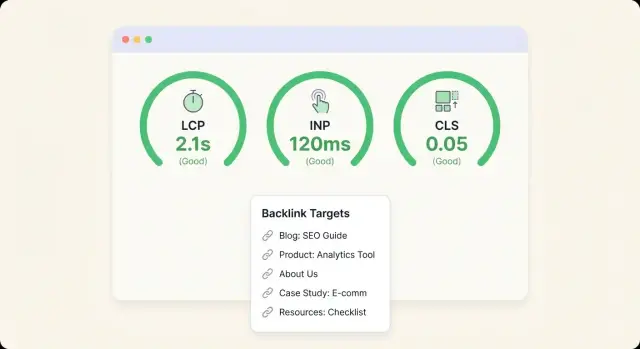
Core Web Vitals are three checks Google uses to gauge how a page feels to real people: how fast the main content shows up, how quickly the page reacts, and how stable the layout is while it loads. When you're choosing link targets, these matter because a page that feels slow or jumpy can waste the momentum a new backlink should create.
The three metrics, without the jargon
- LCP (Largest Contentful Paint): how long it takes for the biggest "main" thing (often a hero image, headline block, or product photo) to appear.
- INP (Interaction to Next Paint): how quickly the page responds when someone taps, clicks, or types.
- CLS (Cumulative Layout Shift): how much the page shifts around while loading (like buttons moving just as you try to tap them).
Reports usually label pages with colors:
- Green: passing.
- Amber: needs improvement.
- Red: poor.
"Passing" doesn't mean perfect. It means the page clears a baseline where speed and stability are unlikely to cap your results.
Why users and rankings both care
These vitals match what people already do.
If the main content takes too long, people leave. If taps lag, they stop exploring. If the layout jumps, they misclick and get annoyed. Search engines try to reward pages that satisfy users, so poor CWV can reduce how much value you get from other SEO work.
Certain page types struggle more than others, especially when they rely on heavy templates or lots of third-party scripts. Homepages with large hero media, ad-heavy articles, product pages with many widgets, and builder-based landing pages often slip because they carry too much weight above the fold.
CWV isn't an abstract score. It's a quick way to predict whether a page will feel smooth when new visitors arrive.
Why favor pages already passing CWV
If you point new links at a page that already passes Core Web Vitals, you remove a common ceiling. The page can actually use the extra authority and move up without being held back by a slow, jumpy, or frustrating experience.
Search engines don't only look at relevance and links. They also watch how people experience the page. When a page is already "good enough" on speed, responsiveness, and layout stability, a ranking boost is more likely to turn into real gains: more clicks, longer visits, and fewer quick bounces.
A page that fails CWV can waste the traffic you just paid for. Imagine a page where the main content appears, but the primary button shifts right as someone taps, or the page freezes after a click. Even if rankings rise briefly, visitors don't convert, and weak engagement can limit how far the page climbs.
When CWV isn't passing, the usual failure modes are predictable:
- Slow loading (LCP) makes people leave before they see the main content.
- Laggy interaction (INP) makes the site feel broken.
- Layout shifts (CLS) cause misclicks, especially on mobile.
- More traffic amplifies the problem because more people hit the same bottlenecks.
There are exceptions. Linking to a non-passing page can still make sense if you must rank for brand protection, you're running a short-term campaign with a deadline, or you're actively rebuilding the page and plan to fix performance immediately. In those cases, treat the link as a bet with a clear, short timeline.
This is prioritization, not a substitute for performance work. Even with high-authority placements, the cleanest wins usually happen when the target page is already stable, fast enough, and easy to use.
What to collect before you choose link targets
Before you choose link targets for Core Web Vitals, gather a small set of facts for each candidate page. This keeps you from pointing links at pages that look promising on paper but are held back by slow load, laggy interactions, or layout shifts.
Start with a page inventory from your CMS or sitemap, then narrow it to pages that match real search demand. A page that doesn't satisfy the query won't hold rankings for long, even with strong links.
For each URL, collect:
- Page type (article, category, product/service, landing page)
- Primary query intent (informational, comparison, transactional)
- Current organic position range (top 3, 4-10, 11-20, 21+)
- Core Web Vitals status (pass/needs improvement/fail)
- Organic landing value (traffic and conversions, or assisted conversions)
Get CWV from field data when possible. Field data reflects what real users experience across devices and networks. Lab tests are still useful, but treat them as diagnostics: they show what might be wrong on your machine, not what most visitors feel.
Also, segment by template instead of treating every URL as unique. Template issues repeat. If one product template fails CLS because of late-loading elements, many product pages likely fail the same way.
Keep the first round manageable. A practical starting point is 20 to 50 URLs, focusing on pages already ranking in positions 4 to 20 and already passing CWV in field data. That range often moves fastest with added authority.
Step-by-step method to pick CWV-safe link targets
The goal is simple: point links at pages that can actually benefit. If a page is already slow or jumpy on mobile, rankings often hit a ceiling even after you add authority.
Step 1: Start with mobile CWV passers
List your important pages, then check Core Web Vitals using field data if you have it. Filter to pages that are already "Good" on mobile (or at least not clearly failing). Mobile is the stricter gate and the one that most often limits results.
If you only have lab scores, treat them as a warning signal, not a verdict. A page that looks borderline in a test but performs well for real users can still be a safe target.
Step 2: Narrow to pages that can rank soon
Now focus on pages with clear purpose, real demand, and enough depth to deserve the link.
Keep pages with one clear search intent. Favor a strong on-page match (title, headings, and copy line up with the query you want). Prioritize URLs that already show signs of life, such as impressions, clicks, or average positions hovering around page 2 to 3.
Drop thin or confusing pages (little original content, vague topic, or "everything for everyone" positioning). Then choose a small set, usually 3 to 10 URLs, and assign a link budget per URL instead of spreading links across dozens of pages.
Example: you have 40 articles, but only 8 pass CWV on mobile. Of those, 3 already get impressions for valuable terms and sit around positions 11 to 25. Those 3 are usually better targets than a brand-new post that fails CWV and has no visibility yet.
A simple scoring model you can reuse
A scoring model keeps backlink decisions consistent. It also helps you avoid pointing links at pages that are already capped by slow load, delayed taps, or layout shifts.
The 1-5 score (simple enough for any team)
Give each page four mini-scores from 1 to 5, then add them up. Keep the meaning of 1 and 5 consistent so different people score the same way.
- CWV status (1-5): 5 = passing in real user data, 3 = mixed/unknown, 1 = failing.
- Intent match (1-5): 5 = page perfectly answers the query you want to rank for, 1 = weak match.
- Rank proximity (1-5): 5 = already close to page 1 (for example positions 8-20), 1 = far away or not ranking.
- Business value (1-5): 5 = strong conversion or leads, 1 = little to no impact.
A total score of 16 to 20 is usually a safe target. 12 to 15 can work if you have limited options. Below 12 is where links often feel "wasted" because either UX is holding the page back or the intent is off.
How to break ties
When two pages score the same, pick the one with fewer hidden risks. Favor simpler templates, fewer third-party scripts, and layouts that don't jump on load. Also consider which page is easiest to protect long-term, since "small" additions (chat widgets, extra trackers, new testing scripts) often push a borderline page into failure.
Document the "why"
Next to each chosen page, write one sentence per factor, like: "Passes CWV, matches pricing intent, ranks around #14, highest trial starts." This makes the next round faster and reduces debates.
Common mistakes that waste backlinks
The fastest way to waste a good backlink is to point it at a page that can't rank, even if the content is strong.
Defaulting to the homepage. Homepages often have broad intent and lots of competing messages. If your goal is to rank a specific product, category, or guide, a homepage link can dilute relevance.
Trusting the wrong CWV view. A page can look fine in a speed test but still fail in real user data. Lab tests help you debug. Field data is what tells you whether real visitors experience friction.
Picking pages with hidden SEO blockers. Sometimes the page is fast but not eligible to win. Common blockers include noindex tags, canonicals pointing elsewhere, thin internal linking, or keyword cannibalization where two pages fight for the same term.
Checking desktop and forgetting mobile. Many sites pass on desktop and fail on mobile due to heavy images, third-party scripts, or slow server response. Validate mobile first.
Making "celebration changes" after rankings improve. It's common to add a chat widget, analytics add-on, A/B testing script, or new ad stack as soon as the page starts moving up. That can quietly hurt INP or LCP and erase the gains.
Before pointing a premium link at a page, do a quick pre-flight:
- Confirm the exact page you want ranking.
- Verify indexability and that the canonical matches the URL you're promoting.
- Check mobile CWV in real user data if available.
- Make sure one page owns the main query (avoid cannibalization).
- Hold off on adding new scripts to the target page for a couple of weeks after links land.
Quick checklist before you point a link at a page
Before you spend a backlink, do a fast sanity check on the exact URL you plan to boost. It takes minutes and prevents the most common problem: paying for authority that never turns into rankings because the page is slow, unstable, or not the version Google chooses.
- Verify CWV on the exact page. A domain can look fine while one template fails.
- Confirm it can be indexed and is the chosen version. Make sure it's not blocked, and that the canonical points where you expect.
- Make sure it has one job. The page should clearly answer one intent.
- Check for visible layout jumps. Load the page on mobile and watch the header, hero area, and any dynamic modules.
- Look for internal support. A strong target should already be linked from relevant parts of your site.
Example: if you're about to boost a pricing page but it redirects, has a different canonical, or shifts when a widget loads, fix those issues first.
Example scenario: choosing targets for a small site
Imagine a small SaaS site with 25 pages. You have a pricing page that loads fast and feels stable, and a long comparison article that brings in impressions but feels heavy and jumps around while loading.
You check search performance and find three pages sitting around positions 8 to 20 for valuable queries:
- The pricing page (around position 11, strong intent, passing CWV)
- The integrations page (around position 16, product-led traffic, passing CWV)
- A competitor comparison page (around position 9, high impressions, failing CWV due to slow LCP and layout shifts)
For link targets, you'd pick the first two now. They're already "uncapped" by speed or stability issues, so added authority has a better chance to turn into ranking gains instead of being held back by a poor page experience.
The comparison page is the tempting one because it's close to the top and has demand. Treat it like a two-step project. Fix the bottleneck first (compress the hero image, reduce above-the-fold scripts, and reserve space for dynamic elements so the layout stops shifting). Re-check CWV. Once it consistently passes, then point stronger links at it.
A simple four-week plan could look like this:
- Weeks 1-2: Send links to the pricing and integrations pages.
- Weeks 1-3: Fix CWV issues on the comparison page.
- Weeks 3-4: Start links to the comparison page once it passes.
Success over 4 to 8 weeks looks like steady movement toward page 1, clicks rising (not just impressions), and engagement holding because users aren't bouncing from slow loads.
Next steps: keep the wins and scale carefully
Once you've identified pages that already pass Core Web Vitals, treat them like assets. Protect their speed and stability while you measure what each new link actually changes.
Make it a monthly routine
Pick one day each month and review the same three things: CWV status, search performance, and your target list. Small changes add up fast, and a page that passed last month can slip without anyone noticing.
Keep it simple: re-check CWV (mobile first), review rankings and impressions per target URL, and confirm the page still matches the intent you care about.
Track results per URL (not just site-wide)
If you only look at overall traffic, you won't know which links paid off. Track outcomes for each target page: rank movement for the main query, impressions and clicks, conversions or meaningful actions, and any CWV changes.
Expand to new targets or deepen winners
After 4 to 8 weeks, you'll usually see early signals. Deepen links to winners when the page stays stable, conversions are strong, and rankings are still climbing but not yet top 3. Expand to new targets when winners are near their ceiling, or when you have other pages that clearly pass CWV and match valuable queries.
If you're using a provider like SEOBoosty (seoboosty.com) to place premium backlinks on specific URLs, this prioritization approach helps you put the strongest placements on pages that are already ready to convert authority into rankings.
FAQ
Why do new backlinks sometimes not improve rankings at all?
Because the target page may be hitting a user-experience ceiling. If the page is slow to show the main content, feels laggy when people interact, or shifts around while loading, users leave faster and engage less. That weak engagement can limit how much ranking lift your new authority can translate into.
What does “link target” mean in this context?
A link target is the exact URL that receives the backlink. That specific page is where you’re trying to move rankings, not your domain “in general.” If you point strong links to the wrong URL, you can increase authority without helping the page that actually needs to rank.
What are Core Web Vitals in simple terms?
They’re three checks that describe how a page feels to real people: how quickly the main content appears (LCP), how responsive it is to taps/clicks (INP), and how stable the layout is while loading (CLS). Passing doesn’t mean perfect, but it usually means performance won’t be the main thing capping your SEO gains.
Why prioritize pages that already pass Core Web Vitals?
If a page already passes CWV, it’s less likely to waste the momentum from new backlinks. You’re removing a common bottleneck, so added authority has a better chance to turn into higher rankings, better engagement, and more conversions instead of stalling after a small bump.
Should I trust lab speed tests or real-user (field) data when choosing targets?
Start with field data when you can, because it reflects real users across devices and networks. Lab tests are still useful for diagnosing what to fix, but don’t treat a single lab score as the final decision-maker for link targeting.
Why is mobile CWV more important than desktop for link targets?
Check mobile CWV first and don’t assume desktop performance carries over. Many pages that feel fine on desktop fail on mobile due to heavier images, third-party scripts, or slower server response, and mobile is often where rankings get capped.
Which ranking positions are the best candidates to point new backlinks at?
Pages already ranking around positions 4–20 often move fastest because they’ve proven relevance and have some visibility, but they need extra authority to break onto page one. Combine that with a CWV pass and a clear intent match, and you usually get more predictable results.
Is it ever worth building links to a page that fails CWV?
It can make sense if you have a short-term need like brand protection, a deadline-driven campaign, or you’re actively rebuilding the page and will fix performance immediately. Treat it as a calculated bet and plan to re-check CWV soon after changes so you don’t keep sending links into a bottleneck.
How do I use a simple scoring model to pick link targets?
Use a simple 1–5 score for CWV status, intent match, rank proximity, and business value, then pick the highest totals. The main benefit is consistency: you’re less likely to choose pages that look important but can’t convert authority into rankings due to weak UX or mismatched intent.
How do I avoid “wasting” premium backlinks after I’ve placed them?
Lock down the target URL’s basics before and after links land: it should be indexable, have the correct canonical, and stay stable on mobile without layout jumps. Also avoid adding new scripts or heavy widgets right after you see improvement, because that’s a common way to hurt LCP/INP/CLS and erase gains. If you’re buying premium placements through a provider like SEOBoosty, these checks help ensure you’re paying to amplify pages that are actually ready to benefit.
Share