Sitewide paid links: how to spot patterns on strong domains
Learn to detect sitewide paid links by spotting repeated commercial anchors, footer blocks, and templated sponsored sections on strong domains.
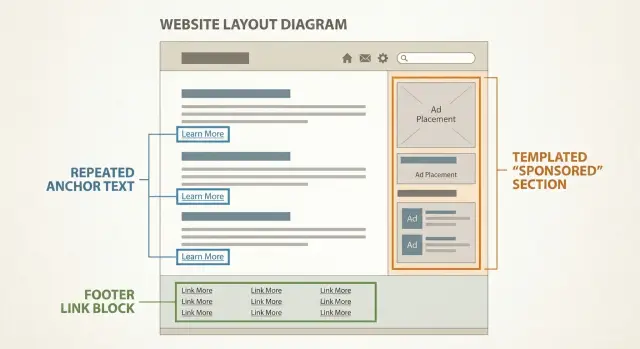
What sitewide paid-link patterns are and why they matter
“Sitewide” is simple in theory: the same external link shows up across a large share of a domain’s pages. In practice, it often appears on every page that uses the same template, like a footer, sidebar, or repeated “Partners” strip.
Sitewide paid links are different from normal navigation. A menu mostly points to the site’s own pages and changes rarely. A paid block is usually an add-on. It tends to repeat in the exact same spot, with the same wording, across hundreds or thousands of URLs.
Even strong domains can sell links at scale because templates make it easy. One edit to a footer or widget can place a buyer’s link everywhere. High-authority sites also know people will pay for the trust they’ve earned, even if the placement is low-effort.
The risk isn’t only “is it paid?” The bigger risk is the footprint. Search engines don’t need a receipt to notice patterns like identical commercial anchors repeated across the whole site, a cluster of unrelated outbound links in the footer, or “sponsored” sections that look the same on every page.
Not every sitewide pattern is bad. Some sites legitimately show the same association badges, charity partners, or software credits across pages. The goal is to spot repeatable signals that look unnatural, not to prove intent.
Treat this as pattern recognition: where the link appears, how often it repeats, what the anchor says, and whether the surrounding content looks built to host rotating buyers. When several of those signals line up on an otherwise reputable domain, it’s worth being cautious about the placement.
Quick triage: normal sitewide navigation vs paid blocks
Strong domains have repeating elements across every page. That’s normal. The point of a quick triage is to separate standard site structure from blocks that look like sitewide paid links.
Open a handful of pages that are far apart: the homepage, a recent article, an older article, a category page, and a page from a different section (careers or help). You’re looking for the same outbound links showing up everywhere, not just inside one article.
Normal navigation usually points inward or to expected essentials like About, Contact, Privacy, Terms, category pages, author pages, and social profiles. These links tend to match the site’s topic and sit in predictable areas (header, main menu, footer legal row).
Paid blocks often feel like “extra furniture”: a small cluster of outbound links that repeats across many unrelated pages, uses salesy or keyword-heavy anchors, points to off-topic industries, and sits in a footer column or sidebar widget that feels separate from real navigation.
A simple test is context. If you remove the block, does the page still make perfect sense? A privacy link is essential. A group of “Best mortgage rates” links on a design blog usually isn’t.
Example: you check five posts on a well-known tech blog. The header is clean and consistent, but the footer has a compact “Recommended” box with the same four outbound links on every page, all in commercial phrases and unrelated to tech. That pattern is worth flagging for a deeper review.
Anchor text red flags: repeated commercial anchors
Anchor text is the clickable words in a link. On strong sites, you usually see a mix: brand names, article titles, and plain phrases like “read more.” When you see the same sales-driven anchor repeated across lots of pages, it often points to sitewide paid links.
The biggest warning sign is repetition. If an exact phrase shows up again and again, it’s rarely natural. Editors don’t choose the same wording across dozens of pages unless it’s part of navigation or a standard reference.
Watch for patterns like these:
- Exact-match “money” terms repeated word-for-word (for example, “best project management software” or “cheap flights”).
- Brand + keyword combos used everywhere (like “BrandName accounting software”).
- A cluster of outbound links that all sound like ads (“buy,” “deal,” “top,” “best,” “discount”) across unrelated pages.
- Anchors that are far too broad for the site (a parenting blog linking sitewide to “crypto trading platform”).
- Multiple advertisers using the same template tone: short, keyword-heavy, and context-free.
Do a quick reality check: does the anchor make sense inside the sentence, or does it feel pasted in? Natural links usually match the flow of the paragraph and vary in wording.
Also compare the anchor to the site’s topic. A tech publication linking to a security tool can be normal. The same site pushing casino, payday loans, or “write my essay” terms repeatedly is a different story.
Concrete example: you open five random articles on a respected marketing blog and spot the exact phrase “best CRM for small business” linking out to the same domain each time. Even if everything else looks clean, that repeated commercial wording is a strong footprint.
Placement clues: footer blocks and template slots
Strong domains can still carry sitewide paid links, and placement is often the fastest giveaway. When a link shows up in the same spot on lots of pages, it usually came from a reusable template, not an editor making a one-off choice.
Start with the footer. Many sites add a neat-looking block titled “Partners”, “Resources”, or “Recommended”. The title sounds harmless, but the content can be a tight cluster of outbound links with little explanation. If the links point to unrelated industries and the block appears across posts, categories, and even author pages, that’s a classic footprint.
Template slots show up outside the footer too. Watch for repeating blocks that look designed rather than written: the same heading, the same button style, the same short paragraph, and then a link out. These are easy to drop into every page type, which is why they’re popular for paid placements.
A quick way to confirm templating is to open 3-5 very different pages (homepage, recent post, older post, category page). If the same outbound block follows you everywhere, treat it as a template-driven placement rather than an editorial recommendation.
Templated sponsored sections and disclosure footprints
Templates aren’t the problem by themselves. The problem is when a “Sponsored” unit is also templated, meaning the same paid placement appears across dozens or hundreds of pages with near-identical layout.
A common footprint is a boxed module that looks like a widget: same background color, same headline style, same button, and the same position on the page (for example, right under the intro or right above the author bio). If the module repeats across categories that have nothing to do with each other, it’s less likely to be an editorial choice.
The giveaway: copy that never changes
Pay attention to wording. Real editorial references vary by topic. Paid blocks often reuse the same call-to-action line on many pages, like “Get a free quote,” “Book a demo,” or “Best [service] in [city].” When the wording is identical across unrelated articles, you’re likely looking at a templated sponsored insert.
Disclosure can also be uneven. You might see “Sponsored” or “Partner” on a few pages, then find the same block without the label elsewhere. That can happen when a template has an optional flag editors forget to enable, or when the label is deliberately hidden on certain templates.
Even without tools, you can get far by checking two things: whether the unit appears in the same spot across many categories, and whether the exact CTA text (including button labels) is identical page after page.
Example: a respected marketing blog has a “Recommended Tools” box under every intro. It always promotes the same lender, with the same button text, even on posts about branding and social media. On a few pages it says “Sponsored,” but most pages don’t. That mix of templating and selective disclosure is the footprint you’re trying to catch.
Step-by-step: a simple manual review you can do in 30 minutes
You can spot many sitewide paid links with nothing more than a browser and a notes doc. The goal isn’t to prove intent. It’s to find repeated patterns that look commercial, placement-heavy, and template-driven.
Pick a small but varied sample: about 10 pages across different parts of the site. Include a few recent posts, a few older posts, a category page, a tag page, and one or two “about” or “resources” pages. Variety matters because paid blocks often appear only on certain templates.
On each page, scan the same areas: header, sidebar, and footer. Look for outbound link blocks that feel bolted on, like a list of brands, “partners,” “recommended,” or a cluster of keyword-rich links. If you see a block, open two more pages and check whether it appears in the exact same place.
Then capture the anchor text and test repetition. Copy a few anchors into your notes and count how often they show up across your sample. Repeated, salesy anchors across many pages are a stronger signal than a single odd link.
Don’t skip mobile. Open 3-4 of the same pages on a phone (or a narrow browser window). Some sites hide sponsored blocks on desktop but surface them in mobile menus, sticky footers, or collapsed sections.
Keep your notes consistent so comparisons are easy later:
- Anchor text (exact wording)
- Destination domain
- Location (footer, sidebar, in-content, menu)
- Pages where it appears (out of your sample)
- Notes (disclosure text, “sponsored” label, odd styling)
Example: you review 10 posts on a well-known blog and notice a “Recommended tools” footer strip on 9 of them. Three anchors are identical on every page and point to unrelated businesses. Even if the domain is strong, that repeating footprint is the real risk signal.
What you can check without specialized tools
You can do a lot with basic repetition checks. Use a search engine query like site:example.com Sponsored or site:example.com Partners (swap in other terms you see on the site). If the same label shows up on hundreds of pages, that’s a clue the block is templated, not editorial.
A simple routine that works well: open the homepage, a category page, and 3-5 random articles; scroll to the footer on each; and look for a “partner” or “resources” cluster that repeats. Then click an author name, open a few posts by that author, and do the same for a different author.
That author comparison is underrated. If every author’s posts contain the same commercial anchors in the same place, it’s probably template-driven. If only one author’s posts include certain links, it may be author-driven (still risky sometimes, but a different pattern).
Older pages help you spot “retrofits.” A strong domain might add a footer link block later and push it across the whole archive. When the same commercial anchors appear on deep, forgotten posts, it usually wasn’t part of the original article.
If you buy placements elsewhere, these checks help you avoid domains where links look mass-inserted even when the site itself seems high quality. That applies whether you’re working directly with publishers or using curated options like SEOBoosty.
Common mistakes and false positives
People often flag a domain too fast, especially when the site looks reputable. Don’t get stuck on a single odd link. Look for a repeatable pattern that suggests sitewide paid links.
A common mix-up is treating affiliate disclosures as proof of a paid-link network. Affiliate pages often have clear language (like “we may earn a commission”) and links tied to the content. That can still be aggressive, but it’s a different footprint than a sitewide block selling keyword-rich anchors across unrelated topics.
Footers also cause false alarms. Not every footer link is paid. Some are normal: theme credits, privacy pages, a parent company, real partners, or tools the site genuinely uses. A footer link becomes more suspicious when it looks like an add-on module (same format across every page) and pushes commercial keywords that don’t match the site’s focus.
Relevance is the piece many people skip. A strong domain can still host off-topic link blocks. If a food blog has repeated anchors about “enterprise payroll software,” the mismatch matters more than the domain’s reputation.
To reduce mistakes: compare 5-10 different pages, look for surrounding context (real editorial links have an explanation), and confirm repetition before labeling a domain as paid-link heavy.
Example: you find one page on a respected news site with a “Recommended” box that includes a casino link. That could be a one-off ad placement. If the exact box appears on every category page with the same commercial anchors, that’s when the risk signal gets real.
If you’re buying placements, treat these checks as a filter. A service like SEOBoosty can still be useful, but only if you choose domains and placements that avoid obvious repeating blocks and templated commercial anchors.
Quick checklist: deciding if a domain has paid-link patterns
When a domain looks strong, it’s easy to assume the outbound links are clean. Sitewide paid links often leave repeatable traces you can spot quickly if you know what to look for.
Use this checklist to make a fast call:
- Repeat across many pages: If you keep seeing the same outbound URLs in the same spot, that’s a pattern, not a one-off mention.
- Anchor text is salesy or identical: Exact-match money phrases used again and again (same wording, same punctuation) are a warning sign.
- Placement is clearly template-driven: Footer columns, sidebar widgets, and recurring “resources” boxes are more suspicious than a link inside the main article.
- The destination doesn’t fit the audience: Off-topic promotions (payday loans, casino offers) stand out even on high-authority sites.
- Disclosure is missing or uneven: If some pages say “sponsored” but most don’t, or the label is hard to find, treat it as a warning.
A quick sanity-check: if you can predict where the outbound links will be before the page finishes loading, you’re probably looking at a templated block.
If two or more items show up together, assume there’s a paid-link footprint and be extra careful about any placement that lives outside the main content.
Example: a strong blog with a hidden sitewide footer block
Imagine a respected marketing blog that looks clean and trustworthy. The posts are well written, comments are real, and the site gets shared on social. On the surface, it feels like a safe place to earn a mention.
Then you scroll to the bottom of a few different articles and notice a small footer area titled “Resources”. It doesn’t look like an ad. It sits below the normal navigation and copyright, and it appears on every page you check, even across different categories.
A closer read shows the same pattern repeating: several links use exact-match, salesy phrases that don’t match the blog’s topic. The anchors look like they were written to rank, not to help readers. The destinations are also off-topic, like local service sites and SaaS landing pages with no connection to the article.
If you were taking notes, you’d likely record that the “Resources” block repeats word-for-word across many pages, the anchors are commercial and overly specific, the outbound links cluster together in a tight block, and there’s no editorial context explaining why those sites are included.
This is a common way sitewide paid links hide on otherwise strong domains: the content is real, but the template carries a permanent link slot.
Decision-wise, treat the domain cautiously. If you still want exposure there, avoid anything that lands in a templated footer block and aim for placements that read like true editorial context.
Next steps: pick safer placements and reduce risk
If you spot sitewide paid-link patterns, treat that domain as high-risk even if the brand looks strong. The goal isn’t “never get links here.” It’s to avoid placements that look rented, repeatable, and easy for search engines to discount.
Shift toward page-specific, editorial-looking placements. A contextual mention inside a relevant article, written in the same voice as the rest of the page, usually carries less risk than any block that appears across dozens or hundreds of URLs. Also watch for “too perfect” phrasing: if the same money keyword shows up again and again, ask for a more natural reference or skip the placement.
Keep a record so you can compare later. Patterns often get worse over time, and your notes help you spot when a domain starts selling links more aggressively. Save a few example URLs where the block appears, note the exact anchor text, record the placement type (footer, sidebar, “partners,” “sponsored” widget), and capture the date you reviewed it.
Set one simple rule and stick to it: avoid sitewide blocks, prefer contextual mentions that are clearly relevant to the page topic. If nobody can explain why the link belongs in that specific article, it’s usually pay-to-play.
If you don’t want to spend time hunting footprints and second-guessing templates, a curated inventory can reduce uncertainty. For example, SEOBoosty (seoboosty.com) offers a curated set of authoritative domains where you can select a source and place a backlink via subscription. Even then, keep the same rule: favor placements that read like real editorial references, not reusable widgets.
FAQ
What exactly counts as a “sitewide paid-link pattern”?
A sitewide paid-link pattern is when the same outbound link (or a small cluster of them) appears across many pages because it’s inserted into a template like a footer, sidebar, or widget. It matters because the repeated footprint can look manufactured, which makes the link more likely to be ignored or treated as risky compared to a one-off, in-content editorial mention.
How can I quickly tell if an outbound block is sitewide without using tools?
Check a small, varied sample: the homepage, a recent post, an older post, a category page, and an about/help page. If the same outbound links show up in the same spot across most of them, you’re likely seeing a template-driven block rather than a page-specific recommendation.
What’s the simplest way to separate normal navigation from a paid link block?
Normal navigation mostly points to the site’s own pages and essential external profiles, and it usually matches the site’s purpose. A paid block often feels like an add-on: a tight set of outbound links that’s off-topic, keyword-heavy, and repeated word-for-word across unrelated pages.
Why is repeated commercial anchor text such a strong red flag?
Repetition is the big tell. Editors naturally vary wording, but paid placements often keep the exact same “money” phrase everywhere to target rankings, so the anchor text looks identical across many pages and doesn’t read like it belongs in the surrounding copy.
Why do sitewide paid links so often show up in footers?
Footers are easy to edit once and deploy everywhere, so they’re a common place to “rent out” space at scale. If you see a “Partners,” “Resources,” or “Recommended” footer area that repeats across different page types and points to unrelated industries, treat it as a higher-risk placement.
How do I recognize a templated sponsored section (even if it looks “clean”)?
Look for a module that keeps the same layout and copy across pages: same heading, same button text, same short pitch, same position on the page. If that unit follows you across unrelated categories, it’s probably a templated sponsorship slot rather than a true editorial choice.
Are all sitewide links bad for SEO?
Not necessarily. Some sitewide elements are legitimate, like theme credits, association badges, charity partners, or a parent company link, and they usually make sense for the site. The pattern becomes suspicious when it’s a cluster of commercial, off-topic anchors that repeat across large parts of the site with little or no context.
What does it mean if some pages show “Sponsored” but most don’t?
Selective disclosure is a warning because it suggests the block is template-driven and the label isn’t consistently applied across page types. Even if you’re not trying to judge intent, uneven disclosure is a practical signal that the placement may be treated as an ad-like pattern rather than an editorial reference.
Why should I check mobile when reviewing possible sitewide paid links?
It can, because some sites hide sponsored modules on desktop but surface them in mobile menus, sticky footers, or collapsed “recommended” sections. If you only check desktop, you can miss the exact block that repeats most consistently across the site.
If I’m buying links, what’s the safer alternative to sitewide blocks?
Prefer page-specific, in-content mentions that match the article topic and read naturally in the site’s voice, and avoid reusable widgets in footers/sidebars. If you’re using a curated provider like SEOBoosty to source authoritative placements, still apply the same rule: aim for contextual editorial-looking placement, not template blocks with repeated commercial anchors.
Share