Domain migration link plan: redirects, updates, monitoring
Use a domain migration link plan to sequence redirects, update top backlinks, and monitor split indexing so rankings and authority consolidate fast.
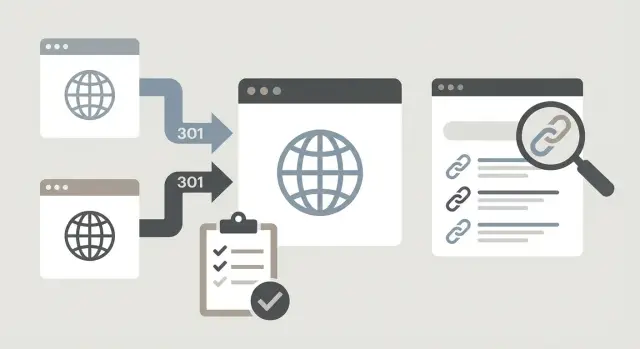
What can go wrong after a rebrand or domain move
A rebrand and a domain move aren’t the same thing for search engines. A rebrand can be a new name, design, and messaging while keeping the same URLs. When the content and site structure stay mostly intact, rankings often stay steady.
A domain move is different. Every URL gets a new home, and Google has to trust that the new domain is the real successor.
The most common issue is split authority. Some signals still point to the old domain (backlinks, mentions, indexed URLs), while others point to the new one (sitemaps, internal links, crawl paths). When those signals don’t line up, rankings wobble because the search engine is effectively choosing between two versions of the same site.
Split authority usually happens when redirects are incomplete or inconsistent. Even a small set of missed redirects can keep valuable pages “alive” on the old domain, which slows consolidation. Another trigger is changing too much at once (new structure, new templates, rewritten content), making it harder for search engines to understand what changed.
Success after a clean migration looks like this:
- The new domain holds the indexed pages that matter, and old pages drop out over time.
- Rankings settle under one domain (no swapping between old and new results).
- Backlinks help the new URLs (not stuck behind redirect chains).
- Crawling shifts to the new domain instead of wasting budget on the old one.
A simple example: a SaaS company moves from oldbrand.com to newbrand.com while also rebuilding the blog. If half the posts redirect to the homepage, some redirect to a category page, and a few return 404, Google may keep old URLs indexed longer while the new ones struggle to inherit the same trust.
Sometimes the right move is to delay. If you’re in the middle of a major paid campaign or a big site rebuild, a migration can add avoidable risk. Waiting a few weeks so you can separate “domain change” from “everything else changed” often leads to faster, cleaner consolidation.
Pre-move inventory: pages, rankings, and link value
A move goes faster when you know exactly what you have today. Build a clean snapshot of the old site so you can prove what improved, what dropped, and what needs fixing.
Start by exporting every indexable URL on the old domain using your sitemap, a crawl, and analytics landing pages. Your final list shouldn’t include blocked pages, existing redirects, or duplicates (for example, tracking parameters). If you can’t answer, “How many real pages do we expect Google to keep after the move?”, stop and finish this step.
Next, sort pages by value. Pull data on recent organic landing sessions (last 28 to 90 days), conversions, referring domains, and pages ranking for important keywords. Also include pages that support revenue pages (pricing, product, lead gen), even if they aren’t the top traffic drivers.
Capture current rankings for priority keywords before anything changes. Keep it simple: the query, the ranking URL, and the current position. This baseline tells you which pages must keep their relevance and authority.
Don’t ignore structure. Note important subdomains (like blog.example.com), language folders (like /en/ and /es/), and key templates (product pages, category pages, help articles). These patterns drive your redirect rules later.
Finally, decide what happens to each page: keep, merge, or retire. Merging thin or overlapping posts can be smart, but only if you’re clear about which page becomes the final destination and which URL inherits the best links.
Redirect mapping that consolidates authority quickly
A redirect map is where most migrations win or lose. Treat redirects like a clear set of instructions, not a safety net.
Start with a one-to-one map for every important URL (pages that rank, get traffic, or have strong backlinks). Each old URL should point to one final destination on the new domain. Avoid sending multiple old pages to a generic page unless the intent truly matches.
Keep redirects direct: old URL -> final new URL. Chains and loops waste crawl budget and can weaken signals. If you have to change paths more than once, update the original redirects so they always point straight to the final version.
When content is removed, don’t redirect everything to the homepage. Redirect to the closest match that satisfies the same intent. If there’s no relevant replacement, a clean 404 can be better than a misleading redirect.
Before you build the map, set a few rules and stick to them:
- Choose one canonical format (www or non-www, with or without trailing slash).
- Decide how parameters should behave (keep, drop, or redirect to a clean URL).
- Confirm HTTP -> HTTPS behavior matches your final site.
- Standardize case sensitivity (avoid mixed-case URLs).
Pay extra attention to areas that generate lots of URL variations, like faceted filters, tag and archive pages, PDFs, campaign landing pages with tracking parameters, and internal search result pages.
Also mark your “money URLs”: the pages with your strongest links. Redirects help, but direct links to the new URLs reduce reliance on perfect redirect handling and can speed up consolidation.
Launch day step-by-step sequence (simple but strict)
Launch day isn’t the moment to improvise. Run a short checklist in a fixed order, and assign someone to verify each step.
First, confirm the new domain is ready to be indexed. Important pages should load over HTTPS, return 200 status codes, and use the final templates you intend to keep. Many migrations stumble because the new site launches with accidental 302s, blocked crawling, or unfinished layouts.
A simple launch sequence that works for most migrations:
- Switch DNS when the new domain is fully live and tested.
- Turn on 301 redirects from the old domain to the new URLs using your prepared mapping (not a blanket homepage redirect).
- Update on-site signals: canonicals should point to the new URLs, and internal links should use the new domain.
- Publish and submit fresh XML sitemaps for the new domain. If possible, keep the old sitemap available for a while.
- Confirm analytics and conversion tracking work on the new domain.
After that, verify ownership in your search tools and submit the new sitemaps. Document the exact timing (DNS change, redirects live, major exceptions) so you can diagnose issues later.
Before you call it done, crawl a sample set of pages: top revenue pages, top linked pages, and a few deep pages. Confirm old URLs 301 to the correct destination (no chains), and the final page returns 200 with the expected canonical.
Finally, write down a rollback plan before you need it: who can revert DNS, what counts as a critical issue, and how long you’ll wait before rolling back.
On-site signals to update so search engines trust the move
After redirects, your own site is the next biggest signal. If pages still “vote” for the old domain through internal links, canonicals, and sitemaps, you’ll slow consolidation.
The goal is straightforward: every signal should point directly to the new URLs, not through a redirect.
Start with internal links. Redirects will catch them, but they waste crawl time and can keep old URLs in play longer than you want. Check the parts of the site that quietly create thousands of links: navigation, footer, breadcrumbs, related-article widgets, and reused template blocks.
Then confirm canonicals. One canonical tag pointing to the old domain can override your intent, especially on paginated pages, category pages, and filtered URLs.
A clean order of operations:
- Update internal links to point to the new URLs.
- Confirm canonical tags reference the new domain across templates.
- Publish XML sitemaps that include only new-domain URLs.
- Verify hreflang (if used) references the new URLs on both sides.
A practical spot check is to pick 10 important pages and view source. You should consistently see new-domain canonicals, new-domain internal links, and hreflang that points to new-domain alternates.
Update top link placements instead of relying on redirects
A 301 redirect is a safety net, not a long-term plan. If your best external links keep pointing to the old domain, you risk slower crawling and a longer period of split authority.
Don’t try to update everything immediately. Focus on links that either pass the most authority or send real visitors: strong domains, top referrers, links to high-value pages, and sitewide links.
When you request an update, keep it easy to approve. Include the old URL, the exact new URL, preferred anchor text (usually your updated brand), and a one-sentence reason for the change.
Don’t forget “citation-style” links that teams often overlook: social profiles, directory listings, app marketplace pages, partner resource pages, podcast show notes, and sponsorship pages. These can rank for your brand name and keep the old domain showing if they aren’t updated.
For links you can’t update (abandoned sites, locked CMS, no response), prioritize stability. Keep the redirect in place and avoid changing targets repeatedly.
Track outreach like a project: linking page, contact, date requested, status, and final destination.
Monitor split indexing and crawling during the first weeks
After a domain move, the fastest way to lose momentum is assuming “the redirects handled it.” For a few weeks, Google may keep parts of both domains indexed. That split indexing delays recovery because signals are spread across two versions of the same site.
Track how many pages are indexed on the old domain versus the new one. You don’t need perfection on day one, but you should see a steady trend: old down, new up.
Watch for duplicates. If the same content can be indexed under both domains, consolidation slows. The usual causes are missed redirects, inconsistent URL versions (like trailing slashes), or internal links still pointing to the old domain.
Crawl behavior is another clue. If bots spend most of their time on the old domain or get stuck in redirect chains, the new domain will take longer to settle.
Each week (for the first 6 to 8 weeks), review a consistent set of signals:
- Indexed page counts for old vs new domain
- Duplicate indexing signals (same titles or content on both domains)
- Crawl stats and where crawl time is being spent
- Redirect health (loops, 404s after redirect, chains longer than one hop)
- Performance of your key pages (the pages that drive revenue should move first)
Fix technical issues quickly. A single redirect loop can waste days.
How to tell if authority is consolidating (and not drifting)
Authority is consolidating when search engines stop treating the old and new domains as competing sources and start giving the new domain the visibility the old one used to have.
A small set of KPIs tells the story:
- Indexing balance shifts steadily toward the new domain.
- Branded queries show the new domain more often.
- Core non-brand rankings stabilize on the new domain (even if they bounce day to day).
- Crawling shifts toward the new domain over time.
Volatility is normal early on. Small sites may settle in days or a few weeks. Larger sites can take longer, especially if redirects or on-site signals are inconsistent.
In search performance reports, compare impressions and clicks for the old domain versus the new domain. Consolidation looks like a clean handoff: new rises as old declines.
Also validate where gains are happening. Pages with the strongest backlinks should be the ones regaining visibility. If low-value pages rise while your key linked assets stay flat, it often points to redirect mapping issues, canonicals, or internal links still favoring old URLs.
Keep a simple issue log: what you see, likely cause, the specific fix, who owns it, and the result.
Common mistakes that slow down consolidation
Most consolidation problems come from small shortcuts that create mixed signals.
Redirecting every old URL to the homepage is a frequent mistake. It breaks relevance and often hurts both rankings and user experience. Page-to-page redirects keep topic and intent aligned, which helps authority carry over.
Another slow leak is internal links that still point to the old domain weeks later. If navigation, footers, blog posts, or hreflang keep referencing old URLs, you’re asking crawlers to keep revisiting the old site.
Blocking the new site by accident is the biggest “silent” failure. Staging rules can carry over to production.
Quick checks that prevent it:
- Confirm robots.txt allows crawling on the new domain.
- Spot-check key templates for a stray noindex.
- Make sure the new domain isn’t behind a login or IP restriction.
- Verify old pages return 301s (not 302s).
- Confirm new pages return 200 and load normally.
Changing too much at once also slows the handoff. If you migrate domains and redesign, rewrite, and reshuffle URLs at the same time, you weaken the “same site, new address” story. When possible, move first, then improve.
Finally, make sure sitemaps and canonicals agree. If your sitemap lists new URLs but pages canonicalize to the old domain, you’re telling search engines the old version is still primary.
Quick checklist and next steps after the move
Right after a move, focus on the basics that prevent mixed signals:
- Spot-check key old URLs: they should 301 to the correct new page (not the homepage).
- Confirm canonicals point to the new URLs.
- Submit a clean XML sitemap for the new domain.
- Verify analytics and conversions work.
- Confirm the new site is crawlable (no accidental noindex, blocked paths, or login walls).
Then fix issues in a sane order: pages that drive revenue first, then pages that carry the most authority (the ones with your strongest backlinks), then supporting hubs and categories.
A simple follow-up timeline:
- 30 days: resolve redirect chains, 404s, canonical mistakes, and tracking gaps.
- 60 days: update the biggest external links you control and request updates for top third-party placements.
- 90 days: review index coverage, rankings, and pages that never fully transferred.
If a few priority pages still feel weaker after the move, consider reinforcing the new URLs with a small number of direct, high-authority links. If you already use a service like SEOBoosty, this is one of the cleaner moments to point premium placements at the new-domain pages rather than relying on redirects to do all the work.
FAQ
What’s the real SEO difference between a rebrand and a domain move?
A rebrand usually changes name and visuals while keeping the same URLs, so search engines can still match old signals to the same pages. A domain move changes every URL, so Google has to transfer trust from one host to another, which is where ranking swings and split authority often show up.
What does “split authority” mean after a domain migration?
Split authority means some signals still support the old domain while others support the new one, so rankings can bounce between them. The most common causes are missed or incorrect redirects, internal links still pointing to old URLs, and canonicals or sitemaps that contradict the move.
What should I inventory before moving domains?
Start with a complete list of indexable URLs from sitemaps, a crawl, and real landing pages from analytics, then remove duplicates, parameters, and already-redirected URLs. If you can’t confidently say how many pages should remain indexable after the move, you’re not ready to launch.
How do I create redirects that actually consolidate rankings?
Map important old URLs to the single most relevant new URL, keeping intent as close as possible. Avoid sending lots of pages to the homepage, avoid redirect chains, and prefer direct one-hop 301s from the old URL to the final new URL.
Should I redirect deleted pages or let them 404?
A clean 404 can be better when there’s no true replacement, because it avoids confusing users and search engines. If there is a close match, redirect to that specific page rather than a generic hub so relevance carries over with the signals.
Do I need 301 redirects, or are 302s okay?
For most migrations, you want 301 redirects for permanent URL changes because they’re the clearest instruction to transfer signals. Accidental 302s can delay consolidation because they imply the move is temporary, which often keeps the old URLs in the mix longer.
What on-site signals must be updated after the move?
Make sure internal links, canonical tags, XML sitemaps, and hreflang (if you use it) all reference the new-domain URLs directly. Even if redirects work, leaving on-site signals pointing at the old domain wastes crawl time and can slow down the handoff.
Why update top backlinks instead of relying on redirects?
Redirects are a safety net, but direct links to the new URLs reduce reliance on perfect redirect handling and can speed up trust transfer. Prioritize updating your highest-value placements first, like links from strong domains, top referrers, and links pointing to revenue or heavily linked pages.
How can I tell if Google is still indexing both domains?
Watch indexed page counts for old versus new, check whether the same content appears indexed on both domains, and monitor crawl behavior for heavy activity on the old site or long redirect chains. If old stays flat while new doesn’t rise, that usually points to redirect gaps, canonical issues, or internal links still favoring the old domain.
What should I do if rankings don’t recover after 30–90 days?
Start with revenue-driving pages and the pages with the strongest backlinks, because those should recover first if mapping and signals are correct. If a few priority URLs lag, strengthening the new URLs with a small number of direct, high-authority links can help, and services like SEOBoosty are most effective when pointed at the final new-domain pages rather than the old domain behind redirects.
Share