Faceted navigation backlink policy for filtered URLs that rank
Faceted navigation backlink policy: learn when to link to filtered URLs, when to avoid them, and how to prevent duplicate and thin pages on ecommerce sites.
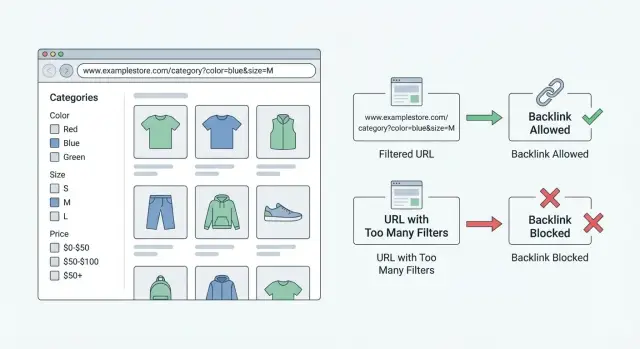
What problem faceted navigation creates
Faceted navigation is the set of filters people use to narrow a list, like size, color, brand, price, rating, or shipping speed. The key detail is that each filter choice often changes the URL, usually by adding parameters or extra path parts. One category can turn into hundreds or thousands of URL variations.
That sounds harmless until search engines start discovering those URLs. Many filtered pages look different but say almost the same thing: the same products in a slightly different order, or the same list with one filter toggled. This creates near-duplicate pages and thin pages (for example, a filter that leaves only one product). Over time, search engines can waste crawl time on these variations and index pages you never meant to compete.
Backlinks can amplify the mess. A strong link pointed at the wrong filtered URL can signal that a random variation is important. Then the page you actually want to rank (usually a clean category page or a carefully chosen filter page) gets less attention. That’s why a faceted navigation backlink policy matters: it keeps link equity focused on the pages that deserve it.
This is how it usually goes wrong: someone copies a URL from a filtered view, the URL includes tracking parameters, sort order, or a niche filter, and that link helps the variation get crawled and indexed. Once a few variants get picked up, many more follow.
The goal is simple: let users filter freely, but only allow a small, intentional set of filtered pages to act like landing pages. Everything else should be treated as a browsing tool, not a page to rank.
Filtered URLs vs category pages: quick definitions
A faceted navigation backlink policy starts with clear names for the pages you might be linking to. If you don’t define them, teams end up treating very different URLs as if they’re the same.
A category page is a stable, curated listing that represents a core topic on your site. It usually has a clean URL, a title that matches a common query, and helpful content like buying guidance, FAQs, or featured items.
A filtered page is what you get after applying one or more facets to a category, such as size, color, brand, price, or rating. Some filtered pages are worth ranking if they match real search demand, but most combinations create lots of near-empty pages.
A search results page is generated from an on-site search box query. These pages change frequently, can mix different intents, and are rarely good targets for backlinks.
Common URL patterns you will see
Facets show up in a few formats:
- Parameter-based:
/shoes?color=black&size=8 - Path-based facets:
/shoes/black/size-8/ - Hash fragments (often treated differently):
/shoes#color=black
“Thin” in plain terms means the page offers too little value on its own. It often looks like a filtered page with only a few products, no unique description, and no clear reason to exist beyond the filter settings.
Duplicates happen because many different URLs can lead to almost the same product set. Sorting options (?sort=price_asc), filter order changes (?size=8&color=black vs ?color=black&size=8), and overlapping filters can all create separate URLs that look like separate pages to search engines.
How to decide which filtered pages deserve links
A filtered page deserves backlinks only when it behaves like a real landing page, not a temporary view. The simplest test is intent: do people actually search for that combination, and would they be happy to land on it?
Start by looking for stable demand. Use Search Console queries, keyword research, and your internal site search logs. If a filter combo shows up month after month (for example, "waterproof hiking boots" or "2 bedroom apartments in Austin"), it has stable intent. If it spikes once and disappears (like a short-lived trend), treat it as a browsing filter, not a link target.
Next, judge whether the page is useful on its own. A link shouldn’t send people to a page with three items, missing context, or confusing defaults. A good candidate has enough choices to compare, clear labeling (what the filters mean), and content that helps people decide.
Quick signals a filtered URL is worth promoting:
- It consistently returns a healthy number of items.
- The combo reads like a normal search phrase, not a parameter stack.
- The page has a clear title and description that match the intent.
- It isn’t dependent on sort or view options to make sense.
- You’d be comfortable putting it in your sitemap.
Finally, keep the set small and predictable. If users can create endless combinations (brand + size + color + price + rating + shipping), you need strict rules so your site doesn’t explode into near-duplicates.
Example: a store selling office chairs might earn links to “ergonomic office chairs” and “mesh office chairs” because both match common searches and show plenty of products. A URL like “mesh + black + under $137 + 4-star + in stock” is too fragile to build links to, even if it briefly converts well.
When pointing backlinks at filtered URLs makes sense (and when it does not)
Backlinks pass authority, so the best target is the page you actually want to rank. With faceted navigation, that’s not always the URL a user happens to land on.
Pointing backlinks at filtered URLs can make sense when the filtered page is stable, useful on its own, and clearly answers repeat search demand. In other words, the filter behaves like a real subcategory, not a temporary view.
Good reasons to link to a filtered URL:
- It has consistent inventory (not often empty).
- The combination matches a common query.
- The page has obvious standalone value (clear title, short intro, curated set).
- The URL rules are fixed and won’t change when filters are reordered.
It usually doesn’t make sense when the page is one of many similar combinations. Linking to lots of variants splits signals and makes it harder for any single page to win. It’s also risky when filters are volatile. A “clearance” filter can look great today and become an empty page next month.
A safe default is to point most backlinks to core category pages or curated landing pages you control. For example, instead of linking to /shoes?color=blue&size=8, create one intentional landing page for “Blue shoes in size 8” only if it can stay relevant.
Set your faceted navigation backlink policy
A faceted navigation backlink policy is a written rulebook that answers one question every time: which URL gets the link. If you don’t write it down, links end up scattered across near-duplicates, and you slowly build pages that look different but compete for the same query.
Start by naming your “indexable facets.” Keep the list short and based on real demand. In many cases, that means 1-2 facets that match how people search (for example: brand and model, or location and property type), not every filter your site offers.
Core rules to document
Write the policy in plain language so anyone can apply it:
- Only a small set of high-demand facet combinations can be indexable and linkable.
- Use one preferred URL format only (one naming style, one parameter order).
- If a filtered page drops below a minimum value, it becomes non-indexable.
- Backlinks to filtered URLs are allowed only to the approved combinations.
- Any exception must be documented with a short reason.
Define what “minimum value” means for your business. A practical starting point is: enough items to be useful, stable inventory, and a clear query you actually want to rank for.
A few concrete examples
Examples remove ambiguity:
- Link to:
/category/shoes?brand=nike(approved, high demand) - Don’t link to:
/category/shoes?brand=nike&color=green&size=7(too specific) - Don’t link to:
/category/shoes?sort=price-asc(sorting pages) - If an approved page falls to 3 items, move it to non-indexable.
Step-by-step: choosing the right target URL for a backlink
When you build backlinks around faceted navigation, the job is to point links only at pages you want search engines to treat as real landing pages. Everything else should be guided back to a stronger page (or kept out of the index).
The 5-step decision process
- Map the shortlist. Start with your core categories, then add the filter combinations people search for most (Search Console, internal search, PPC keywords).
- Check stability. Each combo should stay “full” year-round. If it regularly drops to a handful of items, it’s a thin page waiting to happen.
- Decide the destination. If the combo is valuable, create a clean landing page with a stable URL, unique copy, and a short FAQ.
- Control everything else. Set canonicals and indexing rules so messy variations don’t compete with your chosen page.
- Make it automatic. Update templates and URL rules so new filters follow the same logic without manual cleanup.
If a filter combo matters but your current URL is long and parameter-heavy, it’s usually better to link to a clean, stable version you control. If you can’t commit to keeping the page strong (inventory, copy, and rules), point the backlink to the broader category page instead. One page ranking well beats ten near-duplicates fighting each other.
How to prevent duplicate and thin pages
Faceted navigation can create hundreds of URLs that show nearly the same products with tiny differences (color=blue vs color=navy) or no real value (sort=price-asc). If search engines index all of them, you get duplicate content, thin pages, and wasted crawl time.
Use canonicals and noindex with clear intent
Use a canonical tag when the page can be crawled, but you want search engines to treat it as a variation of a preferred page. For example, if /shoes?color=black shows the same items as /shoes?filter=black, both versions should point to one preferred URL.
Use noindex when the combination doesn’t deserve to appear in search. Common cases include very narrow filters, sorting parameters, internal-only helpers (like view=grid), and empty or near-empty results.
Important: don’t block pages from crawling if you rely on canonicals. If a URL is blocked, search engines may not see the canonical tag or the on-page signals that point to the preferred page.
Keep pagination and parameters consistent
Set one rule for pagination and stick to it. Usually, page 1 is the main target. Page 2+ should be crawlable so products can be discovered, but not treated as separate “new topics.” Sorting should rarely create indexable pages.
A simple approach that prevents most index bloat:
- One indexable URL per intent
- Canonical minor variants to that URL
- Noindex thin combinations and sorting pages
- Keep parameter names consistent so one filter doesn’t generate multiple patterns
Common mistakes that cause index bloat
Index bloat happens when search engines find and try to index thousands of low-value URLs created by filters. The usual results are wasted crawl budget, weaker signals, and rankings that jump around because Google isn’t sure which version is the real page.
One of the biggest causes is leaving every filter combination indexable by default. Color times size times brand can explode into tens of thousands of URLs, even though most combinations have little demand and look almost identical.
Another common mistake is building backlinks to messy URLs that include session IDs, tracking codes, or sort parameters. Even if the content is the same, the URL signals are split.
Canonical tags can also create bloat when they’re inconsistent. If canonicals change depending on filter order, pagination, or user location, search engines see mixed signals.
Thin “SEO filter pages” are another trap. A filtered URL with minimal unique text, weak product depth, or empty states (like 0-2 items) is unlikely to rank, but it can still get indexed and multiply low-quality pages.
Finally, relying on robots.txt alone often backfires. It can stop crawling, but it doesn’t reliably remove already discovered URLs, and it prevents search engines from seeing canonicals or noindex tags on those pages.
Red flags that usually lead to bloat:
- Indexable filters with no clear search demand
- Backlinks pointing to parameter-heavy or sortable URLs
- Canonicals that differ across near-identical variants
- Filter pages with minimal unique content or few products
- Using robots.txt as the main fix
Quick checklist before you build a link to a filtered page
Before you point a backlink at a filtered URL, treat it like you’re choosing a page customers should land on every day. If you’d feel uneasy seeing it in search results for months, it’s not a safe target.
Five checks:
- Clear, stable intent: does the combination match a query people repeat?
- Ranking comfort test: if this exact URL ranked all season, would it still look complete?
- Enough substance: healthy number of items, plus a bit of supporting content.
- One correct canonical target: canonical points to the page you want to rank, consistently.
- Clean URL: no tracking codes, session IDs, sorting, or temporary parameters.
Example: “Running Shoes + Trail” can be a good link target if it stays strong over time. A URL that adds sort=price-low or a tracking parameter from an ad click is a poor target, even if it looks similar.
Example policy in practice: a simple ecommerce scenario
Picture an ecommerce store that sells footwear. The team wants backlinks for demand around “women’s running shoes” and also sees a strong query for a specific brand, like “women’s running shoes Nike.”
Option A is to point links to the main “Women’s Running Shoes” category and let shoppers use on-page filters (brand, size, color). This is usually the safest choice if filtered URLs aren’t meant to rank on their own.
Option B is to create a curated landing page that targets the combo intentionally (for example, brand + category). This works best when the combo has consistent demand, the page is meaningfully different (unique intro copy, curated products, FAQs), and the URL stays stable.
A simple policy for this store could be: link building targets (1) the main category, and (2) a small set of approved, curated combo pages like brand + category. Everything else stays for users, not search.
That means filters such as size, color, price ranges, and sort order shouldn’t become link targets. They often explode into hundreds of thin pages and split authority across many URLs that look almost identical.
Next steps: lock the rules in and keep links focused
A policy only works if it’s easy to follow. Turn your decisions into a short, written “approved targets” list that anyone running SEO or PR can use without guessing.
Start by naming the only URL types you’ll accept as backlink targets, such as your homepage, a small set of core category pages, and a limited number of selected facet landing pages you’ve chosen to keep indexable.
Add a simple gate before any link is built
Most problems happen when a campaign grabs whatever filtered URL looks relevant in the moment. Add one review step that forces a choice from the approved list:
- Keep an “approved targets” sheet with exact URLs and a short note on why each is allowed.
- Require a quick check before a campaign goes live.
- If a requested target isn’t on the list, pause and either reject it or promote it to an approved landing page first.
Monitor what is getting indexed, then adjust
Run a recurring check (monthly is fine) comparing what’s indexed vs what you actually want indexed. When you spot drift, fix the rule, not just the symptom.
Track a small set of signals: index count for filtered URL patterns vs your planned facet landers, new backlink targets created in the last 30 days, and organic landing pages (are unwanted filtered URLs showing up?).
If you’re investing in high-authority placements, be extra strict about targets. For example, SEOBoosty (seoboosty.com) focuses on securing premium backlinks from authoritative sites, so you’ll want to map each placement to a single approved, long-lived URL rather than spreading links across filter variations.
Once the rules are written, reviewed, and monitored, your backlinks reinforce the pages you want to rank, not the pages your filters happen to generate. "}
FAQ
Should I point backlinks to a category page or a filtered URL?
A simple rule is to link to the cleanest page you actually want to rank long-term, usually a core category page. Only link to a filtered URL if it behaves like a stable landing page with repeat search demand and enough products to stay useful.
What’s the main SEO risk of faceted navigation URLs?
Filter combinations can generate thousands of near-duplicate URLs that look different but show almost the same products. Search engines may waste crawl time, index thin pages, and split ranking signals across many variants instead of consolidating authority on one page.
How do I know if a filtered page deserves backlinks?
A filtered page is a good target when the intent is stable and common, the inventory stays healthy, and the page is useful without extra tweaking like sort or view settings. If you’d be happy seeing that exact page in search results for months, it’s usually a safe candidate.
Why shouldn’t I build links to URLs with sort or view parameters?
Sorting and view parameters often create multiple URLs with the same content in a different order, which adds duplication and confuses canonical signals. In most cases, keep those URLs non-indexable and avoid building links to them so authority stays focused on a real landing page.
When should I use canonical vs noindex for filtered pages?
Use canonical tags when you want search engines to treat a variation as a version of your preferred page while still allowing crawling. Use noindex when the page shouldn’t appear in search at all, like very narrow combinations, empty results, internal helper parameters, or volatile filters.
How can I stop filter order and URL variations from creating duplicates?
Pick one preferred format and enforce it everywhere, including parameter names and parameter order. If the same filters can produce multiple URL patterns, you’ll end up with duplicates and inconsistent signals, so define a single canonical version for each approved landing page.
How do I choose which facets should be “indexable” and linkable?
Start with Search Console queries, keyword research, and your internal site search logs to find combinations people repeat. Approve only a small set that matches real demand, then treat everything else as browsing-only so you don’t create an unmanageable number of indexable pages.
What are the most common mistakes that cause index bloat?
Most index bloat happens when every filter combination is indexable by default, especially when color, size, price, rating, and shipping stack together. Another common cause is earning links to messy URLs with tracking codes or session IDs, which splits authority across many versions.
How do I prevent my team or partners from linking to the wrong filtered URL?
Use a short written policy and an “approved targets” list with exact URLs, then require a quick check before any placement goes live. If a high-authority link is involved, be stricter, because one wrong target can push search engines toward the wrong filtered variant.
How does a backlink service like SEOBoosty fit into a faceted navigation policy?
If you buy or secure premium backlinks, map each placement to a single approved, long-lived URL rather than whatever filtered view looks relevant that day. Services like SEOBoosty focus on high-authority placements, so pairing them with strict target selection helps keep link equity concentrated on pages meant to rank.
Share