GA4 setup for placement analysis: referral, assists, organic lift
GA4 setup for placement analysis to split referral traffic, track assisted conversions, and estimate organic lift from one placement using clear segments and cohorts.
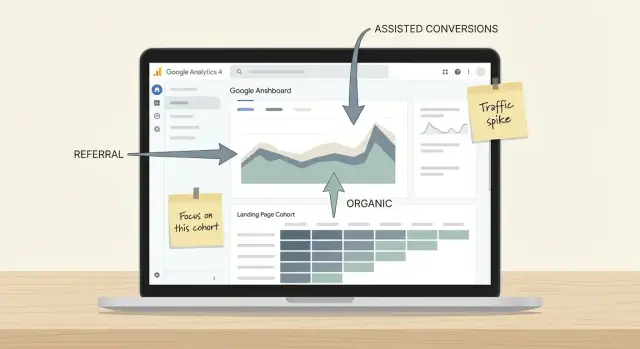
What you are trying to measure (and why it gets messy)
One placement (a mention or backlink on a strong site) can create several kinds of impact at the same time.
Some people click immediately and arrive as referral traffic. Others notice the mention, don’t click, then come back later through Google and convert. Over time, the link can also help the target page rank better, lifting organic traffic even if nobody is clicking the original mention anymore.
That overlap is why placement analysis in GA4 can feel confusing. You’re not answering one question. You’re answering three related questions that share the same time window, the same pages, and sometimes the same users.
Placement analysis is basically: when this placement went live, what changed that you can reasonably connect to it, and how much of that change was direct vs indirect?
You won’t get perfect certainty. People switch devices, cookies expire, and GA4 attribution is a model, not a microscope. But with a clean plan (timeline markers, segments, and page cohorts), you can separate the effects enough to make decisions like “buy more of these placements” or “this one only looks good on the surface.”
Most teams want three outputs from one placement:
- Referral visits: sessions that started because someone clicked from the placement.
- Assisted conversions: conversions where the placement helped earlier in the journey, but didn’t get last click credit.
- Organic lift: extra organic sessions and conversions after the placement, beyond normal ups and downs.
The goal is to keep those three buckets as distinct as possible, so you can report results without mixing signals.
Plan your tracking before the placement goes live
Clean analysis starts with definitions.
Treat a placement as one specific page on another site that links to you, not the whole website. If the site adds more links later (or edits the page), you want reporting that still points to the same source.
Next, pick the destination you actually want to evaluate. The easiest option is one landing page. If you must use more than one, keep it to a small set that serves the same intent (for example, one product page and its pricing page). Mixing a blog post, the homepage, and pricing usually makes results hard to interpret.
Decide your evaluation window before the link goes live, and stick to it. Referral spikes often show up in the first week. Organic lift can take longer. A simple plan is to review three windows: 7, 30, and 90 days.
Write down what “success” means for this placement. Keep it explainable to someone who doesn’t live in analytics.
- Primary: purchase, lead, signup (choose one)
- Secondary: key page view (like pricing), add to cart, demo request start
- Quality: engaged sessions, average engagement time, returning users
Finally, lock what you control. The biggest levers are (1) the exact URL you point to, (2) the go-live date, and (3) whether you can add UTMs.
If UTMs are allowed, use a consistent naming pattern so filtering stays clean later (source, medium, and a placement identifier).
If you’re buying placements through a service like SEOBoosty, ask for the final target URL and the go-live date in writing. Those two details are what you’ll anchor your reporting to later, especially when you start separating referral sessions from assisted conversions and longer-term organic changes.
GA4 basics to confirm first (so the data is usable)
Before you analyze any placement, confirm the basics are solid. If they’re not, a placement can look like a win (or a flop) for the wrong reasons.
Start by checking that GA4 is collecting clean sessions and the key events you care about. Open Realtime, trigger a test visit to the landing page, then complete the main action (signup, purchase, lead form). You should see the page view and the event appear quickly, with sensible event names.
Next, make sure the right events are marked as conversions and named consistently. If one property uses generate_lead and another uses lead, reporting gets messy fast, especially when you compare placements over time.
Also verify that the dimensions you’ll need later are available and populated: source, medium, landing page, and session default channel group. If those show “(not set)” more than rarely, pause and fix the cause before you judge results.
If your funnel crosses domains (for example, a payment provider or separate checkout domain), check that sessions aren’t being split. A common symptom is conversions showing up as Direct or as a referral from the payment domain.
Quick pre-flight checks:
- Confirm your key events fire once per action (not twice).
- Confirm conversions are toggled on and named clearly.
- Confirm you can report on source/medium, landing page, and channel group.
- Confirm cross-domain and payment redirects don’t steal attribution.
- Write down baseline numbers for the same landing pages (sessions, conversions, conversion rate) for a matching period before the placement.
Example: if your landing page averages 200 organic sessions a week before the placement, note it. Without that baseline, a normal weekly swing can be mistaken for “organic lift.”
Use annotations to separate “before” and “after”
Annotations are the simplest way to keep placement analysis honest. They give you a timestamp you can line up with changes in traffic, conversions, and search performance, so you don’t accidentally credit the placement for something else that happened the same week.
Create an annotation on the exact go-live date (and time, if you have it). If the placement is edited later (new link added, anchor changed, URL swapped, the page moved), add another annotation. Those follow-up notes matter because a placement is often not one single moment. It’s a series of changes, and small edits can shift results.
Beyond the placement itself, annotate anything that could move your numbers:
- Website releases (new pages, redesigns, tracking changes)
- Pricing or offer changes (free trial added, discounts, checkout updates)
- Email blasts or paid campaigns that land on the same pages
- PR mentions or social spikes that could inflate referral traffic
- SEO changes (title rewrites, internal linking push)
Keep annotation names consistent so they’re easy to scan later. A simple format works:
- Placement - SiteName - YYYY-MM-DD
- Placement edit - SiteName - YYYY-MM-DD
- Promo - CampaignName - YYYY-MM-DD
- Tracking change - What changed - YYYY-MM-DD
If you run multiple placements (several backlinks over time, including ones purchased through a provider like SEOBoosty), don’t lump them into one generic note like “Backlinks live.” Create one annotation per placement and per edit. Later, when you compare placements side by side, you can see which go-live dates line up with a jump in referrals, which line up with assisted conversions, and which are followed by gradual organic lift.
A quick example: you publish a new pricing page on Monday, your placement goes live on Wednesday, and you send an email on Friday. Without annotations, that week looks like “the placement worked.” With three clear notes, you can separate what likely drove the spike (email), what may have added new sessions (referral), and what needs a longer window to judge (organic).
Step by step: build segments for referral vs organic vs control
The cleanest way to measure one placement in GA4 is to put three segments side by side, while keeping them focused on the same landing pages. That way you’re comparing like with like.
Start in GA4 Explore (Explorations) and use a Free form exploration so you can add segments and switch date ranges quickly. Use a table or line chart, and add metrics like Sessions, Engaged sessions, Conversions, and Total revenue (if you have it).
A build sequence that works for most placements:
-
Create a segment called “Placement referral sessions.” Scope: Session. Condition: Session source (or Session source/medium) matches the referring site domain. If you have variants, use a “contains” match.
-
Add a filter that limits all segments to the same landing page set. Use Landing page + query string and include only the page(s) the backlink points to (or a small cluster you consider the placement’s entry pages).
-
Create a second segment called “Organic to the same landing pages.” Scope: Session. Condition: Session default channel group equals Organic Search. Keep the same landing page filter.
-
Create a third segment called “Control: non-referral, non-organic.” Scope: Session. Condition: Session default channel group is not Organic Search and session source is not the placement referrer. Keep the same landing page filter.
-
Apply all three segments and check that each has enough volume to interpret before you draw conclusions.
A naming habit helps once you have many placements: prefix segments with the placement name and date (example: “TechBlog-2026-02 Referral”).
Save the exploration and reuse it as a template. Consistency is what makes placement results comparable.
Landing page cohorts that keep the analysis focused
A placement rarely affects just one metric. People might click through as referral traffic, or they might see your brand and return later via organic search. If you look at all sessions sitewide, you mix the placement impact with unrelated pages, other campaigns, and normal seasonality.
Landing page cohorts narrow the question: what happens to users who started their journey on the page your placement points to (or a small set of target pages)? This keeps analysis centered on the page that should benefit most.
Build a simple landing page cohort
In GA4 Explorations, define the cohort as users whose first session entry (landing page) matches the placement target page. Keep the rule tight: one URL, or a small group of URLs that share the same intent (for example, a single product page and its localized versions).
To keep it readable:
- Use a clean URL match (exact or begins with) for the landing page.
- Optionally include only new users for the period you’re evaluating.
- Choose one conversion you care about most (lead form, trial start, purchase).
- Pick a date range that includes pre and post placement.
Once the cohort is set, compare behavior over time. Look at engagement (engaged sessions per user, average engagement time), conversions per user, and return visits (do they come back in the next 7 to 28 days?). You’re not trying to prove everything at once. You’re trying to see whether the landing page attracts higher-quality visits after the placement.
Split the cohort by channel to see what changed
Now split that same cohort by acquisition channel. The key comparison is referral vs organic for users who entered on the target page.
If referral users convert quickly but organic users grow over the following weeks, that’s often the “lift” you care about.
Example: if you buy a high-authority placement (for instance via a curated inventory like SEOBoosty), the referral spike might be brief, while organic entries to the same page climb later. Cohorts let you see both without the rest of the site muddying the picture.
How to see assisted conversions from the placement
An assisted conversion is when your placement helps start or move a customer along, but it isn’t the final click before the conversion.
Example: someone clicks a referral today, leaves, then comes back later via organic search and buys. Last-click reporting gives all credit to organic, even though the placement mattered.
In GA4, the most direct place to look is the Advertising reports. Open Advertising and use Conversion paths to see the common sequences people take before converting. Set the report to show Source/medium (or Session source/medium) so you can spot your placement referral as an early touchpoint.
Keep the report focused. Pick one or two conversions that truly represent success (purchase, lead form submit, book a call). Too many conversions make the report noisy and hard to compare.
To compare paths with a placement touch vs without it, use comparisons:
- Comparison A: include sessions where Session source/medium matches the placement referral (your exact referrer)
- Comparison B: exclude that same referral, as a baseline
Keep the same date range and the same conversion in both views.
Then look for patterns like: Referral -> Organic Search -> Direct -> Conversion. If you see that sequence often in Comparison A but not in B, your placement is assisting.
A few things can distort assisted conversion numbers: long sales cycles (you may need a longer date range), repeat buyers (they can inflate assists), and remarketing (ads can “finish” conversions that started with the placement). Also check the attribution lookback window in GA4 attribution settings so you don’t accidentally cut off earlier touches.
Estimating organic lift without fooling yourself
Organic lift isn’t “all organic traffic after the placement.” It’s the change above your normal baseline, for the specific pages that could realistically benefit.
Start by narrowing the question. If a placement points to one landing page, measure organic sessions to that same landing page before vs after. Sitewide organic often hides the signal because other changes (seasonality, campaigns, new pages) move the total up and down.
To keep the comparison fair, define two time windows: a “before” period and an “after” period of equal length. Then compare organic sessions and conversions for the linked landing pages in those windows.
Expect referral traffic to show up immediately. Organic lift often shows later.
Use a control group so you don’t mistake normal growth for lift. Pick a small set of similar pages that didn’t get a link (same template, same topic depth, similar historic traffic). If those pages rise at the same rate as your linked cohort, the “lift” probably isn’t coming from the placement.
A sanity-check sequence:
- Compare linked pages vs control pages (both organic only) in the same date ranges.
- Look for a delayed change (often 2 to 8 weeks), not a same-day spike.
- Check engagement and conversion rate, not only sessions.
- Watch for one-off spikes that fade within a few days.
Branded vs non-branded is another guardrail. GA4 doesn’t show queries, but if you track queries elsewhere, confirm whether growth is mostly branded. A big branded jump can happen after a high-visibility mention. True SEO lift often shows up as non-branded impressions and clicks expanding across more queries.
Example: you buy a strong placement (for instance through a curated inventory like SEOBoosty). The linked page gets immediate referral sessions and a few direct conversions. Organic sessions stay flat for three weeks, then climb while the control pages stay flat. That pattern is closer to real lift than a week-one spike that matches the control group.
Common traps that make placement results look better or worse
Most “placement wins” in GA4 are really measurement mistakes. The goal is to compare like with like, over a clear window, with consistent rules.
A common error is mixing all landing pages together and calling it lift. A single placement usually points to one page (or a small set). If you blend that with your whole site, normal changes on other pages can hide real impact or create fake “growth.” Keep analysis tied to the placed URL(s) and a small, comparable cohort.
Other traps show up constantly:
- Changing conversion definitions mid-test (or forgetting to mark key events as conversions). If “conversion” means something different before and after, you’re not measuring lift.
- Looking only at last-click reporting. Referral clicks might assist a later conversion via direct or organic, so last-click alone will undercount value.
- Ignoring other marketing running at the same time. Email blasts, paid campaigns, PR, or a site-wide promo can move the same metrics you’re attributing to the placement.
- Over-reading small numbers. When volume is low, one extra lead can swing your rate by 50 percent and look like a breakthrough.
A realistic scenario: you get a backlink placement on a major publication and point it to a product page. The next week, your team launches a discount code and updates the pricing page. If you report “organic lift” from the placement without separating the landing page cohort, locking conversion definitions, and calling out the promo window, you’ll likely credit the placement for changes it didn’t cause.
When in doubt, slow down and label the result as “directional” until you have enough sessions and enough time after the placement to trust the trend.
A simple checklist you can run in 10 minutes
When a placement goes live, do a fast setup check before you look at results. This catches the most common reasons numbers end up mixed together.
-
Confirm the timeline markers. Add an annotation for the exact go-live date (and time, if you know it), plus any big site changes around it (new navigation, landing page edits, pricing changes). If you can’t point to the moment “after” started, everything else is guesswork.
-
Sanity-check the referral definition. Open your referral segment and verify it matches the real referrer you expect (source/medium and, if needed, the exact domain). Spot-check a handful of sessions: do they actually land on the pages you promoted?
-
Keep the landing page cohort tight. Include only the intended landing pages (the ones the placement points to, plus any close variants you chose). If it accidentally includes your homepage or unrelated blog posts, you’ll dilute the signal.
-
Verify conversions are real conversions. Trigger your key actions (form submit, sign-up, purchase, demo request) and confirm they appear in GA4 events, then confirm they’re marked as conversions. If you track multiple conversion events, make sure you’re looking at the right one for this placement.
-
Lock comparison windows and a control. Define a baseline period and a clear after period (same length, same days of week). Then compare against at least one control group, like organic traffic to similar pages that weren’t promoted.
A quick example: a backlink lands on a product page. Referral sessions spike on day one, but conversions don’t move. If your control pages show the same “lift,” the change is probably seasonal. If only the promoted page’s organic sessions rise 2 to 3 weeks later, that points to organic lift rather than referral impact.
Example scenario: one placement, three different outcomes
A SaaS brand uses SEOBoosty to get one placement on a major publication. The article links to a pricing or product page, for example: /product.
Days 1 to 3 usually show the loudest signal: a referral spike. This is where your “Placement referral sessions” segment earns its keep. Sessions jump, engagement is mixed, and conversions can be oddly low if the article audience is curious but not ready to buy.
What you might see right away:
- A sharp increase in sessions with source = the publication
- A higher share of new users
- Shorter session duration than your usual organic traffic
- Conversions that lag behind clicks (or show up later)
Weeks 2 to 6 often split into three outcomes.
Outcome 1: Referral-heavy win
Referrals keep bringing qualified traffic and direct conversions rise. Decision: keep the page stable, reduce friction (pricing clarity, faster load, stronger FAQ), and consider a second page for a different intent (comparison or use-case).
Outcome 2: Assist-heavy win
Referral clicks fade, but conversions show up later as assisted (people come back via direct, email, or organic). Decision: improve messaging for first-time visitors (clear value prop above the fold) and add a softer conversion (demo, calculator, checklist) so the first visit isn’t wasted.
Outcome 3: Organic-lift win
Referral stays modest, but organic sessions to the same landing page cohort trend up, and rankings for a few related queries improve. Decision: expand content around that page (supporting pages, clearer internal links, tighter headings) to help the new authority translate into search demand.
Success can be real even with modest referral clicks if assisted conversions rise or organic traffic grows for the linked page and its close neighbors.
Next steps: make results repeatable for future placements
The goal is a decision, not a debate.
If the placement sent clean referral traffic but no assisted conversions, keep the URL but change what happens after the click (headline, proof, offer, page speed). If it showed assists but low last-click sales, keep it and make sure your email flows, retargeting, and sales follow-up are strong. If you saw organic lift without much referral, treat it as an authority play and protect the landing page you used.
Lock in the “recipe” so the next placement is comparable. Reuse the same cohorts, segments, and time windows so you’re not rebuilding rules every time you report.
A repeatable placement template
Write down these choices once and reuse them:
- One primary landing page (or a small, named set) you will point links to
- One control group (similar pages that shouldn’t be affected)
- One analysis window (for example, 7 days pre and 28 days post)
- One set of segments (referral from the placement, organic to the landing page, and a control)
- One success metric set (sessions, engaged sessions, conversions, and assists)
A simple reporting routine
In month 1, check weekly so you catch issues early (wrong URL, missing UTM, unexpected redirect, or a page change). After that, switch to monthly so you can see slower organic effects without overreacting to noise.
When you plan new placements, prioritize sources you can measure cleanly. If you’re using a provider like SEOBoosty (seoboosty.com), the practical advantage is operational consistency: you can match each placement to a specific target URL and go-live date, then run the same GA4 segments and cohorts every time.
FAQ
What should I actually measure from one placement in GA4?
Measure three things separately: referral sessions from the placement, conversions where the placement appeared earlier in the path (assists), and organic changes on the linked landing page after the go-live date. If you only look at one blended metric, you’ll mix direct clicks with delayed search impact and misread the result.
What counts as a “placement” for tracking purposes?
Treat it as one specific page on the referring site that links to one specific destination page on your site. Record the exact target URL and the exact go-live date, because those two details become your anchor for comparisons, segments, and “before vs after” windows.
Should I point the placement to my homepage or a specific landing page?
Use one primary landing page whenever possible, because it keeps analysis clean and makes changes easier to attribute. If you must use more than one, keep it to a small set with the same intent, otherwise you’ll dilute the signal and your conversion rate won’t mean much.
Do I need UTMs for placement analysis?
Yes, if you’re allowed to add them, because UTMs make the referral traffic easy to filter and less likely to get lumped into other sources. Keep the naming consistent across placements so you can reuse the same GA4 exploration without rewriting filters every time.
How do I separate referral vs organic traffic for the same landing page?
Use an exploration with three session-scoped segments that all share the same landing page filter. One segment is sessions where the session source or source/medium matches the referrer, one is Organic Search sessions to the same landing page, and one is everything else to that landing page so you have a baseline to sanity-check movement.
How can I see if the placement is driving assisted conversions?
Look in the Advertising reports, especially Conversion paths, and inspect journeys where the placement source appears early but isn’t the last touch. Keep it focused on one primary conversion, because mixing many conversion events makes the paths noisy and harder to compare over time.
How do I estimate organic lift without fooling myself?
Compare equal “before” and “after” time windows for organic sessions and conversions to the linked page, not the whole site. Add a control set of similar pages that did not receive a link; if both the linked page and control pages rise together, the change is more likely normal variation than lift from the placement.
What should I annotate around the placement go-live date?
Add an annotation on the exact go-live date, and add more if the placement is edited later, like a URL swap or anchor change. Also annotate anything else that could move the same metrics, such as pricing changes, tracking changes, email sends, or paid campaigns, so you don’t accidentally credit the placement for unrelated spikes.
How long should I wait before judging a placement?
Referral impact often shows up quickly, but organic changes usually lag, so plan multiple check-ins such as 7, 30, and 90 days. Decide these windows before the placement goes live and stick to them, otherwise it’s too easy to cherry-pick a good-looking date range.
Why do my placement results look wrong in GA4 even though clicks happened?
First confirm GA4 fundamentals, including that key events fire once, conversions are marked correctly, and source/medium and landing page dimensions aren’t frequently “(not set).” If your checkout or forms happen on another domain, fix cross-domain measurement so conversions don’t get misattributed to Direct or payment referrals, because that can make a good placement look bad or vice versa.
Share