Internal linking plan to route authority to money pages
Build an internal linking plan that moves authority from backlink pages to money pages, with simple steps, anchor text tips, and quick checks to improve rankings.
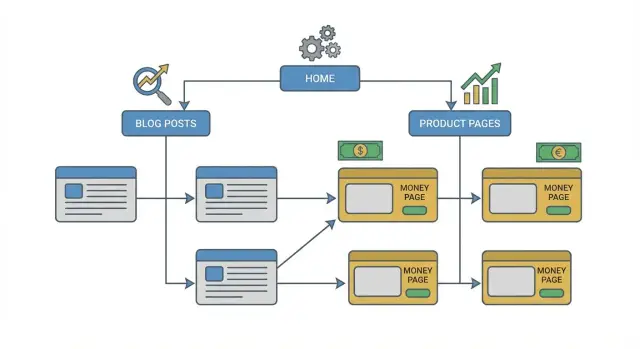
Why backlinks do not automatically help your money pages
It’s common to earn backlinks to pages that are easy to cite: a strong blog post, a free tool, a data study, or a glossary entry. Those pages deserve links because they’re genuinely useful. But they’re often not the pages that drive revenue.
Money pages are the pages you want to rank when someone is ready to buy or book: product pages, service pages, pricing pages, and core landing pages.
When people say a page has “authority,” they usually mean it has earned trust in search. Strong backlinks can help a page look more credible and rank more easily. The catch is that this strength doesn’t automatically spread to the rest of your site.
Search engines evaluate pages individually. Backlinks point to a specific URL, and most of the benefit stays concentrated there unless your site gives a clear, natural path from that linked page to the money page.
A simple example: a tech blog links to your “Beginner’s Guide” because it’s genuinely helpful. Your service page can still sit on page 3 if the guide never points readers (and crawlers) to the service page in a clear way. The link helped the guide, not the offer.
Internal linking isn’t about spraying links everywhere. It’s about routing value in a way that makes sense to a real reader. Keep it simple: link from your strongest, most relevant pages to the one or two money pages that match the intent, use plain anchor text that describes the destination, and place links where people naturally look for “what to do next.”
Backlinks plus internal links: how value actually moves
A backlink usually lifts one page first, not your whole domain. Search engines can pass some of that value through internal links, but only if you make the route obvious.
The pages that attract backlinks are often helpful, shareable, or newsy: deep guides, original research, free tools and templates, press pages, and resource hubs.
Where things go wrong is predictable. A guide earns links, lives in a blog section, links out to a bunch of related posts, and never points clearly to the product or service page that should rank. Or the only path to the money page is a generic top-nav link, which doesn’t provide much context.
Internal links do the most work when they’re:
- Relevant: the source and destination serve the same audience and intent.
- Clear: the link appears where a reader would actually use it, with words that explain what’s on the other side.
- Crawlable: a normal HTML link that isn’t blocked, buried, or hidden behind scripts.
A useful way to think about it: backlinks create authority, internal links route it.
Timing matters, too. After you add internal links, search engines have to recrawl the source page and the target page, then update how they interpret the relationship. Sometimes you’ll see movement in days; often it takes weeks, especially on sites that aren’t crawled frequently.
Choose the money pages and define what “winning” means
Internal linking works best when you’re clear about where you want authority to end up.
Start by choosing a small set of money pages that directly drive revenue or leads. Keep it tight. Three to ten pages is enough for a first pass. If you pick thirty, you’ll spread value thin and the plan becomes hard to execute.
For each money page, pick one primary search intent (the reason someone is searching). Common intent buckets are:
- Buy/act now (pricing, book, hire, subscribe)
- Compare/choose (best, vs, alternatives, reviews)
- Learn first (how to, guide, examples, what is)
- Local (near me, city + service)
Then define “winning” for each page with one metric you can check later. For sales pages, track conversions (leads, trials, purchases). For entry-point pages, track organic traffic to that page. For pages built around a small set of queries, track rankings for one to three target terms.
Finally, write down constraints before you start: legal copy you can’t change, templates that limit link placement, seasonal pages, or pages owned by another team. If a page is hard to edit, plan to route links from pages you do control.
Inventory the pages that can pass authority
Not every page is a good “donor.” Some pages already earn trust; others are thin and rarely visited.
Start by identifying pages with strong signals, such as steady organic traffic, existing backlinks or mentions, evergreen guides that keep getting visits, or tools and templates people come back to.
Topical closeness matters more than most teams expect. If a page is about email marketing, don’t use it to push authority to a page about car insurance just because it has traffic. Aim for “same problem, same audience, same language.”
For each topic cluster, build a short donor list of supporting pages you can edit today. If you have ten to thirty, great. If you only have three to eight, that’s still workable.
Your inventory doesn’t need to be fancy. For each cluster, capture:
- The topic name
- The one money page that needs to rank
- A ranked list of donor pages (strongest to weakest)
- A one-sentence note on why each donor is relevant
Design a simple routing map (no complex diagrams needed)
A routing map is just a decision about how authority should flow. You don’t need special software. You need a clear path from pages that can earn links to the page that makes money.
Start with one choice: should supporting pages link directly to the money page, or should they link to a hub page that then links to the money page? Direct links are simplest when the supporting page is tightly related. A hub works well when you have many related articles and want one strong topic page to organize them.
Keep the route short. Every extra hop usually means less value reaches the target and more chances you forget to maintain the links. In most cases, aim for one hop: donor page to money page.
Also, favor a few high-quality internal links over dozens of weak ones. A contextual link placed near the top of a relevant page, with clear surrounding text, is often worth more than a pile of links shoved into footers or “related posts” blocks.
Step-by-step: build the internal linking plan in one afternoon
You can build a solid first pass quickly if you keep the scope small. The goal isn’t to perfect your entire site. It’s to send clear, relevant signals from pages you already have to the pages that need to rank.
Start by opening your list of money pages. For each one, pick five to ten supporting pages you can realistically edit today, prioritizing pages that already get traffic, already have backlinks, or sit close to the topic.
Then edit in this order:
- Add one contextual link in the body where it naturally fits the sentence.
- Add a second link only if it genuinely helps the reader take the next step.
- If the page has no natural spot, add a short, useful mini-section (two to four sentences) that makes the link feel obvious.
Keep each update small. One strong internal link beats three forced ones.
To finish in an afternoon, timebox it: thirty to forty-five minutes per money page. Then roll forward weekly by updating another money page and refreshing older supporting posts as you publish new content.
Anchor text that helps rankings and still reads naturally
Anchor text is the clickable words in a link. It also tells search engines what the destination page is about. The goal is simple: write anchors that sound normal and accurately describe the page you’re linking to.
Match the promise of the destination. If your page is “Payroll software for restaurants,” don’t use an anchor that implies “free payroll templates.” That mismatch hurts trust and often leads to quick bounces.
If every internal link uses the exact same keyword phrase, it reads awkwardly and can look forced. Variety helps, as long as the meaning stays consistent. Mix descriptive phrases, partial matches, branded anchors, and simple navigation-style anchors like “pricing for restaurants.”
Avoid empty anchors like “click here” or “read more.” On a page that has earned strong backlinks, those waste a clear chance to signal relevance.
Placement matters as much as wording. Anchors work best inside a sentence that already discusses the problem the money page solves. Keep anchors short and clean so they don’t feel spammy, especially on mobile.
Common mistakes that waste authority (or create risk)
Internal links should make it easier for people and search engines to find your best pages. When the plan is messy, value gets diluted and relevance gets muddy.
Treating a page like a link dumping ground. If every paragraph has a link, the page stops reading like content and starts reading like a directory. Add links where they help someone take the next step.
Forcing links from unrelated pages. A high-authority page is tempting, but relevance still matters. If you want to pass value from an off-topic page, use a relevant bridge page that makes sense to humans.
Overusing exact-match anchors. Exact matches can work, but repeating the same phrase over and over looks unnatural and narrows how search engines understand the destination page.
Sending lots of links to a weak destination. Internal links amplify what’s already there. If the money page is thin, slow, or misaligned with intent, more links won’t fix the core issue. Improve the page first.
Changing URLs and leaving broken paths. Old posts, templates, and nav elements often keep pointing at outdated URLs. If you update a URL, update internal links sitewide and make sure redirects and canonicals match the new structure.
Quick checklist before you hit publish
Before changes go live, do a fast pass on the pages that matter:
- Each money page has meaningful support (roughly three to ten relevant internal links from real pages, not only nav/footer).
- Your strongest linked pages point to at least one closely related money page.
- Routes are clean (no broken links, no redirect chains between the supporting page and the money page).
- Contextual in-text links do most of the work; navigation stays simple.
- The topic lines up across title, on-page heading, and anchors.
Then do two reality checks.
First, click the links like a reader. If a link feels odd in the sentence, the anchor is probably forced. If the jump feels natural, it’s usually fine.
Second, scan for topic drift. If your money page is about “payroll software for small businesses” but supporting pages link with anchors like “accounting” or “HR tools,” you’re sending mixed signals. Adjust anchors so they match the page focus without repeating the same phrase every time.
Realistic example: routing authority to one priority page
Imagine a small SaaS company that sells a team scheduling tool. Their “Employee scheduling software” feature page is the money page, but it earns almost no backlinks because it isn’t very shareable. Meanwhile, a few blog posts have picked up links over time.
The goal is to push more authority from those linked articles to the feature page without making the site feel spammy.
A clean approach looks like this:
- A comparison post links once in the first third (after defining the category) and once near the section that lists key features.
- A use-case guide (for example, “Scheduling for retail teams”) links once in the problem section and once in the solution section.
- A glossary entry (“shift scheduling”) includes a single link near the top, right after the definition.
- A pricing FAQ post links where it explains who the product is best for.
Notice the pattern: each page links where it naturally helps the reader take the next step.
To keep it manageable, roll it out weekly instead of editing everything at once: start with your top traffic pages, then pages with backlinks, then supporting pages that rank on page 2 or 3. After that, refresh the money page and link back out to the best supporting pages so the cluster feels connected.
After publishing, watch more than rankings. Over the next one to three weeks, check whether search engines recrawl the edited pages, whether the money page is crawled more often, and whether impressions rise for the main query. If visits increase but conversions drop, your links may be pulling in the wrong intent.
If results stall, strengthen the supporting pages, not only the money page. For teams that use premium backlink placements, that often means building links to a small set of high-quality donor pages and then routing that authority internally. SEOBoosty (seoboosty.com) is one option for securing backlinks on authoritative sites; the internal linking work is what helps that authority reach the pages that actually drive revenue.
FAQ
Why don’t backlinks automatically boost my product or service pages?
Backlinks help the specific URL they point to first. If that page doesn’t link clearly to your product, service, or pricing page, most of the benefit stays trapped on the linked page instead of reaching the page that drives revenue.
How many money pages should I focus on at once?
Pick a small set of pages that directly generate leads or sales, like service, product, pricing, and core landing pages. Keep it to about three to ten pages so the internal links stay focused and you don’t spread value too thin.
What does internal linking actually do for SEO here?
Search engines judge pages individually, and internal links are the main way you show which pages are closely related and which pages matter most. A relevant, crawlable internal link is the “route” that lets some authority flow from a linked guide or tool to the money page.
Which pages are the best “donors” for passing authority?
Start with pages that already show strength: steady organic traffic, existing backlinks or mentions, evergreen guides, tools, templates, and resource hubs. Prioritize donors that are topically close to the money page because relevance usually matters more than raw traffic.
Should donor pages link directly to the money page or to a hub page first?
A direct link is best when the supporting page closely matches the intent of the money page and the next step is obvious for the reader. A hub page can work when you have many related articles and want one central page that organizes the topic before pointing to the offer.
What anchor text should I use for internal links to money pages?
Use anchor text that describes the destination in plain language and matches what the page actually offers. Keep it natural by mixing a few variations, and avoid empty anchors like “click here” that waste a clear relevance signal.
Where should I place internal links so they actually count?
Place a contextual link where a reader would naturally want the next step, often in the first third of the page or inside the section that discusses the problem and solution. One strong, well-placed link usually beats several forced links in footers or “related posts.”
How long does it take to see results after adding internal links?
Search engines need to recrawl the edited pages and then reassess the relationship between the source and destination. You might see movement in days, but weeks is common, especially if your site isn’t crawled often.
What are the most common internal linking mistakes that waste authority?
Don’t turn pages into link dumps, don’t force links from unrelated topics, and don’t repeat the same exact-match anchor everywhere. Also fix weak money pages first, and avoid broken links, redirect chains, or outdated URLs that block the path.
How do premium backlinks (like SEOBoosty placements) fit into this strategy?
Premium backlinks can be useful when you point them at strong, relevant donor pages that can attract links and hold trust. The key is to then route that value with clear internal links to the money pages, otherwise the impact may stay isolated to the linked content page.
Share