Link-driven keyword cannibalization: detect and fix it fast
Learn how to spot link-driven keyword cannibalization, confirm which pages compete, and fix it with merges, canonicals, redirects, and re-optimization.
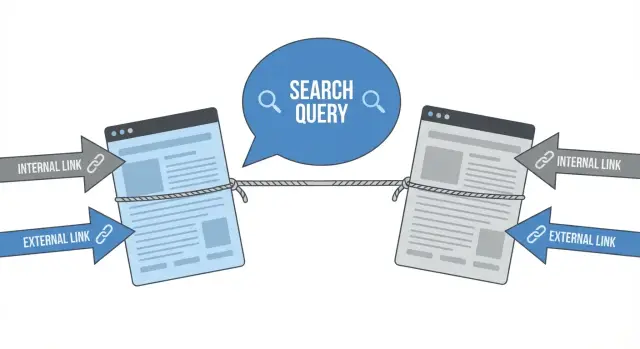
What link-driven cannibalization looks like in plain terms
Link-driven keyword cannibalization happens when two or more pages on your site compete for the same query because links keep nudging Google toward different URLs at different times.
It usually looks like a tug of war. One week Page A ranks, then Page B takes over, then they swap again. Neither page fully wins because the signals (links, anchor text, internal navigation) are split.
This is different from normal ranking volatility. Normal volatility is often small up-and-down movement for the same page due to competitors, freshness, or Google testing. Cannibalization is Google changing its mind about which of your pages is the best match, often because your own linking makes the choice unclear.
You can spot it quickly in Search Console and analytics. Typical symptoms include split clicks and impressions across multiple URLs for one query, unstable positions where pages trade places every few days, and links pointing to the wrong page for the search intent.
Example: you have a product page and a blog post that both target “enterprise SEO backlinks.” If a few strong links point to the blog post, Google may rank the blog post. Then your internal navigation and category pages keep linking to the product page with similar anchor text, so the product page starts ranking instead. The result is two pages alternating, and neither collecting all the trust.
The goal is simple: one clear page per intent, with the rest of your pages (and links) supporting it. When Google sees a single best URL, rankings usually get more stable, clicks consolidate, and your strongest page can move up faster.
How links create the problem (internal and external)
Links are votes, but they also act like signposts. If your site sends mixed signals about which page should rank for a query, Google can spread attention across several pages instead of picking one clear winner.
Internal links: you can promote the wrong page by accident
Internal links drift over time. A new blog post launches, people add it to menus, footers, and older articles, and suddenly it has more internal support than the page you meant to rank.
This often happens through “helpful” links: a CTA pointing to a newer post instead of the main guide, a sidebar widget that links to a category page, or a template link that repeats sitewide. If those links use the same anchor text, you’re effectively telling Google, “this other URL is the best match for this keyword.”
Common internal patterns that cause competition:
- Many pages using the same anchor text but pointing it at different URLs
- Navigation links pointing to a tag/category page instead of the main landing page
- Sitewide header/footer links pushing authority to a secondary page
- Rotating “read more” blocks that keep changing the target
- Old links that were never updated after a new page launch or URL change
External links: authority gets split across similar pages
Backlinks can create the same problem when multiple pages attract links for the same topic. If one page has strong content but another page has better backlinks (or just more of them), rankings can flip-flop. Sometimes both pages hover in the middle of the results because neither builds enough clear authority.
This is common when links are earned or placed to different URLs over time. Anchor text makes it worse: if external anchors repeatedly mention the same keyword but point to different URLs, you train search engines to associate multiple pages with one query.
When it’s not a problem
It’s not cannibalization if the pages serve different intent and have clear roles in search results, like a product page vs a how-to guide, or a pricing page vs a comparison page. If each page wins different keywords and users land on the right page for the right job, keep them separate.
Where to spot cannibalization signals quickly
The fastest way to catch link-driven keyword cannibalization is to look for “flip-flopping” signals: the same query sending Google to different pages over time, even though nothing major changed on your site.
Search Console: one query, multiple landing pages
In Google Search Console, check the query view and look at which pages get impressions and clicks for that query. A clean setup usually has one clear page leading. A cannibalization hint is when two or more URLs each get a meaningful share, or when the top page keeps changing week to week.
Also watch for cases where one URL has a better average position but another gets more clicks. That mismatch often means Google is unsure which page best matches intent.
Rank tracking: the “ranking URL” keeps changing
If you use a rank tracker, pay attention to the URL that ranks for a keyword. When it swaps between two similar pages (for example, Monday is /pricing, Tuesday is /plans), both pages are competing and links are pulling relevance in different directions.
This often shows up after internal link changes, new navigation blocks, or external links pointing to different pages for the same topic.
Analytics: traffic spread across near-duplicates
In analytics, compare organic landing pages that look too similar to both be needed. If each page gets a small amount of traffic for the same theme, you may be splitting authority and user signals.
A quick reality check: if you removed one of the pages, would users truly lose a distinct option? If not, it’s a cannibalization candidate.
On-site clues: titles, H1s, and templates that overlap
Sometimes you can spot the issue without any tool. Scan your top pages and look for repeated patterns: titles that differ by only a word or two, overlapping H1s, pages built from the same template with minor changes, multiple “ultimate guide” pages on one topic, and internal links using the same anchor text to different URLs.
Example: you have “Best Project Management Tools” and “Top Project Management Software” pages. If your navigation and blog posts link to both using “project management tools,” Google may rotate which one ranks, especially if each page also has some external links.
When you see multiple signals together, flag the query and URLs for a deeper audit before you decide to merge, set a canonical, redirect, or re-optimize.
Step-by-step: run a simple cannibalization audit
A simple audit starts by narrowing the scope. Pick one query that matters (the one you actually want to rank for), then check whether more than one page is getting traction for it. Link-driven cannibalization usually shows up when Google keeps swapping which URL ranks even though the intent is the same.
1) Choose the query and find your competing URLs
In Search Console, filter performance by the exact query. Look for the handful of URLs that show impressions for that query. If you see two to five pages sharing impressions, that’s enough to audit.
Write those URLs down and add a plain-English label (product page, category, blog post, comparison, landing page). This makes the next decisions easier.
2) Pull the numbers that show who is actually winning
For that query, capture the basics per URL: impressions and clicks, average position, the trend over time, and what the snippet looks like in results.
Don’t overthink the math. You’re looking for a clear picture: does one page consistently earn clicks, or are they splitting attention?
Then do a reality check by searching the query and noting what type of result Google seems to prefer (guide, product, comparison, definition). If your “best” URL doesn’t match that intent, it may be ranking for the wrong reasons.
3) Map internal links and anchor text
Next, check where your site is sending link equity. Look at navigation, footer, related-post blocks, and any “best of” pages. Note which competing URL gets the most internal links and what the anchor text says.
If multiple pages are linked with similar anchors (like “pricing,” “SEO backlinks,” or the exact query), you’re telling Google they’re all the same answer.
4) Check where external authority is landing
Use your backlink tool (or your provider’s reporting) to see which competing URL has the strongest external links. A page with more authority often keeps re-entering rankings even if it isn’t the best match.
This can happen after you build strong links to a newer page while an older page still has many legacy links. Both URLs can start trading positions for the same query.
5) Write a one-paragraph verdict
End with a decision you can act on: which URL should be the main page for the query, and why. Use three criteria: best intent match, strongest performance (clicks and position), and cleanest link support (internal and external). If you can’t justify a winner in one paragraph, the pages are probably too similar and need consolidation or clearer separation.
How to choose the winning page for each query
Fixing link-driven keyword cannibalization gets easier once you pick a single “owner” page for the query. One page should match what the searcher wants, and everything else should support it.
Start with intent. What does a person expect when they type the query?
- Informational: definitions, steps, explanations
- Comparison: “best”, “vs”, alternatives, reviews
- Transactional: pricing, signup, product, demo
If two pages target the same words but different intent, they shouldn’t compete. A “What is X?” guide shouldn’t fight your “X pricing” page. The winner is the page that matches the intent of the query you care about.
Next, compare which page actually deserves to rank. Look for depth, freshness, and usefulness. A page can be long and still be weak if it rambles or hides the main answer.
Then look at links, after intent. If one URL has stronger backlinks, it often has a head start. Also check what Google is rewarding in the results. If the top results are mostly product pages, a blog post may struggle no matter how well written. If the top results are guides and FAQs, a thin landing page can underperform.
If you want a quick scoring method, keep it simple: intent match, content quality, recency, link strength (internal and external), and business value.
Once you choose the winner, decide what happens to the others: repurpose them for a different angle, fold their best sections into the winner, or retire them so they stop splitting signals.
Fix option 1: merge content without losing value
Merging is the cleanest fix when two or more pages target the same intent and mostly say the same thing. If both pages are getting links and impressions for the same query, Google keeps testing which URL to rank, and neither becomes the clear winner.
A good sign you should merge: users would be fine landing on either page because they’re trying to do the same job. If intent is different (one page is “how to” and the other is “pricing”), merging usually makes the page messy and weaker.
When you merge, keep one page as the home (the future ranking URL) and move only what’s truly unique from the other page. That preserves value without bloating the result.
What’s usually worth moving over: unique sections that answer missing questions, the better example or step-by-step explanation, non-duplicate FAQs, and any definitions or data points that add trust.
After the merge, decide what happens to the old URL. In most cases, set a 301 redirect from the old page to the merged page so authority and visits consolidate. Use a canonical only when you must keep the old page accessible (for example, a near-duplicate needed for a specific audience or format) and you’re confident it won’t confuse users.
Then clean up internal links. If navigation, blog posts, or related-article blocks still point to the old URL, you keep splitting signals. Update internal links so they point to the merged page, especially from high-traffic pages.
Finally, rewrite the title and headings so the merged page is clearly about one intent, and nearby pages are clearly about something else. That’s how you prevent the overlap from creeping back.
Fix option 2: canonicals and redirects (and when each is right)
Canonicals and redirects both tell Google which page should win, but they send different signals.
Use a canonical when both pages still need to exist for users but are basically the same in meaning. Think true duplicates, printer-friendly versions, tracking variations, or near-identical pages where most of the content matches. A canonical says: “Index the other page instead.”
Use a redirect when one page should not exist anymore. If the page is outdated, thin, or only there because of an old campaign, redirect it (usually 301) to the best replacement. This is also a strong option when external backlinks point to the weaker page and you want that value to flow into the stronger one.
A common failure is mixed signals. If you canonical Page B to Page A, but your navigation and internal links keep pushing Page B, Google may ignore the canonical or keep swapping rankings.
Keep the site consistent:
- Internal links should point to the chosen page
- Your sitemap should include the chosen page, not the losing one
- Titles and headings shouldn’t claim the same query focus across both URLs
- Canonicals should be consistent (A canonicals to A; B canonicals to A)
To confirm it’s working, check which URL is indexed for the query and whether impressions and clicks consolidate over time.
Fix option 3: re-optimize pages so they stop competing
Sometimes you don’t need to merge anything. You just need to make each page clearly about a different job.
Start with on-page signals. If two pages say the same thing in the title, H1, and opening lines, Google will keep testing them against each other. Rewrite those elements so only one page matches the main query, and the other page focuses on a different angle.
A simple way to split close pages is by intent: one page is “choose and buy,” another is “learn and compare.” You can also split by audience and use case (beginners vs advanced teams, small sites vs enterprise) or by purpose (“how it works” vs “pricing and options”).
Internal links matter just as much as the copy. Pick one primary destination for each anchor theme, then update menus, footers, and in-content links so they point consistently to the winner. Supporting pages can still link to the winner, but their anchors should describe their own topic, not the head term.
To make supporting pages help without competing, keep the structure tight: use the main query on the winner (not everywhere), give the supporting page a distinct secondary keyword set, clarify intent with a short “who this is for” section, and remove repeated sections that echo the winner’s wording.
After the edits, watch whether the same query stops bouncing between URLs and whether internal links now concentrate authority on the page you want to rank.
Common mistakes that keep cannibalization coming back
Most recurring problems come from “almost the same page” decisions. Two URLs keep the same title template, the same H1 pattern, and the same intro, with only a few words swapped. Google reads them as substitutes, so rankings and links get split.
Another trap is treating a canonical like a magic switch. If you set a canonical to Page A but your navigation, breadcrumbs, and most internal links still point to Page B, you’re sending mixed signals. Earning new external links to the non-canonical URL makes it worse.
Redirects can also backfire when the pages serve different intent. If one page is a how-to guide and the other is a pricing page, redirecting one into the other can hurt relevance and frustrate visitors. In those cases, it’s often better to keep both and make their topics clearly different.
Merges fail more often due to cleanup than writing. Teams combine content, publish the winner, and stop there. But old internal links keep pointing to the retired URL, category pages still feature it, and sitemap or navigation elements keep resurfacing it.
Mistakes that often undo the fix:
- Keeping two pages with near-identical titles and headings
- Setting canonicals while heavily linking to the non-canonical page
- Redirecting a page that answers a different question than the target page
- Merging content but not updating internal links, menus, and CTAs
- Stuffing too many queries into one page, creating fresh overlap elsewhere
Quick checklist and next steps after the fix
After you merge, add a canonical, redirect, or re-optimize, do a final pass to make sure the site is sending one clear signal per query.
Quick checklist (10 minutes)
- One query, one primary URL: pick the page you want to rank and make sure everything points there
- Internal links support the winner: navigation, hub pages, and high-traffic posts link to the chosen URL
- Anchor text stays consistent with intent (don’t mix “pricing” and “features” anchors for the same query)
- Old URLs don’t send mixed signals (redirected or clearly canonicalized)
- Title and H1 match the winner’s job
Example: if you fixed two “best project management templates” pages, make sure your templates category page and your top blog post both link to the same final guide using consistent anchors, not half pointing to an older checklist.
Verify the fix worked
Don’t only look at rankings. Check that the winning URL is the one getting impressions and clicks for the target query in your search performance reports. If the wrong URL still shows up, internal links are usually still split, or the “winner” doesn’t match intent as well as the “loser.”
Monitor for 2-6 weeks
Early on, you may see URL swaps as search engines re-evaluate. Track a small set of queries and note which URL ranks each week. If you keep seeing flips, tighten internal links and improve the winning page’s clarity (intro, headings, and the section that answers the query).
Next steps: build authority toward the winner
Once the mapping is stable, reinforce the chosen page with a few high-quality backlinks and fresh internal links from relevant pages. If you’re using a backlink provider, the main rule is simple: point new high-authority placements at the winning URL only. For example, SEOBoosty (seoboosty.com) offers subscription backlinks from a curated inventory of authoritative domains, which can help you concentrate authority on the page you picked as the owner."}
FAQ
What is link-driven keyword cannibalization in simple terms?
Link-driven cannibalization is when your own internal links and backlinks point Google toward different URLs for the same query. Instead of one clear “best” page, you create competing signals, so rankings can alternate between pages and clicks get split.
How can I tell if I’m seeing cannibalization or normal ranking volatility?
The biggest clue is a “swap” pattern: the ranking URL changes for the same query over and over. In Search Console you’ll often see the same query producing impressions and clicks for multiple URLs, with the top URL changing week to week.
Where should I look first in Google Search Console to confirm cannibalization?
Check the query in Search Console and look at the Pages tab to see which URLs are getting impressions and clicks. If two to five URLs meaningfully share the same query and the winner keeps changing, you likely have a cannibalization issue worth fixing.
How do internal links accidentally cause two pages to compete?
Internal links act like signposts, and they can drift over time as menus, footers, widgets, and newer posts start linking to a different URL with similar anchor text. When multiple internal links use the same wording but point to different pages, you’re telling Google they’re interchangeable.
How do external backlinks create the flip-flopping ranking effect?
Backlinks can split authority across multiple pages that cover the same topic, especially when similar anchor text points to different URLs. If one page has stronger links but another matches intent better, Google can keep testing both, and neither page collects all the trust consistently.
Is cannibalization always bad, or can two pages target similar keywords safely?
No, not always. If the pages satisfy different intent and each page wins different keywords cleanly, keeping them separate can be the better move because users want different answers in different situations.
How do I choose the “winning” page for a query?
Pick the page that best matches the search intent first, then confirm it can actually satisfy the query with clear, useful content. After that, use performance signals like clicks and position, and finally check which URL has cleaner internal and external link support so you’re not fighting your own authority.
When should I merge two pages instead of keeping both?
Merge when the pages serve the same intent and users would be fine landing on either one because they do the same job. Keep one URL as the home, move only the unique value from the other page, and then consolidate signals so Google sees a single best destination.
Should I use a 301 redirect or a canonical tag to fix cannibalization?
Use a redirect when the losing page shouldn’t exist anymore and you want authority and visitors to consolidate on the winner. Use a canonical when both pages must remain accessible but are near-duplicates, and make sure your internal links consistently favor the page you want indexed.
What are the most common mistakes that make cannibalization come back after a fix?
It usually fails because signals stay mixed, like keeping sitewide navigation and old in-content links pointing at the “loser,” or keeping nearly identical titles and H1s across both pages. After you fix the URLs, point new internal links and any new high-authority backlinks only to the winning URL; if you use a provider like SEOBoosty, make the target URL consistent so authority doesn’t get split again.
Share