Link neighborhood check: a fast scan using outbound topics
Learn a fast link neighborhood check using outbound link topics to spot spam-adjacent pages before you earn links, buy ads, or list your brand.
What a link neighborhood check is (and why it matters)
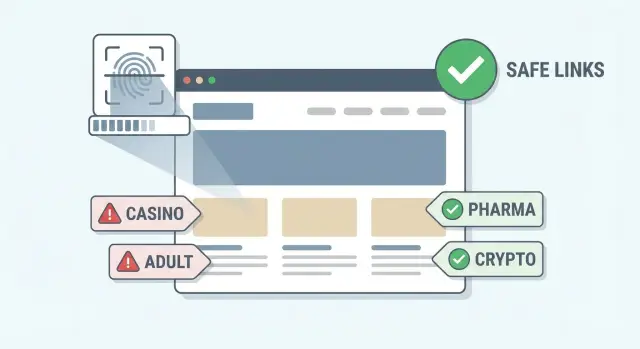
A “link neighborhood” is the company a page keeps. Not the sites that link to it, but the sites it links out to. When a page regularly points readers to good sources, it usually reflects real editing and real care. When it points to shady, unrelated, or spammy places, it’s a sign the page will link to almost anything.
A link neighborhood check is a quick way to judge that company. You skim a page (or a site) and note the themes of its outbound links. If many of those links lead into spam-heavy niches, that’s a strong clue the publisher has low editorial standards. And if they’re loose with outbound links, they’re often loose with what they publish overall.
Outbound links matter even if the page links to you. Search engines and readers both use context. A backlink sitting among casino, pills, and “get rich fast” references can look out of place. Even if you don’t get “penalized,” you can still end up with a weak, low-trust mention that does little for rankings and might hurt your brand if customers see it.
Spammy outbound topics are often a footprint of paid link selling, hacked pages, or thin content farms. That doesn’t prove anything by itself, but it’s a fast early warning.
A good link neighborhood check helps you:
- Spot whether a page feels curated (a few relevant references) or messy (random unrelated links).
- Notice when a site mixes normal topics with obvious spam niches.
- Decide whether it’s worth deeper review before you accept or buy placement.
It won’t tell you:
- The exact SEO value of a link.
- Whether a site is “safe” forever (sites change hands and get abused).
- Whether a single odd outbound link is a deal-breaker on its own.
Example: you find a “marketing tips” article that could mention your brand. Two minutes of skimming shows outbound links to a payday loan offer and an adult chat page. That mismatch isn’t a small detail. It’s the neighborhood telling you what kind of street you’re on.
Even if you use a curated placement service, this scan is still a good sanity check on the specific page you’re considering, especially when the topic match looks great at first glance.
Outbound link topics, explained simply
Outbound links are the links on a page that point away from that site to other sites. They’re normal. A news story might cite a study. A how-to post might reference a tool. The problem isn’t that a page links out, but where it tends to send people.
“Outbound link topics” means the themes you see in those outgoing links. Instead of counting how many outbound links a page has, skim the destinations and ask: what kinds of subjects does this page regularly promote?
A page that links out rarely isn’t automatically safe. It might have only a few links, but if those few point to sketchy topics, that’s still a bad sign. On the other hand, a page that links out a lot isn’t automatically risky. Some pages are resource hubs or news roundups, so they naturally include many citations.
Topics are more useful than link counts because spam often clusters by niche. A link neighborhood check is basically a quick “who do they hang out with?” scan. If the outbound topics keep circling back to the same spam-heavy themes, that page may be part of a network.
You’ll usually see outbound links in a few common contexts:
- Editorial citations: the link supports a point in the text. Usually the safest.
- Sponsored placements: not always bad, but watch for lots of paid-looking posts and thin content.
- Directory or “best sites” lists: can be fine, but also a favorite format for link farms.
- Sitewide widgets or badges: often a footprint of templated linking.
- Comment or forum links: can be messy when unmoderated.
Quick example: you’re checking a blog post about project management. If its outbound links mostly go to reputable tools, research, and well-known publications, the topic mix feels normal. If the “resources” section points to online casinos, payday loans, and “instant approval” offers, that mismatch is the signal, even if there are only two or three such links.
If you buy placements by choosing specific domains (for example, from a curated inventory), this topic scan still works as a gut-check on any page you’re considering.
Niches that often show up in spam-heavy neighborhoods
A link neighborhood check isn’t about judging a site by its design or how famous it looks. It’s about what the page chooses to associate with. A page can look normal and still sit in a messy neighborhood if it regularly links out to high-spam topics.
Some niches show up again and again on pages that sell links, run link farms, or exist mainly to push conversions. If you spot these topics in the outbound links (especially in sitewide areas like footers, sidebar widgets, or “Partners” blocks), treat it as a warning sign.
Common spam-heavy themes include:
- Adult content and explicit dating offers
- Gambling and casino promos (including “no verification” angles)
- Payday loans and quick-cash lenders
- “Pills” and miracle supplements (especially aggressive weight loss or ED claims)
- Cracked software, license keys, and piracy downloads
Not every risky neighborhood is obvious. Some gray zones can be legitimate in context but are frequently used in low-quality networks. Watch for patterns like:
- Crypto promos that read like paid shills or copy-paste press releases
- Essay mills and “do my homework” services
- Fake news networks that republish the same stories across many domains
- Thin “review” pages that exist only to push affiliate clicks
Mixed neighborhoods are common. A real publication might have one neglected section (like a “sponsored posts” tag) where almost anything gets published. Or an old site might have been sold and now includes a new directory of questionable partners. In those cases, the site isn’t purely spam, but the part linking to you still might be.
One risky topic is a signal, not an automatic verdict. Focus on context and concentration: is it one unrelated link on an old page, or a cluster of outbound links to the same spammy niches across many pages?
A simple way to think about it: if a page links to payday loans, casinos, and “miracle pills” in the same breath, it’s usually not an accident. If it mentions crypto once in a well-edited, clearly labeled opinion piece, that’s different.
The 5-minute scan: step-by-step
A link neighborhood check works best when you review the exact page where your link would sit, not the site’s best-looking homepage. You’re answering one question: does this page behave like a normal article, or like a page built to send visitors (and bots) out to questionable places?
Here’s a fast scan you can do in about five minutes:
- Open the exact page you might work with. If someone offered a “guest post” or placement on a specific URL, review that URL. Homepages can be clean while deeper sections are messy.
- Find outbound links quickly. Use your browser’s find function for patterns like “http”, “sponsored”, “partner”, or “casino”. Then check common link zones: footer, sidebar, author box, “resources”, and any badges.
- Notice where links appear. Links in the main text usually follow an editorial flow. Links stuffed into widgets, “recommended” blocks, or sticky sidebars can be a sign the page exists mainly to push people away.
- Write down the visible topics. You don’t need to click everything. Often the anchor text and nearby wording is enough (for example: “crypto exchange”, “payday loan”, “online casino”, “essay help”, “forex signals”).
- Decide: editorial page or link hub? If it reads like a real article with a few relevant citations, that’s usually fine. If it feels like a directory of unrelated offers, treat it as risky.
To make this practical, do a tiny “topic tally.” If you see three or more unrelated money-heavy niches (like gambling, adult, pills, payday loans) mixed into the same page layout, that’s rarely accidental.
Example: you’re considering a placement on a tech blog post about cloud costs. The body text is normal, but the sidebar is packed with “Best casino bonus”, “Instant loan approval”, and “Crypto signals”. The page may be part of a spammy neighborhood even if the article itself looks decent. That’s the kind of page you skip, even when the domain name sounds reputable.
If you use a service to choose domains for backlinks, this same scan still helps. It’s a quick quality filter on the page context, so you don’t end up with a good-looking domain paired with a bad linking environment.
What to look for when you skim the page
A link neighborhood check gets easier when you stop reading like a visitor and start scanning like an editor. You’re not grading the writing. You’re looking for clues that the page exists mainly to push people (and PageRank) out to unrelated places.
Start with the page template. Some sites hide the worst signals outside the main article: footer widgets, sidebar “resources,” or a “partners” block that appears on every page. A sitewide section packed with outbound links can pull an otherwise decent article into a messy neighborhood.
Quick patterns that often signal trouble
These are the “spot it in 30 seconds” patterns:
- Repeated anchor text across multiple links (same keyword, same wording, over and over)
- “Best” lists that feel generic, like they were made to fit any topic
- Coupon, promo code, or “deal” blocks that have nothing to do with the article
- Thin paragraphs wrapped around many outbound links (more links than ideas)
- Sudden topic jumps that don’t match the site’s usual theme
Then open two or three other articles from the same category (not random pages). You’re checking consistency. A normal publication has a recognizable style: similar length, similar formatting, and outbound links that are mostly citations or useful references. A risky site often looks uneven: one normal post, then several pages that read like link collections.
Doorway behavior: the big red flag
Doorway-style pages are designed to rank for a phrase, then send users elsewhere. The giveaway is “thin text with many exits.” If the intro is vague, the headings are generic, and every section funnels to a different external site, treat that as a warning even if the design looks clean.
Example: you’re considering a backlink from a marketing blog post about email templates. While skimming, you notice a sidebar with dozens of outbound links, including gambling, adult, and “quick loan” topics. Even if the article itself is fine, that sitewide block suggests the site sells space to spam-heavy niches.
How to classify what you find (safe, mixed, risky)
After your scan, label the page so you can decide fast. This works best when your rules are simple enough to repeat.
The three buckets
Use broad buckets based on what the page links out to and how consistent the topics feel:
- Safe: Outbound links mostly point to well-known brands, credible publishers, tools, or references that match the page topic.
- Mixed: Mostly normal links, plus a few that feel off-topic, overly salesy, or repeated across many pages.
- Risky: Outbound links cluster around spam-heavy niches, thin affiliate pages, “write for us” farms, or obvious link-selling patterns.
“Safe” topics often look boring, and that’s good: company documentation, industry news, research, universities, widely used software, reputable communities. “Risky” topics are usually obvious in plain language: casino and betting pages, payday or “instant” loans, adult content, counterfeit goods, sketchy crypto schemes, fake IDs, miracle weight loss pills, “get rich quick” courses, and anything promising unrealistic results.
Affiliate-heavy is not always spam
A page can be affiliate-heavy and still be acceptable if it’s honest and useful. A detailed review that links to a handful of retailers, includes real pros and cons, and stays on-topic can land in Mixed instead of Risky.
It tips toward Risky when the page is basically a coupon wall, repeats the same money keywords, links out to dozens of unrelated offers, or funnels readers through “best X” lists that could be swapped for any niche.
What to do with each label
Keep the action simple:
- Safe: Proceed. This is usually the kind of page you want.
- Mixed: Ask for a different page placement (same site, cleaner context), or request fewer questionable outbound links near your link.
- Risky: Walk away. Even if the site looks strong on the surface, the neighborhood can drag the value down.
If you’re buying placements from a curated inventory, you can still use this classification to pick which specific page on a domain is worth targeting and which ones to avoid.
Common mistakes and traps
Most bad decisions happen because people skim the wrong thing, or stop too early. The page you’re getting a link from matters more than the site’s best-looking parts.
The most common slip is checking only the homepage. Homepages are often polished and carefully curated, while the actual article page (or author page) may be loaded with unrelated outbound links. Always open the exact page where your link would live, then scan what that page links out to.
Another easy miss is the stuff around the content. Sidebars, “related posts,” footer menus, and widgets can contain outbound links that reveal the site’s habits. If a page links to normal sources in the text but the sidebar pushes users toward payday loans, casino offers, or strange “partner” pages, that’s still part of the neighborhood.
Design is a trap, too. A pretty layout, a modern logo, and fast loading don’t prove quality. Some spam networks buy clean themes and publish harmless posts on the surface, then monetize with aggressive outbound links. Judge by what the site points to, not how it looks.
Other mistakes that cause people to underestimate risk:
- Treating “nofollow” as a magic shield. It can reduce direct SEO impact, but it doesn’t erase association risk or reputational risk.
- Forgetting subdomains. A main domain can look clean, while a subdomain (like a “blog” or “deals” area) is where link selling happens.
- Missing “resources” or “partners” pages. These are often link dumps that don’t show up in the main navigation unless you scroll.
- Skipping link patterns. If every outbound link uses the same tracking style or exact-match anchor text, it often signals paid placements.
- Over-trusting author profiles. Some sites keep the article clean, but the author page lists dozens of unrelated “recommended tools” links.
Realistic example: you find a well-written tech article that would fit your brand. The page looks professional, and the in-text citations are fine. But the footer includes a “Recommended” block linking out to crypto casinos and “quick loan” sites, plus a “Resources” page with hundreds of outbound links. That’s a mixed-to-risky neighborhood, even if your specific link would sit in a normal paragraph.
This is also why “curated” matters. Fewer random surprises usually means fewer ugly neighborhoods later.
A realistic example: deciding whether to take a link
You’re offered a guest post on a mid-sized marketing blog. The pitch sounds fine: your article will be published in their “Guides” section, and you’ll get one dofollow backlink in the author bio.
Before you say yes, you do a quick link neighborhood check by scanning what the page links out to. You’re not judging the writing style. You’re judging the company it keeps.
You open a few recent posts and skim the page layout from top to bottom. In the article body, the outbound links are normal: a couple of well-known analytics tools, a popular email platform, and one reference to an industry report. The “related posts” area also stays on-topic.
Then you notice a “Sponsors” block in the sidebar that appears on every post. The outbound topics in that block feel different. Instead of marketing or business resources, you see links to:
- Online casino and sports betting
- Payday loans and “instant approval” credit
- Adult chat and dating
- “Buy followers” social growth services
- Unregulated crypto token promos
That one block changes the risk picture. Even if your link would sit in a clean article, your page is sharing real estate with spam-heavy niches. Search engines can treat that as a signal of a low-quality neighborhood.
At that point you have a few practical options:
- Ask whether your post can be published on a template without the sponsor block (or with different sponsors).
- Ask what sponsor categories they accept and how they approve them.
- Request a different placement type (for example, a resource page that doesn’t carry sitewide ads).
- If they can’t change anything, skip and look for another site.
In this scenario, they reply that the sponsor block is “automatic” and can’t be removed.
Decision: skip the link because the page consistently links out to gambling, payday loans, and other spam-prone topics. That’s avoidable risk.
Quick checklist for repeatable checks
A link neighborhood check only works if you do it the same way every time. This routine keeps you fast, consistent, and harder to fool.
Three under-a-minute checks
Start with a quick skim, then run these in order. If any one feels off, slow down and look closer before you decide:
- Scan the page for obvious outbound links (sidebar, footer, within the first screen). Ask: what kinds of sites are they pointing to?
- Use page search (Ctrl/Command + F) for a few “money” terms like “casino”, “bonus”, “loan”, “viagra”, “crypto”, “escort”. One or two hits can be normal; lots of hits is a pattern.
- Scroll to the bottom and check whether the page is part of a big “resources” or “partners” list. Long lists often hide mixed outbound topics.
If you’re short on time, do the first check and the bottom-of-page check. Those two catch a lot of risky pages quickly.
Stop-now red flags
These usually mean it’s smarter to walk away than debate it:
- The page links out to adult, gambling, payday loans, or pharma offers (especially mixed together).
- Outbound links feel unrelated to the page topic, like a random cluster of deals, coupons, or “best sites” lists.
- The page has dozens of outbound links with thin text between them.
- Multiple outbound links use keyword-heavy anchor text (“best online casino bonus”, “instant loan approval”).
- The site looks neglected: broken layout, spun paragraphs, or heavy ad clutter.
Green flags are quieter: outbound links mostly go to well-known brands, citations match the page topic, and links support a point instead of acting like ads. A short, focused set of references is usually a good sign.
To stay consistent over time, document each check the same way. A simple row in a notes doc is enough: page URL, date, main page topic, 3-5 outbound link topics you noticed, your rating (safe/mixed/risky), and one sentence explaining why.
Next steps: turn the scan into a simple decision rule
A link neighborhood check is a fast filter, not the whole story. Use it early to skip obvious bad pages, then spend your time on placements that deserve closer review.
After the scan, add three extra signals: is the content actually relevant to your site, does the site have a real reputation (not just “looks nice”), and will your link sit in a normal editorial spot (not a sidebar, footer, or a “partners” block that feels mass-produced)?
Write one rule your team can follow
If your process lives in someone’s head, it will drift. Put a simple rule in writing and apply it the same way every time. For example:
- Reject if you see spam-heavy outbound topics on the same page template (casino, pills, adult, payday, crypto pumps).
- Reject if the page links out to dozens of unrelated sites with similar keyword-stuffed anchors.
- Accept only if outbound links mostly stay in one clear topic area that matches the site.
- Escalate to manual review if it’s “mixed” and the site otherwise looks strong.
That kind of rule keeps decisions consistent, even when you’re moving fast.
Know when to be stricter
Raise your standards when the stakes are higher: money pages (pricing, signup), regulated industries (health, finance, legal), or brand-sensitive campaigns where you can’t risk being placed near questionable topics. In those cases, “mixed” should usually mean “no.” For a low-risk blog post, you might allow a mixed result if everything else is clean and the placement is clearly editorial.
A practical way to act on this: build a shortlist of sites and page types that repeatedly scan clean, and prefer those. Over time, your “approved” list becomes more valuable than any one placement.
If you don’t want to spend hours filtering questionable pages, curated sources can reduce the noise. For example, SEOBoosty (seoboosty.com) offers subscriptions to pre-selected backlink placements on authoritative sites, and this same neighborhood scan still helps you sanity-check the specific page context before you point a link at your site.
The goal is simple: one decision rule, applied consistently, so every link you approve has a clear reason to be there.
FAQ
What is a link neighborhood check in plain English?
A link neighborhood check is a quick review of what a page links out to. If the outbound links mostly go to relevant, credible sources, the page usually has real editorial standards; if they go to spam-heavy or unrelated topics, it’s a warning that the page will link to almost anything.
Why do outbound links matter if the page is linking to me?
Because your backlink sits in a context, not in isolation. A mention placed on a page that also promotes gambling, payday loans, or other sketchy offers can look low-trust to both readers and search engines, even if your link itself is “fine.”
How do I do a link neighborhood check in five minutes?
Open the exact URL where your link would appear and scroll top to bottom, including the sidebar and footer. Note the topics you see in outbound links and ask whether the page feels like a normal article with a few citations or a hub that pushes people out to unrelated offers.
Which outbound link topics are the biggest red flags?
Start with obvious spam-prone themes like adult content, gambling, payday loans, miracle supplements, and piracy. Then watch for repeated money keywords, generic “best sites” lists that don’t fit the article, and clusters of unrelated outbound links across the same page template.
Can a sidebar or footer widget make an otherwise good article risky?
Yes, it can. Many sites keep the article body clean but monetize with a sitewide “Sponsors,” “Partners,” or widget block that appears on every page, and that block becomes part of the page’s overall linking environment.
How should I label a page as safe, mixed, or risky?
Use three buckets: safe, mixed, and risky. Safe means outbound links mostly match the topic and point to reputable sources; mixed means mostly normal with a few off-topic or salesy links; risky means outbound links cluster around spam-heavy niches or obvious link-selling patterns.
Are affiliate-heavy pages always a bad neighborhood?
No, affiliate links aren’t automatically bad. A focused review that stays on-topic and links to a few relevant merchants can be acceptable; it becomes a problem when the page turns into thin text wrapping dozens of unrelated outbound links or coupon-style exits.
Does “nofollow” make a spammy neighborhood safe?
No, it’s not a shield. It may reduce direct ranking impact, but it doesn’t remove the association risk or the brand risk of being displayed next to questionable outbound topics on the same page.
What should I do if the page looks “mixed” but not obviously spammy?
Prefer getting placed on a cleaner page within the same site if that’s possible, such as a different category or a template without the spammy blocks. If the site can’t change anything and the spam-heavy topics are part of the page template, skipping the placement is usually the safest move.
When should I be extra strict about link neighborhoods?
Be stricter for brand-sensitive or high-stakes pages, like pricing, signup, health, finance, or legal topics, where appearing near questionable offers can hurt trust. If you use a curated placement service like SEOBoosty, still run this scan on the specific page so you don’t end up on a clean domain with a messy page context.
Share