Link strategy for single-page websites with a minimal structure
Link strategy for single-page websites: build a small set of intent-matched pages (use cases, FAQ, resources) so backlinks land where users expect.
Why single-page sites make backlinking harder
Single-page sites are clean and quick to launch, but they tend to fight SEO. The main issue is intent. People search with different goals: to compare options, solve a problem, check pricing, or confirm trust. One page rarely does all of that well.
Backlinking gets tricky fast because every backlink has to point to the same URL. That forces unrelated mentions to land on the homepage, even when the reader expected something specific. A “how to” reference, a “best tools for X” roundup, and a “pricing” mention all end up in the same place.
When every backlink points to the homepage, two things usually happen:
- The page turns into a crowded mix of messages, so it’s harder to rank clearly.
- Even if traffic goes up, conversions can drop because visitors don’t immediately see what they came for.
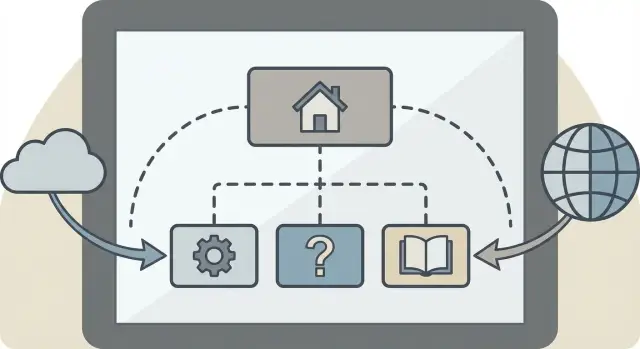
A minimal multi-page structure fixes this without turning your site into a full blog. In practice, it’s often just a homepage plus a few focused pages, like use cases, an FAQ, and a resources page.
Start with intent, not pages
A one-page site usually struggles with link building for one simple reason: a backlink needs a clear reason to exist. People link to pages that answer a specific question, compare options, prove credibility, or help someone do something.
Before you create a multi-page structure for backlinks, write down the few “jobs” your pages need to do. Most single-page businesses cover a lot with four intents:
- Buy: someone is ready to choose and needs pricing, packages, or a clear next step
- Compare: someone is weighing alternatives and wants differences and fit
- Learn: someone needs basics, definitions, or a how-it-works explanation
- Trust: someone wants proof like results, references, team, or policies
Next, list 5 to 10 real searches people do before they pick you. Keep them plain and specific: “{service} pricing,” “{service} for {use case},” “{service} vs {alternative},” “is {service} safe,” “how long does {service} take.”
Then map each cluster to a page type. “{Service} for {use case}” becomes a use case page. Worries and objections become an FAQ. How-it-works and definitions belong on a resources page. Pricing and trust get their own space.
On the homepage, keep the big promise, a short overview, and one clear call to action. Anything that needs depth should move to a dedicated page. That’s what makes a link strategy for single-page websites work: each backlink can land where it actually makes sense.
The minimal page set that covers most backlink needs
You don’t need a full blog to support backlinks. You just need a few clear destinations that match why someone is clicking.
For most sites, 3 to 6 pages is enough. Each page should answer one question: “What is this for?” If it tries to do five things, it becomes a weak target.
A simple starter set:
- Home: the big promise, the main proof, and the primary call to action
- Use cases (or Solutions): one page per audience or job-to-be-done
- FAQ: quick answers that remove doubt before someone contacts or buys
- Resources (or Guides): one strong, evergreen page people can cite
- Contact (or Pricing): the action page for visitors who are ready
Keep URLs readable and specific. Someone should understand what they’ll get just by seeing the URL text.
Most important: plan the “next step” for each page. A backlink isn’t the finish line. If someone lands on a use case page, the next step might be pricing. If they land on an FAQ, the next step might be contacting you or starting a trial.
Use case pages: the best targets for intent-matched links
Use case pages solve a simple problem: they give other sites a URL that matches what their readers are looking for. A homepage is usually too broad. A use case page can be specific without needing a full content program.
Start by choosing 3 to 5 real situations people are in when they search. Don’t pick broad “industries” unless the problem truly changes. Better examples are situations like “recover rankings after a site redesign” or “support a new product launch page.”
A consistent layout makes these pages easier to write and easier to reference:
- The problem (what’s happening, what it costs)
- Who it’s for (one clear audience)
- The approach (what you do, in plain steps)
- Proof (one metric, outcome, or credible signal)
- Next step (one action that fits the situation)
Match the call to action to the intent. If the page is for people comparing options, the next step could be “See examples” or “Get a plan for your target pages,” not “Book a call” if calls aren’t part of how you work.
Add one or two details a referrer would naturally mention, like what you need from the customer, what you won’t do, or what the process looks like.
FAQ pages that earn links and reduce friction
A good FAQ page does two jobs: it answers the questions that stop people from buying, and it gives you a clean URL that matches “question” intent.
Start with real questions, not guesses. Pull them from sales calls, support emails, and common objections you see in proposals. Competitor FAQs and reviews can help, too, especially for doubts people hint at but don’t say directly.
Keep the structure easy to scan by grouping questions into a few sections. For example:
- Pricing and plans
- Setup
- Results
- Trust and safety
- Limitations
Keep answers short and specific. Replace sales language with plain facts, numbers when you have them, and clear boundaries.
If you want the page to be easy to cite, use question-style headings (“How long does setup take?”) and make it simple to skim from top to bottom.
Resource pages: linkable content without a full blog
For single-page sites, a resource page is often the easiest way to create something worth linking to without committing to weekly posts. It gives you one clean URL that can attract citations and match informational intent.
The key is to build one strong, curated page instead of scattering thin articles across multiple URLs. A good resource page feels like a toolbox: practical, skimmable, and specific to your niche.
Formats that tend to earn links more often than generic “tips”:
- Short definitions of terms people keep asking about
- A one-page checklist readers can copy into their workflow
- Simple templates (email copy, briefs, spec sheets, SOPs)
- A rules-of-thumb table (time, cost, sizing, limits)
- A small calculator (even a step-by-step formula works)
A short “How to use this page” section near the top helps. Explain who it’s for, when to use each item, and what a good result looks like.
To keep it link-worthy over time, treat it like a product: update outdated items, remove anything off-topic, and add one new resource when the same question keeps coming up.
How to choose the right backlink target URL
A good backlink does two jobs: it helps search engines understand a page, and it meets what the reader expected to find after clicking. That’s why the target URL matters as much as the site linking to you.
Start by naming the intent behind the link. Is the source page recommending a solution, comparing options, explaining a problem, or listing helpful references? Your target should answer that exact intent.
Quick rules that keep choices simple:
- If the source is a how-to or guide, point to a resources page or FAQ that teaches.
- If the source is a “for teams like...” article, point to a matching use case page.
- If the source is a comparison or alternatives page, point to a page that speaks to that category and your angle.
- If the source is brand-focused (reviews, company profiles), point to an About or main product page.
- If the source is news or announcements, point to a page that explains the update clearly.
Anchor text and the words around it should sound natural and match the target page topic. Avoid forcing exact-match anchors that don’t fit the sentence.
A simple spreadsheet can keep this under control and prevent random links all pointing to the same URL.
Internal linking that makes the small structure work
A minimal multi-page setup only helps if people and search engines can move through it easily. Internal links are your site’s signposts. They help visitors find the next step and help Google understand which page fits which question.
Start with the homepage. It should point clearly to each supporting page using plain labels that match what a visitor expects. If your site offers one main service, your menu can stay small. The goal is that every important page is always one click away.
Then connect supporting pages where it naturally helps the reader. A use case page shouldn’t be a dead end. Someone reading “SEO for SaaS” will often want quick proof, common objections, or a practical explainer. That’s where your FAQ and resources pages earn their keep.
A simple internal link map
- Homepage: links to each use case, FAQ, and resources page
- Use case pages: link to the most relevant FAQ section and one resource that supports that use case
- FAQ page: links back to related use case pages (not just the homepage)
- Resources page: links into the best-matching use case pages
Keep click depth low. If a page matters enough to earn backlinks, it should usually be reachable in two clicks or less from the homepage.
Common mistakes to avoid
A minimal structure only helps if each page has a clear job. Most one-page sites struggle because they add pages for the wrong reasons, or they create pages that look different but say the same thing.
One big trap is cloning content. If your Use Cases, FAQ, and Resources pages repeat the same paragraphs with different headings, search engines and people both get confused. Pick one place for each promise, proof point, and key detail, then link to it.
Another mistake is making too many thin pages just to have more URLs. A page with two sentences and no examples won’t feel worth linking to, and it often won’t rank.
Backlink targeting mistakes are also expensive. If someone is referencing pricing, your pricing page should be the target. If the link is about “how it works,” point it to a clear explainer, not a homepage that makes visitors hunt.
If you want a quick test, imagine a reader landing on the page from a mention. Can they answer their question in 10 seconds? If not, move the key info onto that page and add one clear next step.
Quick checklist before you build links
Before you spend time or money on backlinks, make sure you have a page worth linking to.
A good target page is easy to describe, easy to trust, and easy to act on. If you can’t explain why the link should go there in one sentence, the page is probably doing too many jobs.
A quick check:
- One page, one purpose
- Titles and headings match what a referrer would actually say
- Fast on mobile
- A clear next step exists (contact, demo, signup, get a quote) without overwhelming choices
- One-sentence link reason: you can explain why this page deserves a link
Example link reason: “Link to this page because it explains how our service helps Shopify stores fix slow category pages, with steps and screenshots.”
A simple example you can copy
Picture a solo consultant with a clean one-page site: headline, services, short bio, and a contact form. It looks good, but every backlink they earn has only one place to go: the homepage. That makes it harder to match what the reader expects when they click.
They keep the homepage, but add four small pages that cover the most common intents:
- Use cases (one page with 3 to 5 scenarios)
- FAQ (answers to the questions that block a purchase)
- Resources (definitions, templates, and quick guides)
- Pricing (clear packages and what’s included)
Now backlink targets get specific.
They do an interview on a niche industry site. Instead of linking to the homepage, the host links to a use case like “Reducing support tickets in 30 days.” People who click are already thinking about that outcome, so they land on a page that speaks their language.
Later, a community newsletter needs a source for a term and links to the Resources page, where the consultant has a short definition plus a simple example and a checklist. That page is useful even for someone who isn’t ready to hire.
The result is a cleaner system: each link points to a URL that matches intent, and visitors don’t have to hunt.
Next steps: build the pages, then build the right links
Draft your minimal pages in plain text first. Don’t worry about design yet. Write the headline, a short intro, 3 to 6 key points, and a clear call to action. Once the words feel right, publish the pages and add basic navigation so both people and search engines can move between them.
Then pick just a few pages to focus on for backlinks. If you try to build links to everything, you usually end up with links that don’t match what the reader expected.
A simple way to choose priorities:
- Pick 2 to 3 pages that match high-intent searches (often a core use case page plus pricing or contact).
- Favor pages tied to revenue, not “nice to have” topics.
- Make sure each page answers one clear question and feels complete on its own.
Track what happens next: which URLs receive backlinks, what kinds of sites link, and whether visitors click your main call to action. You may find your FAQ earns more links, while a use case page converts better. That’s normal.
If you already know which intent pages you want to strengthen but don’t want long outreach cycles, SEOBoosty (seoboosty.com) is one option for securing premium backlinks and pointing each placement to the most relevant page, rather than defaulting everything to the homepage.
Publish a small set of pages that match real intent, then build links to the pages that attract clicks and drive results.
FAQ
Why do single-page sites struggle more with backlinks?
A single-page site forces every mention to point to the same URL, even when the context is different. That makes it harder for search engines to understand what the page is really about, and it often frustrates visitors because they don’t land on the exact topic they expected.
What’s the first thing I should plan before adding more pages?
Start with search intent rather than design. A simple default is to separate buying intent, comparison intent, learning intent, and trust intent so each backlink can point to the page that matches the reader’s goal.
How many pages do I actually need for a “minimal” structure?
For most small businesses, a homepage plus a few focused pages is enough. A common setup is a homepage, a couple of use case pages, one FAQ page, one resource page, and one pricing or contact page so links don’t all pile onto the homepage.
What makes a good use case page for earning backlinks?
Use case pages work best when each one matches a real situation someone searches for and a referrer would naturally cite. Keep each page centered on one scenario, explain the problem and outcome in plain language, and include one clear next step that fits that scenario.
How can an FAQ page help with backlinks and conversions?
An FAQ earns links when it answers specific objections and “is it safe / how long / what’s included” questions clearly. Keep answers tight and factual, and make sure each question is something a real buyer or reviewer would actually ask.
Do I need a blog, or is a single resources page enough?
A resource page gives you one strong URL that people can cite when they need definitions, a checklist, or a simple how-it-works explanation. It’s most effective when it stays focused on your niche and gets updated instead of being split into many thin pages.
How do I choose the right page to point a backlink to?
Match the target to the source’s intent. If the mention is educational, send it to a resource or FAQ section; if it’s recommending you for a specific scenario, send it to that use case page; if it’s about cost or packages, send it to pricing.
How should I handle internal linking with only a few pages?
Internal links make sure visitors don’t get stuck and help search engines see how pages relate. A practical rule is that any page you want to earn backlinks should be easy to reach quickly from the homepage and should point to a clear “next step” page that fits the visitor’s intent.
What are the biggest mistakes when expanding beyond one page?
The most common mistake is creating pages that look different but say the same thing, which dilutes relevance. Another is publishing thin pages just to have more URLs; a page should feel complete on its own, especially if you expect other sites to link to it.
How can SEOBoosty fit into a link strategy for a minimal site?
You can use a service like SEOBoosty to secure premium backlink placements and then choose the most relevant intent-matched URL as the target, instead of sending everything to your homepage. It works best when you first publish a small set of focused pages so each placement has a clear, useful destination.
Share