Prove Backlink Impact with Server Logs Before Rankings Change
Prove backlink impact with server logs by tracking Googlebot crawl spikes, bot paths, and fetch frequency to confirm link effects before rankings move.
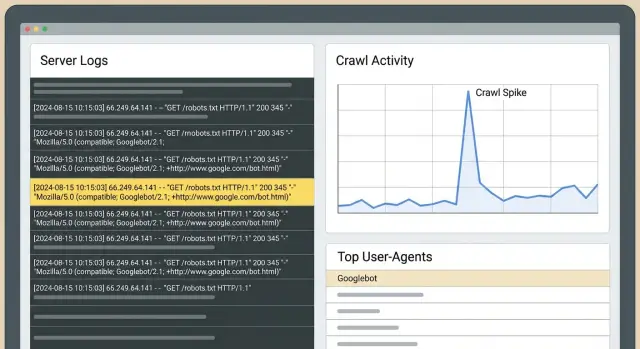
What you can prove with logs before rankings move
Rankings often lag. Google has to recrawl pages, process new signals, update the index, and then decide whether positions should change. That delay is why you can do good work and still see no movement in rank trackers for days or weeks.
Server logs sit earlier in that chain. They can answer a simpler question: did Googlebot change what it does on your site after the links went live? If the answer is yes, you have evidence that something real happened, even if traffic and rankings are still flat.
The fastest, most visible shifts in logs usually look like this:
- The linked page gets crawled more often, or starts getting crawled at all.
- Googlebot revisits that page sooner (shorter gaps between fetches).
- Googlebot uses that page as an entry point, then follows internal links deeper into the site.
- You see crawl bursts shortly after placement, especially when the linking site is crawled frequently.
This is different from Search Console and rank trackers. Search Console is useful, but delayed and grouped. Trackers show outcomes, not causes. Logs show raw behavior: every request, timestamped, including which bot hit which URL and what status code your server returned.
The core method is straightforward: pick a clean “before” window and an “after” window, then compare Googlebot activity for the specific URLs you targeted. If the “after” period shows higher crawl rate and more intentional paths, you can say the links changed Google’s attention.
Example: you point a new backlink to a product page. Two days later, logs show Googlebot fetching that page repeatedly, then requesting the specs page and pricing page it links to. Rankings might not budge yet, but Google is clearly spending crawl budget there. That’s often the first visible step before broader gains.
Server logs basics (in plain language)
A server log is a diary of requests to your site. Every time a browser, app, or search engine bot asks for a page or file, your server (or CDN) records a line.
For SEO checks, the fields that matter most are: timestamp, requested URL, user-agent (like Googlebot), status code (200, 301, 404), and usually an IP address. You don’t need to memorize every column. Each line answers: who requested what, when, and what happened.
Which logs should you use?
Start with origin access logs if you can. They’re closest to “ground truth” and include the exact URLs and response codes.
If you use a CDN/WAF/bot protection layer, its logs can add context (blocked requests, challenges), but they may filter or label traffic in ways that hide part of the picture. When possible, keep both and note any filtering rules that could change what you see.
How long should you keep logs?
Retention matters for before-vs-after comparisons. Thirty days is a practical minimum. Sixty to ninety days is better if you build links in waves or publish frequently. You want enough “before” data to understand normal crawling, and enough “after” data to see whether visit frequency and crawl routes actually shift.
On privacy: store only what you need, limit access, and delete on a schedule. If logs contain personal data (for example, full IPs or query strings with emails), mask or remove those fields. For this kind of analysis, bot behavior, status codes, and page paths are what matter.
Spotting real Googlebot vs noise
Before you interpret any “spike,” make sure the Googlebot traffic in your logs is actually Google. Fake bots often copy Google’s user-agent. If you count them, you can “prove” a crawl surge that never happened.
User-agent strings are a starting point (Googlebot, Googlebot-Image, AdsBot-Google), but they aren’t proof.
Why fake bots show up
Spoofing Google helps scrapers avoid blocks, probe sites, or pull content at scale. They can also inflate requests to specific URLs and make it look like Google got interested right after you built links.
Simple ways to validate Googlebot
Pick one approach and use it consistently:
- Reverse DNS verification: the IP should resolve to a Google-owned hostname, and that hostname should resolve back to the same IP.
- Pattern sanity checks: real Googlebot tends to show steady behavior (regular robots.txt fetches, sensible navigation).
If you can, separate Googlebot Smartphone from Googlebot Desktop. They often behave differently. A change might show up on Smartphone first while Desktop stays flat.
Four log signals that suggest links changed behavior
Rankings lag behind what Googlebot is already doing. After a placement goes live, these are the early log signals worth watching.
Signal 1: Sustained crawl lift on the target page
A strong sign is a noticeable increase in Googlebot requests to the page you built links to, sustained across several days. Compare like-for-like (same weekdays) so you don’t mistake normal weekly cycles for a “win.”
Signal 2: Higher fetch frequency (shorter revisit cycles)
When Google cares more, it often comes back sooner. In logs, you’ll see shorter gaps between hits to the same URL. This can happen long before any ranking lift, especially for pages that used to be crawled lightly.
Signal 3: Bot paths that expand from the landing page
After Googlebot hits the linked page, check what it requests next in the same session, or within a short time window. If discovery improved, you’ll see more consistent movement from the target page into related URLs (category pages, supporting articles, key product pages).
Signal 4: First-time crawls for nearby URLs
If the target page links to other pages that were barely getting crawled, watch for first-time fetches of those URLs. That “fan out” pattern usually means Googlebot is exploring, not just rechecking one page.
Across all four signals, status codes decide whether the crawling is useful:
- 200 means Googlebot got content it can evaluate.
- 301 isn’t always bad, but long redirect chains waste crawl budget.
- 404 can create noisy spikes with no value.
- 5xx errors often lead to crawl drops later.
Set up a before-and-after comparison you can trust
The biggest risk with log-based validation is a messy comparison. Googlebot changes its behavior for many reasons, so your setup should make “link went live” the main variable.
Use two equal windows: commonly 14 to 28 days before the link goes live (baseline), and the same number of days after.
Then track a small, specific set of pages:
- The URL that received the new link.
- The page you ultimately care about (if different).
- 2 to 3 closely related pages in the same site section.
- One control page in the same template/folder that did not get new links.
For each page, track daily Googlebot hits, unique URLs crawled in that cluster, and the median time between fetches. Median is more stable than average when crawl bursts skew the data.
Before comparing, do quick checks: confirm the link is live and indexable in the “after” window, keep major site changes out of the windows (migrations, big template changes), apply the same bot-validation and filtering rules, and keep your control page comparable.
Step by step: validate link impact from logs
You don’t need rankings to move to see early behavior changes. If the link was discovered and treated as a meaningful signal, logs usually show it first.
A practical workflow:
- Pull raw logs for a clean “before” window and a matching “after” window.
- Filter down to verified Googlebot requests, and split Smartphone vs Desktop if available.
- Group by URL and by day. Look for concentrated lifts on the pages you targeted, not just a sitewide increase.
- Review paths: after Googlebot fetches the linked page, what does it request next?
- Write one conclusion sentence per page using the same template every time.
Keep conclusions strict and testable. For example: “After the link went live, Googlebot Smartphone increased fetches to /pricing from 3 per week to 11 per week and then crawled /features and /checkout within 10 minutes, which didn’t happen in the baseline window.”
If you can’t write a clean sentence like that, the comparison window is probably noisy, or you’re mixing Googlebot with other crawlers.
Interpreting bot paths: what Googlebot does after it finds a link
When a new backlink is discovered, Googlebot rarely changes rankings overnight. It often changes its route through your site first. Path analysis is just reading Googlebot’s footsteps: what it requests first, what it requests next, and how often it returns.
Separate two URLs in your mind:
- The linked URL (where the backlink points).
- The “money” page (the page you want to win).
Often the linked URL warms up first, then passes attention through internal links.
A useful comparison is entry points. Before the link, Googlebot might enter through your homepage or sitemap. After the link, you may see Googlebot land directly on the linked URL and then move deeper through internal links.
Watch for these changes:
- More frequent hits on the linked URL.
- Deeper pages getting crawled sooner and more consistently.
- Shorter refresh cycles on the pages in that cluster.
- Spikes in parameter or duplicate URLs (often a sign of crawl waste, not progress).
If parameter URLs spike (like ?sort= or pagination), the backlink may still be helping, but logs are also telling you to clean up crawl traps so Googlebot spends more time on your important pages.
Common mistakes that lead to false conclusions
Logs can give early proof, but they can also magnify normal noise.
The most common failure is comparing two periods that aren’t actually comparable. Crawl lifts can be caused by redesigns, navigation changes, new page launches, robots.txt edits, WAF/firewall rules, and status code problems (redirect chains, 404 spikes, 5xx errors).
Another frequent mistake is counting all bots, including spoofed user agents.
Before you trust a “win,” sanity check the basics: compare the same weekdays, review robots and indexing changes in the window, break results out by status code (200 vs 3xx vs 4xx/5xx), filter to verified Googlebot only, and look for a sustained lift rather than a one-day peak.
Example: you buy a backlink to /pricing, and two days later Googlebot hits /pricing 5x more. But if you also pushed a redesign that added header links to /pricing, the lift may be internal discovery, not the backlink.
Quick checklist: did the new links change Google behavior?
Use the same time window on both sides (for example, 14 days before placement vs 14 days after). Filter to verified Googlebot requests, then answer these questions:
- Did requests to the linked target URL rise in a meaningful way?
- Did crawling become steadier across the week instead of one random burst?
- Did the typical time between fetches drop for the target URL and its closest supporting pages?
- Did error rates stay stable while crawling increased?
- Did a similar control page stay roughly flat?
If you have three or more “yes” answers, Googlebot behavior likely changed even if positions haven’t moved yet.
Two extra checks keep this honest: make sure the change isn’t sitewide, and make sure the timing lines up (starts soon after placement and stays elevated).
Example scenario: proving impact for one page in 3 weeks
A SaaS company has a feature page that converts well, but it’s not getting much organic traffic yet. They add three new backlinks pointing directly to that page. They want proof something changed without waiting for rankings.
Before the links go live, they pull a baseline from server logs for that URL: Googlebot hits per day, the time gaps between hits, and which URLs Googlebot visits right after.
Week 1: within a few days, logs show a crawl lift. More importantly, Googlebot doesn’t stop at the feature page. It starts exploring deeper paths nearby, like pricing, integrations, and supporting articles. That “fan out” behavior often signals a new entry point.
Week 2 to 3: revisit rate increases and crawl gaps shrink. You may also see more 304 (not modified) responses, which is normal when Google checks back often and the content hasn’t changed.
To explain this to a stakeholder without discussing rankings, show the behavior change: before vs after daily requests to the feature page, median hours between visits, and the most common next URLs crawled after the feature page.
If logs show no change after 2 to 3 weeks, don’t assume the links failed. Check blockers (robots.txt, noindex, 4xx/5xx), tighten internal linking to the page, and reassess whether the link target should be a hub page instead.
Next steps: turn log proof into a repeatable process
Once you can validate link effects in logs, make it a monthly routine. Keep a consistent window (like the last 30 days) and report the same few metrics each time: which pages got the most Googlebot hits, where crawl lifts concentrated after link work, how median fetch gaps changed on key pages, which paths appeared or strengthened, and what errors might be wasting crawl.
If you’re using a provider like SEOBoosty (seoboosty.com) to secure placements, keep a record of exact go-live dates and target URLs. Clean timing makes before-and-after log comparisons much easier to trust.
FAQ
Why can logs show progress even when rankings don’t move?
Rankings require recrawling, signal processing, indexing updates, and then re-evaluation of positions. Logs sit earlier in that chain, so they can show whether Googlebot changed its crawling behavior soon after a link went live, even when rank trackers stay flat.
What’s the clearest log sign that a new backlink was noticed?
Look for a sustained increase in verified Googlebot hits to the exact linked URL, plus shorter gaps between fetches. The strongest confirmation is when Googlebot lands on the linked page and then consistently crawls deeper pages you care about soon afterward.
How long should my “before” and “after” windows be?
Use equal windows on both sides of the go-live date, commonly 14–28 days before and the same length after. Match weekdays when you compare, because crawl patterns often differ on weekends vs weekdays.
Which logs should I use: origin logs or CDN/WAF logs?
Start with origin access logs because they’re closest to what your server actually returned, including precise status codes. If you rely on a CDN, WAF, or bot protection, keep those logs too, but treat them as supplemental because filtering and challenges can hide or relabel requests.
How do I make sure “Googlebot” in my logs is actually Google?
Don’t trust user-agent alone because fake bots copy it. The practical baseline is reverse DNS validation: the IP should resolve to a Google-owned hostname and then resolve back to the same IP, so you’re counting real Googlebot.
Should I separate Googlebot Smartphone vs Desktop in analysis?
Split them when you can, because they often crawl differently and changes may appear in one before the other. If you only look at a combined view, a real shift can get diluted and look like “no change.”
How do I tell a real crawl lift from normal noise?
A real shift is usually sustained across multiple days and concentrated on the pages you targeted, not just a one-day spike. Also confirm the timing lines up with the link going live and that your control page stays roughly stable.
Which status codes matter most when judging crawl changes?
A 200 means Googlebot received content it can evaluate, so crawl increases are actually useful. Frequent 301s and long redirect chains waste crawl budget, 404 spikes create misleading “activity,” and 5xx errors can lead to crawl slowdowns later.
How do I analyze bot paths after the linked page gets crawled?
Track entry points and what Googlebot requests next after visiting the linked URL within a short time window. If the linked page becomes a consistent starting point and Googlebot then crawls related pages (like pricing, specs, or supporting content), that’s strong evidence the link improved discovery.
What’s the best way to report backlink impact from logs to a stakeholder?
Write one strict, testable sentence per target URL that states the before vs after change in fetch volume and revisit timing, plus one observed path change if it exists. If you use a provider like SEOBoosty, keep exact go-live dates and target URLs so your comparison windows stay clean and your conclusions stay believable.
Share