Query-parameter backlink cleanup: keep authority links clean
Learn query-parameter backlink cleanup to keep authority links pointing to clean URLs, avoid duplicates, and consolidate ranking signals safely.
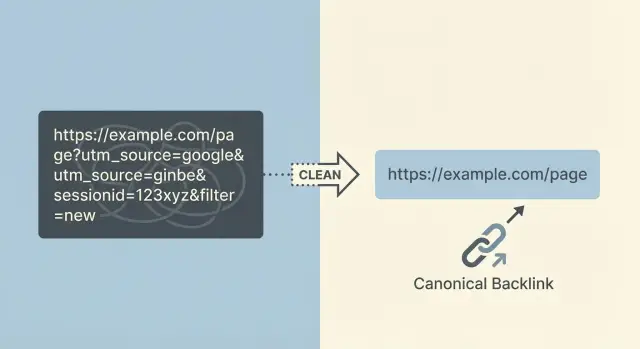
What goes wrong when backlinks include query parameters
Query parameters are the extra bits tacked onto the end of a URL after a question mark. They look like ?utm_source=newsletter or ?sessionid=123. They’re used for tracking clicks, keeping a cart alive, applying filters, or showing a specific view of a page.
The trouble is that one page can suddenly have dozens (or thousands) of “different” URLs that all load basically the same content. One person shares a link from an email tool with UTM tags, another arrives through an affiliate link with an ID, and someone else copies a URL after using a site filter. Each version is a new URL, even if the page looks identical.
Messy outcomes follow quickly:
- Link authority gets split across many URL versions instead of strengthening one preferred page.
- Search engines may crawl and index the “wrong” versions, creating duplicates.
- Analytics and reporting get confusing because the same page shows up under multiple URLs.
- Some parameter URLs expire or break (session IDs often do), so good backlinks can end up pointing to dead ends.
- Link value gets diluted when a parameterized version redirects inconsistently.
Common sources include tracking tags (UTM parameters from email tools and ads), affiliate IDs, session IDs, faceted filters (like color=black or sort=price), internal search result pages, and “share” buttons that add extra parameters by default.
The goal is straightforward: when a strong backlink exists, it should reliably resolve to one preferred, canonical URL. That preferred URL should be the one you actually want people and search engines to land on.
A “clean URL” is stable (doesn’t change per visit), shareable (safe to copy and paste), and indexable (appropriate for search results). The cleaner your target URL, the easier it is to protect the value of hard-earned authority links.
Why parameterized backlinks can hurt rankings and reporting
When a strong site links to you, you want all that value to land on one clean, stable page. If the link points to a URL with extra parameters, that value can get spread across multiple versions of what’s basically the same page.
How rankings get dragged down
Search engines treat different URLs as different pages, even if they look identical to a person. If you have links pointing to:
/product/product?utm_source=newsletter/product?session=12345/product?color=blue&sort=price
those links can end up split across several URL versions. Instead of one page building strong authority, you get several weaker pages competing with each other.
There’s also a “same page, different address” problem. When the same content is reachable through many URLs, a search engine has to choose which version to show. Sometimes it picks the messy one. Sometimes it switches between versions. Either way, your main page tends to gain traction more slowly.
Parameters can also waste crawl time. Bots may burn their budget crawling near-duplicates (filtered or tracked versions) instead of discovering your newest or most important pages quickly.
How reporting gets confusing
Parameterized backlinks can make analytics and SEO tools messy. Traffic and backlinks get split across multiple URLs, which makes it harder to answer basic questions like “Which page earned this link?” or “Did our page actually improve?”
A common scenario: you earn an authority backlink, but it points to a UTM-tagged URL. In tools, you now have two entries for the same page. One looks strong (the tagged URL with the backlink), and the other looks weak (the clean URL you actually want to rank). That can push teams toward the wrong fixes.
It helps to separate parameters into two buckets:
- Tracking-only params: used for attribution or internal routing, and not meant to be indexed.
- Indexable duplicates: filters, sorts, and facets that create many crawlable versions that look like separate pages.
Both can cause trouble, but indexable duplicates usually do more damage because they multiply quickly.
How to find the parameterized URLs that have inbound links
The foundation of any cleanup is knowing which backlinks hit parameterized URLs. You want proof, not guesses, because one strong link pointing to the wrong URL can split authority across duplicates.
Pull candidates from multiple sources, because each one has blind spots:
- Backlink tools: export “target URL” lists and include the linking page.
- Google Search Console: review the exact URLs listed in “Links.”
- Analytics landing pages: find landing URLs that include parameters and still get entrances.
- Server logs: spot real requests coming from referrers (especially when bots don’t show in analytics).
- Paid campaign trackers: collect the parameter patterns you actually see in the wild.
Once you have a list, group URLs by path first (everything before the ?). Treat /pricing as one group, then compare the parameter patterns inside that group. This makes it easier to separate harmless tracking params (like utm_*) from messy duplicates (like multiple sort= and filter= combinations).
Then prioritize. Sort by the strength of referring domains and by the number of unique linking pages. If a high-authority placement points to something like /guides/seo?utm_source=newsletter&session=9f3K2..., it’s worth fixing early.
Session-like parameters are usually easy to spot because they look random or change every visit. Watch for:
- Long mixed strings (
a8F9kLm2Pq...) - Parameters named
session,sid,phpsessid,token,gclid - Many near-identical URLs that differ only by one value
Define success before you change anything. A practical goal is “80%+ of known inbound links resolve to the canonical URL,” plus a short list of the highest-authority referrers confirmed to land on the clean version.
Decide your canonical URL rules before changing anything
Before you start cleanup, decide what the “one true” version of each page is. Otherwise you’ll fix one set of URLs and accidentally create another.
Start with the global rules your whole team can follow:
- HTTPS only (no HTTP versions)
- One trailing slash style (always with it, or always without it)
- One hostname style (www or non-www)
- Lowercase paths when possible
- No tracking parameters in public, shareable links
Next, be clear about when a parameter creates real content vs a duplicate.
A parameter is “real” when the page meaningfully changes for a user and should be searchable on its own. A common example is a product variant with its own SKU, price, and stock status.
A parameter is a “duplicate” when it only changes how the same items are displayed or tracked. That includes most tracking tags, session IDs, and sorting options. These should usually fold into the clean canonical URL.
Write down rules for the parameters you actually see. For many sites, a starting point looks like this:
utm_*and other campaign tags: not part of the canonical URLgclidandfbclid: not part of the canonical URLsessionorsid: never canonical, never indexablesortandorder: usually not canonical, typically not indexable- filter and facet parameters: depends (some are useful, many create duplicates)
Then decide what should be indexable vs non-indexable. Faceted category filters and internal search pages are where sites accidentally create thousands of thin duplicates. If a filtered page has unique value you want in search, treat it like a real landing page with a stable URL and consistent canonicals. If it’s just a temporary view, keep it out of the index and push signals back to the main category.
Document these decisions in plain language. Marketing needs to know what to tag and how to share links. Dev needs to know what to redirect, what to canonicalize, and what to keep out of the index.
Step-by-step: the safest way to clean up parameter backlinks
Parameter cleanup touches SEO, analytics, and sometimes checkout or login flows. The safest approach is to change as little as possible at once, and to make every rule easy to test.
A safe cleanup workflow
Start by listing the parameter patterns you want to fix, then rank them by risk and impact. UTMs and click IDs are usually low-risk and high-volume. Session IDs can be higher risk because they sometimes affect how pages load for logged-in users.
A practical sequence looks like this:
- Decide the target URL for each parameter pattern (for example, remove
utm_*,gclid,fbclid,sessionid). - Add 301 redirects where the parameterized URL is a clear duplicate of the same page. Keep it to one hop.
- Use
rel=canonicalon pages where redirects aren’t practical (for example, when parameters change page content but you still want one main URL indexed). - Fix URL generation at the source (app router, CMS templates, internal search, filters, caching, sitemap generation).
- Test real URLs end-to-end, then monitor results for 2-4 weeks as search engines recrawl and signals consolidate.
Testing matters. Pick examples from real backlinks (an authority site, a newsletter, a social post) and confirm the final destination URL is consistent, loads fast, and shows the expected content.
Example: if a strong backlink points to /pricing?utm_source=partner&utm_campaign=spring, your rule should 301 it to /pricing (no extra parameters). If attribution matters, keep UTMs for tracking in your analytics setup, but avoid letting them create separate indexable URLs.
After launch, watch for redirect loops, unexpected 404s, and spikes in Search Console reports like “Duplicate” or “Alternate page with proper canonical.”
Tracking parameters: keep attribution without creating duplicate URLs
UTM tags and other tracking parameters are useful because they tell you where a visit came from. Problems start when those parameterized URLs become crawlable, indexable, and shareable. Then you end up with many versions of the same page, each competing for signals and each cluttering reports.
The goal is simple: keep attribution, but make sure the URL that search engines index (and that earns long-term link value) is the clean, canonical version.
How to handle tracking params without losing data
Decide which parameters are tracking-only (for example: utm_source, utm_medium, utm_campaign, utm_term, utm_content, gclid, fbclid). Those shouldn’t create new indexable pages.
When you can, strip known tracking parameters as early as possible. A common approach is a 301 redirect from the parameterized URL to the same path without the tracking parameters.
To keep this safe and predictable:
- Redirect only for parameters you’re confident are tracking-only.
- Keep the destination exactly the same page, just without the params.
- Make sure the clean URL is the one you use in canonical tags and internal links.
- Test a handful of real campaign URLs before rolling it out widely.
Exceptions to plan for
Sometimes a partner or ad platform requires a parameter for their reporting or approval process. In those cases, you can often allow the parameter for users while still keeping the canonical URL clean. The key is that search engines should understand the preferred version and avoid indexing the tracking variant.
Also align with your email and ads teams. Keep a short tagging rule (allowed parameters, naming, lowercase vs uppercase) so future campaigns don’t invent new variants and bring the duplicates back.
Filters and faceted navigation: where cleanup gets tricky
Faceted navigation is where URL cleanup stops being a simple “remove the params” job. Filters can create thousands of page variations that look different to a user but are near-duplicates to a search engine. Common offenders include parameters like sort=, color=, size=, price=, brand=, and inStock=.
Some filtered pages are genuinely useful. “Men’s running shoes” might be broad, but “men’s running shoes size 12” could have real demand. If you treat every filter URL as junk, you can erase pages that should rank.
A practical rule is to allow only a small set of high-demand filter pages to be crawlable, and keep the rest out of the index. That means deciding in advance which filters represent a real search landing page and which are just UI controls.
What often works is a mix of:
- Canonicalizing most filtered pages to the base category when the content is mostly the same.
- Using
noindexon filtered pages you want users to use, but don’t want indexed. - Reducing crawl waste for obvious low-value variations (especially
sort=and view options). - Creating a short list of “indexable facets” with stable, intentional URLs.
Be careful with blanket redirects. Redirecting every parameterized URL to the base category can break user-selected views (for example, a link that expects color=black suddenly lands on an unfiltered page). It can also blur reporting when marketing relies on certain parameters.
A safer approach is selective cleanup: normalize what you don’t want indexed, and preserve what you intentionally want to rank.
Common mistakes that waste link equity during cleanup
The goal is to keep authority flowing to one clean, consistent URL. Most problems happen when the fix is rushed and destination rules aren’t clear.
Redirecting every parameterized URL to the home page (or a “close enough” category) is a frequent mistake. Search engines often treat that as a soft error when the original URL looked like a specific product, article, or location page. Even when the redirect works, relevance can drop and the benefit of the link weakens.
Redirect chains are another quiet drain. For example, a backlink hits /page?utm_source=x, then redirects to /page?ref=y, then finally to /page. Chains slow crawling, increase failure risk, and make consolidation less reliable. Aim for one hop: the parameter URL goes straight to the canonical.
Also watch for using a 302 (temporary) redirect for a permanent cleanup. If the parameter URL should never be indexed, treat it as permanent. Otherwise you can end up with both versions lingering in the index.
Canonical tags can backfire when they point to a URL that isn’t a 200 page, or when you mix HTTP and HTTPS. A canonical should point to the exact version you want indexed, and that page must load correctly.
One mistake that surprises people is blocking parameter URLs in robots.txt too early. If Google can’t crawl the parameter URL, it may not see your redirect or canonical tag, which slows consolidation. Let redirects and canonicals do the work first, then tighten crawling rules later if needed.
Finally, cleanup fails when marketing keeps generating new parameter patterns with no guardrails. You fix utm_ links, then the next campaign invents campaignId, ref, or session IDs, and duplicates return.
Quick checklist before and after you deploy changes
Treat cleanup like a small release: define what “correct” looks like, then verify it in real browsers, crawlers, and search tools.
Before you deploy
Pick a handful of real parameter URLs already showing up in backlinks (UTM, session IDs, sort, filter). For each one, write down the single clean URL it should end on.
- Confirm each sample parameter URL ends on one final clean URL (not multiple outcomes).
- Check for redirect chains and loops (one hop is ideal).
- Make sure the canonical tag on the final page matches the final URL exactly.
- Verify important pages are reachable without parameters and load quickly.
- Decide how you’ll handle “allowed” parameters (for example: keep UTM for analytics, but don’t let it create indexable pages).
After you deploy
Start with a spot-check, then watch the trend over a few weeks. Redirects and canonicals can look fine in isolation but behave differently at scale.
- Re-test the same sample set and confirm they resolve the same way in a browser and in a crawler.
- Check that your most-linked pages didn’t lose internal links or navigation paths.
- Watch Search Console for a gradual drop in duplicate or alternate URL entries tied to parameters.
- Confirm reports still attribute campaigns correctly, without new parameter pages showing up as landing pages.
Example: fixing authority backlinks that point to UTM and session URLs
An authority site links to your pricing page, but the URL they used is messy: /pricing?utm_source=techblog&utm_medium=referral.
A second site links to a session-based version like /pricing?sessionid=9f3a.... Both links are valuable, but the destination URLs aren’t.
Before cleanup, users and crawlers can see multiple versions of the same page. Analytics may show several “pricing” pages. Search engines may index more than one URL. Link equity gets split across duplicates.
Apply a clear rule: the canonical URL is /pricing, and tracking and session parameters shouldn’t create a new version.
For session IDs, the fix is usually to remove them entirely. If your site still generates sessionid in URLs, that’s a bigger issue to solve, but you can protect SEO by redirecting any URL that contains sessionid to /pricing.
For UTMs, you can keep attribution without keeping the messy URL indexed. One common approach is: when a request arrives with utm_ parameters, your server reads and stores the campaign values (for example, in first-party cookies or server logs), then issues a 301 redirect to /pricing.
Over time, you should see consolidation:
- Fewer parameter URLs in the index
- Rankings and impressions concentrating on the main
/pricingpage - Backlink tools attributing more value to the canonical URL
If you’re actively building authority links, this cleanup is worth doing early. When you place or request links through a provider like SEOBoosty (seoboosty.com), send the clean canonical URL up front so the strongest mentions reinforce the page you actually want to rank.
FAQ
What counts as a query parameter in a backlink URL?
Query parameters are everything after the ? in a URL, like ?utm_source=newsletter or ?sessionid=123. They often change tracking or the way a page is displayed, but they can also create many “different” URLs that load the same content.
Why can backlinks with parameters hurt rankings?
Because search engines treat different URLs as different pages, even if they look identical. If backlinks point to many parameter versions, authority can get split across duplicates, and the version you actually want to rank may strengthen more slowly.
How do I find which parameterized URLs are getting backlinks?
Start by exporting the exact “target URLs” from your backlink tool and Google Search Console, then look for ? in the URLs. Group them by the base path (everything before the ?) so you can see which parameters are just tracking versus which ones create lots of near-duplicate variations.
Should I redirect UTM-tagged backlinks to the clean URL?
Usually yes for tracking-only parameters, as long as the content is the same and you’re not breaking required functionality. The cleanest approach is to make those requests resolve to the canonical URL consistently, so the long-term value of links consolidates on one preferred page.
What about ad click IDs like gclid or fbclid—do they need special handling?
Treat click IDs like gclid and fbclid as tracking-only in most cases, so they shouldn’t become indexable page variants. If you strip them, make sure your measurement setup still captures the campaign information before the URL is normalized.
Why are session ID parameters especially dangerous for backlinks?
Session IDs in URLs are risky because they can expire or vary per visitor, which turns good backlinks into unstable or broken destinations. The practical fix is to stop generating session IDs in URLs if possible, and to normalize any incoming session-parameter URLs so they land on a stable canonical page.
Should I remove or keep filter and sort parameters on category pages?
Not always, because some filtered pages can be legitimate search landing pages if they’re stable and truly unique. A safe default is to keep most filter and sort variants from competing with your main category page, and only allow a small set of intentional, stable filter pages to be indexable.
When should I use 301 redirects vs canonical tags vs noindex for parameter URLs?
Use a 301 redirect when the parameter version is a clear duplicate and you want one definitive URL. Use a canonical tag when you need the parameter for users but still want search engines to treat a different URL as primary, and consider noindex for pages users need but you don’t want appearing in search results.
Should I block parameter URLs in robots.txt to stop duplicates?
Blocking too early can slow consolidation because search engines may not be able to crawl the parameter URL to see your redirect or canonical. It’s usually better to let redirects and canonicals work first, then tighten crawl rules later if you still need to reduce crawl waste.
What URL should I provide to partners or SEOBoosty when building backlinks?
Give them the exact clean canonical URL you want to rank, with no tracking or session parameters, and specify your preferred HTTPS and hostname format. If you’re placing authority links through a provider like SEOBoosty, sending the clean URL up front helps ensure the strongest placements reinforce the right page instead of a messy variant.
Share