Subdomain vs subfolder link targeting for blog, docs, app
Subdomain vs subfolder link targeting: learn how to send link authority to your blog, docs, or app when they sit on different hosts.
What problem you are solving
A common SaaS setup looks like this: the marketing site lives on your main domain, the blog is on a subdomain, the docs are on another host, and the product app sits somewhere else again. That setup is fine for publishing, but it creates a practical problem once you start earning backlinks: where should those links point?
When people talk about “authority,” they’re usually talking about trust signals search engines pick up when other sites mention and link to you. Pages that earn strong links tend to rank more easily, and the host those pages live on usually benefits first.
So subdomain vs subfolder link targeting isn’t a debate about what’s “right” in theory. It’s a priority decision: where do you want rankings and trust to grow first?
If you need more signups, you likely want the main marketing domain to get stronger. If your growth depends on educational content, you might want strength on the blog. If support and “how-to” searches drive adoption, docs might be the best target.
Links help, but they don’t replace a good structure. If your blog earns links but doesn’t guide readers to the product with clear internal links, the impact can stall. The same goes for docs that never connect back to key features or pricing.
Subdomain vs subfolder in plain English
A subdomain is like a separate property that shares the same brand name. Examples include blog.example.com or docs.example.com. It often has its own server, settings, and sometimes even a different team running it.
A subfolder (also called a subdirectory) is a section inside the main site. Examples include example.com/blog or example.com/docs. It usually lives under the same website setup as your homepage and other key pages.
For subdomain vs subfolder link targeting, the simplest question is: are you sending authority to a separate host, or to a section that clearly lives inside your main site?
Day to day, the differences people notice most are straightforward. Subfolders usually show up as one site in analytics by default, while subdomains can look like separate sites unless tracking is set up carefully. Subdomains are often easier to hand off to another system or team (like a hosted docs platform). Subfolders usually require changes on the main website. And for visitors, subfolders tend to feel like “still on the same site,” while subdomains can feel like a different place.
Search engines can treat subdomains differently depending on how they’re built and connected. A subdomain can behave like a separate website if it’s weakly linked to the main domain or feels like a different product. But it can perform closer to a subfolder when branding, navigation, and internal linking make it feel like one unified site.
A concrete example: if your marketing site is on example.com, your blog is on blog.example.com, and your docs are on docs.example.com, you’re asking search engines (and users) to understand three distinct areas. If your goal is to strengthen the main domain, a subfolder setup often makes that intention clearer.
Decide where you want the strongest domain to be
Before you worry about subdomain vs subfolder link targeting, decide where you want your strongest authority to land. Think of authority like reputation. You can concentrate it in one place, or spread it across several hosts and accept that each will grow slower.
Start with real goals, not what feels “SEO correct.” If your top goal is trials and demos, you usually want the marketing site and key conversion pages to be the strongest. If support load is high, you may care more about docs pages ranking for problem queries.
A simple way to keep this from turning into a moving target is to write a short “priority map” and commit to it for 3 to 6 months. For example:
- More signups or demo requests: prioritize the main marketing domain and a small set of high-converting pages.
- More “how to” and troubleshooting traffic: prioritize the docs host, but only if docs clearly lead to product actions.
- More thought leadership: prioritize the blog, then funnel readers to product pages.
For most small teams, the best default is the “one main domain” principle: pick a single domain you want to win long term, and make it the primary home for authority. That doesn’t mean everything must live there today. It means your link building should mostly reinforce one core domain, while other hosts get selective support.
Splitting authority can still be the right call when you have real constraints: security rules that keep the app separate, legacy setups you can’t change quickly, or a docs platform that’s easiest to run on its own host. That’s fine, but be honest about the trade-off: you’ll often need more links overall to get the same impact.
How link equity tends to flow across hosts
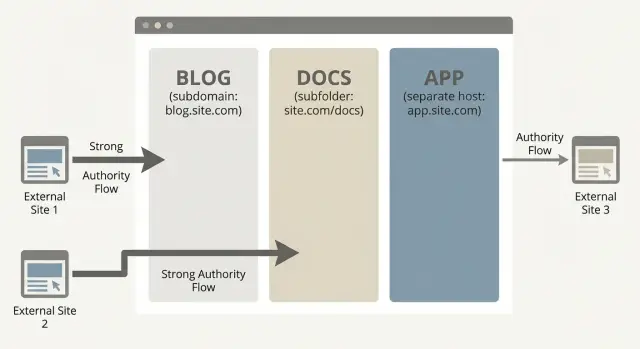
When a page earns a backlink, the biggest benefit usually goes to the exact host that link points to. If the link points to your docs host, your docs host gains the most. If it points to your app host, your app host gains the most.
That simple rule creates a real trade-off when your blog, docs, and app live on different hosts. You can build authority for docs and improve docs rankings, but it may not lift your marketing pages very much if they live elsewhere. The same is true for a blog on a separate host: you can grow blog traffic while the signup pages stay stuck.
There can be spillover, but it’s usually indirect. It tends to happen through:
- strong internal links from the boosted host to the host you care about
- clear navigation that nudges users to the next step (for example, docs to product)
- brand searches that increase after people discover you through content
- people naturally linking to your main site after finding you on one host
Cross-host navigation is often the weak point. If your blog header links to the docs, but the docs feel like a different website, users drop off and search engines may treat the properties as loosely connected. Keep the experience consistent: similar branding, predictable menus, and obvious paths like “Product”, “Pricing”, “Sign in”, and “Docs”.
A quick example: a SaaS has marketing pages on www, docs on docs., and the app on app.. If most new backlinks point to docs because tutorials are easy to place, docs rankings may climb fast. But if docs pages only link to the app with a tiny “Login” button, the app host may see little benefit.
Step by step: choose a link target for blog, docs, and app
When your blog, docs, and app live on different hosts, the first decision is simple: where should new authority land first?
1) Map what Google actually crawls
Write down every hostname a user can land on, including variations like www, blog, docs, app, help, or status. Include country versions if they exist. If you can’t list them in one minute, tracking and SEO decisions will stay fuzzy.
2) Pick one primary backlink target for the next 90 days
Choose the host you want to grow fastest, and that can pass value to what you sell. Commit for 90 days so results are measurable. Switching targets weekly usually spreads gains too thin.
If trials start on the marketing site, focus new links on www. If most signups happen after reading documentation, focus on docs instead.
3) Make sure the target can reach your money pages
Before you build links, confirm the boosted pages have clear paths to key pages: pricing, signup, contact, and core features. If the target host is a content island, authority often stays there.
4) Guide the value with intentional internal links
Once links land, steer their impact with a small internal linking plan. Keep it practical: link from your strongest pages to your highest-intent pages, use plain anchor text, and place links where someone would actually click (not just in footers). A regular habit that works well is revisiting older high-traffic pages and adding 1 to 2 relevant links to core pages.
Also fix broken links and unnecessary redirects before you scale link building. Clean paths make everything easier to measure.
5) Measure per host
Verify each host in analytics and search tools so you can compare impressions, clicks, and branded searches. Keep a simple log of which host each new backlink points to, otherwise you’ll end up guessing where gains came from.
When to aim links at the blog
Aim links at the blog when the blog is your main “front door” for new people. If most first-time visitors arrive from search, a strong blog can pull them in and guide them toward the pages that sell your product.
This choice works best when posts rank for questions that are close to purchase intent, and the posts naturally point readers to a feature page, pricing page, or a “start here” page on the marketing domain.
A useful rule of thumb: send authority to where you need ranking power today, not where it’s easiest to place a link.
Signs blog links make sense:
- Your best keywords are informational, and blog posts are the pages already earning impressions.
- Top posts have a clear next step and readers actually click it.
- You can keep internal links to core pages consistent across posts.
One warning: don’t heavily feed a blog you plan to retire. If you expect to move from blog.example.com to example.com/blog, be cautious about building lots of links to the old host. Redirects help, but migrations are never perfect, and they add risk.
When to aim links at the docs
Docs are often a natural link target because they genuinely help people. How-to guides, definitions, API references, error explanations, and “what does X mean?” pages stay useful for years. They also get cited in tickets, forum answers, and internal wikis.
If your blog, docs, and app live on different hosts, docs links can work well when docs pages are good at handing users off to the next step. That handoff should feel like help, not a pitch.
Instead of spreading links across dozens of doc pages, pick a small set of evergreen targets you can keep accurate and stable. Typical winners include a “Getting started” page, a key integration guide, a concepts/glossary hub, and one or two high-intent troubleshooting pages.
Then connect docs to outcomes in a subtle way. A small “Next step” box, a short line in the intro, or a simple footer banner can point to pricing, a demo, or a relevant feature page without turning docs into an ad.
Common mistakes that waste link value
Most link waste isn’t about choosing subdomain or subfolder. It’s about sending authority to places that can’t keep it, measure it, or pass it on.
A few problems show up repeatedly:
- Backlinks hitting redirect chains instead of the final page
- Links pointing to login-only app pages with little crawlable content
- Splitting links evenly across blog, docs, and main site without a clear priority
- Thin pages created only as link targets
- Internal links left outdated after moving blog or docs content
Redirect chains are a quiet drain. If a backlink hits an old URL and hops through multiple redirects, some value is lost and reporting gets messy. Before you build links, make sure the final URL is the one you want long term.
Another common issue is pointing links at your app host when the app has little indexable content. If most pages require login or block crawling, authority has nowhere to “stick.” In many SaaS setups, links to marketing pages or docs help more than links to the app itself.
Quick checklist before you buy or build links
The easiest way to waste value with subdomain vs subfolder link targeting is to spread links across three hosts and hope it adds up.
Keep the checklist short and strict:
- Pick one primary host to strengthen for the next 60 to 90 days.
- Choose 5 to 10 target pages on that host that deserve authority.
- Confirm each target page is indexable (no
noindex, not blocked, loads properly). - Make sure each target page clearly links to money pages (pricing, demo, signup, core features).
- Track performance per host so you can see what moved.
A simple example: your blog lives on blog.example.com, docs on docs.example.com, and the app on app.example.com. If your goal is more trials, links to the blog only help if blog pages regularly send people into the signup path. If they don’t, aim links at the host closest to conversion, then use internal links to distribute value.
Example plan for a SaaS with separate blog, docs, and app
Picture a SaaS where the marketing site lives on www, the documentation lives on docs, and the product lives on app. The goal is to rank for problem queries (“how do I fix X”, “best way to do Y”) and turn that attention into demo requests.
Treat subdomain vs subfolder link targeting like budgeting: most authority should land where it can win searches and move people to the next step.
A practical plan:
- Pick 2 to 4 “problem” topics that match what buyers search before they know your brand.
- Publish the main answers on the host you want to strengthen most (often
wwwif it also holds core product and demo pages, ordocsif documentation is your main organic engine). - Point most new backlinks to those specific pages, not a generic homepage.
- Add clear internal links from those pages to the product page and the demo request page (one near the top, one near the end).
- Keep the experience consistent so the reader always has a next action.
Only send links to the app host when it has public, indexable pages you actually want in search, like a public template gallery, a status page, or a public changelog. If the app is mostly behind a login, links there often do little for rankings and can dilute your effort.
Next steps: pick a target and make it easy to measure
Write down your real priority for the next 90 days. Be honest about it, because it changes where link authority should land: awareness, trust, conversions, or lower support load.
Once you have that, make one simple rule for new links and stick to it for a full quarter. Constantly switching between blog, docs, and the app makes results hard to read.
A workable 90-day split might look like this: most links go to your main commercial host, a smaller share goes to one support hub (docs or help center), and a small portion goes to one standout piece of content. Deep-link only when the page will still matter in a year.
Then make measurement boring and consistent. Pick one primary metric (rankings for a small keyword set, demo signups, ticket volume) and review it weekly.
If you want tighter control over placements, SEOBoosty is one option that lets you choose the exact domain and target page for a backlink, so you can reinforce the host you’ve prioritized instead of scattering authority across multiple properties.
FAQ
Where should I point backlinks if my blog, docs, and app are on different hosts?
Default to pointing most new backlinks at the host that needs to rank for your main goal. If you want more trials or demos, that’s usually the main marketing domain with pricing and feature pages. If documentation drives adoption, docs can be the better primary target as long as it clearly routes people to product actions.
What’s the real difference between a subdomain and a subfolder for SEO authority?
A subdomain is a separate hostname like blog.example.com that can behave like its own site if it’s weakly connected. A subfolder is a path like example.com/blog that clearly sits inside the main site. For link targeting, the practical difference is whether you’re concentrating authority on one main host or spreading it across multiple hosts.
If I build links to my docs subdomain, will my main site rankings go up too?
Not by itself. Links usually help the host they land on first, so a docs backlink mostly strengthens docs, not the marketing site. You can get spillover if docs strongly and consistently link to key marketing pages and the whole experience feels unified, but it’s rarely as direct as building links to the marketing host.
Is it a mistake to build backlinks to a blog subdomain?
Usually no, unless your goal is specifically to rank those blog posts. A separate blog host can grow traffic while your signup pages stay flat. If you keep the blog on a subdomain, make sure top posts have obvious, useful links to feature, pricing, and “start here” pages so value and users don’t get stuck on the blog.
Should I ever point backlinks directly to my app subdomain?
Only when the app has public, indexable pages that deserve to rank, like a public template gallery, changelog, or a landing page for a feature. If the app is mostly behind login or blocked from crawling, backlinks there often don’t “stick,” and you’ll get more impact by linking to marketing pages or docs instead.
How do I choose one primary backlink target without second-guessing it every week?
Pick one primary host and stick with it for 60–90 days so results are measurable. Then choose a small set of target pages on that host that you’re confident will stay stable for at least a year. Spreading links evenly across hosts usually slows everything down and makes it hard to tell what worked.
What should I fix on my site before buying or building more backlinks?
Treat it like a must-have before scaling. Confirm the target pages are indexable, load properly, and don’t rely on redirects. Then add clear internal links from those pages to your money pages (pricing, demo, signup, core features) where a real reader would click, not hidden in a footer.
What are the most common backlink targeting mistakes for multi-host SaaS sites?
Redirect chains and outdated URLs are a big one, because value can leak and reporting gets messy. Another common issue is linking to pages that aren’t crawlable, like login-only app screens. Also watch for “content islands,” where boosted pages don’t link to anything important, so authority and users have nowhere to go.
Is it worth moving from subdomains to subfolders just for SEO?
It can be worth it if you have real constraints like security, legacy infrastructure, or a hosted docs platform that’s hard to integrate. The trade-off is that you’ll often need more total links to get the same business outcome because authority is split. If you can’t consolidate hosts, be extra disciplined about internal links and navigation across them.
How do I measure whether my link targeting strategy is working across hosts?
Track each host separately so you can see which one actually moved. Keep a simple log of every new backlink with its exact target URL and host, then monitor a small set of metrics tied to your goal, like rankings for a short keyword list, demo signups, or support tickets. If you can’t attribute changes per host, you’ll end up guessing.
Share