Topical relevance test for backlinks: judge fit step by step
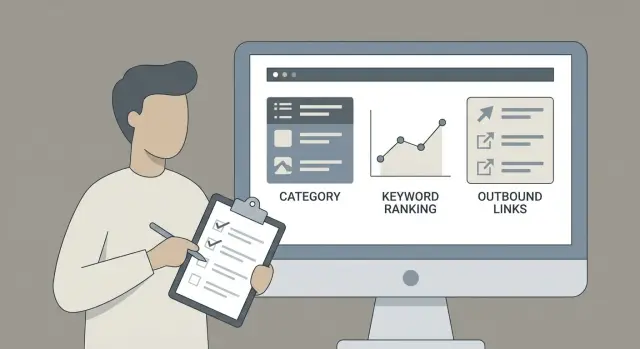
Use a topical relevance test for backlinks to check site categories, ranking keywords, and outbound links before you accept, buy, or place a link.
What topical relevance means for a backlink
Topical relevance means a backlink comes from a site that covers the same subject and serves a similar audience as your page.
If you sell accounting software, a mention from a finance publication makes sense. A link from a random coupon blog or a pet forum might still be “a link,” but it doesn’t match the topic or the reader.
That match matters because both search engines and real people look for consistency. When a link appears in a context that fits the page it points to, it feels normal. It’s more likely to get clicks, and the visitors who do click are more likely to stick around. Relevant links also tend to age better because the site and its readers have a reason to keep the recommendation.
A topical relevance test is a simple sanity check: does this site regularly cover what your customers care about, and does it link out in a way that fits that coverage?
Why relevance is more than an SEO checkbox
Picture a reader on an article about cloud security who sees a link to a password manager. That’s helpful.
Now imagine the same link in a post about celebrity gossip. Even if that second site has traffic, the link feels forced. People ignore it, and it can look suspicious.
Relevance also helps you avoid “empty authority.” A site with strong metrics but little real connection to your topic may deliver less value than a smaller site that’s tightly focused and trusted in your niche.
What this test can and can’t tell you
This method can tell you whether a backlink fits a site’s theme and linking habits. It helps you avoid placements that look out of place.
It can’t guarantee rankings, a specific traffic lift, or that a site is risk-free. Relevance is one part of link quality, alongside things like editorial standards, placement context, and overall site health.
Run this check before you commit to anything that’s hard to undo, like paying for a placement, agreeing to a link swap, publishing a guest post, redirecting a valuable page, or rolling out a batch of links at scale.
What you need before you start
A topical relevance check works best when you prepare a few specifics first. Otherwise you end up judging a whole site in the abstract, and links don’t live in the abstract - they live on a specific page, inside a specific paragraph.
Start with the most important choice: the exact page on the linking site where your link might appear. If you don’t know yet, pick the most likely candidates (an article on your topic, a resources page, or a partner list). A site can look relevant from the homepage, then fall apart on the actual page where the link would sit.
Next, define your target page topic and 3-5 core keywords. Keep them tight and plain. If your target page is about “payroll software for startups,” your core keywords might include payroll software, startup payroll, payroll compliance, and employee payments. This gives you something concrete to compare against the linking site.
Finally, decide your goal. “Good fit” changes depending on what you want.
If you want rankings, you care more about topical alignment and whether the linking page ranks for related searches. If you want referral traffic, you care more about whether real readers will click. If you want brand trust, you care more about the publication’s reputation and the context around the mention.
Set a simple pass/fail rule before you start evaluating domains:
- Pass only if the linking page is clearly about the same topic (or a close parent topic).
- Fail if you have to explain the connection in more than one sentence.
- Fail if the site publishes mostly unrelated content and the placement would look random.
- Pass only if you’d feel comfortable showing the page to a customer.
Practical tip: keep a small sheet with the page you’re evaluating, your target keywords, your goal, and a final pass/fail decision. It keeps you consistent when you’re reviewing multiple options.
Step 1: Check site categories and content focus
Treat the site like a bookstore. If you can’t quickly tell what it’s mainly about, the backlink will be harder to justify as relevant.
Open the homepage and look at the top navigation. Those menu items usually show what the publisher wants to be known for. Then check the footer for category links that don’t fit in the main menu.
A strong sign is when your topic has a clear home. That means there’s a real category or section built for it, not just a one-off tag slapped onto a random post. Tags can help, but they’re often messy. A category usually signals ongoing coverage.
A quick category scan
Open the closest category and read 3-5 recent posts. You’re looking for consistency:
- A similar audience (beginners vs experts, buyers vs casual readers)
- A similar style (news, tutorials, opinion) without wild swings
- Familiar vocabulary and recurring concepts
- Recent activity (not a category that hasn’t been updated in years)
If those posts feel like they belong together, you’re off to a good start.
Red flags you can spot fast
Some category setups make irrelevant links look acceptable on the surface. Watch for patterns like:
- Everything dumped into one bucket like “Blog” or “News”
- Unrelated categories featured equally (fitness, crypto, travel, pets)
- Your topic exists only as a thin tag page with one post
- The “closest” category is mostly guest posts that don’t match the site’s usual voice
Example: if you sell accounting software and the site has a clear “Small Business Finance” category with regular guides on bookkeeping, taxes, and cash flow, that’s a natural fit. If the categories are “Lifestyle,” “Gaming,” and “Random,” and your placement would live under a generic “Blog,” the link will likely look forced.
Step 2: Compare ranking keyword topics
A site can look relevant on the surface but rank for topics that have nothing to do with your page. This step checks what search engines seem to associate the site with, based on the kinds of queries its pages attract.
Pull a list of ranking keywords for the domain, or for the specific section where your link would appear. Don’t stop at brand terms. You want the non-brand topics that bring real search traffic.
Look for themes, not single words
Group the keywords into themes. One keyword doesn’t tell the whole story, but repeated patterns across many pages do.
Common themes include:
- Educational intent (guides, definitions, comparisons)
- Product intent (best X, X software, X pricing)
- Industry updates (announcements, releases)
- Local intent (near me, city names)
- Deal intent (coupon, promo code, discount)
If you see dozens of keywords pointing to the same theme, that’s often the site’s true focus, even if the homepage copy sounds broader.
Check overlap with your page
Do a simple overlap check: would a reader who came for those keywords naturally want your page next?
A practical way to keep this honest is to write your page’s “main promise” in one line (for example, “payroll software that helps startups stay compliant”) and compare it to the site’s dominant themes (for example, “payroll tax forms” or “workplace culture ideas”). Some overlap is fine. A big mismatch usually means the link will feel unnatural.
Warning signs of low fit (and sometimes low quality):
- The site ranks mainly for coupons, promo codes, or “best deals”
- Adult, gambling, or pharma themes show up repeatedly
- Random, unrelated queries dominate most of the keyword list
- Many top pages are thin listicles covering unrelated topics
Example: you sell accounting software. A “business blog” might look relevant, but if its top keywords are mostly “casino bonus code” and “cheap flights,” the overlap is basically zero.
Step 3: Review outbound linking behavior
Outbound links show what a site considers a normal reference. If a page regularly links to the kinds of sources your business belongs next to, your link will look natural. If the site links out in odd ways, even a good domain can be a poor fit.
Open 5 to 10 articles similar to the page where your link would likely appear. Avoid cherry-picking the homepage or a single “best of” post. Stick to regular posts in the same category, ideally from the last year.
Pay attention to who they link to and why. Are they citing research, pointing to official documentation, referencing well-known tools, or linking to partner pages? A site that links out to credible sources in the same topic area usually has real standards.
What “healthy” outbound linking looks like
You’ll often see one to three outbound links that support the point being made. The anchor text fits the sentence, the destinations vary, and the placement feels like part of the writing.
A quick gut-check question: if your link were swapped with a competitor in the same niche, would anyone notice? If the answer is no, that’s usually a good sign.
Red flags that suggest paid-link behavior
If you notice several of these across multiple posts, treat it as a mismatch:
- Lots of outbound links on every page, especially to unrelated topics
- Awkward anchor text that reads like keywords pasted into a sentence
- The same destinations appearing again and again across unrelated articles
- Links stuffed into blocks, footers, or copied “resources” sections
- Outbound links pointing to thin pages, coupon sites, or random businesses
Example: you run a project management software site. You open three “productivity tips” posts and see outbound links to a crypto exchange, a casino review, and a payday loan comparison, all with keyword-heavy anchors. That linking pattern tells you what neighborhood your link would sit in.
A simple scoring method you can reuse
To make your decisions consistent (and easier to explain later), turn the check into a small score. The goal isn’t to be scientific. It’s to be repeatable.
The 10-point relevance score
Score both the site and the planned placement page:
- Categories and content focus (0-3): 0 if it’s clearly a different niche, 1 if it’s very broad, 2 if it has a related section, 3 if most content matches your topic.
- Ranking keyword topics (0-4): 0 if it ranks for unrelated queries, 2 if it’s mixed with some overlap, 4 if many top pages and keywords sit in the same topic cluster as your target.
- Outbound linking behavior (0-3): 0 if it shows spammy patterns, 1 if links look random, 2 if links usually make sense, 3 if it regularly links to credible sources in the same field and your link would fit naturally.
Total the points:
- 7-10: Pass (good topical fit)
- 5-6: Caution (could work, but placement details matter)
- 0-4: Fail (not worth it)
Then write one sentence in plain words explaining the score. If you can’t explain it clearly, you probably don’t understand the fit well enough to move forward.
What to do after you score it
Use the score to choose the simplest next move:
- If the site fits but the page doesn’t, change the placement page.
- If the page fits but your target URL doesn’t, change the page on your site the link points to.
- If it fails, walk away. Don’t talk yourself into it just because the domain looks impressive.
Example: running the test in a real situation
You sell a SaaS invoicing tool for freelancers. You’re considering a backlink from a site that calls itself a “small business blog,” but its homepage shows a mix of topics: taxes, productivity apps, coffee gear, and occasional startup news.
Candidate site: "SmallBizDaily" (mixed-topic blog)
Step 1: Categories and content focus
You open the category pages and recent posts. Around 40% of the content is clearly small business and freelancing (bookkeeping tips, client contracts, budgeting). The rest is general lifestyle or random product reviews.
Verdict: partially aligned, but not focused.
Step 2: Ranking keyword topics
You scan the themes in the site’s top pages. The strongest cluster looks like “freelance taxes,” “invoice templates,” “expense tracking,” and “how to get paid faster.” That’s close to invoicing software, even if it’s not purely SaaS.
Verdict: good overlap.
Step 3: Outbound linking behavior
You review several posts in the relevant cluster. They link out to accounting tools, payment processors, and government tax pages. But some posts also include “best apps” sections with coupon-style anchors.
Verdict: mostly natural, with a small deal-site smell in places.
A quick 0 to 2 score per step could look like this:
- Step 1 (category focus): 1/2
- Step 2 (topic overlap): 2/2
- Step 3 (outbound links look natural): 1/2
Total: 4/6.
Decision: acceptable if you can control the placement page, but not your first choice if you have better options.
How the placement page can flip the result
Option A: your link goes into a “Productivity” post titled “Best Coffee Gadgets for Working From Home.” Even if the site has business content overall, this page is off-topic. Your invoicing link looks random.
Option B: your link goes into a “Freelance Finance” post titled “How to invoice clients without awkward follow-ups.” The article already discusses invoices, late payments, and tracking income. Outbound links point to invoicing templates and payment tools. Your link fits what the reader is trying to do.
With Option B, you’d likely rescore Step 1 and Step 3 higher, and the decision flips from “maybe” to “yes.”
Common mistakes that make irrelevant links look OK
A link can look impressive on paper and still do very little. Most bad-fit links slip through because people stop at surface signals like authority scores, a nice design, or a familiar brand.
One common mistake is treating “high authority” as a shortcut and skipping the topical check. Authority helps, but relevance is what makes the link believable to readers and consistent with the site’s content.
Another trap is over-trusting labels like tags, categories, or an author bio. A site can have a “Marketing” tag, but if most of its real content is crypto news, your SaaS backlink is still a mismatch.
Outbound linking patterns are also easy to ignore. A page might read well, but the links around it tell a different story. If a site regularly links out to thin affiliate pages, random coupons, or unrelated topics, your placement can end up looking like part of a link dump.
Mistakes that show up often:
- Judging from the homepage only, not the category or page where the link will live
- Forcing relevance with an awkward anchor that doesn’t fit the sentence
- Assuming “guest post friendly” equals “topically aligned”
- Treating one relevant article as proof the whole site matches
- Ignoring nearby links on the same page
Quick checklist (2 minutes per site)
When you’re moving fast, you don’t need a perfect analysis. You need a quick way to catch obvious mismatches before you spend time (or money).
Run these checks in order. If you hit two clear “no” answers, skip the site.
- Category fit: Is there a clear category or recurring theme that matches your topic?
- Topic overlap: Do the site’s ranking pages focus on the same problem space, not just a shared word?
- Outbound linking behavior: Do similar articles link out in a normal editorial way, or do links feel frequent and random?
- Reader expectation: Would your link feel like a helpful next step, or like an ad break?
- Anchor sentence: Can you say the anchor in a full sentence without it sounding like SEO copy?
If the site passes, note what page type you want (guide, glossary, tool list) and what angle fits best.
Next steps: build a relevance-first backlink plan
After a site passes, treat it like a qualified lead, not an automatic yes. Turn “this fits” into “this helps” by choosing the right placement page and the right target URL.
Create a shortlist of the sites that scored well and write down the best placement pages on each site. The best page is usually one that already ranks for close topics, sits in a clear category, and links out to related resources in a way that feels natural.
Keep a simple log so your team evaluates placements the same way every time. A spreadsheet is enough: site, category fit, topic overlap, outbound linking notes, suggested placement pages, and final decision.
Roll out in small batches first. Watch what happens (rankings, traffic, crawl and indexing), then adjust your threshold if you see weak results even from “passing” sites.
If you’re sourcing placements through an inventory-based service like SEOBoosty (seoboosty.com), this same scoring helps you choose domains that match your topic before you commit to a subscription, and it keeps the focus on fit and placement context instead of names and metrics.
FAQ
What does “topical relevance” mean for a backlink?
Topical relevance means the linking site and the specific page where the link appears are genuinely about the same subject as your target page, for a similar audience. A relevant link feels like a normal recommendation in that context, not a random add-on.
What’s the fastest way to check if a backlink is topically relevant?
Start with the exact page where your link would live, not the homepage. Then ask two quick questions: would the page’s readers naturally want your page next, and would the link read like a helpful reference inside the paragraph it’s placed in.
How do I use categories and content focus to judge relevance?
Use the site’s navigation and categories to see what it consistently publishes, then read a handful of recent posts in the closest category. If the category has steady coverage, consistent vocabulary, and a clear audience match, you’re usually looking at a real topical fit.
Why shouldn’t I judge relevance from the homepage alone?
The homepage can look broad and polished while the actual content is scattered or outdated. The placement page and its surrounding articles show the real theme, the real audience, and whether your link would look normal next to what they already publish.
How do ranking keywords help confirm topical relevance?
Look at the non-brand keywords the site or section ranks for and group them into themes you see repeated across many pages. If those themes align with your page’s main promise, the fit is likely real; if the themes skew toward unrelated intents like deals or random topics, the fit is weak.
What should I look for in a site’s outbound linking behavior?
Open several similar articles in the same category and see who they cite and why. Healthy linking usually supports the content with a few natural references, while suspicious behavior looks like frequent, awkward, or unrelated outbound links that feel inserted rather than earned.
What are the clearest signs a backlink is not a good topical fit?
Treat it as a fail if you have to explain the connection in more than one sentence, or if the link would surprise a normal reader of that page. Another clear fail is when the site’s content is mostly unrelated and your placement would look like a one-off exception.
How can I score topical relevance in a repeatable way?
A simple approach is to score the site and the specific placement page on content focus, ranking-topic overlap, and outbound linking patterns, then set a pass threshold you follow consistently. The value is not the exact number, but that you can repeat the same logic across many options.
Can a mixed-topic site still be a good backlink opportunity?
Yes, because a mixed-topic site can still have a tightly relevant cluster where your link fits naturally. The key is choosing the right placement page in the right section; a good domain with a wrong page can still produce an off-topic, forced-looking link.
How should I apply this test when buying or subscribing to backlinks?
Use the same topical check before committing to anything that’s hard to undo, including subscriptions. Even with a curated inventory like SEOBoosty, you’ll get better results by picking domains and placement contexts that match your topic, instead of choosing only by name or authority metrics.
Share