Updatable data pages: a playbook for evergreen stats pages
Updatable data pages help you earn ongoing citations by publishing evergreen stats with clear refresh cycles, methodology notes, and editor-friendly visuals.
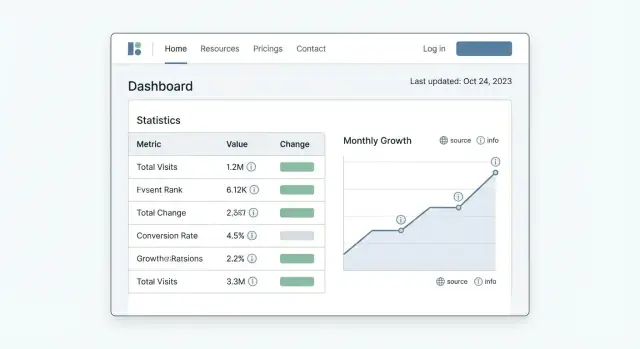
Why most stats pages stop earning citations
Most statistics pages are built like one-time reports. They get a quick burst of attention when they’re new, then citations fade because there’s no reason to reference them again. Editors move on to fresher sources, and your page becomes yesterday’s numbers.
Editors pick sources that feel safe to quote. They want clear dates, consistent definitions, and a page that answers one question fast: “Can I trust this number enough to put it in print?” If they have to hunt for context or the metric is vague, they’ll grab a different source.
Stale numbers reduce trust quietly. Nobody emails you to say a chart is outdated. They just stop linking. Worse, outdated stats can keep spreading as people copy them, which makes your page look sloppy when someone eventually notices.
“Updatable” means the page is designed to get better over time, not just to look current. Changing the published date without changing the data is a red flag. A truly updatable page has a repeatable way to refresh the core figures, explain what changed, and keep old versions from confusing readers.
A simple test: if the data changed next month, would updating the page take 10 minutes or 10 hours? Updatable data pages are easier to refresh because the definitions stay fixed, the sources are repeatable, and updates follow a predictable pattern. Readers should see a clear “Last updated” note, a short summary of what changed, and either an archive or labels that prevent old numbers from being mistaken as current.
If your goal is to earn editorial citations over time, the page needs ongoing reasons to be referenced. A steady refresh cycle keeps the numbers credible, and smart distribution helps the page stay discoverable, but the foundation is always the same: figures people can trust, updated in a way they can verify.
What makes a data page worth citing
Editors cite pages that help them write faster and feel safe. That usually comes down to three things: a quotable takeaway, visible proof, and an easy way to double-check the numbers.
Start with one specific claim that can stand alone. If a writer can copy one sentence into their draft without rewriting it, you’re ahead. Put that claim near the top and back it up immediately with the relevant table or chart.
Freshness matters, but only if it’s believable. Add a visible “Last updated” date and say what changed in plain words. “Updated with Q4 2025 data and revised the sample size” is stronger than “Updated recently.” That’s the kind of signal that earns repeat citations.
Traceability removes doubt. Show where the data came from, how you cleaned it, and what you didn’t include. Keep it short, but specific. For example: “We removed duplicates, excluded outliers above X, and rounded to one decimal.” If a writer gets questioned by an editor, they can point to your method.
Skimmability is the final piece. Most writers are rushing. The layout has to work even when they only scan for 20 seconds.
A quick test before you publish
Before you hit publish, check that the page offers:
- One sentence that’s easy to quote.
- A clear “Last updated” date plus a brief change summary.
- Plain-language sources and methodology.
- A copy-friendly table with numbers (not only an image).
- Definitions for key terms and time ranges.
Example: a reporter writing about hiring trends needs a line like “Median time-to-hire rose from 28 to 35 days in the last 12 months (n=12,400 roles).” If your page gives that line, shows the dataset, and explains the filter rules, citing you becomes the simplest choice.
Choosing a topic with repeat link potential
The best topics for updatable data pages are the ones people expect to change. If the numbers can stay the same for a year, editors have no reason to replace an old citation or add a new one.
Start with areas where writers regularly need fresh proof to support a claim or decision. Pricing shifts, product usage, adoption rates, performance benchmarks, and market share show up constantly in comparisons, “best of” posts, planning decks, and trend pieces.
A quick filter: does this stat help someone choose, budget, or prioritize? “Nice to know” trivia rarely earns repeat citations because it doesn’t change what the reader does next.
Before you commit to a scope you can’t maintain, make sure you can update it at least quarterly for a year, explain the method without jargon, and offer at least one number that can be quoted without a long explanation. Also ask whether a new data point would actually change the takeaway. If the answer is no, the page won’t create new reasons to cite it.
Imagine a “remote work software pricing index.” Every quarter, you re-check the same 30 tools, track price changes, note plan limits, and summarize what got more expensive. Review sites, HR blogs, and startup budget guides cite it because it supports a real choice: what will this stack cost next quarter?
Be honest about your update capacity. A broad “state of AI” page sounds exciting, but it quickly becomes a full-time research job. A tighter topic like “median response time benchmarks for customer support chat” is easier to refresh and still useful.
Planning the page structure so updates are easy
If you want updatable data pages to keep earning citations, the structure has to stay steady while the numbers change. Editors don’t want to relearn a new layout every quarter. They want to trust that the page will look familiar the next time they return.
Pick one primary metric that the page is truly about. Then add a handful of supporting stats that explain or break down that main number, such as by segment, time period, region, device, industry, or company size. This keeps the page focused and gives writers multiple angles to cite without turning the page into a messy dashboard.
Keep the URL and the main headings stable. Avoid headings like “2026 update” as section titles, because they’ll become wrong later and make old citations feel stale. Use headings based on what the statistic is, not when it was refreshed.
A simple, update-friendly layout is usually enough:
- Define the primary metric and why it matters.
- Show the main number in a table with clear units and a clear date range.
- Add supporting sections, each with a small table and a short summary.
- Include a “Last updated” line and a brief note on what changed.
Use tables and plain-text numbers whenever possible. If you include a chart image, still put the exact figures in a table underneath. Make numbers easy to copy by including units, rounding rules, and the exact period (for example, “Q1 2026” or “Jan to Mar 2026”).
Example: if your primary metric is “median time to first response,” supporting stats could include “by channel,” “by company size,” and “top 5 industries,” each with a small table and a short takeaway paragraph.
Data sourcing and methodology that editors trust
Editors cite numbers they can defend. That usually comes down to two things: where the data came from, and whether someone else could reproduce the same result next month.
Choose the source type that matches the claim. Public datasets work well for official context (government, standards bodies, large research groups). Surveys are better for opinions and self-reported behavior, but only if you explain who you asked. First-party product data can be powerful for benchmarks if you describe the user base and what you excluded. Scraped data can support market snapshots, but it needs extra care because pages change and sites block bots.
A short “Methodology” box near the top is often the difference between a citation and a pass. Include the source names and types, collection dates, the page’s “as of” date, sample size, what the sample represents, major limits (regions, devices, industries, paid vs free users), and a one-sentence description of how you calculated the headline metric.
Keep cleaning rules boring and consistent across updates. If you remove outliers, define the rule once and keep it stable, or your trend line becomes hard to trust. Consistency in units, rounding, deduplication rules, and missing-value handling is what makes numbers comparable.
When a source changes or disappears, don’t quietly swap it. Note the change, keep the old numbers archived internally, and add a short “Methodology change” note with the date. Editors can accept evolving inputs. They don’t accept hidden revisions.
Building a refresh cycle that justifies new links
Editors link to data when it feels current. The easiest way to keep earning citations is to treat updates like a release, not a vague reminder on a calendar.
Match your cadence to how fast the numbers move. If the topic swings week to week, monthly updates can make sense. If the pattern moves slowly, quarterly is usually enough. If the data is stable and only meaningful year over year, do an annual refresh and make it the best version anyone can cite.
A fixed “refresh window” prevents updates from dragging on. Pick a week (or two) where the work happens, assign owners, and keep the scope tight. The work typically breaks down into collecting the new data, running checks, updating tables and charts, rewriting the top-line takeaways, and recording the update in the log.
Not every change deserves outreach. Decide in advance what counts as meaningful: a clear shift in the headline metric, a new segment added, a methodology improvement, or a correction that changes conclusions.
Finally, add a visible update log near the top or bottom. Writers returning months later should see the dates, what changed, and what stayed the same. It lowers their risk and speeds up their writing.
Step by step workflow to publish each update
A repeatable workflow matters more than fancy visuals. If an editor can trust that every update follows the same rules, your updatable data pages can keep earning citations without starting over each time.
A simple 5-step update routine
Run every release the same way, even when the data “looks fine.” Consistency is what makes numbers comparable.
- Collect the new data and log the time window. Save the raw export and write down the exact date range (for example, “Oct 1 to Dec 31, 2025”). If the source changed definitions, sampling, or coverage, note it now.
- Apply the same cleaning rules and calculations. Use the same filters, outlier handling, and formulas as last time. If you must change a rule, document the reason and re-run the prior period so the trend stays fair.
- Update tables, charts, and the short takeaways. Start with the summary at the top, then refresh the supporting visuals. Keep chart types and labels stable so returning readers can compare quickly.
- Add a “what changed” note that explains why it matters. Call out the biggest movement and one plausible cause. Example: “Mobile conversion rose 12% quarter over quarter, likely driven by a faster checkout flow reported by several sources.”
- Publish, then do a quick formatting and timestamp check. Confirm the “Last updated” date is visible, charts load, and table headers still match the methodology.
After publishing, store a short change log in your working doc (even if you don’t show everything on the page). That log becomes your memory when someone asks, “Can we cite the Q2 numbers, or did the method change?”
On-page elements that make citing painless
Editors cite what they can quote and verify in seconds. If your page hides the punchline or makes readers hunt for definitions, you’ll lose the easiest citations.
Open with a short top-of-page summary that’s plain language and specific, with two or three numbers that capture the update. Writers are looking for a sentence they can lift into a draft without decoding your charts.
Clarity beats cleverness. Add simple definitions wherever a reader might pause, especially for metrics, acronyms, and any internal scoring. If you use terms like CAGR, DAU, or “weighted average,” define them at first mention and consider a small glossary if the page is long.
Make every visual easy to reference
Charts get cited when they have names, not just shapes. Use chart titles that work in a sentence.
Good: “Median response time by industry (Q1 2026)”
Less helpful: “Performance overview”
Include the unit, timeframe, and sample size near the chart. If someone can’t answer “what does this number represent?” immediately, they won’t cite it.
Add a citation box writers can copy
Near the top or bottom, include a short “Suggested citation” line with the page title, your brand, the last updated date, and an access-date note. For example:
“Suggested citation: [Page title], [Brand], last updated [Month Day, Year]. Accessed [Month Day, Year].”
A few details make a bigger difference than they seem. Put “Last updated” near the headline (not buried in the footer), keep section headings stable so references don’t break after refreshes, and keep naming consistent for metrics across updates.
How to promote updates without annoying people
Treat each refresh like a small news event, not a full re-launch. If nothing meaningful changed, skip outreach and update the page quietly.
A simple rule: send a short “what changed” note only when the update gives someone a new reason to cite you. That could be a new record high or low, a clear reversal, or a brand-new slice of the data.
When you do reach out, keep it personal and limited. Pick a small set of writers who have covered the topic recently and only message them when the update truly fits their beat. One tight email beats five follow-ups.
Offer a couple of ready-to-use angles. For example: a clear rise with the percentage change, a clear drop with the timeframe, or a new breakdown that wasn’t available before. Keep the note easy to scan with a few bullets, one key stat, and the exact time range you updated.
Track what earns mentions so you get better each cycle. Log who referenced the page, which section they used, and which angle they framed. If most citations come from one chart or one table, make that element even easier to reuse.
Example scenario: an evergreen benchmarks page over 12 months
A B2B SaaS company publishes a quarterly “Customer Support Response Time Benchmarks” page. The goal is simple: become the page writers cite when they need a number, and stay cite-worthy as the market shifts.
At launch (Month 0), the page includes only what supports trust and easy quoting: a clear headline, a set of core benchmarks (for example, median first response time and median resolution time, plus breakdowns by company size), a short methodology section, and a visible “Last updated” date. It includes a small table that can be copy-pasted and a one-sentence “how to cite this page” note. It avoids raw customer-level data, anything that could identify specific companies, and long commentary that will go stale.
By Month 3 (Refresh 1), the URL and core layout stay the same, but the numbers update and the story gains one new angle. The team adds a short “What changed since last quarter” block and one new slice editors asked for (for example, benchmarks by region). Prior numbers aren’t buried in an old blog post. They’re kept in a “Previous quarters” snapshot so writers can compare trends.
Over 12 months, the pattern stays predictable: baseline benchmarks and methodology first, then one update per quarter, adding only small expansions like a year-over-year chart or a short note explaining a seasonal outlier.
Each update gives editors a fresh reason to link again: a current “as of this quarter” number, a clear trend, and a clean summary they can quote without extra work. If an editor cited your Q1 stat in a “best practices” piece, they can cite the Q4 version again in a trends update because it supports a new claim with current data and a visible change log.
Common mistakes that reduce citations
Editors cite data pages when they feel safe. Most citation drop-offs happen after one or two updates because the page stops being predictable.
One of the fastest ways to lose trust is changing definitions between updates. If “active users” suddenly means something else, old citations become misleading and people stop linking. If a definition must change, keep the old series visible and clearly label the break so readers can compare.
Another trust killer is “updating” only the date. If the headline says “Updated January 2026” but the numbers match last year, readers learn your updates are cosmetic.
Too many charts can also reduce citations. A wall of visuals with no explanation forces the reader to guess what matters. Editors want a takeaway they can quote in one sentence.
Watch for patterns that quietly kill citations: definition changes with no warning, fresh timestamps with stale figures, chart overload with no short narrative, vague sourcing like “internal data” with no details, and old stats left indexed without a clear archive.
Methodology is a common weak spot. If you use proprietary numbers, be specific about sample size, date range, selection rules, and limits. “Internal data” alone sounds like marketing.
Finally, manage old versions on purpose. A practical approach is one canonical page with the latest numbers plus an archive section that lists past snapshots and dates. If a monthly page changes methodology in February, keep January’s results in the archive, add a visible note explaining why the line shifts, and highlight a single key-stat summary.
Quick checklist and next steps
Before you ship an update, do a fast quality sweep. Editors cite pages they trust, and small errors (a wrong unit, a missing date) are what make people back away.
Do these five checks every time:
- Recheck the math (totals, averages, percentage changes) against the raw source.
- Make labels unambiguous: units, time period, geography, and sample size.
- Put the “Last updated” date near the top and keep it consistent.
- Show sources clearly and note any adjustments you made.
- Read it on mobile to confirm tables and charts still make sense without zooming.
After publishing, set a simple quarterly review. Pull a list of new citations and note which specific stats got referenced. If one chart keeps getting mentioned, make it easier to reuse with a clear title, consistent naming, and a short explanation. If another section never gets cited, it’s probably too niche, too confusing, or too buried.
When you plan the next update, choose one direction and stick to it. Either expand the scope carefully (one new segment that matches the existing method), or stay focused so the page remains consistent year to year.
If the page is new and you need early authority, a small number of high-quality placements can help the right editors discover it. For teams that already invest in SEO distribution, SEOBoosty (seoboosty.com) is one option for securing premium backlinks from authoritative sites, but it works best when the page itself is genuinely easy to cite: clear definitions, transparent sources, and a visible update log.
FAQ
Why do stats pages stop getting citations after the first spike?
They usually launch as a one-time report and then stop changing in a meaningful way. Once the numbers feel old or the page looks abandoned, writers choose newer sources that feel safer to quote.
What’s the fastest way to make my data page look trustworthy to editors?
A visible Last updated date is the minimum, but the real signal is a short note that says what changed and why it matters. If you only change the date without changing the data, writers quickly stop trusting the page.
What should my “quotable takeaway” look like?
Put one clear, standalone sentence near the top that a writer can copy without rewriting. It should include the metric, the timeframe, and a concrete number, so it reads like a ready-made fact, not a vague claim.
How do I choose metrics that won’t become confusing after a few updates?
Fix your definitions first and keep them stable across updates. When the meaning of a metric shifts, trends become hard to compare, and editors hesitate because they can’t be sure older citations still match the new numbers.
What kinds of topics earn repeat links over time?
Pick topics where people expect change and where fresh numbers affect decisions, like pricing, benchmarks, adoption, or performance. If the number barely moves for a year, there’s no strong reason for someone to replace an older citation.
Should I publish a new page for each quarter, or update one page?
Keep the URL and primary headings stable, and update the numbers inside the same structure. This makes it easy for returning readers to re-check the stat and keeps old citations from pointing to a page that looks completely different.
What belongs in the methodology section for citation-worthy stats?
Near the top, include the source type, collection dates, sample size, what the sample represents, and the exact rule used to compute the headline metric. Keep it short but specific so a writer can defend the number if an editor asks.
How often should I refresh an updatable data page?
Quarterly is a good default because it’s frequent enough to stay credible without creating constant churn. If the numbers move quickly, monthly can work, and if they only matter year over year, an annual refresh is better than forced “busy” updates.
Do editors prefer tables or charts for citing stats?
Use tables with copyable numbers, clear units, and exact time ranges, even if you also show charts. A chart alone is hard to quote precisely, while a table lets a writer grab the exact figure in seconds.
When should I promote an update, and how can backlinks help?
Promote only when there’s a real change that creates a new reason to cite you, like a clear shift in the headline stat, a new segment, or a methodology fix that changes conclusions. If you need early discovery, services like SEOBoosty can place premium backlinks on authoritative sites, but they work best when your page is already easy to trust, verify, and quote.
Share